Express + Mongoose
Terminal:
ls
npm init -y
npm i express ejs mongoose
touch index.js
mkdir views
index.js
const express = require('express');
const app = express();
const path = require('path');
const mongoose = require('mongoose');

const Product = require('./models/product');

mongoose
  .connect('mongodb://localhost:27017/farmStand', { useNewUrlParser: true })
  .then(() => {
    console.log('MONGO CONNECTION OPEN!!');
  })
  .catch((err) => {
    console.log('OH NO MONGO CONNECTION ERROR!!!!');
    console.log(err);
  });

app.set('views', path.join(__dirname, 'views'));
app.set('view engine', 'ejs');

app.get('/dog', (req, res) => {
  res.send('WOOF!');
});

app.listen(3000, () => {
  console.log('APP IS LISTENING ON PORT 3000!');
});
models directory 생성하고 product.js file 생성
product.js
const mongoose = require('mongoose');

const productSchema = new mongoose.Schema({
  name: {
    type: String,
    required: true,
  },
  price: {
    type: Number,
    required: true,
    min: 0,
  },
  category: {
    type: String,
    lowercase: true,
    enum: ['fruit', 'vegetable', 'dairy'],
  },
});

const Product = mongoose.model('Product', productSchema);

module.exports = Product;
seeds.js seed file 생성
const mongoose = require('mongoose');
const Product = require('./models/product');

mongoose
  .connect('mongodb://localhost:27017/farmStand', { useNewUrlParser: true })
  .then(() => {
    console.log('MONGO CONNECTION OPEN!!');
  })
  .catch((err) => {
    console.log('OH NO MONGO CONNECTION ERROR!!!!');
    console.log(err);
  });

// const p = new Product({
//   name: 'Ruby Grapefruit',
//   price: 1.99,
//   category: 'fruit',
// });
// p.save()
//   .then((p) => {
//     console.log(p);
//   })
//   .catch((err) => {
//     console.log(err);
//   });

const seedProducts = [
  {
    name: 'Fairy Eggplant',
    price: 1.0,
    category: 'vegetable',
  },
  {
    name: 'Organic Gooddess Melon',
    price: 4.99,
    category: 'fruit',
  },
  {
    name: 'Organic Mini Seedless Watermelon',
    price: 3.99,
    category: 'fruit',
  },
  {
    name: 'Organic Celery',
    price: 1.5,
    category: 'vegetable',
  },
  {
    name: 'Chocolate Whole Milk',
    price: 2.69,
    category: 'dairy',
  },
];

Product.insertMany(seedProducts)
  .then((res) => {
    console.log(res);
  })
  .catch((e) => {
    console.log(e);
  });
rendering index.ejs
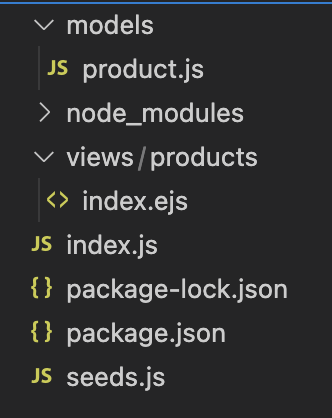
index.ejs
<!DOCTYPE html>
<html lang="en">
  <head>
    <meta charset="UTF-8" />
    <meta http-equiv="X-UA-Compatible" content="IE=edge" />
    <meta name="viewport" content="width=device-width, initial-scale=1.0" />
    <title>All products</title>
  </head>
  <body>
    <h1>All products!</h1>
    <ul>
      <% for(let product of products) { %>
      <li><%= product.name%></li>
      <%}%>
    </ul>
  </body>
</html>
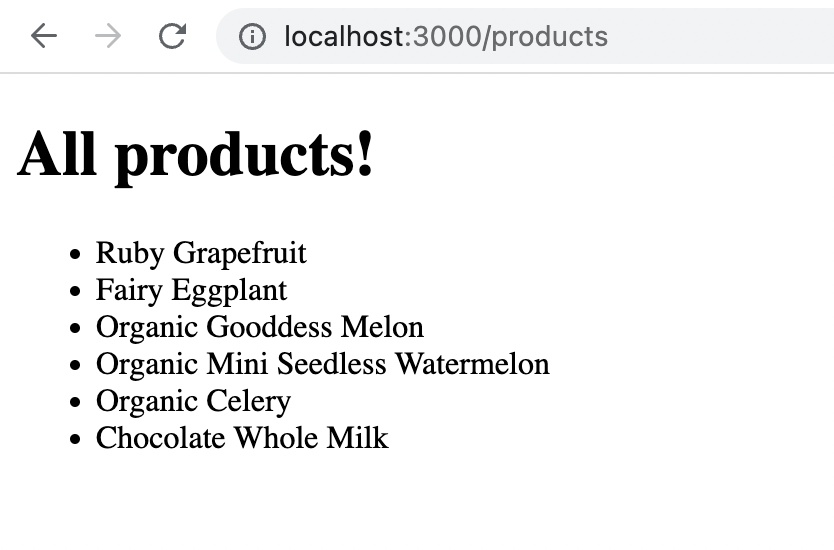
index.js
...
app.get('/products', async (req, res) => {
  const products = await Product.find({});
  res.render('products/index', { products });
});
...
product detail
index.js
...
app.get('/products/:id', async (req, res) => {
  const { id } = req.params;
  const product = await Product.findById(id);
  console.log(product);
  res.render('products/show', { product });
});
...
show.ejs
<!DOCTYPE html>
<html lang="en">
  <head>
    <meta charset="UTF-8" />
    <meta http-equiv="X-UA-Compatible" content="IE=edge" />
    <meta name="viewport" content="width=device-width, initial-scale=1.0" />
    <title><%= product.name%></title>
  </head>
  <body>
    <h1><%= product.name%></h1>
    <ul>
      <li>Price: $<%= product.price%></li>
      <li>Category: <%= product.category%></li>
    </ul>
    <a href="/products">ALL PRODUCTS</a>
  </body>
</html>
index.ejs
<!DOCTYPE html>
<html lang="en">
  <head>
    <meta charset="UTF-8" />
    <meta http-equiv="X-UA-Compatible" content="IE=edge" />
    <meta name="viewport" content="width=device-width, initial-scale=1.0" />
    <title>All products</title>
  </head>
  <body>
    <h1>All products!</h1>
    <ul>
      <% for(let product of products) { %>
      <li><a href="/products/<%= product._id%>"><%= product.name%></a></li>
      <% } %>
    </ul>
  </body>
</html>
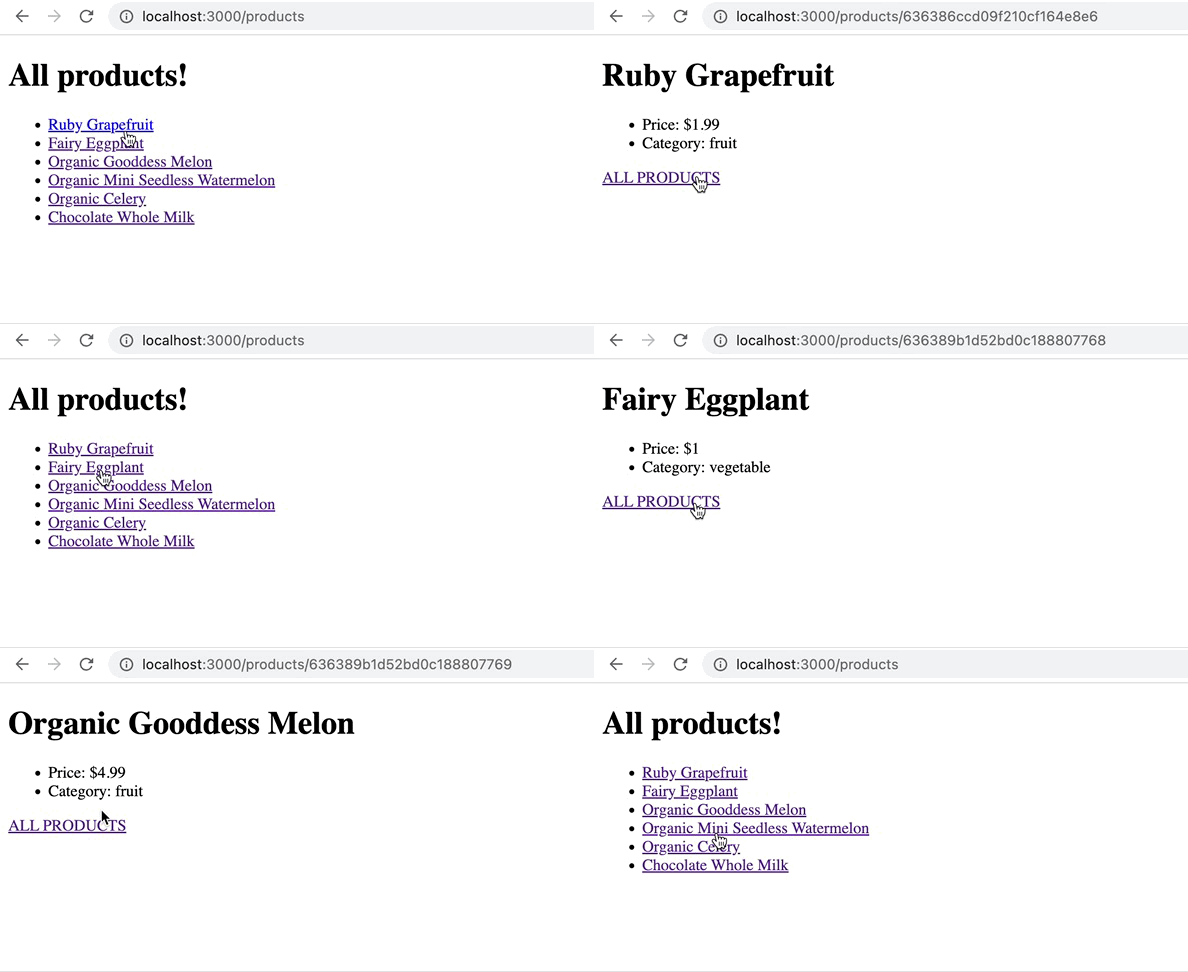
하 ㅋㅋㅋㅋ 이게 왜 되지....?
Insert
index.js
...
app.use(express.urlencoded({ extended: true }));
...
app.post('/products', async (req, res) => {
  const newProduct = new Product(req.body);
  await newProduct.save();
  res.redirect(`/products/${newProduct._id}`);
});

app.get('/products/:id', async (req, res) => {
  const { id } = req.params;
  const product = await Product.findById(id);
  console.log(product);
  res.render('products/show', { product });
});
...
new.ejs
<!DOCTYPE html>
<html lang="en">
  <head>
    <meta charset="UTF-8" />
    <meta http-equiv="X-UA-Compatible" content="IE=edge" />
    <meta name="viewport" content="width=device-width, initial-scale=1.0" />
    <title>New Product</title>
  </head>
  <body>
    <h1>Add A Product</h1>
    <form action="/products" method="POST">
      <label for="name">Product Name</label>
      <input type="text" name="name" id="name" placeholder="product name" />
      <label for="price">Price (Unit)</label>
      <input type="number" name="price" id="price" placeholder="price" />
      <label for="category">Select Category</label>
      <select name="category" id="category">
        <option value="fruit">fruit</option>
        <option value="vegetable">vegetable</option>
        <option value="dairy">dairy</option>
      </select>
      <button>Submit</button>
    </form>
  </body>
</html>
Update
Terminal:
npm i method-override
index.js
...
const methodOverride = require('method-override')
...
app.use(methodOverride('_method'))
...
app.get('/products/:id/edit', async (req, res) => {
  const { id } = req.params;
  const product = await Product.findById(id);
  res.render('products/edit', { product });
});

app.put('/products/:id', async (req, res) => {
  const { id } = req.params;
  const product = await Product.findByIdAndUpdate(id, req.body, {
    runValidators: true,
    new: true,
  });
  res.redirect(`/products/${product._id}`);
});
edit.ejs
<!DOCTYPE html>
<html lang="en">
  <head>
    <meta charset="UTF-8" />
    <meta http-equiv="X-UA-Compatible" content="IE=edge" />
    <meta name="viewport" content="width=device-width, initial-scale=1.0" />
    <title>Edit Product</title>
  </head>
  <body>
    <h1>Edit Product</h1>
    <form action="/products/<%=product._id%>?_method=PUT" method="POST">
      <label for="name">Product Name</label>
      <input
        type="text"
        name="name"
        id="name"
        placeholder="product name"
        value="<%=product.name%>"
      />
      <label for="price">Price (Unit)</label>
      <input
        type="number"
        name="price"
        id="price"
        placeholder="price"
        value="<%=product.price%>"
      />
      <label for="category">Select Category</label>
      <select name="category" id="category">
        <option value="fruit">fruit</option>
        <option value="vegetable">vegetable</option>
        <option value="dairy">dairy</option>
      </select>
      <button>Submit</button>
    </form>
  </body>
</html>
DELETE
index.js
...
app.delete('/products/:id', async (req, res) => {
  const { id } = req.params;
  const deleteProduct = await Product.findByIdAndDelete(id);
  res.redirect('/products');
});
...
show.ejs
...
<form action="/products/<%=product._id%>?_method=DELETE" method="POST">
    <button>DELETE</button>
</form>
...
Category
show.ejs
...
	  <li>
        Category:
        <a href="/products?category=<%= product.category%>"><%= product.category%></a>
      </li>
...
index.js
app.get('/products', async (req, res) => {
  const { category } = req.query;
  if (category) {
    const products = await Product.find({ category });
    res.render('products/index', { products, category });
  } else {
    const products = await Product.find({});
    res.render('products/index', { products, category: 'ALL' });
  }
});
index.ejs
  <body>
    <h1><%= category%> products!</h1>
    <ul>
      <% for(let product of products) { %>
      <li><a href="/products/<%= product._id%>"><%= product.name%></a></li>
      <% } %>
    </ul>
    <a href="/products/new">NEW PRODUCT</a>
    <%if(category !== 'ALL') {%>
    <a href="/products">ALL PRODUCTS</a>
    <%}%>
  </body>
개발을 배우는 듯 하면서도