day09/emp_list.html
<!DOCTYPE html>
<html>
<head>
<meta charset="UTF-8">
<title></title>
</head>
<body>
EMP LIST 화면
<table border = '1'>
	<tr>
		<th>사번</th>
		<th>이름</th>
		<th>성별</th>
		<th>주소</th>
	</tr>
	{% for e in list: %}
	<tr>
		<td><a href="/emp_detail?e_id={{e.e_id}}">{{e.e_id}}</a></td>
		<td>{{e.e_name}}</td>
		<td>{{e.gen}}</td>
		<td>{{e.addr}}</td>
	</tr>
	{% endfor %}
</table>
<br>
<input type="button" value="추가">
</body>
</html>
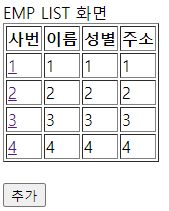
∴ 실행 결과 :: 사번 a링크 클릭 시 emp_detail로 이동
day09/emp_detail.html
<!DOCTYPE html>
<html>
<head>
<meta charset="UTF-8">
<title>Insert title here</title>
</head>
<body>
EMP DETAIL 화면
<table border = '1'>
	<tr>
		<th>사번</th>
		<td>{{vo.e_id}}</td>
	</tr>
	<tr>
		<th>이름</th>
		<td>{{vo.e_name}}</td>
	</tr>
	<tr>
		<th>성별</th>
		<td>{{vo.gen}}</td>
	</tr>
	<tr>
		<th>주소</th>
		<td>{{vo.addr}}</td>
	</tr>
	<tr>
		<td colspan="2">
			<input type="button" value="수정">
			<input type="button" value="삭제">
		</td>
	</tr>
</table>
</body>
</html>
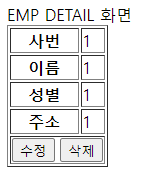
∴ 실행 결과
day09/myflask.py
from flask.app import Flask, request
from flask.templating import render_template
import pymysql

from day09.daoemp import DaoEmp

app = Flask(__name__)

@app.route('/')
@app.route('/emp_list')
def main():

    # dao에서 이미 다 만들어 뒀기 때문에 필요없음!
    # #메인코드
    # con = pymysql.connect(host='127.0.0.1', port=3300, user='root', password='python',
    #                        db='python', charset='utf8') #접속 정보

    de = DaoEmp()
    list = de.selectList()
    return render_template('emp_list.html', list=list)

@app.route('/emp_detail')
def emp_detail():
    e_id = request.args['e_id']
    de = DaoEmp()
    vo = de.selectOne(e_id) #daoemp.py의 selectOne 메소드
    print(vo)
    return render_template('emp_detail.html', vo=vo)

if __name__ == '__main__':
    app.run(host="0.0.0.0", debug=True, port=80)
day09/daoemp.py
import pymysql

class DaoEmp:

    #자주 사용하는 것들을 전역 변수로
    def __init__(self):
        self.con = pymysql.connect(host='127.0.0.1', port=3300, user='root', password='python',
                       db='python', charset='utf8') #접속 정보

        self.cur = self.con.cursor(pymysql.cursors.DictCursor) #커서 생성

    def selectList(self):
        sql = "select * from emp"
        self.cur.execute(sql)

        list = self.cur.fetchall()
        return list

    def selectOne(self, e_id):
        sql = f"""
        select
        e_id, e_name, gen, addr
        from emp
        where e_id = '{e_id}'

        """
        print(sql)
        self.cur.execute(sql)

        #list = self.cur.fetchall()
        # return list[0]
        vo = self.cur.fetchone()
        return vo

    def insert(self, e_id, e_name, gen, addr):
        sql = f"""
        insert into emp (e_id, e_name, gen, addr)
        values ('{e_id}','{e_name}','{gen}','{addr}')
        """
        print(sql)

        cnt = self.cur.execute(sql)
        self.con.commit()
        return cnt

    def update(self, e_id, e_name, gen, addr):
        sql = f"""
        update emp
        set e_name = '{e_name}', gen = '{gen}', addr = '{addr}'
        where e_id = '{e_id}'
        """
        print(sql)

        cnt = self.cur.execute(sql)
        self.con.commit()
        return cnt

    def delete(self, e_id):
        sql = f"""
        delete from emp
        where e_id = '{e_id}'
        """
        print(sql)

        cnt = self.cur.execute(sql)
        self.con.commit()
        return cnt

    #소멸자
    def __del__(self):
        self.cur.close()
        self.con.close()

if __name__ == '__main__':
    de = DaoEmp()
    #cnt = de.insert("6", "6", "6", "6")
    #cnt = de.update("6", "7", "7", "7")
    cnt = de.delete("6", "7", "7", "7")
    print("cnt",cnt)
괴발개발