day05/pyqt06.ui
<?xml version="1.0" encoding="UTF-8"?>
<ui version="4.0">
 <class>MainWindow</class>
 <widget class="QMainWindow" name="MainWindow">
  <property name="geometry">
   <rect>
    <x>0</x>
    <y>0</y>
    <width>800</width>
    <height>207</height>
   </rect>
  </property>
  <property name="windowTitle">
   <string>MainWindow</string>
  </property>
  <widget class="QWidget" name="centralwidget">
   <widget class="QLabel" name="lbl_mine">
    <property name="geometry">
     <rect>
      <x>50</x>
      <y>50</y>
      <width>56</width>
      <height>31</height>
     </rect>
    </property>
    <property name="text">
     <string>나:</string>
    </property>
   </widget>
   <widget class="QLabel" name="lbl_com">
    <property name="geometry">
     <rect>
      <x>50</x>
      <y>80</y>
      <width>56</width>
      <height>31</height>
     </rect>
    </property>
    <property name="text">
     <string>컴:</string>
    </property>
   </widget>
   <widget class="QLabel" name="lbl_result">
    <property name="geometry">
     <rect>
      <x>40</x>
      <y>110</y>
      <width>56</width>
      <height>31</height>
     </rect>
    </property>
    <property name="text">
     <string>결과:</string>
    </property>
   </widget>
   <widget class="QLineEdit" name="le_mine">
    <property name="geometry">
     <rect>
      <x>90</x>
      <y>50</y>
      <width>113</width>
      <height>20</height>
     </rect>
    </property>
   </widget>
   <widget class="QLineEdit" name="le_com">
    <property name="geometry">
     <rect>
      <x>90</x>
      <y>80</y>
      <width>113</width>
      <height>20</height>
     </rect>
    </property>
   </widget>
   <widget class="QLineEdit" name="le_result">
    <property name="geometry">
     <rect>
      <x>90</x>
      <y>110</y>
      <width>113</width>
      <height>20</height>
     </rect>
    </property>
   </widget>
   <widget class="QPushButton" name="pb">
    <property name="geometry">
     <rect>
      <x>40</x>
      <y>150</y>
      <width>161</width>
      <height>23</height>
     </rect>
    </property>
    <property name="text">
     <string>결과 보기</string>
    </property>
   </widget>
  </widget>
 </widget>
 <resources/>
 <connections/>
</ui>
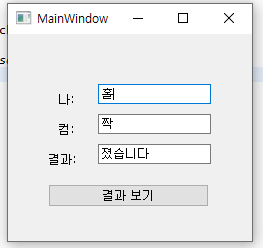
day05/pyqt06.py 홀짝게임
import sys

from PyQt5 import uic
from PyQt5.QtWidgets import QApplication, QMainWindow
from random import random


form_class = uic.loadUiType("pyqt06.ui")[0]

class WindowClass(QMainWindow, form_class):
    def __init__(self):
        super().__init__()
        self.setupUi(self)

        self.pb.clicked.connect(self.btnClick)
        #enter 누르면 결과 보기 버튼 실행
        self.le_mine.returnPressed.connect(self.btnClick)

    def btnClick(self):
        rnd = random()

        com = ""
        user = ""

        if(rnd > 0.5):
            com = "홀"
        else:
            com = "짝"

        user = self.le_mine.text()
        self.le_com.setText(com)
        com = self.le_com.text()

        #if com == mine:
        if((user == "홀" and com == "홀") or (user == "짝" and com == "짝")):
            result = "이겼습니다"
        else:
            result = "졌습니다"

        self.le_mine.setText(user)
        self.le_result.setText(result)


if __name__ == "__main__":
    app = QApplication(sys.argv)
    myWindow = WindowClass()
    myWindow.show()
    app.exec_()
∴ 실행 결과
day05/pyqt07.ui
<?xml version="1.0" encoding="UTF-8"?>
<ui version="4.0">
 <class>MainWindow</class>
 <widget class="QMainWindow" name="MainWindow">
  <property name="geometry">
   <rect>
    <x>0</x>
    <y>0</y>
    <width>800</width>
    <height>600</height>
   </rect>
  </property>
  <property name="windowTitle">
   <string>MainWindow</string>
  </property>
  <widget class="QWidget" name="centralwidget">
   <widget class="QLineEdit" name="le">
    <property name="geometry">
     <rect>
      <x>60</x>
      <y>50</y>
      <width>181</width>
      <height>31</height>
     </rect>
    </property>
    <property name="alignment">
     <set>Qt::AlignRight|Qt::AlignTrailing|Qt::AlignVCenter</set>
    </property>
   </widget>
   <widget class="QPushButton" name="pb1">
    <property name="geometry">
     <rect>
      <x>60</x>
      <y>90</y>
      <width>51</width>
      <height>41</height>
     </rect>
    </property>
    <property name="text">
     <string>1</string>
    </property>
   </widget>
   <widget class="QPushButton" name="pb2">
    <property name="geometry">
     <rect>
      <x>120</x>
      <y>90</y>
      <width>51</width>
      <height>41</height>
     </rect>
    </property>
    <property name="text">
     <string>2</string>
    </property>
   </widget>
   <widget class="QPushButton" name="pb3">
    <property name="geometry">
     <rect>
      <x>180</x>
      <y>90</y>
      <width>51</width>
      <height>41</height>
     </rect>
    </property>
    <property name="text">
     <string>3</string>
    </property>
   </widget>
   <widget class="QPushButton" name="pb6">
    <property name="geometry">
     <rect>
      <x>180</x>
      <y>140</y>
      <width>51</width>
      <height>41</height>
     </rect>
    </property>
    <property name="text">
     <string>6</string>
    </property>
   </widget>
   <widget class="QPushButton" name="pb5">
    <property name="geometry">
     <rect>
      <x>120</x>
      <y>140</y>
      <width>51</width>
      <height>41</height>
     </rect>
    </property>
    <property name="text">
     <string>5</string>
    </property>
   </widget>
   <widget class="QPushButton" name="pb4">
    <property name="geometry">
     <rect>
      <x>60</x>
      <y>140</y>
      <width>51</width>
      <height>41</height>
     </rect>
    </property>
    <property name="text">
     <string>4</string>
    </property>
   </widget>
   <widget class="QPushButton" name="pb9">
    <property name="geometry">
     <rect>
      <x>180</x>
      <y>190</y>
      <width>51</width>
      <height>41</height>
     </rect>
    </property>
    <property name="text">
     <string>9</string>
    </property>
   </widget>
   <widget class="QPushButton" name="pb8">
    <property name="geometry">
     <rect>
      <x>120</x>
      <y>190</y>
      <width>51</width>
      <height>41</height>
     </rect>
    </property>
    <property name="text">
     <string>8</string>
    </property>
   </widget>
   <widget class="QPushButton" name="pb7">
    <property name="geometry">
     <rect>
      <x>60</x>
      <y>190</y>
      <width>51</width>
      <height>41</height>
     </rect>
    </property>
    <property name="text">
     <string>7</string>
    </property>
   </widget>
   <widget class="QPushButton" name="pb0">
    <property name="geometry">
     <rect>
      <x>60</x>
      <y>240</y>
      <width>51</width>
      <height>41</height>
     </rect>
    </property>
    <property name="text">
     <string>0</string>
    </property>
   </widget>
   <widget class="QPushButton" name="pb_call">
    <property name="geometry">
     <rect>
      <x>120</x>
      <y>240</y>
      <width>111</width>
      <height>41</height>
     </rect>
    </property>
    <property name="text">
     <string>☎</string>
    </property>
   </widget>
  </widget>
 </widget>
 <resources/>
 <connections/>
</ui>
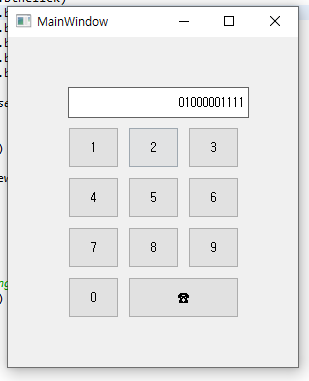
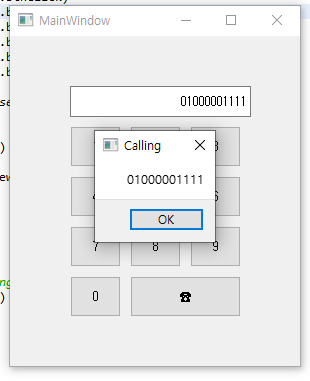
day05/pyqt07.py 전화번호 입력
import sys

from PyQt5 import uic
from PyQt5.Qt import QMessageBox
from PyQt5.QtWidgets import QApplication, QMainWindow


form_class = uic.loadUiType("pyqt07.ui")[0]

class WindowClass(QMainWindow, form_class):
    def __init__(self):
        super().__init__()
        self.setupUi(self)

        self.pb0.clicked.connect(self.btnClick)
        self.pb1.clicked.connect(self.btnClick)
        self.pb2.clicked.connect(self.btnClick)
        self.pb3.clicked.connect(self.btnClick)
        self.pb4.clicked.connect(self.btnClick)
        self.pb5.clicked.connect(self.btnClick)
        self.pb6.clicked.connect(self.btnClick)
        self.pb7.clicked.connect(self.btnClick)
        self.pb8.clicked.connect(self.btnClick)
        self.pb9.clicked.connect(self.btnClick)

        self.pb_call.clicked.connect(self.callClick)

    def btnClick(self):
        str_new = self.sender().text()
        str_old = self.le.text()
        self.le.setText(str_old+str_new)

        print(self.sender().text())

    def callClick(self):
        print("btnClick")
        str_num = self.le.text()
        QMessageBox.about(self,'Calling',str_num)
        str_new = self.sender().text()

if __name__ == "__main__":
    app = QApplication(sys.argv)
    myWindow = WindowClass()
    myWindow.show()
    app.exec_()
∴ 실행 결과
 |  |
|---|
day05/pyqt08.ui
<?xml version="1.0" encoding="UTF-8"?>
<ui version="4.0">
 <class>MainWindow</class>
 <widget class="QMainWindow" name="MainWindow">
  <property name="geometry">
   <rect>
    <x>0</x>
    <y>0</y>
    <width>222</width>
    <height>348</height>
   </rect>
  </property>
  <property name="windowTitle">
   <string>MainWindow</string>
  </property>
  <widget class="QWidget" name="centralwidget">
   <widget class="QLineEdit" name="le">
    <property name="geometry">
     <rect>
      <x>80</x>
      <y>30</y>
      <width>113</width>
      <height>20</height>
     </rect>
    </property>
   </widget>
   <widget class="QPushButton" name="pb">
    <property name="geometry">
     <rect>
      <x>20</x>
      <y>60</y>
      <width>171</width>
      <height>23</height>
     </rect>
    </property>
    <property name="text">
     <string>맞혀 보기</string>
    </property>
   </widget>
   <widget class="QLabel" name="lbl">
    <property name="geometry">
     <rect>
      <x>20</x>
      <y>30</y>
      <width>56</width>
      <height>12</height>
     </rect>
    </property>
    <property name="text">
     <string>맞힐 수:</string>
    </property>
   </widget>
   <widget class="QPlainTextEdit" name="pte">
    <property name="geometry">
     <rect>
      <x>20</x>
      <y>100</y>
      <width>171</width>
      <height>221</height>
     </rect>
    </property>
   </widget>
  </widget>
 </widget>
 <resources/>
 <connections/>
</ui>
day05/pyqt08.py
import sys

from PyQt5 import uic
from PyQt5.Qt import QMessageBox, QPlainTextEdit
from PyQt5.QtWidgets import QApplication, QMainWindow
from random import random


form_class = uic.loadUiType("pyqt08.ui")[0]

class WindowClass(QMainWindow, form_class):
    def __init__(self):
        super().__init__()
        self.setupUi(self)
        self.com = int(random() * 99) + 1
        print("self.com", self.com)
        self.pb.clicked.connect(self.myClick)


    def myClick(self):
        mine = int(self.le.text())
        #imine = int(mine)
        str_new = ""

        if mine < self.com:
            str_new = "{}    UP".format(mine)
            self.pte.setvalue(str_new)
        elif mine > self.com:
            str_new = "{}    DOWN".format(mine)
        else:
            str_new = "{}    정답입니다".format(mine)
            QMessageBox.about(self, 'UP&DOWN', "축하합니다")

        print(str_new)
        str_old = self.pte.toPlainText()
        self.pte.setPlainText(str_old+str_new)
        #버튼을 누르면 le 비워짐
        self.le.setText("")


if __name__ == "__main__":
    app = QApplication(sys.argv)
    myWindow = WindowClass()
    myWindow.show()
    app.exec_()
day05/pyqt09.ui
<?xml version="1.0" encoding="UTF-8"?>
<ui version="4.0">
 <class>MainWindow</class>
 <widget class="QMainWindow" name="MainWindow">
  <property name="geometry">
   <rect>
    <x>0</x>
    <y>0</y>
    <width>222</width>
    <height>348</height>
   </rect>
  </property>
  <property name="windowTitle">
   <string>MainWindow</string>
  </property>
  <widget class="QWidget" name="centralwidget">
   <widget class="QLabel" name="lbl_first">
    <property name="geometry">
     <rect>
      <x>20</x>
      <y>30</y>
      <width>56</width>
      <height>12</height>
     </rect>
    </property>
    <property name="text">
     <string>첫별수</string>
    </property>
   </widget>
   <widget class="QLabel" name="lbl_last">
    <property name="geometry">
     <rect>
      <x>20</x>
      <y>60</y>
      <width>56</width>
      <height>12</height>
     </rect>
    </property>
    <property name="text">
     <string>끝별수</string>
    </property>
   </widget>
   <widget class="QLineEdit" name="le_first">
    <property name="geometry">
     <rect>
      <x>90</x>
      <y>30</y>
      <width>113</width>
      <height>20</height>
     </rect>
    </property>
   </widget>
   <widget class="QLineEdit" name="le_last">
    <property name="geometry">
     <rect>
      <x>90</x>
      <y>60</y>
      <width>113</width>
      <height>20</height>
     </rect>
    </property>
   </widget>
   <widget class="QPushButton" name="pb">
    <property name="geometry">
     <rect>
      <x>20</x>
      <y>100</y>
      <width>181</width>
      <height>23</height>
     </rect>
    </property>
    <property name="text">
     <string>별 그리기</string>
    </property>
   </widget>
   <widget class="QTextEdit" name="te">
    <property name="geometry">
     <rect>
      <x>20</x>
      <y>140</y>
      <width>181</width>
      <height>191</height>
     </rect>
    </property>
   </widget>
  </widget>
 </widget>
 <resources/>
 <connections/>
</ui>
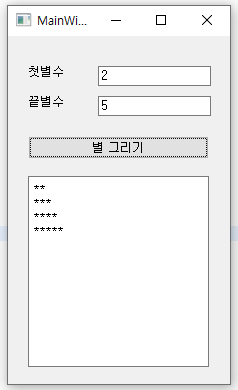
day05/pyqt09.py (메소드 활용)
import sys

from PyQt5 import uic
from PyQt5.Qt import QMessageBox, QPlainTextEdit
from PyQt5.QtWidgets import QApplication, QMainWindow
from random import random


form_class = uic.loadUiType("pyqt09.ui")[0]

class WindowClass(QMainWindow, form_class):
    def __init__(self):
        super().__init__()
        self.setupUi(self)
        self.pb.clicked.connect(self.myClick)

    def star(self, first, last):
    	#join 메서드 활용하여 한 줄로 간결하게 대체 가능
        #return "\n".join("*" * i for i in range(first, last + 1))

        star_str = ""
        for i in range(first, last + 1):
            star_str += "*" * i + "\n"

        return star_str

    def myClick(self):
        first = int(self.le_first.text())
        last = int(self.le_last.text())
        result = self.star(first, last)
        self.te.setText(result)

if __name__ == "__main__":
    app = QApplication(sys.argv)
    myWindow = WindowClass()
    myWindow.show()
    app.exec_()
∴ 실행 결과
괴발개발