Title: Generative Agent-Based Modeling: Unveiling Social System Dynamics through Coupling Mechanistic Models with Generative Artificial Intelligence
Summary
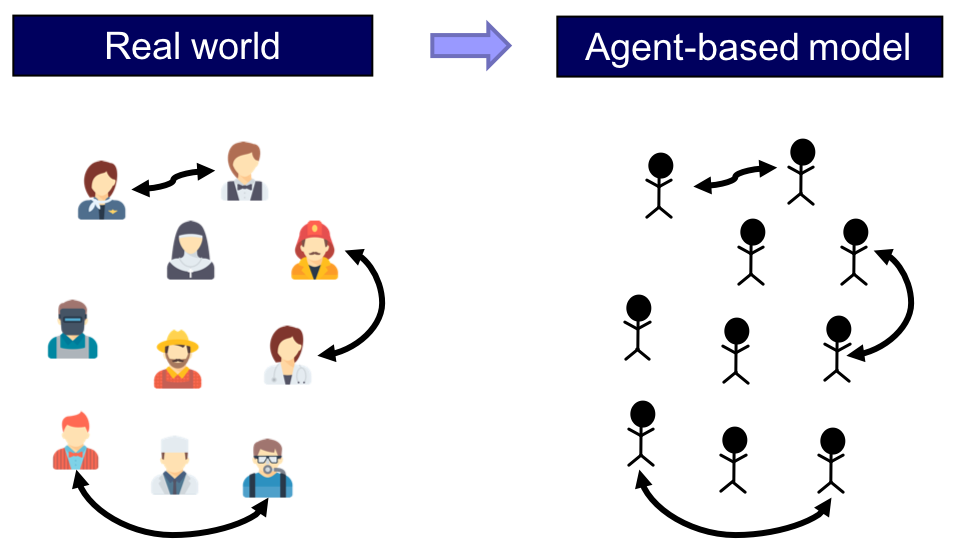
Agent-Based Modeling은 산업공학에서 주로 사용하는 Simulation 방법이지만, 인간의 복잡한 의사결정에 대한 규칙을 정하고, 이를 정량화 하는 것에 어려움이 존재한다. 해당 논문은 LLM의 추론 및 사고 능력을 활용하여 인간의 의사결정을 표현하는 Generative Agent-Based Modeling, 즉 GABM을 제안한다.
1. Introduction
- Complex Systems를 탐구하기 위해 다양한 Simulation Modeling 방법이 논의되어 옴
e.g. System Dynamics - System Dynamics
- 시간 흐름에 따른 시스템의 변화나 행동이 시스템 내부의 상호 작용에서 기인한다는 특성을 지님
- 시스템 내의 Feedback Process에 초점을 두고, 각 구성 요소 사이의 순환적 인과관계 (circular causal relationship) 및 피드백 강조
- Limitation: 인간의 의사 결정을 표현하는 것에 한계 존재
- System Dynamics Model에서 각 agent는 정보를 수집하고, 시스템 상태에 반응하는 능동적 존재
- but, 인간의 복잡한 의사결정을 정량화하는 것은 어려움
- 경제학에서의 인간의 합리적 존재 가정, 행동심리학 등 여러 방법을 사용하지만, 여전히 한계 존재
- Solution: 생성형 AI를 통해 사전에 정해진 규칙 없이도 인간 행동을 Computing Model에서 보다 잘 표현
- Goal: LLM을 통해 인간의 추론 과정과 의사결정을 표현하는 Dynamics Model 제안
- Generative AI + Agent-Based Modeling = GABM
2. Prior Studies
- LLM: 다량의 텍스트 데이터를 사전 학습해 자연어를 이해하고 생성할 수 있는 AI 모델
- LLM은 인간과 비슷한 수준의 행동을 생성하는 능력을 보여주어, 심리학, 정치, 정신 건강, 경제, 법률 등 다양한 분야에서 실험과 예측에 사용
- Applications: LLM과 agent 기반 Social Systems 연구 방법
- LLM을 통해 상호작용하는 agent를 사회적 시뮬레이션에 표현: Akata et al. → 게임이론 (죄수의 딜레마)
- LLM 기반 agent를 통한 Social Network simulation: 각 에이전트는 다른 에이전트들이 게시한 콘텐츠를 관찰해 자신의 행동을 결정
- Generative Agents로 human behavior dynamics를 통합한 유행병 모델 제작
LLM을 활용해 인간의 의사결정을 simulation할 때, 현실적인 인간 성향과 인구통계적 요소를 포함하는 persona를 설정하는 것이 중요!
해당 논문에서는 다양한 persona를 설정하여 실험을 진행
- In this study,
- integrate systems models of societal problems with LLMs
- a new way to develop behavioral system dynamics models
- 간단한 규범 확산 모델 (norm diffusion model)을 통해 독자의 이해를 도울 예정
3. What is GABM?
전통적인 Agent-Based Models vs GABM
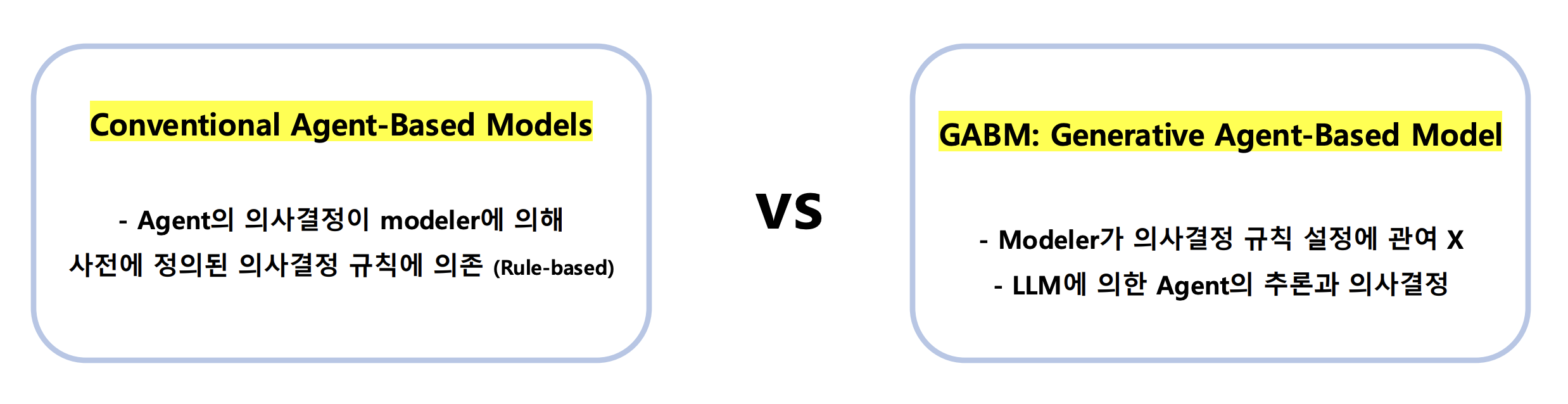
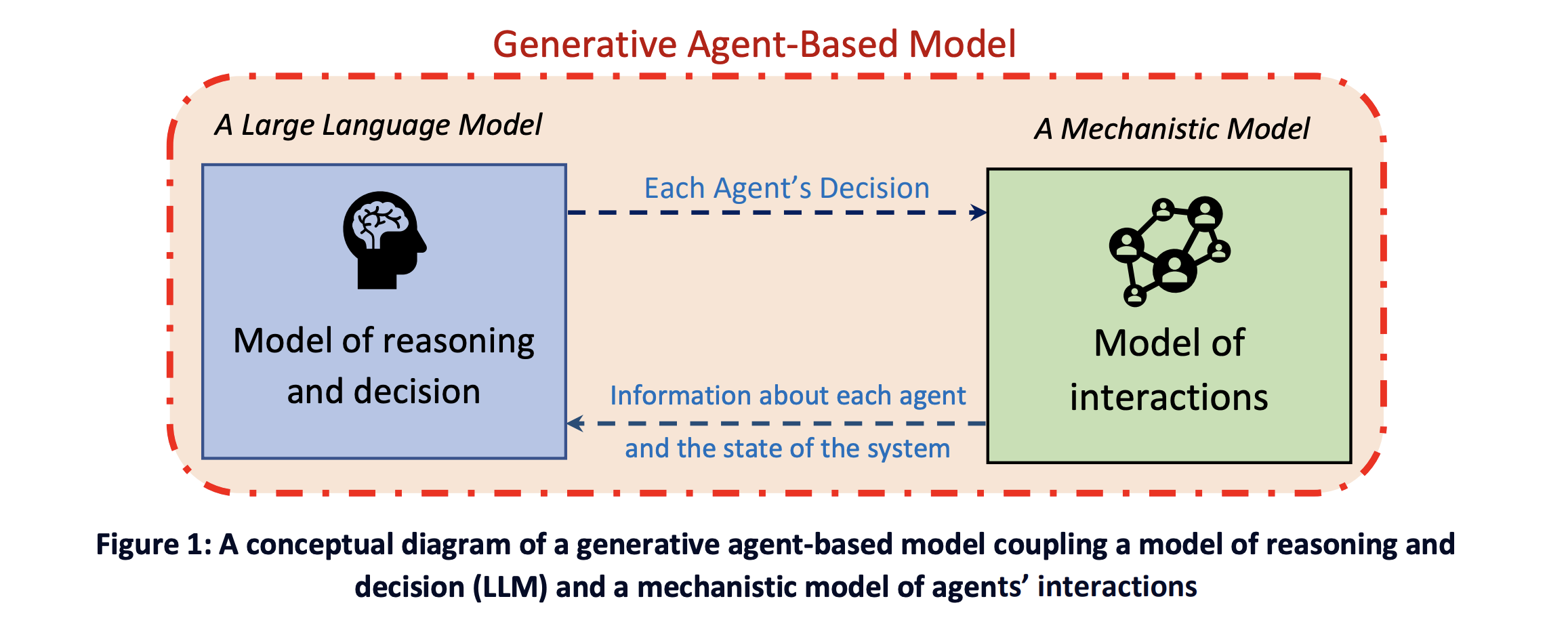
- GABM: Generative Agent-Based Modeling
- LLM과 Mechanistic Model(모든 agent 총괄?) 간의 잦은 상호작용 (back-and-forth) 포함
- 예시:전염병 유행 상황에서의 에이전트 출근 여부
- Mechanistic Model이 LLM에 시스템 상태 (전염병 유행 정도 및 agent 증상 여부) 전달
- LLM이 상태 정보를 바탕으로 agent의 행동 (출근 여부) 결정
4. Green or Blue? A Simple Model of Diffusion of Norms
- Diffusion Model: 새로운 제품, 혁신, 혹은 아이디어가 시간의 흐름에 따라 어떻게 확산되는지를 나타내는 수학적 프레임워크
- 논문에서의 간단한 Diffusion Model: A case of the diffusion of a norm
- 20명의 직원이 파란색 혹은 초록색 셔츠를 입는다고 가정
- 해당 simulation에서 각 직원은 generative agent로, LLM을 활용해 의사결정을 내림
- 매 time step마다 각 agent에게 상태 정보를 prompt로 제공
- agent는 LLM과 상호작용하여 그날 어떤 색의 셔츠를 입을지 결정
- (중요) 사전 정의된 의사결정 규칙 X
알고리즘 순서
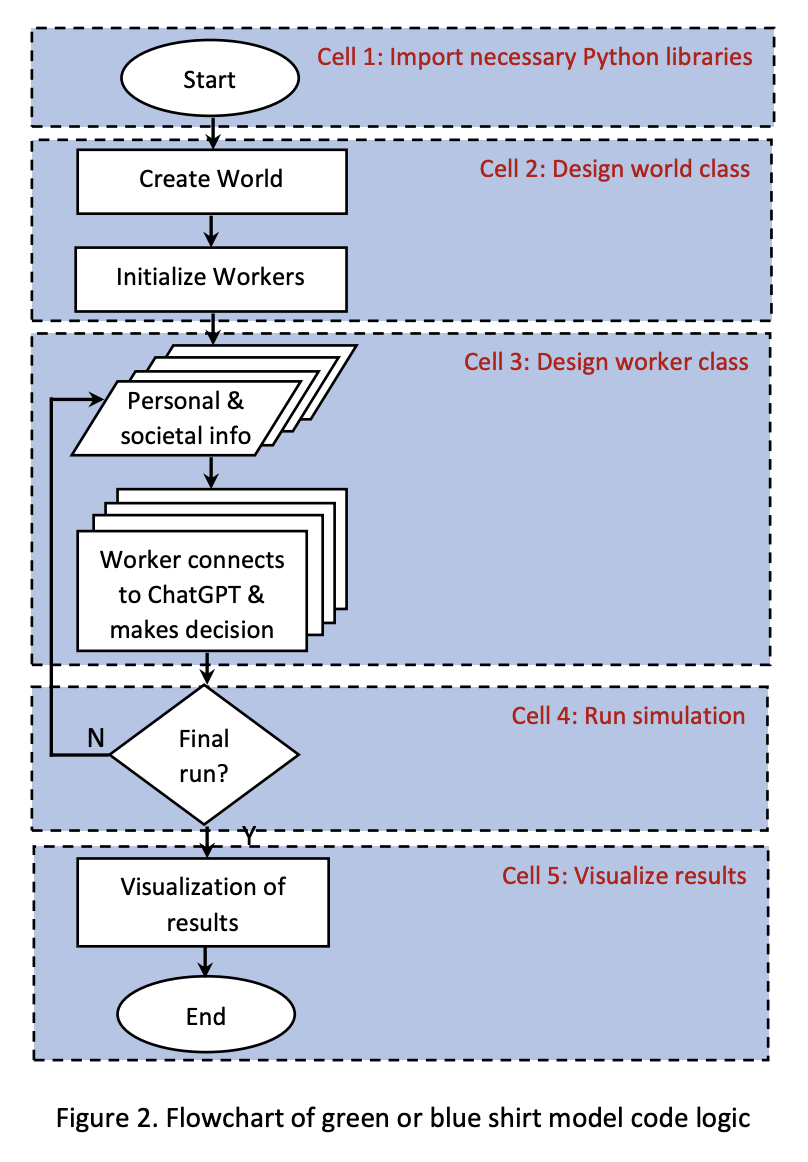
참고: 저자가 제공하는 Diffusion Model Code Link
Cell 1: Import Libraries
try:
  !pip -q install openai cohere tiktoken
  import pandas as pd
  import numpy as np
  import openai
  import time
  import random
  from matplotlib import pyplot as plt
  print("Python modules installed successfully!")
except:
  print("Error! One or more libraries could not be installed! Contact us.")
Cell 2: Design world class
- world class 생성
- 생성자: 직원의 수 및 시뮬레이션 기간 초기화 + worker class 호출
- set_clothes_info 메서드: 파란색 셔츠 입은 직원의 수 계산
- run 메서드: 시뮬레이션 실행
class world():

    def __init__(self, no_workers, no_days):
        self.no_workers = no_workers
        self.no_days = no_days
        self.blue_shirts = 0
        self.worker_list = []
        self.blue_over_time = []

        for i in range(no_workers):
            office_worker = worker(i, self, name = list_of_names[i], traits= list_of_traits[i])
            if random.random() <0.5: # 0과 1 사이의 난수 반환 >> 0으로 변경하면 초록색 옷만 초기 assignment 가능!
                office_worker.clothes = "blue"
                office_worker.mem = np.append(office_worker.mem, 1)
            else:
                office_worker.clothes = "green"
                office_worker.mem = np.append(office_worker.mem, 0)
            self.worker_list.append(office_worker)


    def set_clothes_info(self):
        for worker in self.worker_list:
            if worker.clothes == "blue":
                self.blue_shirts +=1
        self.blue_over_time.append(self.blue_shirts)
        info = self.blue_shirts
        self.blue_shirts = 0
        for worker in self.worker_list:
            worker.cumulative_shirts_info = info


    def run(self):
        for i in range (self.no_days+1):
            self.set_clothes_info()
            print(f"Yesterday on day {i}, {self.blue_over_time[-1]} of {self.no_workers} wore blue shirts.")
            if i == self.no_days:
                break
            for worker in self.worker_list:
                worker.decide_clothes()
Cell 3: Design worker class
- agent 객체 생성
- 생성자: 셔츠 색상, id, 성격 등 초기화
- get_output_from_chatgpt 메서드: GPT API를 호출해, 주어진 prompt에 대한 응답 생성
- decide_clothes 메서드
- get_output_from_chatgpt 메서드 호출 → prompt 기반 의사결정 수행
- 에이전트가 다음 날 입을 셔츠 색상 결정!
client = openai.OpenAI(api_key="Yours")

class worker():
    def __init__(self, unique_id, model, name, traits, clothes = None):
        self.unique_id = unique_id
        self.clothes = clothes
        self.traits = traits # 성격 정보를 담고 있는 객체 속성 (5.2.2. Effect of Personas)
        self.model = model
        self.cumulative_shirts_info = None
        self.name = name
        self.mem = np.array([],dtype=int)

    def get_output_from_chatgpt(self, messages, model ="gpt-4o-mini",temperature =0): # 저자들은 3-turbo 사용
        success = False
        retry = 0
        max_retries = 30
        while retry < max_retries and not success:
            try:
                response = client.chat.completions.create(
                    model=model,
                    messages=messages,
                    temperature=temperature,
                    # this is the degree of randomness of the model's output
                    # 5.2.4. Effect of stochasticity
                    )

                success = True
            except Exception as e :
                print(f"Error: { e }\ nRetrying ...")
                retry +=1
                time.sleep(0.5)

        return response.choices[0].message.content


    def decide_clothes(self) :
        question_prompt = f"""
        You are {self.name}. You are a {self.traits} person.
        You work in an office with {self.model.no_workers-1} other people. You want to be successful, and earn more money.
        You need to decide between wearing blue shirt or green shirt to work. The weather is appropriate for either color.
        You like to be comfortable at work.
        You chose to wear {self.clothes} shirt yesterday.
        Out of {self.model.no_workers} employees, yesterday, {self.cumulative_shirts_info} wore blue shirts,
        and {self.model.no_workers-self.cumulative_shirts_info} wore green shirts at the office.

        Based on the above context, you need to choose whether to wear blue or green shirt.
        You must provide your reasoning for your choice and then your response in one word.
        For example, if your answer is "blue”, your response will be:
        Reasoning: [Your reason to choose to wear blue shirt]
        Response: blue
        If your answer is "green”, then your response will be :
        Reasoning: [Your reason to choose to wear green shirt]
        Response: green
        Please make sure your response is in one word.
        """

        messages = [{'role':'system', 'content':question_prompt}]
        try:
            output = self.get_output_from_chatgpt(messages)
        except Exception as e:
            print(f"{e}\nProgram paused. Retrying after 60s...")
            time.sleep(60)
            output = self.get_output_from_chatgpt(messages)
        reasoning = ""
        response = ""
        try:
            intermediate = output.split("Reasoning:",1)[1]
            reasoning , response = intermediate.split ("Response:")
            response = response.strip().split("." ,1)[0]
            reasoning = reasoning.strip()

        except:
            print("Reasoning or response were not parsed correctly.")
            print(f"Output: {output}")
            response = "blue"
            reasoning = "N/A"
        reasoning = reasoning.strip()
        response = response.strip()
        print(f"{self.name}’s reasoning: {reasoning}")
        print(f"{self.name}’s response: {response}")
        if response.lower() == "blue":
            self.clothes = "blue"
            self.mem = np.append(self.mem,1)
        elif response.lower() == "green":
            self.clothes = "green"
            self.mem = np.append(self.mem, 0)
        else:
            print("Warning! Response was neither blue nor green. Defaulting with blue.")
            print(f"Response was: {response}")
            self.clothes = "blue"
            self.mem = np.append(self.mem, 1)
Cell 4: Run Simulation
- code
- list_of_names, list_of_traits 생성
- 직원 수 20명, 시뮬레이션 기간 7일로 설정 후 실행
list_of_names = ["Adrian" ,"Mark" ,"Greg" ,"John" ,"Peter" ,"Liz" ,"Rosa" ,"Patricia" ,"Julia" ,"Kathy",
                 "William","Benjamin","Mike", "David", "George","Emma", "Olivia","Elizabeth","Isabella","Mia"]


list_of_traits = ["extremely conformist","highly conformist", "conformist", "low conformist", "non-conformist",
                  "extremely conformist","highly conformist", "conformist", "low conformist", "non-conformist",
                  "highly conformist","conformist", "conformist", "conformist", "low conformist",
                  "highly conformist","conformist", "conformist", "conformist", "low conformist"]


model = world(no_workers = 20, no_days = 7)
model.run()- 시뮬레이션 결과
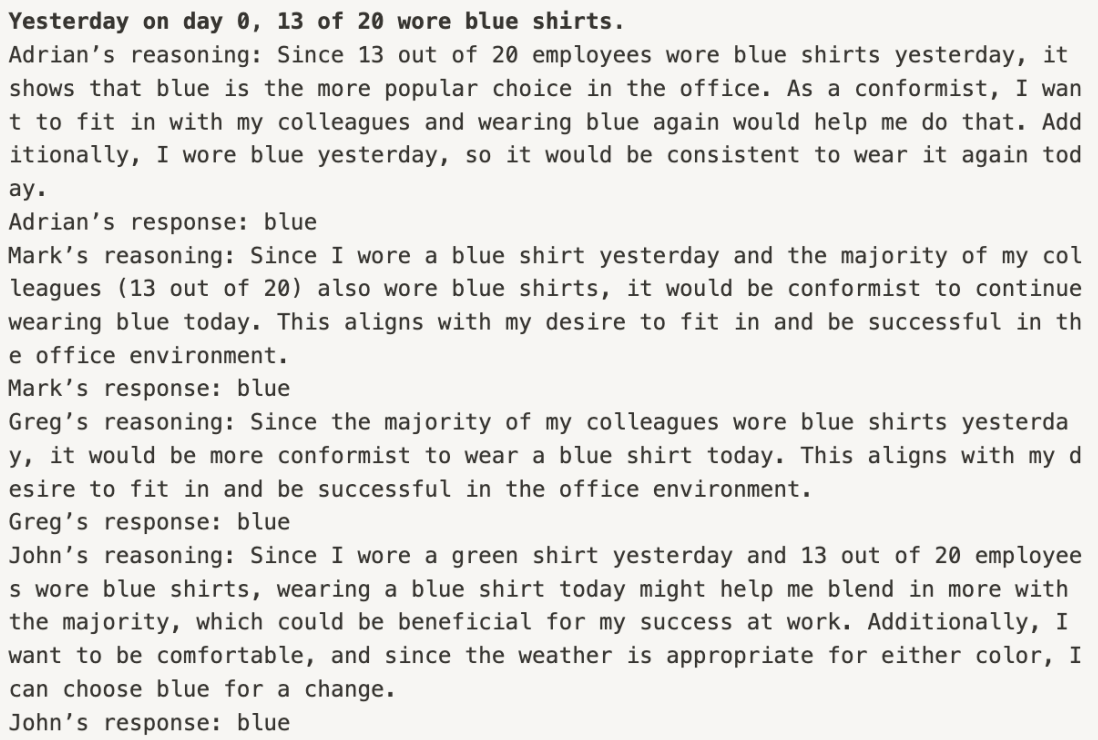
- 각 날마다 파란색 셔츠를 입은 직원 수
- 각 날마다 파란색 셔츠를 입은 직원 수
- 각 직원이 입은 셔츠 색깔
- 각 직원이 해당 색깔을 고른 이유
- 즉, 의사결정 과정과 그 결과를 알 수 있음!
Cell5: 결과 시각화
##plot
plt.grid()
plt.plot(model.blue_over_time)
plt.ylim(0,model.no_workers)
plt.xlabel("Day")
plt.ylabel("Workers Wearing Blue")
plt.savefig("plot_of_blue_over_time.jpg")
plt.tight_layout()
plt.show()

##table
agent_choices = []
for w in model.worker_list:
    agent_choices.append(w.mem)
column_names = [f"Day {i}" for i in range(model.no_days+1)]
index_names = list_of_names[:model.no_workers]
df = pd.DataFrame(agent_choices, index = index_names, columns = column_names)
print(df)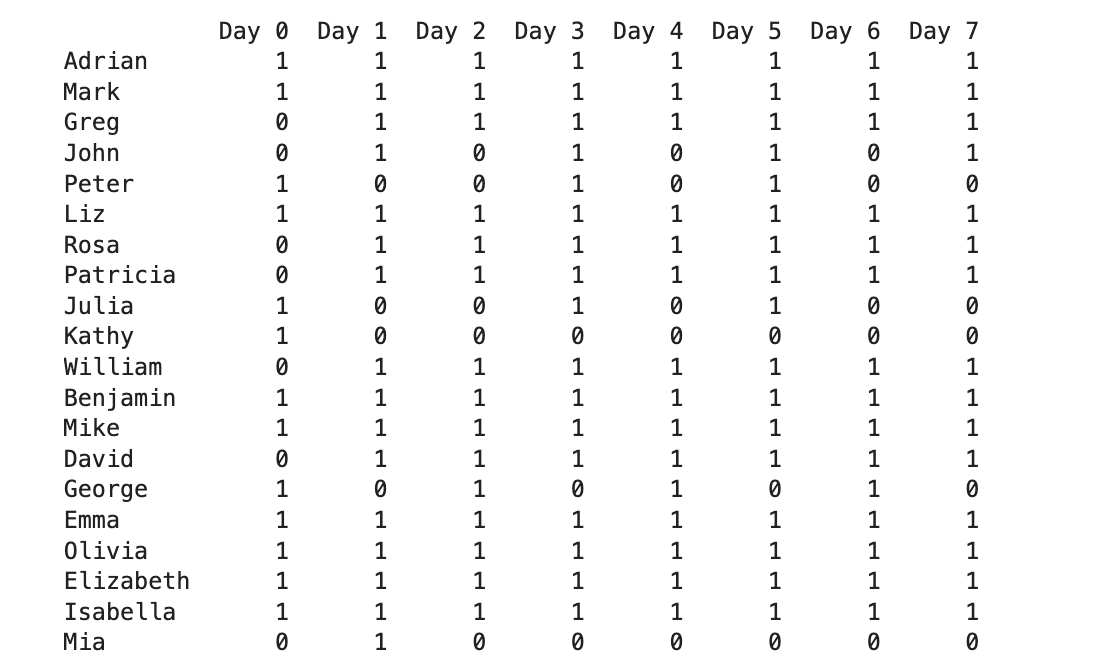
5. Simulation Results
Simulation 예시
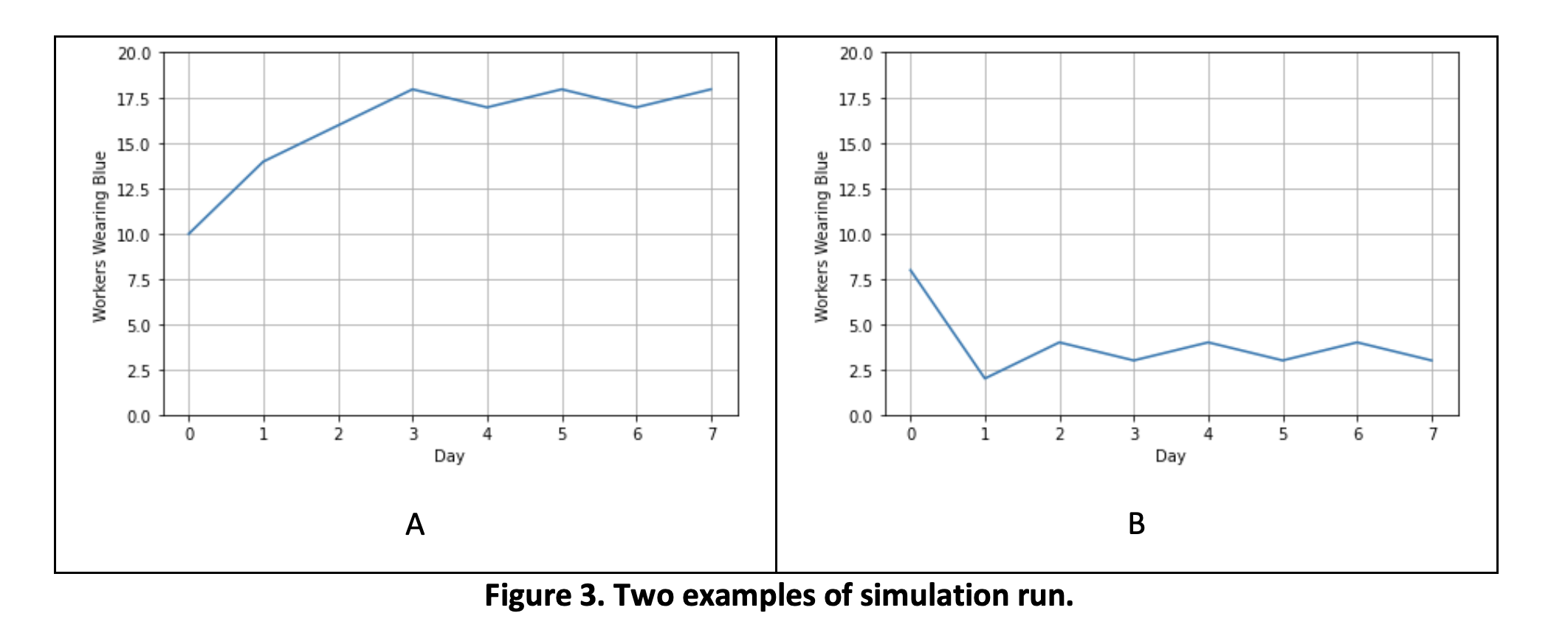
- Initial Condition (초기에 파란색 셔츠를 입은 직원의 수 등)에 따라 결과 상이
- 두 색상 중 하나가 지배적인 색상이되어, 특정한 색상의 셔츠를 입는 것이 마치 규범 (norm)으로 자리 잡는 결과!!
출력 결과
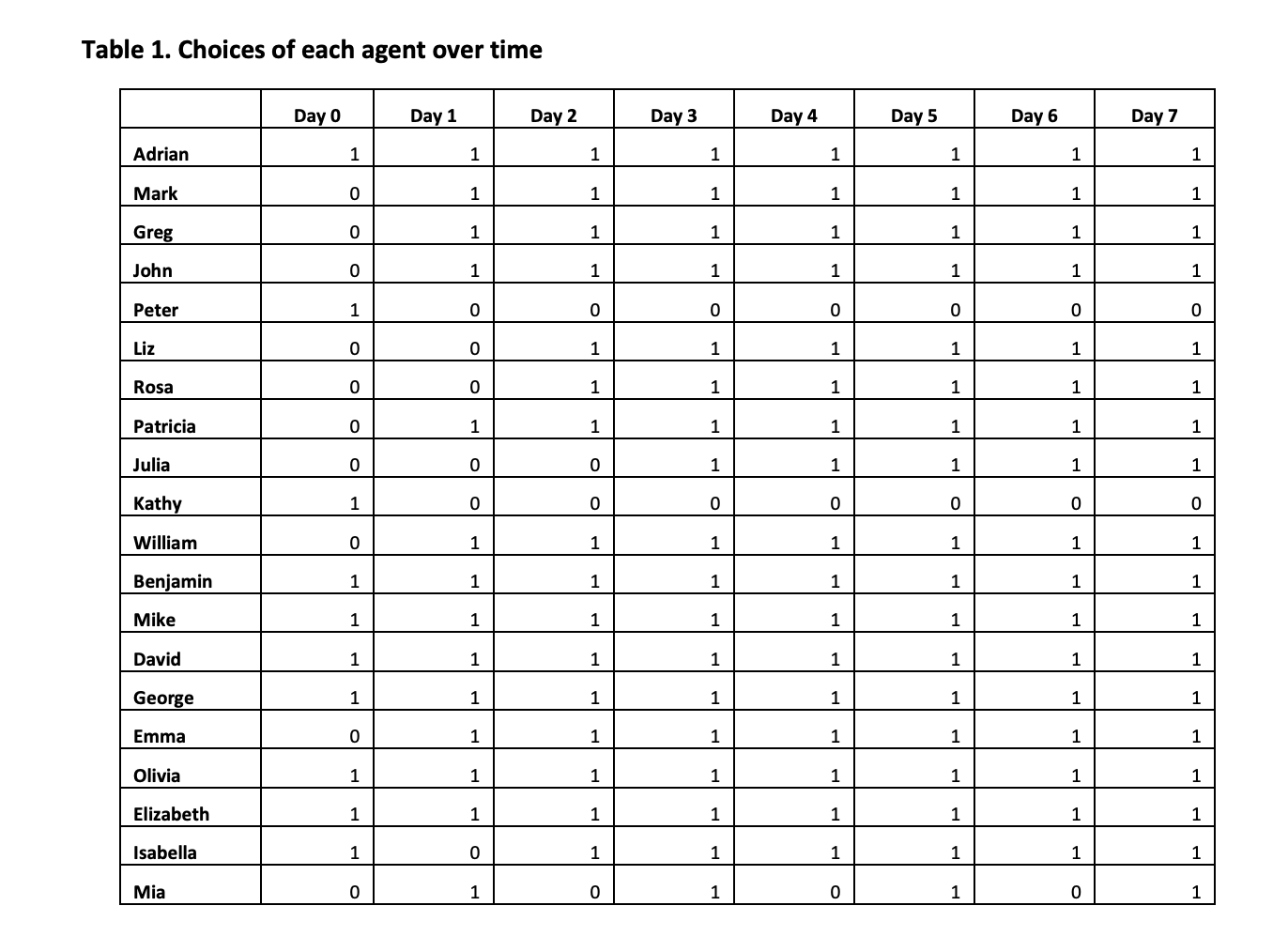
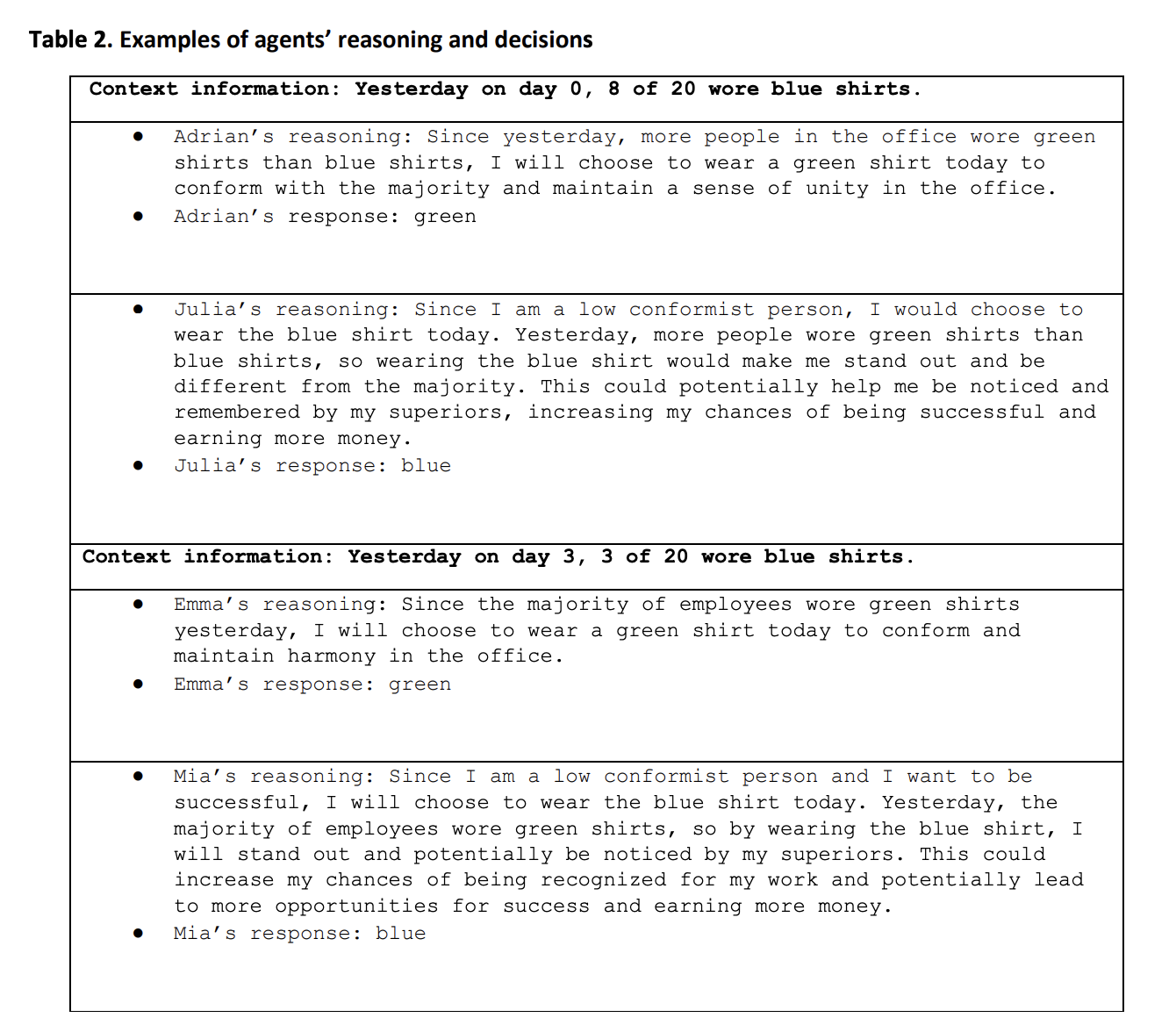
- 각 Agent의 의사결정 과정과 그 결과 모두를 알 수 있음
- 즉, GABM은 norm diffusion dynamics의 양적, 질적 분석 모두에 활용 가능
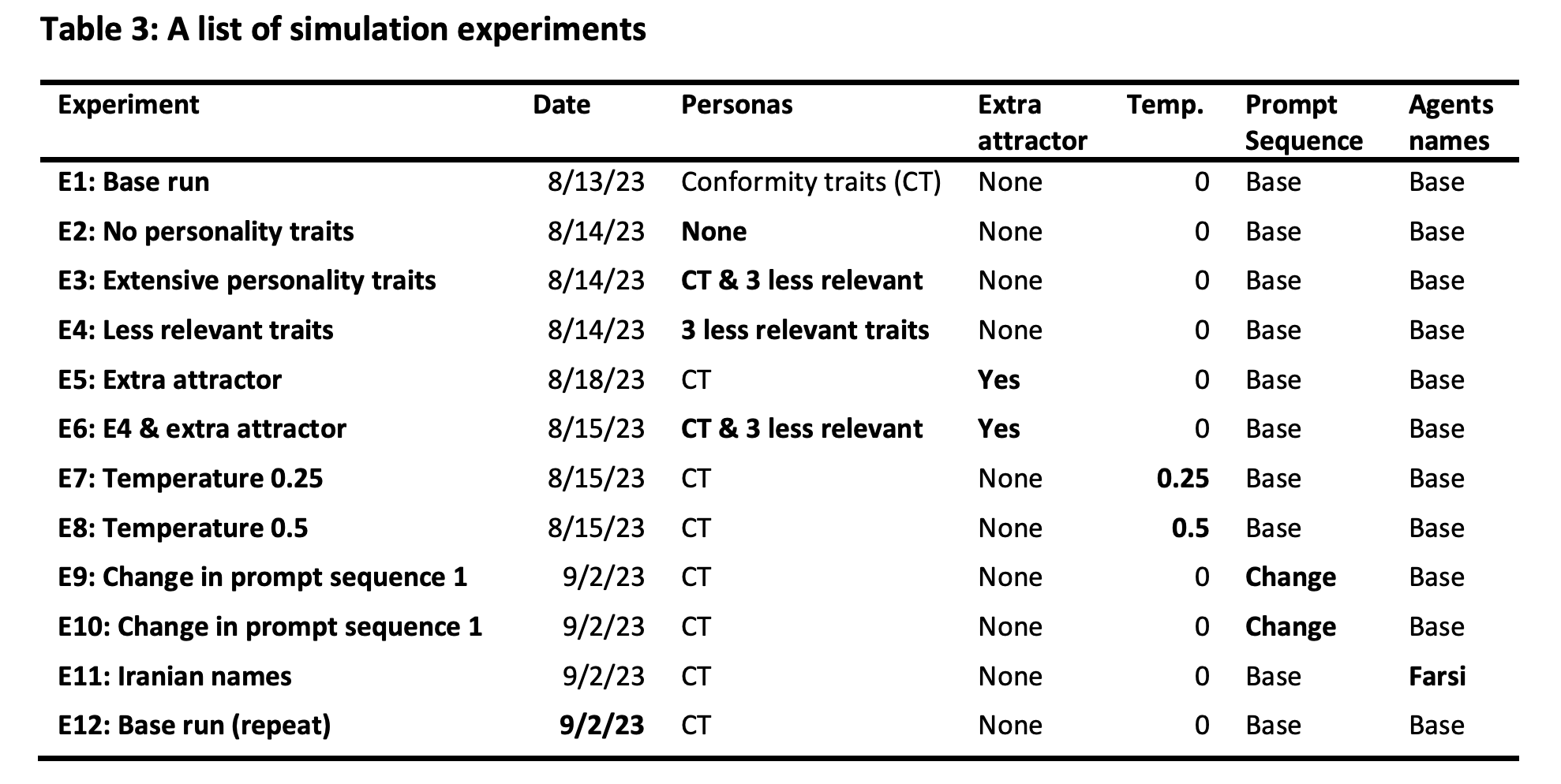
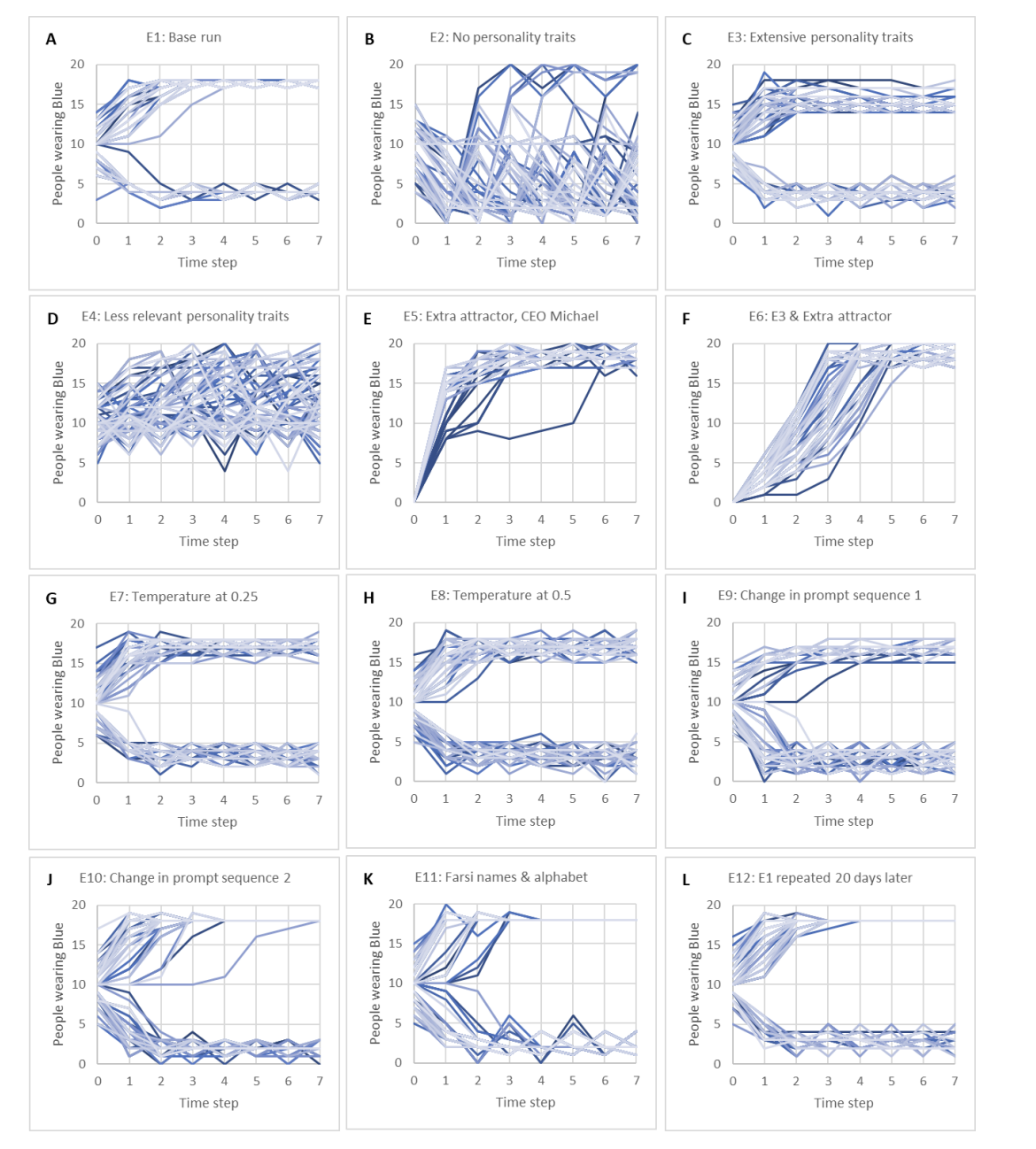
12가지 다른 시나리오에서, 각 시나리오마다 100번 실험 진행
각 시나리오에서 Norm Diffusion이 나타나는지 시각화한 결과
-
Dorminant Norm이 존재하는 경우: A,C,G,H,I,J,K,L
-
A: Base run
-
B,C,D: persona의 영향을 확인하기 위해 성격 특징 정보를 추가 및 제거
- Cell 4: Run Simulation에서, list_of_traits를 변경!
- 페르소나가 어떻게 정의되었느냐에 따라 시뮬레이션 결과가 매우 다름
- real-world application을 위해서는 성격 특성을 세심하게 정의해야 함
# 5.2.2 Table 4: More extensive trait information list_of_traits = ["extremely conformist, curious, friendly, and sensitive", "highly conformist, cautious, friendly, and confident", "conformist, curious, critical, and confident", "low conformist, cautious, critical, and sensitive", "non-conformist, curious, friendly, and sensitive", "extremely conformist, cautious, friendly, and confident", "highly conformist, curious, critical, and confident", "conformist, cautious, critical, and sensitive", "low conformist, curious, friendly, and sensitive", "non-conformist, cautious, critical, and confident", "highly conformist, curious, friendly, and confident", "conformist, cautious, critical, and sensitive", "conformist, curious, critical, and sensitive", "conformist, cautious, friendly, and confident", "low conformist, curious, critical, and confident", "highly conformist, cautious, friendly, and sensitive", "conformist, curious, friendly, and sensitive", "conformist, cautious, friendly, and confident", "conformist, curious, critical, and confident", "low conformist, cautious, critical, and sensitive"] -
E,F: Effect of a strong adoption force
- 항상 파란색 셔츠를 입는 CEO가 등장하면 시뮬레이션 결과는 어떻게 될까?
- CEO의 선택으로 수렴하지만, 성격 정보가 더 많은 F가 E보다 더 느리게 수렴
- Cell 3의 worker class에서 아래의 prompt 추가
        Michael, the new CEO, bikes to work everyday, likes coffee, and often wears blue shirts. #추가한 프롬프트 5.2.3.
You note that your neighbor who works in a difference compnay wears green. #추가한 프롬프트 5.2.3.- G,H: Effect of Stochasticity
- GPT API의 temperature 조정
- temperature 값이 달라도 결과적으로 한쪽 색상이 지배적 선택이 되는 경향 유지
- 다만 temperature가 높을수록 선택이 더 다양한 경향성을 보임
- I,J,K: prompt sensitivity analysis → GABM의 시뮬레이션 결과에 프롬프트가 얼마나 영향을 주는가?
- I: 오늘 입을 옷의 색상을 선택하는 코드 주변에, 전날 입은 셔츠 색상 정보 코드를 배치
- J: 동료의 옷 색상 정보를 프롬프트의 맨 위로 배치
- K: : 프롬프트에서 이름 변경 → base run과 질적으로 동일한 결과
- L: Reproducibility → 20일 이후 Base run을 반복했을 때, 시뮬레이션 결과에 대한 재현성 확인
6. Discussions and Conclusion
- GABM: 복잡한 social systems를 modeling하는 새로운 방법
- LLM을 활용해 인간의 복잡한 의사결정을 효과적으로 표현
- 사전 정의된 규칙 없이 feedback loop를 통해 의사결정
- Generative agents에게 다양한 성격 특성 적용 가능 (페르소나, 나이, 성별..)
- Limitations
- Prompt에 민감한 모델의 결과
- 사전 학습 데이터의 편향으로 인해 generative agents에도 편향 존재 가능
My Thoughts
- GABM의 결과를 신뢰할 수 있는가? 평가 지표는?
➢ 여러 시나리오에서의 실험을 통해 dominant norm 형성 여부 강조
➢ 그러나 simulation 결과 및 dominant norm 형성 여부가 실제로 GABM이 인간 행동을 얼마나 잘 모사했는지를 측정하는 지표는 아니라는 생각
➢ 실제 인간 행동 데이터를 통한 평가 등이 포함되어야 GABM의 결과를 신뢰 가능하지 않을까? - 전통적인 rule-based ABM과 얼마나 차별성이 있는가?
➢ Personality traits와 같은 초기 설정이 결과에 막대한 영향
➢ 이러한 초기 설정은 여전히 모델러가 결정
➢ 결과적으로 Modeler의 가정이 결과가 반영될 가능성이 높아보임 - GABM이 정말 novel한 framework인가..?
➢ System Dynamics에 대한 지식이 부족해서 판단이 어려움


최근에 LLM에 대해서 공부하기 시작해서 이것저것 글 읽어보고 있었는데 LLM을 활용한 의사결정 시뮬레이션 방법은 처음 봐서 신기했습니다! 잘 읽고 갑니다~!