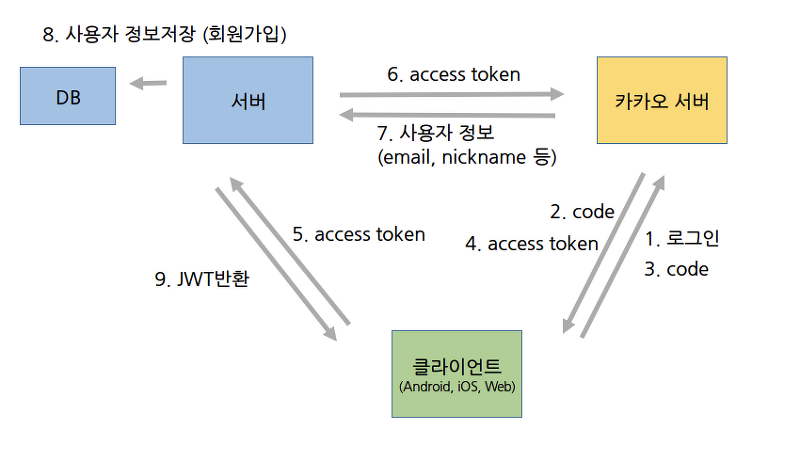
우리 프로젝트 로그인은 그림과 같이, 프론트로부터 token을 받아와서 카카오로 부터 정보를 받아와 저장하고, JWT를 프론트로 return 시켜주는 방법을 사용하기로 했다.
카카오톡 로그인 구현
Controller
@PostMapping("/kakao")
    public void kakaoLogin(@RequestHeader(value = "Authorization") String token) throws Exception{
         kakaoService.getUserInfoWithToken(token);
@RestController
@RestController는 @Controller에 @ResponseBody가 추가된 것이다. 주용도는 Json 형태로 객체 데이터를 반환하는 것이다.
@RequiredArgsConstructor
클래스에 선언된 final 변수들, 필드들을 매개변수로 하는 생성자를 자동으로 생성해주는 어노테이션이다.
Service
public void getUserInfoWithToken(String accessToken) throws Exception {
        //HttpHeader 생성
        HttpHeaders headers = new HttpHeaders();
        headers.add("Authorization", accessToken);
        headers.add("Content-type", "application/x-www-form-urlencoded;charset=utf-8");

        //HttpHeader 담기
        RestTemplate rt = new RestTemplate();
        HttpEntity<MultiValueMap<String, String>> httpEntity = new HttpEntity<>(headers);
        ResponseEntity<String> response = rt.exchange(
                KAKAO_API_URI + "/v1/user/access_token_info",
                HttpMethod.GET,
                httpEntity,
                String.class
        );

        //Response 데이터 파싱
        JSONParser jsonParser = new JSONParser();
        JSONObject jsonObj    = (JSONObject) jsonParser.parse(response.getBody());

        long id = (long) jsonObj.get("id");
    }
@Service
해당 클래스를 루트 컨테이너에 빈(Bean) 객체로 생성해주는 어노테이션이다.

안녕하세요! :)