만드는 서비스에서 기능으로 리스트를 드래그로 옮길 수 있어야 했다.
react native에서 드래그 리스트 라이브러리가 있는지 찾아보니 다행히 있었다.!
https://github.com/computerjazz/react-native-draggable-flatlist
기존에 ui-kitten을 사용해 만들었던 리스트 컴포넌트에 해당 라이브러리를 붙여보았다.
#1
라이브러리 사용법 예제로 익히기
// react-native-draggable-flatlist 깃헙에 있는 예제 코드

export default function App() {
  const [data, setData] = useState(initialData);

  const renderItem = ({ item, drag, isActive }: RenderItemParams<Item>) => {
    return (
      <ScaleDecorator>
        <TouchableOpacity
          onLongPress={drag}
          disabled={isActive}
          style={[
            styles.rowItem,
            { backgroundColor: isActive ? "red" : item.backgroundColor },
          ]}
        >
          <Text style={styles.text}>{item.label}</Text>
        </TouchableOpacity>
      </ScaleDecorator>
    );
  };

  return (
    <DraggableFlatList
      data={data}
      onDragEnd={({ data }) => setData(data)}
      keyExtractor={(item) => item.key}
      renderItem={renderItem}
    />
  );
}
예제 코드를 보고 DraggableFlatList 컴포넌트의 인자를 파악했다. 출력할 리스트: data, 드래그 종료시 발생 이벤트: onDragEnd, 리스트 요소 키 추출: keyExtractor, 렌더링할 리스트아이템 컴포넌트: renderItem
renderItem에 기존에 쓰던 리스트 컴포넌트를 넣고 drag, isActive를 추가로 넘겨줬다.
// 내가 작성한 DragNDropPoC.jsx

const DragNDropPoC = () => {
  const [data, setData] = useState(study_todos);

  const renderItem = ({ item, drag, isActive }) => (
    <ScaleDecorator>
      <DailyTodo item={item} drag={drag} isActive={isActive} />
    </ScaleDecorator>
  );
  return (
    <KeyboardAvoidingView>
      <Layout>
        <DraggableFlatList
          data={data}
          onDragEnd={({ data: newData }) => setData(newData)}
          keyExtractor={item => item.id}
          renderItem={renderItem}
          contentContainerStyle={{ paddingBottom: 200 }}
          ListFooterComponentStyle={{ paddingTop: 0, paddingBottom: 125 }}
        />
      </Layout>
    </KeyboardAvoidingView>
  );
};

export default DragNDropPoC;
DailyTodo에 drag, isActive가 매개변수로 잘 들어가더라. 궁금해서 찾아봤다.
// DailyTodo.jsx 중 일부

import { Icon, ListItem, useTheme, Input, Text } from '@ui-kitten/components';

<ListItem
	title={
    ...
    key={item.id}
    accessoryLeft={props => checkIcon(props)}
    accessoryRight={props => settingIcon(props)}
    onPress={() => setVisible(true)}
    onLongPress={drag}
    isActive={isActive}
/>
우리 팀 DailyTodo는 ui-kitten의 ListItem 컴포넌트를 썼다.
// listItem.component.tsx 중 일부

...
export class ListItem extends React.Component<ListItemProps> {
  ...
  public render(): TouchableWebElement {
    const {
      eva,
      style,
      children,
      title,
      description,
      accessoryLeft,
      accessoryRight,
      ...touchableProps
    } = this.props;

    const evaStyle = this.getComponentStyle(eva.style);

    return (
      <TouchableWeb
        {...touchableProps}
        style={[evaStyle.container, styles.container, webStyles.container, style]}
        onPressIn={this.onPressIn}
        onPressOut={this.onPressOut}
      >
        {children || this.renderTemplateChildren(this.props, evaStyle)}
      </TouchableWeb>
    );
  }
}
return으로 TouchableWeb 컴포넌트를 쓴다.
ui-kitten 코드에서 찾아보니
🔗
// touchableWeb.component.tsx 중

export class TouchableWeb extends React.Component<TouchableWebProps> {

  public render(): React.ReactElement {
    const { style, ...touchableProps } = this.props;

    return (
      <TouchableWithoutFeedback
        {...touchableProps}
        style={[styles.container, style]}
      />
    );
  }
}```
TouchableWithoutFeedback 컴포넌트를 다시 리턴에서 주고...

```tsx
// touchableWithoutFeedback.component.tsx 중

export class TouchableWithoutFeedback extends React.Component<TouchableWithoutFeedbackProps> {

  private createHitSlopInsets = (): Insets => {
    const flatStyle: ViewStyle = StyleSheet.flatten(this.props.style || {});

    // @ts-ignore: `width` is restricted to be a number
    const value: number = 40 - flatStyle.height || 0;

    return {
      left: value,
      top: value,
      right: value,
      bottom: value,
    };
  };

  public render(): React.ReactElement {
    return (
      <TouchableOpacity
        activeOpacity={1.0}
        hitSlop={this.props.useDefaultHitSlop && this.createHitSlopInsets()}
        {...this.props}
      />
    );
  }
}
아하! 결국 그냥 TouchableOpacity였군
궁금증 해결했다.
그외 에러
- Invariant Violation: TurboModuleRegistry.getEnforcing(...): 'RNGestureHandlerModule' could not be found. Verify that a module by this name is registered in the native binary.Bridgeless mode: false. TurboModule interop: false. Modules loaded
해결
react-native-gesture-handler 설치
npm install react-native-gesture-handler- Error: [Reanimated] Native part of Reanimated doesn't seem to be initialized.
해결
npm install react-native-reanimated- Error: GestureDetector must be used as a descendant of GestureHandlerRootView. Otherwise the gestures will not be recognized. See https://docs.swmansion.com/react-native-gesture-handler/docs/installation for more details.
해결
GestureHandlerRootView를 사용하여 루트 컴포넌트를 감싼다.
#2
// react-native-draggable-flatlist 깃헙에 있는 예제 코드 중 일부

  return (
    <DraggableFlatList
      data={data}
      onDragEnd={({ data }) => setData(data)}
      keyExtractor={(item) => item.key}
      renderItem={renderItem}
    />
  );
}
예제코드와 같이 onDragEnd의 인자로 ({ data }) => setData(data)를 넣으면 구조분해 할당으로 받은 data가 undifined로 나왔다.
그래서 관련 코드를 뒤적여봤다. 🔗
// DraggableFlatList.tsx 중 일부

function DraggableFlatListInner<T>(props: DraggableFlatListProps<T>) {
  ...
  ...
const onDragEnd = useStableCallback(
    ({ from, to }: { from: number; to: number }) => {
      const { onDragEnd, data } = props;

      const newData = [...data];
      if (from !== to) {
        newData.splice(from, 1);
        newData.splice(to, 0, data[from]);
      }

      onDragEnd?.({ from, to, data: newData });
      reset();
    }
  );
DraggableFlatListInner 컴포넌트 내에 정의된 onDragEnd는 DraggableFlatListInner에서 받은 props에서 사용자가 인자로 전달한 onDragEnd와 Data를 구조분해 할당으로 받아온다.
그리고
onDragEnd?props에 onDdragEnd가 있었다면
onDragEnd?.({ from, to, data: newData });from, to, data}를 객체로 전달하고 새로 생성한 newData를 data라는 속성이름으로 준다.
보다보니까 내가 data라는 변수를 이미 state로 쓰고 있었다.
// 내가 작성한 DragNDropPoC.jsx

const DragNDropPoC = () => {
  const [data, setData] = useState(study_todos); //여기

  const renderItem = ({ item, drag, isActive }) => (
    <ScaleDecorator>
      <DailyTodo item={item} drag={drag} isActive={isActive} />
    </ScaleDecorator>
  );
  return (
    <KeyboardAvoidingView>
      <Layout>
        <DraggableFlatList
          data={data}
          onDragEnd={({ data: newData }) => setData(newData)} // 여기
          keyExtractor={item => item.id}
          renderItem={renderItem}
          contentContainerStyle={{ paddingBottom: 200 }}
          ListFooterComponentStyle={{ paddingTop: 0, paddingBottom: 125 }}
        />
      </Layout>
    </KeyboardAvoidingView>
  );
};
그래서 구조분해 할당으로 data를 받을 때 newData라고 별칭을 주니 해결되었다.
#3
문제 상황
리스트 아이템이 onLongPress이 될 때, 즉 hover 애니메이션이 되자마자
[Reanimated] Tried to modify key current of an object which has been already passed to a worklet. See
https://docs.swmansion.com/react-native-reanimated/docs/guides/troubleshooting#tried-to-modify-key-of-an-object-which-has-been-converted-to-a-shareable
라는 warn이 뜬다.
이유가 뭘까
🔗

...
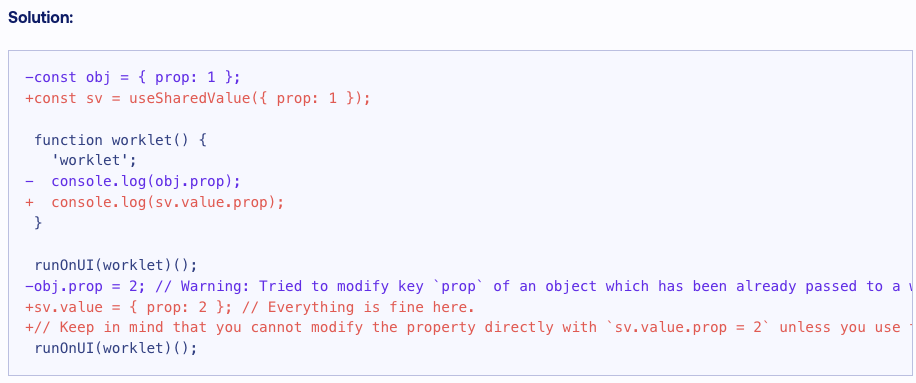
확인해보라는 사이트를 봐도 잘 모르겠다.
일단 내가 작성한 코드에서는 worklet이라는 함수를 본적이 없다.
라이브러리 문제인가?
리스트 아이템을 꾸욱 눌렀을 때 바로 -> onDragBegin에서 문제일까?
    const { onDragBegin } = propsRef.current;
    if (index !== undefined) {
      spacerIndexAnim.value = index;
      activeIndexAnim.value = index;
      setActiveKey(activeKey);
      onDragBegin?.(index);
    }
  });
spacerIndexAnim : context api
activeIndexAnim : context api
setActiveKey : useState setter
// animatedValueContext.tsx에서

const activeIndexAnim = useSharedValue(-1); // Index of hovering cell
  const spacerIndexAnim = useSharedValue(-1); // Index of hovered-over cell
근데 onDragBegin 부분에서는 위에서 나온 useSharedValue 업데이트를 잘못한 것도 아니다.
// darg 함수
  const drag = useStableCallback((activeKey: string) => {
    if (disabled.value) return;
    const index = keyToIndexRef.current.get(activeKey);
    const cellData = cellDataRef.current.get(activeKey);
    if (cellData) {
      activeCellOffset.value = cellData.measurements.offset;
      activeCellSize.value = cellData.measurements.size;
    }

    const { onDragBegin } = propsRef.current;
    if (index !== undefined) {
      spacerIndexAnim.value = index;
      activeIndexAnim.value = index;
      setActiveKey(activeKey);
      onDragBegin?.(index);
    }
  });
ListItem에서 onLongPress일 때 전달해주는 drag 함수에서 잘못되었나 봐도 문제가 없다.
그래서 해당 라이브러리 깃헙 이슈를 뒤적이다가 똑같은 에러를 찾았다!
🔗
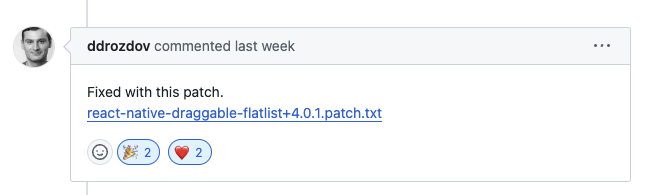
나도 잘 해결되었다.
patch 내용을 보니 내가 생각하지 못한 부분에서 앞서 말했던 문제들이 있었다.
1. DraggableFlatList.tsx
-        animationConfigRef.current,
+ animationConfigRef.value,- refContext.tsx
-import Animated, { WithSpringConfig } from "react-native-reanimated";
+import Animated, { type SharedValue, useSharedValue, WithSpringConfig } from "react-native-reanimated";

-  const animationConfigRef = useRef(animConfig);
-  animationConfigRef.current = animConfig;
+  const animationConfigRef = useSharedValue(animConfig);
+ animationConfigRef.value = animConfig;- useCellTranslate.tsx
-    return withSpring(translationAmt, animationConfigRef.current);
+ return withSpring(translationAmt, animationConfigRef.value);- useOnCellActiveAnimation.ts
+  useSharedValue,
-  const animationConfigRef = useRef(animationConfig);
-  animationConfigRef.current = animationConfig;
+  const animationConfigRef = useSharedValue(animationConfig);
+  animationConfigRef.value = animationConfig;
근데 이 파일을 프로젝트 폴더에 넣고 적용하려면 새 브랜치를 팔때마다 git apply 해야 하나
자동으로 적용되면 좋겠다고 생각
방법1. patch-package를 사용하면 된다고 한다.
// 패키지 설치
npm install patch-package postinstall-postinstall --save-dev
// 루트 디렉토리에 patches 폴더 생성 및 패치 파일 넣기
mkdir -p patches
mv /mnt/data/react-native-draggable-flatlist+4.0.1.patch patches/// package.json에 내용 추가
{
"scripts": {
"postinstall": "patch-package"
}
}방법2. 라이브러리 fork해서 수정사항 적용하고 내 깃헙에서 불러오기
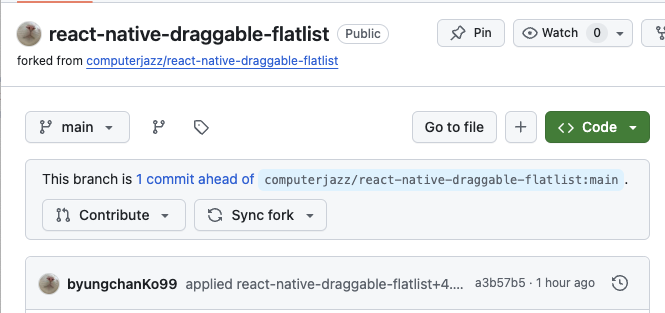
클론하고
// package.json에서
  "dependencies": {
-    "react-native-draggable-flatlist": "4.0.1",
+    "react-native-draggable-flatlist": "git+https://github.com/byungchanKo99/react-native-draggable-flatlist.git#main"
근데 이렇게 해도 되나 싶다.
근데 에러가 떴다
Failed to construct transformer: Error: TreeFS: Could not add directory node_modules/react-native-draggable-flatlist, adding node_modules/react-native-draggable-flatlist/jest-setup.js. node_modules/react-native-draggable-flatlist already exists in the file map as a file.
GPT는 자꾸 node_modules랑 package-lock.json 지우고 npm cache만 지우면 된다고 한다.
근데 node_modules를 다 지웠다 삭제해도 계속 react-native-draggable-flatlist가 이미 존재한다고 한다.
file map이라는거 보고 빌더 문제인가 하고 메트로 캐시 초기화해봤다.
파일 변화를 감지 못하나 해서 watchman도 캐치 초기화해봤다.
// metro 캐시 정리
rm -rf $TMPDIR/metro-cache

// watchman 캐시 정리
watchman watch-del-all
그랬더니 잘됐다! 성공
#4
runOnJS 와 runOnUI
runOnJS: UI 스레드에서 JavaScript 스레드로 함수를 호출합니다. 주로 애니메이션이나 제스처 처리 중에 JavaScript 상태나 로직을 업데이트할 때 사용됩니다.
runOnUI: JavaScript 스레드에서 UI 스레드로 함수를 호출합니다. 주로 UI 스레드에서 안전하게 공유 값을 업데이트하거나 UI와 관련된 작업을 수행할 때 사용됩니다.
예제 상황
다음은 runOnUI와 runOnJS를 적절히 사용하는 예제입니다:
import React, { useState } from 'react';
import { Button, Text, View } from 'react-native';
import { useSharedValue, runOnJS, runOnUI } from 'react-native-reanimated';

const App = () => {
  const [state, setState] = useState(0);
  const sharedValue = useSharedValue(0);

  const updateStateFromUI = (value) => {
    runOnJS(setState)(value);
  };

  const incrementSharedValue = () => {
    runOnUI(() => {
      sharedValue.value += 1;
      updateStateFromUI(sharedValue.value);
    })();
  };

  return (
    <View>
      <Text>Shared Value: {sharedValue.value}</Text>
      <Text>State: {state}</Text>
      <Button title="Increment" onPress={incrementSharedValue} />
    </View>
  );
};

export default App;
runOnUI에 괄호 두개인 이유 : https://hojncode.tistory.com/39