
📁this
자바스크립트에서 객체를 가리키는 키워드이다.
메서드에서 사용된 this가 가리키는 객체는 해당 메서드를 호출한 객체이다.
메서드를 호출한 객체가 없을 경우에는 기본값인 window 객체를 가리킨다.
📂this 객체 사용 예시
🗂️this 객체 사용 예시
let person = {
    fullname: "성민",
    age: 20,
    printThis: function() {
        console.log(this); // { fullname: '성민', age: 20, printThis: [Function:printThis] }
        console.log(this === person); // true
      	console.log(this.fullname); // "성민"
        console.log(this.age); // 20
    },
};

person.printThis();
printThis() 메서드 안에 사용된 this는 printThis() 메서드를 호출한 person 객체를 가리킨다.
🗂️메서드를 호출한 객체가 없는 경우 this 예시
let person = {
    fullname: "성민",
    age: 20,
    printThis: function() {
        console.log(this);
        console.log(this === person);
    },
};

let printThis = person.printThis;
printThis();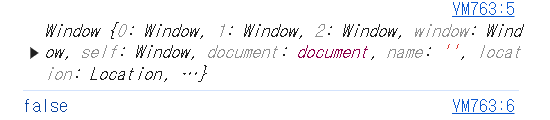
메서드를 호출한 객체가 없을 경우에는, 해당 메서드 내에서 사용된 this는 브라우저가 제공하는 전역 객체인 window를 가리킨다.
🗂️여러 객체에 대해서 this 사용 예시
function printThis() {
    console.log(this); // default this => window
}

let person1 = {
    name: '홍길동',
    printThis: printThis,
};
person1.printThis();

let person2 = {
    name: '홍길동2',
    printThis: printThis,
};
person2.printThis();


let person3 = {
    name: '홍길동3',
    printThis: printThis,
};
person3.printThis();
대부분의 경우 this는 함수를 호출한 객체를 가리킨다.
🗂️addEventListener의 콜백함수에서 사용된 this 예시
🔽 practice.html
<!DOCTYPE html>
<html lang="en">
<head>
    <script src="practice.js" defer></script>
</head>
<body>
    <button>버튼</button>
</body>
</html>
🔽 practice.js
let btn = document.querySelector('button');
btn.addEventListener('click', function() {
    console.log(this);
    console.log(this === btn); // true
})
메서드 내에서 사용된 this 객체는 btn 객체를 가리킨다. 즉, this 객체가 속한 익명함수는 btn 객체에 의해 호출 되었다.
📂bind 메서드
🗂️bind 메서드 예시
function printThis() {
  console.log(this);
}

let person1 = {
  name: '홍길동',
};

let printThis1 = printThis.bind(person1);
printThis1();
bind() 메서드를 사용해서, 특정 함수 내에서 사용된 this가 가리키는 객체를 지정한 새로운 함수를 반환한다.
위 코드는 this에 person1 객체가 바인딩된 새로운 printThis() 함수를 반환한다.
🗂️바인딩 하지 않은 경우
let printThis1 = printThis;
printThis1();
만약 this를 특정 객체로 바인딩하지 않고, 함수를 호출하면 window 객체를 출력한다. this의 기본값은 window 객체이기 때문이다.
🗂️bind는 한 번만 바인딩된다
function printThis() {
    console.log(this);
}

let person1 = {
    name: '홍길동',
};

let person2 = {
    name: '김길동',
};

let printThis1 = printThis.bind(person1);
let printThis2 = printThis1.bind(person2);
printThis2();
bind() 메서드를 사용해서 printThis1 함수는 printThis 함수의 this 객체가 person1으로 영구적으로 바인딩된 새로운 printThis 함수를 가진다.
따라서, printThis1 함수에서 this 객체는 이미 person1으로 영구적으로 바인딩 되었기 때문에 person2로 다시 바인딩 되지 않는다. bind() 메서드를 사용하여 this 객체를 한번 바인딩하면 다시 바꿀 수 없다.
bind() 메서드에 대해서 더 알고 싶다면, bind() 메서드에 관한 글을 참조하길 바란다.
🗂️바인딩을 통해 특정 객체 지정해주기
let person = {
    name: '성민',
    age: 20,
    hello: function() {
        setTimeout(function() {
            console.log(this.name);
            console.log(this.age);
        }, 1000);
    },
};

person.hello();this가 window 객체를 가리키는 이유는 this 객체가 속한 익명 함수 자체가 호출되었기 때문이다. setTimeout()의 콜백 함수는 특정 객체에 의해 호출되지 않으므로, this는 window 전역 객체를 가리킨다.
아래 코드를 통해서 this를 person 객체로 바인딩 시켜줄 수 있다.
let person = {
    name: '성민',
    age: 20,
    hello: function() {
        console.log(this); // { name: '성민', age: 20, hello: [Function: hello] }

        function printHello() { // setTimeout() 콜백함수
            console.log(this.name); // 성민
            console.log(this.age); // 20
        }

        setTimeout(printHello.bind(this), 1000);
    },
};

person.hello();
printHello() 메서드에서 사용된 this를 this로 바인딩 해줄 수 있는 이유는 hello() 함수가 직접 가지고 있는 this는person을 가리키기 때문이다. hello() 함수 내에서 printHello()와 같이 정의된 독립적인 함수에서 사용되는 this는 window 전역 객체를 가리킬 수도 있다.
📂this의 예외적인 경우
🗂️전역스코프에서의 this
- 전역스코프에서
this는window객체이다.
console.log(this === window); // true🗂️화살표 함수에서의 this
- 화살표 함수(Arrow Function)에서
this가 조금 달라진다.
화살표 함수는 ES6에서 나왔다. 화살표 함수가 나오기 전까지는 함수를 호출한 객체에 따라 this 값이 정의되었다. 하지만 화살표 함수는 자신을 포함하고 있는 외부 Scope에서 this를 물려받는다.
let person = {
    name: '성민',
    age: 20,
    hello: function() {
      	console.log(this); // this는 person 객체를 가리킴
        setTimeout(() => {
            console.log(this);
        }, 1000);
    },
};

person.hello();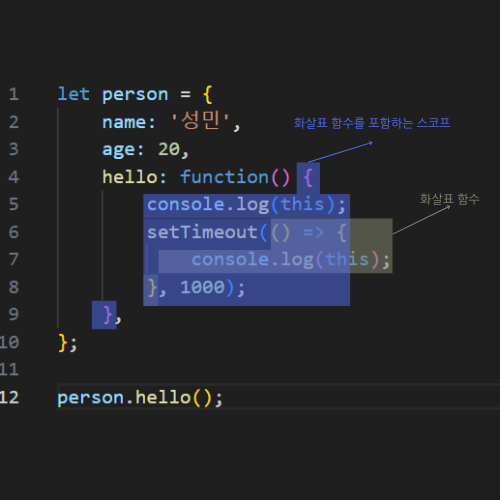
화살표 함수를 포함하는 외부 스코프는 파란색으로 칠한 범위이다. 화살표 함수를 감싸는 외부 스코프에서 this를 물려받는다. 상위 스코프에서의 this는 this가 속한 메서드를 호출하는 person 객체를 가리킨다.
🔽 화살표 함수를 사용하지 않을 때의 코드
let person = {
    name: '성민',
    age: 20,
    hello: function() {
        let that = this;
        setTimeout(function() {
			console.log(this); // window 객체
            console.log(that); // { name: '성민', age: 20, hello: [Function: hello] }
        }, 1000);
    },
};

person.hello();setTimeout()의 콜백함수 안에서 this는 window 객체를 가리킨다. 하지만, that 변수에 person 객체를 할당해주었기에 that으로 person 객체에 접근하였다.
화살표 함수가 등장하고, 외부 스코프의 this를 물려받는 성질을 이용해서 this로 원하는 객체에 접근할 수 있다.
🗂️엄격 모드에서의 this
- 엄격 모드(Strict Mode)에서 메서드를 호출한 객체가 없을 경우
this객체의 기본값을window로 하지 않고undefined로 한다. 더 엄격하게 검사한다.
'use strict';

function printThis() {
  console.log(this);
}

printThis(); // undefined
🗂️화살표 함수를 사용하면 안되는 경우
- 객체 메서드를 선언할 때 화살표 함수를 사용하면 안된다.
let person = {
  name: '성민',
  printThis: () => {
    console.log(this);
  },
};

person.printThis(); // window 객체
화살표 함수는 화살표 함수를 감싸는 외부 스코프에서 this를 물려받는다. 현재, 화살표 함수를 둘러싸고 있는 외부 스코프는 전역 스코프이다. 전역 스코프에서 this는 window 객체를 가리킨다. 따라서 위 코드에서는 window 객체가 출력된다.
✅객체의 메서드를 선언할 때는 function으로 함수를 정의해서 this가 person 객체를 가리키도록 한다.
addEventListener함수의 콜백 함수에서도 화살표 함수를 사용하면this가window객체를 가리킬 수 있다.
let btn = document.querySelector('button');
btn.addEventListener('click', () => {
    console.log(this === window); // true
})
화살표 함수를 감싸는 가장 가까운 함수는 존재하지 않기에, 현재 화살표 함수를 둘러싸고 있는 외부 스코프는 전역 스코프이다. addEventListener()는 화살표 함수를 인자로 받는 함수일 뿐, 외부 스코프가 아니다.
따라서, 이와 같은 두 가지 상황에서는 화살표 함수 사용을 지양해야 한다.
📝외부 스코프란?
화살표 함수의 외부 스코프는 화살표 함수를 감싸는 가장 가까운 함수 또는 블록 컨텍스트(if문, for문, while문 등)를 의미한다.
하지만, 애초에 블록 자체는 함수가 아니기에 this 값이 변경되지 않는다. this의 정의를 생각해보면, this가 속한 메서드가 호출되었을 때 해당 메서드를 호출한 객체를 this가 가리키게 되니 말이다. 따라서, 화살표 함수에서의 this는 블록이 아닌 가장 가까운 상위 함수의 this를 상속한다.
참고
- 자바스크립트 this 설명 강의 자료: https://youtu.be/GteV4zfqPIk?si=jMH5B6plij-af33K