Checked & Unchecked Exceptions
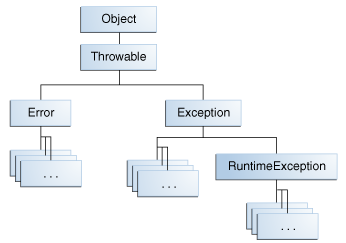
- Exception 은 Checked Exception(RuntimeException 을 제외한 Exception) 과 Unchecked Exeption(RuntimeException) 으로 구분할 수 있습니다.
- RuntimeException 과 Exception 으로 구분해서 부르는 경우도 있는데, 혼란을 줄 수 있기에 공식적인 명칭인
Checked|UncheckedException을 사용합시다.
try / catch / finally
try block 에서 발생한 예외는 catch block 에서 처리합니다.
catch block, finally block 에서 발생한 예외는 어떻게 될까요?
try 블럭에서 발생한 예외와 catch | finally block 에서 발생한 예외 중 어느것이 우선일까요?다음 코드를 통해 간단하게 확인할 수 있습니다.
public class TryCatchFinallyTest {
    public static void main(String[] args) {
//        exceptionInCatch();
//        exceptionInFinally();
    }

    private static void exceptionInCatch() {
        try {
            int i = 1 / 0; // ArithmeticException
        } catch (ArithmeticException e) { // caught
            throw new NullPointerException(); // result
        }
    }

    private static void exceptionInFinally() {
        try {
            int i = 1 / 0; // ArithmeticException
        } catch (NullPointerException e) { // not caught
            e.printStackTrace();
        } finally {
            throw new ClassCastException(); // result
        }
    }
}
Chained Exception
initCause()또는생성자의매개변수를 통해원인 예외를 설정할 수 있습니다.- 주의할 점은 원인 예외는
포함 관계이기 때문에 호출한 곳에서는 원인 예외를catchblock 에서 잡을 수 없습니다.Throwable을매개변수로 가지는생성자를제공하지 않는예외들도 있습니다.
public class ChainedExceptionTest {
    public static void main(String[] args) {
        try {
            chainedException();
        } catch (ArithmeticException e) { // can't catch NullPointerException
            System.out.println("ArithmeticException caught");
        }
    }

    private static void chainedException() {
        try {
            int i = 1 / 0;
        } catch (ArithmeticException e) {
//            throw new NullPointerException(e); // compiler error, no constructor
            NullPointerException ne = new NullPointerException();
            ne.initCause(e);
            throw ne;
        }
    }
}

// result
// Exception in thread "main" java.lang.NullPointerException
//	at ChainedExceptionTest.chainedException(ChainedExceptionTest.java:14)
//	at ChainedExceptionTest.main(ChainedExceptionTest.java:4)
// Caused by: java.lang.ArithmeticException: / by zero
//	at ChainedExceptionTest.chainedException(ChainedExceptionTest.java:12)
Multi-Catch Block
Multi-catch block 을 사용하면 여러 종류의 예외를 묶어서 처리할 수 있습니다.
- 예외를 묶을 때는
|를 사용합니다.- 이때 사용하는
|는 논리연산자가 아닙니다. 그 의미가 OR 일 뿐입니다.- multi-catch block 에서 논리연산자(&&, ||, &, !)는 사용 불가능합니다.
- 예외 객체간의 논리연산 또한 불가능합니다.
public class MultiCatchTest {
    public static void main(String[] args) {
        try {
            int i = 1 / 0;
//        } catch (ArithmeticException & NullPointerException e) {
//        } catch (ArithmeticException && NullPointerException e) {
//        } catch (ArithmeticException || NullPointerException e) {
//        } catch (ArithmeticException | !NullPointerException e) {
        } catch (ArithmeticException | NullPointerException e) {
            e.printStackTrace();
        }
    }
}
Uncaught Exception
예외를 처리하는 방법은 크게 두가지로 구분합니다.
1. 직접 처리 -try/catch
2. 던지기 -throw
throw 를 사용하여 계속해서 호출 스텍의 이전 메서드로 예외를 던지다가 가장 마지막 main 메서드가 예외를 던지면JVM의UncaughtExceptionHandler가 예외를 받아서 원인을 출력하고 프로그램을 종료합니다.
UncaughtExceptionHandler는인터페이스이며 이를 구현해서사용자가 정의한 ExceptionHandler 를 사용할 수 도 있습니다.DefaultUncaughtExceptionHandler 를 사용하면 JVM 의 UncaughtExceptionHandler 가Main thread의main메서드가 던지는 예외를 처리하는 방식도 재정의 할 수 있습니다.
public class UncaughtExceptionTest {
    public static void main(String[] args) {
        Thread.setDefaultUncaughtExceptionHandler(new MyUncaughtExceptionHandler());

        Thread thread = new Thread(() -> {
            throw new RuntimeException("I'm an uncaught exception!");
        });

        thread.setUncaughtExceptionHandler((t, e) -> {
            System.out.println("custom handler");
            System.out.println("Thread " + t.getName() + " threw an exception.");
            System.out.println("Uncaught exception: " + e.getMessage());});

        thread.start();

        throw new RuntimeException("I'm an exception!");
    }
}

class MyUncaughtExceptionHandler implements Thread.UncaughtExceptionHandler {
    @Override
    public void uncaughtException(Thread t, Throwable e) {
        System.out.println("default handler");
        System.out.println( "Thread " + t.getName() + " threw an exception.");
        System.out.println("Uncaught exception: " + e.getMessage());
    }
}
Try-With-Resource
try-with-resource의 try() 부분에 들어갈 수 있는 문장은AutoCloseable의 구현체들의선언과 초기화를 한번에 한 문장들 뿐입니다.
- 두가지 더 가능한 경우가 있긴 하지만 이렇게 사용할 이유가 없습니다.
//        BufferedReader reader = new BufferedReader(new FileReader("test.txt")); // effectively final
//        try (reader) {
//        final BufferedReader reader = new BufferedReader(new FileReader("test.txt"));
//        try (reader) {
        try (BufferedReader reader = new BufferedReader(new FileReader("test.txt"))) {
            System.out.println(reader.readLine());
        } catch (IOException e) {
            e.printStackTrace();
        }
- 모든 자원이 사용이 끝났다고 해서

백엔드 개발자 지망생입니다.