PART01. 파이토치 기초
2. CUDA, CuDNN 설치하기
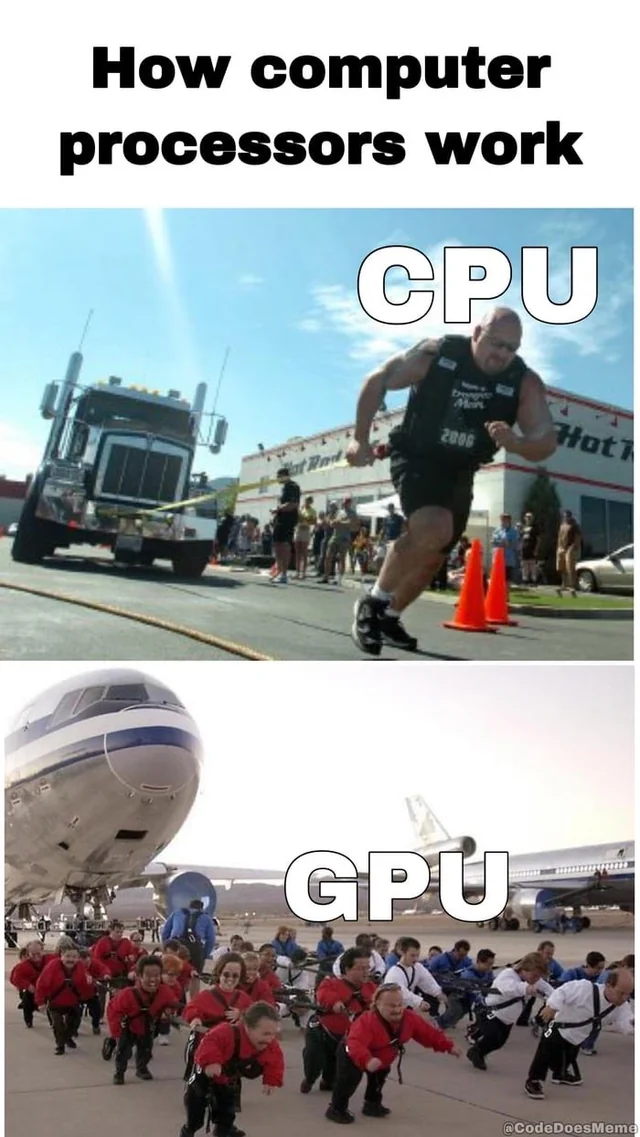
2.1 CPU vs GPU
CPU
- 고차원의 일을 수행할 수 있는 능력이있지만, 너무 많은 수의 파라미터 값을 계산하기에는 속도가 느리다.
GPU
- 비교적 성능이 낮은 코어가 여러개 있는것. 딥러닝에서는 엄청나게 많은 수 의 파라미터에 대한 Gradient, BackPropagation을 통한 임베딩 값 업데이트만 발생.
- 이는 비교적 단순한 계산에 해당되며 GPU로 하기에 적합함.
그래서 deep learning에서는 GPU가 중요하다.
CUDA의 역할
CUDA
- GPU에서 병렬처리를 수행하는 알고리즘을 각종 프로그래밍 언어에 사용할 수 있도록 해주는 GPGPU기술
- GPGPU: General-Purpose computing on Graphics Processing Units
CuDNN의 역할
CUDNN
- CUDNN: NVIDA CUDA Depp Neural Network Library
- 딥러닝 모델을 위한 GPU 가속화 라이브러리의 기초 요소와 같은 일반적인 루틴을 빠르게 이행할 수 있도록 해주는 라이브러리
내 컴퓨터인 M1 mac에서는 둘다 설치가 불가능함.
3. Pytorch 설치
- 책에서는 pytorch 홈페이지를 참고하여 설치하기를 권장
- 나는 그냥 gpt한테 물어봐서 설치
pyenv install
brew install pyenv
eval "$(pyenv init --path)"
source ~/.zshrc  # 혹은 `source ~/.bashrc`

pyenv install 3.10.9
cd /path/to/your/pytorch_study
pyenv local 3.10.9

python -m venv torch  # venv 폴더 생성
source ./torch  # 가상환경 활성화
pytorch install
Apple Silicon (M1/M2, GPU 지원 - MPS)
- Apple Silicon에서는 PyTorch가 Metal Performance Shaders(MPS) 백엔드를 사용하여 GPU를 지원합니다
pip install --upgrade pip setuptools wheel
pip install torch torchvision torchaudio
jupyterlab 설치
pip install jupyterlab
jupyter-lab
4. 파이토치 기본개념
4.1 텐서
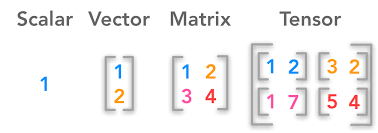
Scalar: 하나의 값
'''
scalar
'''

scalar1= torch.tensor([1.])
print(scalar1)

scalar2=torch.tensor([3.])
print(scalar2)

# four basic operation w special character
add_scalar=scalar1+scalar2
sub_scalar=scalar1-scalar2
mul_scalar=scalar1*scalar2
div_scalar=scalar1/scalar2

# four basic operation w torch method
torch.add(scalar1,scalar2)
torch.sub(scalar1,scalar2)
torch.mul(scalar1,scalar2)
torch.div(scalar1,scalar2)
Vector: 배열
'''
vector: 사칙연산시 각 요소별로 계산됨.
special charactor, method 모두 사용가능.
'''
vector1 = torch.tensor([1.,2.,3.])
print(vector1)
vector2 = torch.tensor([4.,5.,6.,])
print(vector2)
Matrix: 행렬
- matmul 메소드만 추가됨
'''
matrix: 2개 이상의 벡터값을 통합하여 구성
+,-,*,/: 벡터와 동일하게 동일위치에 있는 원소과 계산
matmul: 행렬곱
'''
matrix1 = torch.tensor([[1.,2.],[3.,4.]])
matrix2 = torch.tensor([[5.,6.],[7.,8.]])

torch.matmul(matrix1,matrix2)
Tensor: 2차원 이상의 배열
'''
tensor: 이 차원이상의 배열
tensor의 요소가 행렬인경우 행렬 곱 연산도 가능함
'''
'''
tensor: 이 차원이상의 배열
tensor의 요소가 행렬인경우 행렬 곱 연산도 가능함
'''

tensor1 = torch.tensor([[[1., 2.], [3., 4.]], [[5., 6.], [7., 8.]]])
tensor2 = torch.tensor([[[9., 10.], [11., 12.]], [[13., 14.], [15., 16.]]])

# Tensor addition
add_tensor = tensor1 + tensor2
print("Addition:\n", add_tensor)

# Tensor subtraction
sub_tensor = tensor1 - tensor2
print("Subtraction:\n", sub_tensor)

# Tensor multiplication (element-wise)
mul_tensor = tensor1 * tensor2
print("Multiplication:\n", mul_tensor)

# Tensor division (element-wise)
div_tensor = tensor1 / tensor2
print("Division:\n", div_tensor)

# Tensor matrix multiplication
matmul_tensor = torch.matmul(tensor1, tensor2)
print("Matrix Multiplication:\n", matmul_tensor)
Autograd
- backpropagation을 이용한 파라미터 업데이트를 구현하기 위한 방법

감자탈출지망생