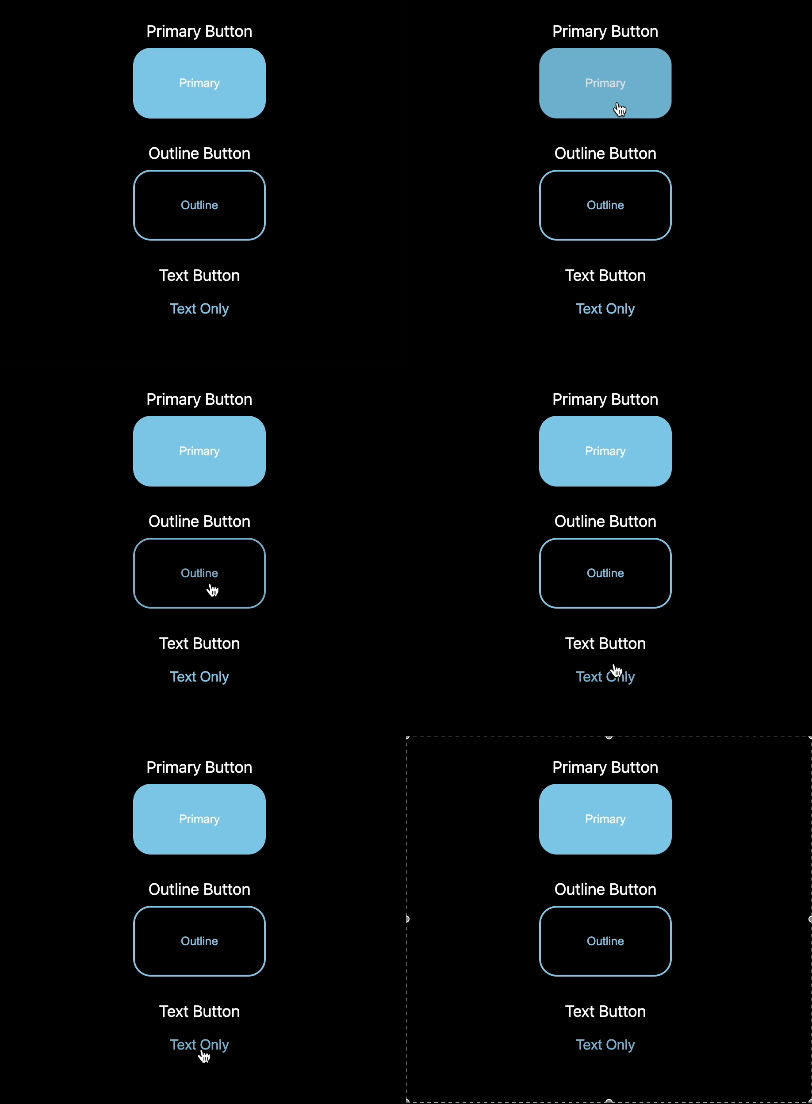
다른 작업들을 보고싶다면.
깃헙주소:
https://github.com/Leeselbin/Animation-css-playground
배포되어있는주소:
https://graceful-puppy-2e2f6c.netlify.app
아래는 코드참고...
'use client';

import React from 'react';
import styled from 'styled-components';

const ButtonWrap = styled.div`
    display: flex;
    flex-direction: column;
    margin: 0 auto;
    align-items: center;
`;

const Button = styled.button`
    width: 150px;
    height: 80px;
    border-radius: 20px;
    border: none;
    cursor: pointer;
    transition: transform 0.1s ease;
    margin-bottom: 30px;
    margin-top: 10px;

    &:hover {
        opacity: 0.9;
    }

    &:active {
        transform: scale(0.95);
    }
`;

const PrimaryButton = styled(Button)`
    background-color: skyblue;
    color: white;
`;

const OutlineButton = styled(Button)`
    background-color: transparent;
    border: 2px solid skyblue;
    color: skyblue;
`;

const TextButton = styled(Button)`
    background-color: transparent;
    color: skyblue;
    width: auto;
    height: auto;
    padding: 10px;
    font-size: 16px;
`;
const NormalButton = () => {
    return (
        <ButtonWrap>
            <p>Primary Button</p>
            <PrimaryButton>Primary</PrimaryButton>

            <p>Outline Button</p>
            <OutlineButton>Outline</OutlineButton>

            <p>Text Button</p>
            <TextButton>Text Only</TextButton>
        </ButtonWrap>
    );
};

export default NormalButton;
front-end-developer