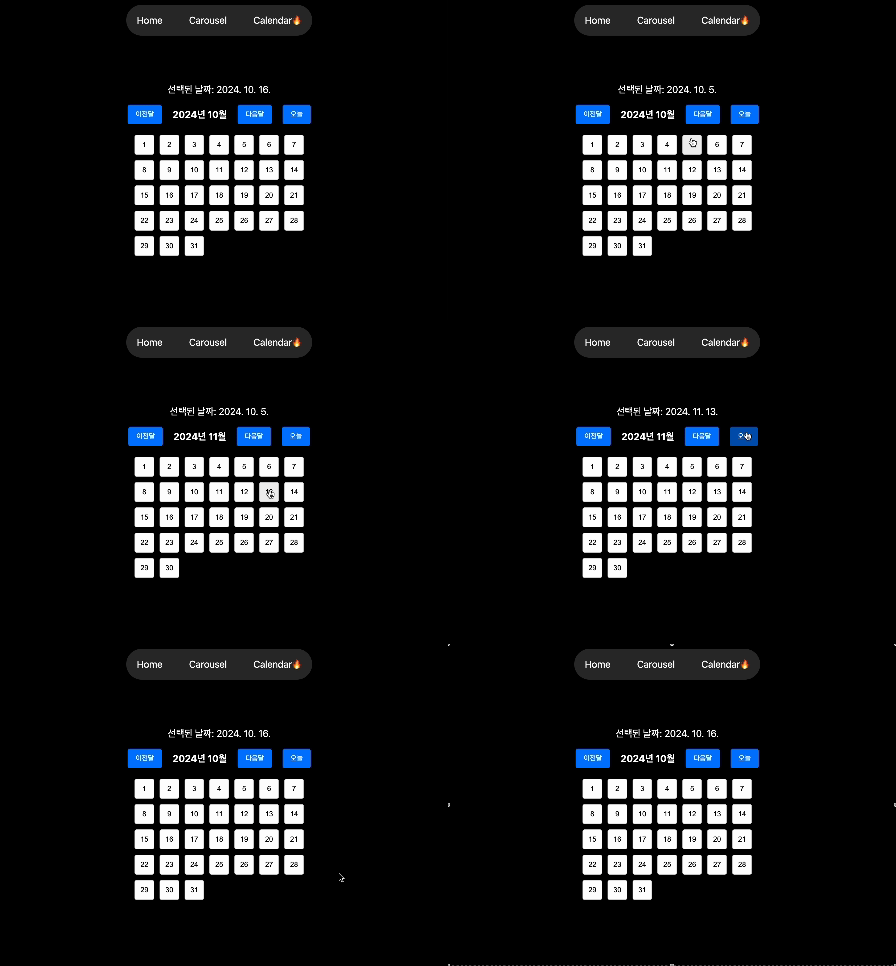
핵심 코드를 살펴보자면
// 연도와 월을 바탕으로, 해당월의 1일을 가리키는 Date객체생성후
// date객체의 월이 입력받은 month와 같은 반복문 실행
// date객체를 복사한 새로운 Date객체를 days배열에 push
// setDate로 push이후 date 객체의 날짜를 하루씩 증가시킨다
// 참고로 자바스크립트에서 월은 0부터 시작한다.
const getDaysInMonth = (year: number, month: number) => {
    const date = new Date(year, month, 1);
    const days = [];
    while (date.getMonth() === month) {
        days.push(new Date(date));
        date.setDate(date.getDate() + 1);
    }
    return days;
};
전체코드
'use client';
import React, { useState } from 'react';
import styled from 'styled-components';

const getDaysInMonth = (year: number, month: number) => {
    const date = new Date(year, month, 1);
    const days = [];
    while (date.getMonth() === month) {
        days.push(new Date(date));
        date.setDate(date.getDate() + 1);
    }
    return days;
};

const Calendar: React.FC = () => {
    const today = new Date();
    const [selectedDate, setSelectedDate] = useState<Date>(today);
    const [currentMonth, setCurrentMonth] = useState<number>(today.getMonth());
    const [currentYear, setCurrentYear] = useState<number>(today.getFullYear());

    // 달 변경 함수
    const handlePrevMonth = () => {
        setCurrentMonth((prevMonth) => (prevMonth === 0 ? 11 : prevMonth - 1));
        setCurrentYear((prevYear) => (currentMonth === 0 ? prevYear - 1 : prevYear));
    };

    const handleNextMonth = () => {
        setCurrentMonth((prevMonth) => (prevMonth === 11 ? 0 : prevMonth + 1));
        setCurrentYear((prevYear) => (currentMonth === 11 ? prevYear + 1 : prevYear));
    };

    // 오늘 날짜로 이동하는 함수
    const handleTodayClick = () => {
        setSelectedDate(today);
        setCurrentMonth(today.getMonth());
        setCurrentYear(today.getFullYear());
    };

    const daysInMonth = getDaysInMonth(currentYear, currentMonth);

    const handleDateClick = (date: Date) => {
        setSelectedDate(date);
    };

    return (
        <Container>
            <Title>선택된 날짜: {selectedDate.toLocaleDateString('ko-KR')}</Title>

            {/* 달 변경 버튼 */}
            <Header>
                <Button onClick={handlePrevMonth}>이전달</Button>
                <MonthLabel>
                    {currentYear}년 {currentMonth + 1}월
                </MonthLabel>
                <Button onClick={handleNextMonth}>다음달</Button>
                <Button onClick={handleTodayClick} marginLeft="20px">
                    오늘
                </Button>
            </Header>

            {/* 달력 표시 */}
            <Grid>
                {daysInMonth.map((date, index) => (
                    <DayButton key={index} onClick={() => handleDateClick(date)}>
                        {date.getDate()}
                    </DayButton>
                ))}
            </Grid>
        </Container>
    );
};

// 스타일드 컴포넌트 정의
const Container = styled.div`
    display: flex;
    flex-direction: column;
    align-items: center;
    padding: 20px;
`;

const Title = styled.h1`
    margin-bottom: 20px;
`;

const Header = styled.div`
    display: flex;
    align-items: center;
    margin-bottom: 20px;
`;

const Button = styled.button<{ marginLeft?: string }>`
    padding: 10px 15px;
    margin-left: ${({ marginLeft }) => marginLeft || '0'};
    border: none;
    background-color: #007bff;
    color: white;
    border-radius: 4px;
    cursor: pointer;

    &:hover {
        background-color: #0056b3;
    }
`;

const MonthLabel = styled.span`
    margin: 0 20px;
    font-size: 18px;
    font-weight: bold;
`;

const Grid = styled.div`
    display: grid;
    grid-template-columns: repeat(7, 1fr);
    gap: 10px;
`;

const DayButton = styled.button`
    padding: 10px;
    border: 1px solid #ccc;
    border-radius: 4px;
    background-color: white;
    cursor: pointer;

    &:hover {
        background-color: #f0f0f0;
    }
`;

export default Calendar;

front-end-developer