✅ 오늘 한 일
- Project BCA
- 한 권으로 끝내는 블렌더 교과서
- 씹어먹는 c++
📝 배운 것들
🏷️ Unity : 씬 로딩 순서
- 씬이 로드됨 (씬에 배치된 모든 오브젝트 로드)
- 모든 오브젝트의 Awake() 실행 (순서는 Unity가 정함)
- 모든 오브젝트의 Start() 실행 (순서는 Unity가 정함)
- 첫 번째 프레임 업데이트 시작
즉, 씬이 로드될 때 모든 오브젝트가 로드된 상태에서 Awake()가 실행되므로, Awake()에서 다른 오브젝트를 참조하는 건 안전
🏷️ Unity : 파일 저장 경로
Unity에서 파일을 저장하거나 불러올 수 있는 주요 경로들은 다음과 같습니다. 플랫폼별 경로 차이를 유의해야 합니다.
1. Application.persistentDataPath
- 설명: 애플리케이션이 데이터를 영구적으로 저장할 수 있는 경로입니다. 유저가 앱을 삭제하지 않는 한 데이터가 유지됩니다.
- 사용 예시: 세이브 파일, 설정 파일, 캐시 데이터 저장
- 경로
- Windows:
C:\Users\사용자\AppData\LocalLow\회사명\게임명 - macOS:
~/Library/Application Support/회사명/게임명 - Android:
/storage/emulated/0/Android/data/패키지명/files/ - iOS:
Application Sandbox/Documents/
- Windows:
- 사용 예
string path = Path.Combine(Application.persistentDataPath, "savefile.json");
File.WriteAllText(path, jsonData);
2. Application.streamingAssetsPath
- 설명: 애플리케이션과 함께 배포되는 정적 파일을 저장하는 경로입니다. 읽기 전용이며 실행 중에 수정할 수 없습니다.
- 사용 예시: 비디오, JSON 설정 파일, 텍스처 등의 미디어 파일 배포
- 경로
- Windows/macOS:
Assets/StreamingAssets/ - Android:
jar:file:///android_asset/ - iOS:
Application Sandbox/StreamingAssets/
- Windows/macOS:
- 사용 예
string path = Path.Combine(Application.streamingAssetsPath, "config.json"); string jsonData = File.ReadAllText(path);- Android에서 사용 시 UnityWebRequest 필요
IEnumerator LoadJsonAndroid()
{
    string path = Path.Combine(Application.streamingAssetsPath, "config.json");
    UnityWebRequest request = UnityWebRequest.Get(path);
    yield return request.SendWebRequest();
    if (request.result == UnityWebRequest.Result.Success)
    {
        string jsonData = request.downloadHandler.text;
    }
}
- Android에서 사용 시 UnityWebRequest 필요
3. Application.dataPath
- 설명: Unity 프로젝트의
Assets폴더 위치를 나타냅니다. - 사용 예시: 개발 중 내부 파일을 참조할 때 사용 (런타임 저장 X)
- 경로
- Windows:
<프로젝트 폴더>/Assets - Android:
/data/app/패키지명/base.apk - iOS:
Application Sandbox/Data/
- Windows:
- 사용 예
string path = Path.Combine(Application.dataPath, "Resources/config.json");
string jsonData = File.ReadAllText(path);
4. Application.temporaryCachePath
- 설명: 임시 파일을 저장하는 경로로, 앱이 종료되거나 시스템이 공간을 확보할 때 삭제될 수 있음.
- 사용 예시: 다운로드한 이미지, 네트워크에서 받은 임시 데이터
- 경로
- Windows:
C:\Users\사용자\AppData\Local\Temp\회사명\게임명 - Android:
/data/data/패키지명/cache/ - iOS:
Application Sandbox/Library/Caches/
- Windows:
- 사용 예
string tempPath = Path.Combine(Application.temporaryCachePath, "tempfile.txt");
File.WriteAllText(tempPath, "Temporary Data");
5. Resources 폴더
- 설명: Unity의
Resources폴더에 있는 파일을 런타임에 로드할 수 있습니다. - 주의:
Resources폴더의 모든 파일은 빌드 시 메모리에 포함되므로 과도한 사용은 피해야 합니다. - 사용 예
TextAsset textAsset = Resources.Load<TextAsset>("config"); string jsonData = textAsset.text; - 대안:
Addressables을 활용하여 동적 로딩을 고려
6. System.Environment.GetFolderPath() (Windows/macOS)
- 설명: OS의 기본 문서, 바탕화면 등의 위치를 가져올 수 있습니다.
- 예시
string desktopPath = System.Environment.GetFolderPath(System.Environment.SpecialFolder.Desktop); string savePath = Path.Combine(desktopPath, "game_save.json"); File.WriteAllText(savePath, saveData); - 사용할 수 있는 SpecialFolder 값
Desktop: 바탕화면 경로MyDocuments: 내 문서 폴더ApplicationData: 사용자별 설정 데이터 (AppData\Roaming)LocalApplicationData: 로컬 설정 데이터 (AppData\Local)
정리
| 경로 | 설명 | 읽기/쓰기 가능 여부 | 주요 용도 |
|---|---|---|---|
Application.persistentDataPath | 영구 저장 경로 | 읽기/쓰기 가능 | 세이브 데이터, 설정 파일 |
Application.streamingAssetsPath | 빌드에 포함된 정적 파일 | 읽기 가능 (Android는 웹 요청 필요) | 비디오, 설정 파일, 텍스처 |
Application.dataPath | 프로젝트 Assets 폴더 위치 | 읽기 가능 | 내부 참조 (런타임 저장 X) |
Application.temporaryCachePath | 임시 캐시 저장 | 읽기/쓰기 가능 | 다운로드한 데이터, 캐시 |
Resources 폴더 | Unity의 미리 포함된 리소스 | 읽기 가능 (메모리 상주) | 이미지, 오디오, 프리팹 |
System.Environment.GetFolderPath() | OS의 기본 폴더 경로 | 읽기/쓰기 가능 | 문서, 바탕화면 저장 |
🎮 Project BCA
승진
원래대로라면 UI를 만들고 어떤 기물로 승진할지 결정할 수 있게 해줘야 겠지만,
일단 간단하게 퀸으로 바꿔놓는 걸로 임시 구현.
    /// <summary>
    /// 폰이 마지막 칸에 도착했다면 위치를 옮겨주기 전 게임 오브젝트 바꿔치기
    /// </summary>
    private GameObject TryPromotion(Pawn pawn, int my)
    {
        int x = (int)pawn.transform.position.x;
        int y = (int)pawn.transform.position.y;

        if (pawn.isWhite && my == 8)
        {
            Destroy(pieces[x, y]);
            return Instantiate(white_Queen, new Vector2(x, y), Quaternion.identity);
        }
        if (!pawn.isWhite && my == 1)
        {
            Destroy(pieces[x, y]);
            return Instantiate(black_Queen, new Vector2(x, y), Quaternion.identity);
        }
        return pawn.gameObject;
    }
디버그
새로 만들어진 퀸에 의한 체크 여부를 확인하기 위해 PossibleMove()를 조회할 때
아직 GameManager가 할당되지 않아 오류 뜸. 초기화를 Start()가 아니라 Awake()에서 해주어 해결.
AI integration
https://official-stockfish.github.io/docs/stockfish-wiki/UCI-&-Commands.html
Stockfish UCI command
quit: 종료uci: 부팅 시 UCI 사용 설정. UCI 모드가 되면uciok라고 메시지 보내준다setoption: 엔진 설정값 변경할 때 사용.button들은 value 필요 없다.- 사용법 :
setoption name <id> [value <x>]Threadstype spin default 1 min 1 max 1024: 수 찾기에 사용될 CPU 쓰레드 수. 최고 성능 내려면 가능한 CPU 최대 개수로 놓으면 된다.Hashtype spin default 16 min 1 max 33554432: MB 단위로 해쉬 테이블 크기 설정. Threads 설정 후에 Hash를 설정하는 걸 추천한다.MultiPVtype spin default 1 min 1 max 500: 뭔지 모르겠는데 그냥 1로 두면 된다고 함.NumaPolicytype string default aturo: 쓰레드를 NUMA 노드에 바인드해서 어쩌구Clear Hashtype button: 해시 테이블 지우기Pondertype check default false: 상대가 생각중일 때 다음 수 생각하게 할 건지EvalFiletype string default nn-[SHA256 first 12 digits].nnue: NNUE 평가 파라미터 어쩌구UCI_LimitStrengthtype check default false:UCI_elo로 설정한 Elo rating에 맞는 약한 플레이를 목표한다.Skill Level을 override한다.UCItype spin default 1320 min 1320 max 3190:UCI_Strength가 켜져 있으면, 주어진 Elo를 목표한다. 120초 기본 시간 + 한 수당 1초 증가라는 제한시간과 평균 40수당 4분(= 240초) 정도의 시간 설정 기준.Skill Leveltype spin default 20 min 0 max 20: Stockfish가 약하게 플레이하게 한다. MultiPV가 활성화돼있으면Skill Level에 따라 약하게 플레이.SyzygyPathtype string default <empty>: 엔드게임 데이터베이스 경로 (6기물도 150GB, 비워둬서 비활성화하는게 나을듯)Move Overheadtype spin default 10 min 0 max 5000: Stockfish가 계산한 수를 GUI에서 받아들이는 딜레이. 이거 설정 안 하면 1초 남았을 때 1초 다 쓰고 결과값을 줘서 스톡피시가 패배하는 경우가 생긴다. 내 게임은 그냥 스톡피시 믿고 0으로 둬도 될듯?Debug Log Filetype string default: Write all communication to and from the engine into a text file.
- 사용법 :
position:fenstring에 적힌대로 포지션 세팅한다. 시작 포지션에서부터 시작하는거라면startpos를 포함해야 함.- 사용법 :
position [fen <fenstring> | startpos ] moves <move1> .... <movei> - 엔진에 보내진 마지막 포지션과 다른 게임을 시작하는 거라면
ucinewgame을 중간에 보내줘야 함 - 불법적인 수 쓰면 스톡피시가 용납 안 하기 때문에 새로 시작해야 함
- 사용법 :
ucinewgame: 다음 서치가 새 게임에서 이루어질 때position과go와 함께 엔진에 보낸다. 이거 보낸 후엔isready보내서 엔진 켜졌는지 확인해라.isready: 엔진 초기화됐는지 확인. 켜지고 나면readyok응답. 엔진이 탐색 중일 때도 무조건readyok보내준다.go: 현재 포지션에 대해 계산 시작. 여러 매개변수가 있다. 매개변수 안 보내면go depth 245실행됨.- 매개변수
searchmoves <move1> .... <movei>: 해당 수들로만 움직이도록 제한ponder: 고민 시작. 메이트여도 서치 안 멈춤.wtime <x>: 하양 시간 얼마 남았는지winc <x>: 수마다 몇 초 추가할지 설정movestogo <x>: 시간 추가 언제 되는지infinite:stop명령어 주어질 때까지 탐색.
- 매개변수
ponderhit: Stockfish가 예측한 수를 유저가 뒀으면 GUI에서ponderhit를 보내주면 답변 좀 더 빨라짐
체스의 시간 조정(Time Control)
체스에서는 "시간 조정(time control)" 개념이 있어.
시간 조정 방식에는 크게 두 가지가 있음:
Increment 방식 (매 수마다 일정 시간 추가)
예: "10+5" → 기본 10분 + 매 수마다 5초 추가
이 경우 movestogo 필요 없음.
Fixed Moves 방식 (일정 수를 두면 추가 시간 제공)
예: "40수까지 90분, 이후 30분 추가"
즉, 40수까지 90분을 쓰고, 40수가 지나면 30분 추가됨.
이때 Stockfish에게 "40수까지 몇 수 남았는지"를 movestogo로 알려줘야 함!
기초 코드
public class AIManager : MonoBehaviour
{
    private Process stockfish;
    private StreamWriter input;
    private StreamReader output;

    void Start()
    {
        StartCoroutine(RunStockfish());
    }

    IEnumerator RunStockfish()
    {
        stockfish = new Process();
        stockfish.StartInfo.FileName = Path.Combine(Application.streamingAssetsPath, "stockfish/stockfish-windows-x86-64-avx2.exe"); ; // Stockfish 실행 파일 경로
        stockfish.StartInfo.RedirectStandardInput = true;
        stockfish.StartInfo.RedirectStandardOutput = true;
        stockfish.StartInfo.UseShellExecute = false;
        stockfish.StartInfo.CreateNoWindow = true;

        stockfish.Start();
        input = stockfish.StandardInput;
        output = stockfish.StandardOutput;

        // Stockfish 초기화
        input.WriteLine("uci");
        input.Flush();

        // Stockfish 응답 읽기
        while (true)
        {
            if (stockfish.HasExited) yield break;
            string response = output.ReadLine();
            if (!string.IsNullOrEmpty(response))
            {
                UnityEngine.Debug.Log("Stockfish 응답: " + response);
                if (response.Contains("uciok")) break;
            }
            yield return null;
        }

        // 명령어 예시: "go depth 10" (깊이 10까지 탐색)
        input.WriteLine("go depth 10");
        input.Flush();

        while (true)
        {
            if (stockfish.HasExited) yield break;
            string response = output.ReadLine();
            if (!string.IsNullOrEmpty(response))
            {
                UnityEngine.Debug.Log("Stockfish 응답: " + response);
                if (response.StartsWith("bestmove")) break;
            }
            yield return null;
        }

        stockfish.Close();
    }

    void OnApplicationQuit()
    {
        if (stockfish != null && !stockfish.HasExited)
        {
            stockfish.Kill(); // 게임 종료 시 Stockfish 프로세스도 종료
        }
    }
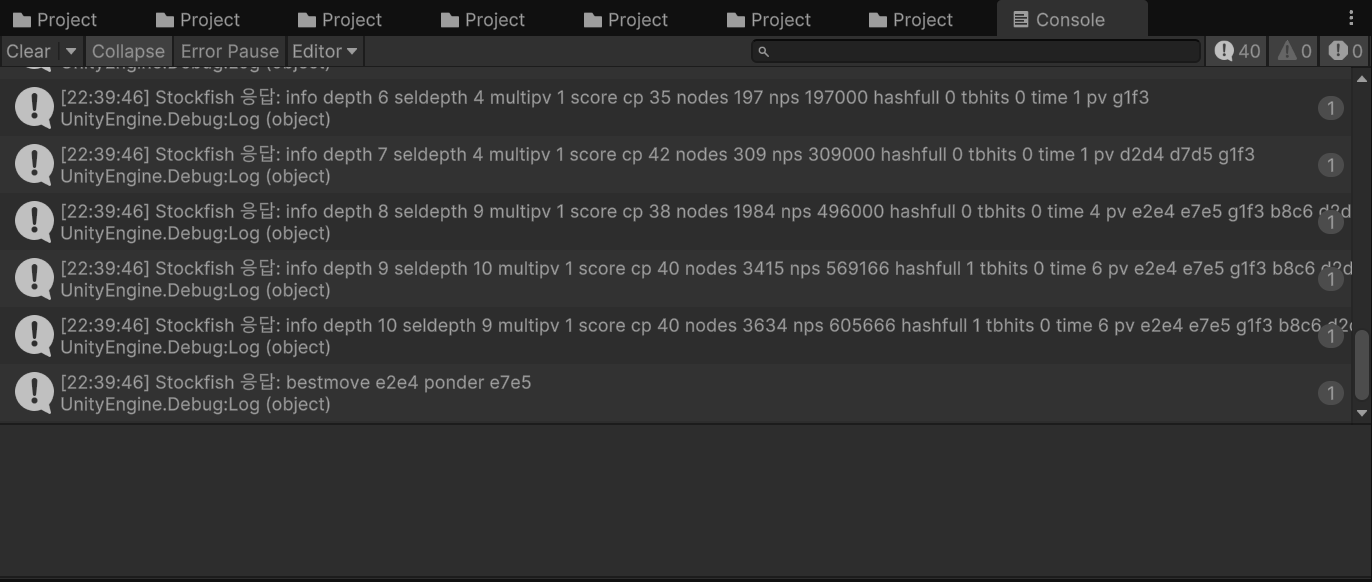
}
디버그
에디터에서 실행 꺼도 Close() 때문에 꺼지지는 않으면서 변수에 할당했던게 release되어버려서 stockfish process를 kill할 수 없는 현상 발생했었음. Close() 주석처리 하니 바로 해결.
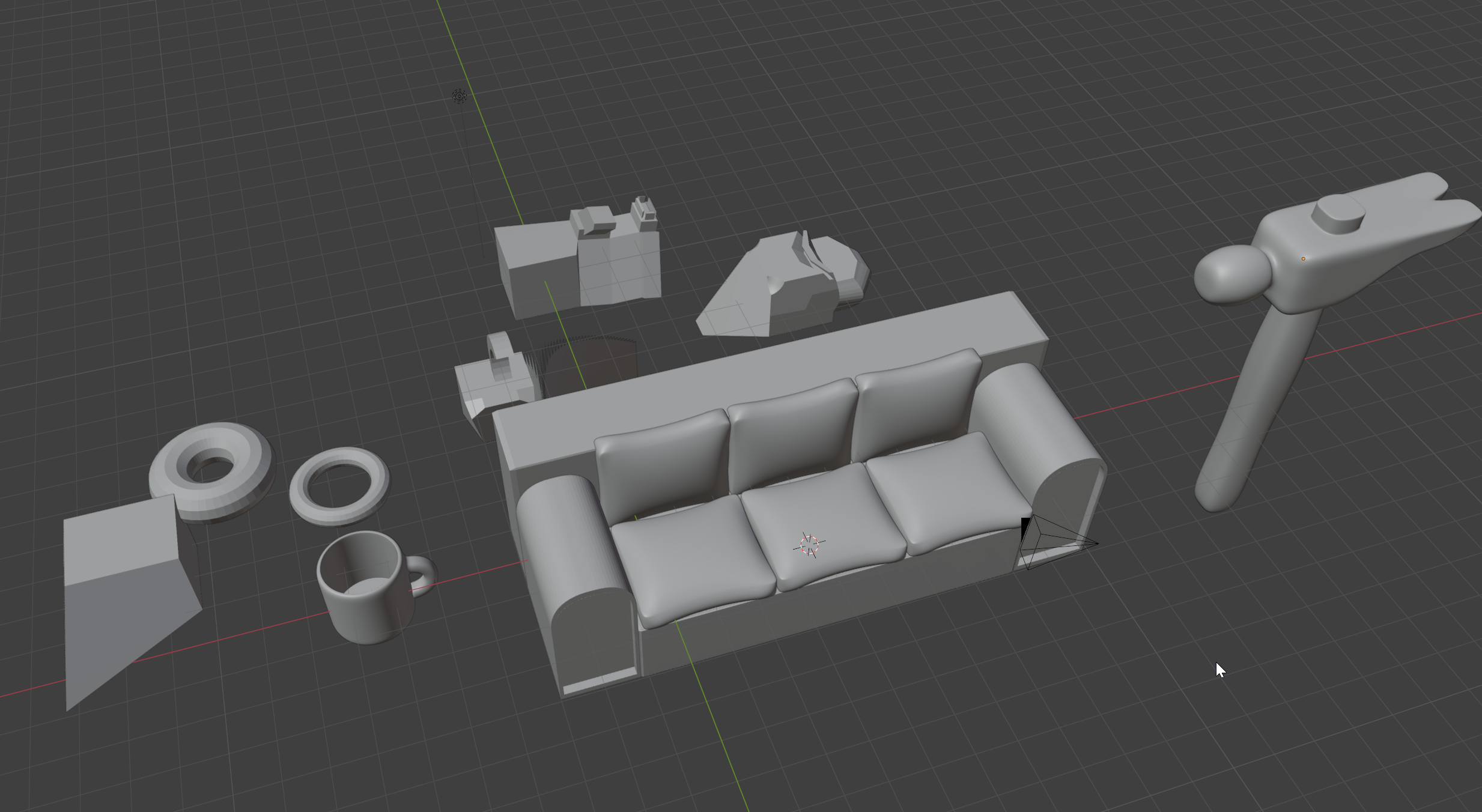
📖 한 권으로 끝내는 블렌더 교과서
p.119~170
💻 씹어먹는 c++
4 - 4. 스타크래프트를 만들자 ② (const, static)
초기화 리스트
Marine::Marine() {
  hp = 50;
  coord_x = coord_y = 0;
  damage = 5;
  is_dead = false;
}
이 생성자를
Marine::Marine() : hp(50), coord_x(0), coord_y(0), damage(5), is_dead(false), name(NULL) {}이렇게 요약 가능하다
생성자 뒤에 오는 걸 초기화 리스트라고 부름
초기화 리스트를 사용하면 생성과 초기화를 동시에 함.
초기화 리스트를 사용하지 않는다면 생성을 먼저 하고 그 다음에 대입함.
int a = 10;int a;
a = 10;이 둘의 차이와 같다.
따라서 초기화 리스트가 좀 더 효율적이다.
상수와 레퍼런스들은 모두 생성과 동시에 초기화가 되어야 하기 때문에 클래스 내부에 그런 것들 넣고 싶으면 초기화 리스트 무조건 써야된다.
static
static 멤버 변수 : 전역 변수 같지만 클래스 하나에만 종속
어떤 클래스의 static 멤버 변수의 경우, 멤버 변수들 처럼 객체가 소멸될 때 소멸되는 것이 아닌, 프로그램이 종료될 때 소멸되는 것
static 멤버 변수의 경우, 클래스의 모든 객체들이 '공유' 하는 변수로써 각 객체 별로 따로 존재하는 멤버 변수들과는 달리 모든 객체들이 '하나의' static 멤버 변수를 사용
static 변수는 클래스 내부에서 위와 같이 초기화 하는 것은 불가능 합니다. 위와 같은 꼴이 되는유일한 경우는 const static 변수일 때만 가능
static 함수 : 클래스 안에 딱 1개만 존재하는 함수
static 변수가 어떠한 객체에 종속되는 것이 아니라, 그냥 클래스 자체에 딱 1 개 존재하는 것인 것 처럼, static 함수 역시 어떤 특정 객체에 종속되는 것이 아니라 클래스 전체에 딱 1 개 존재하는 함수입니다.
즉, static 이 아닌 멤버 함수들의 경우 객체를 만들어야지만 각 멤버 함수들을 호출할 수 있지만 static 함수의 경우, 객체가 없어도 그냥 클래스 자체에서 호출할 수 있게 됩니다.
static 함수 내에서는 클래스의 static 변수 만을 이용할 수 밖에 없습니다.
this
Marine& Marine::be_attacked(int damage_earn) {
  hp -= damage_earn;
  if (hp <= 0) is_dead = true;

  return *this;
}
this 라는 것이 C++ 언어 차원에서 정의되어 있는 키워드 인데, 이는 객체 자신을 가리키는 포인터의 역할을 합니다. 즉, 이 멤버 함수를 호출하는 객체 자신을 가리킨다
int& access_x() { return x; }

int& c = a.access_x();
은
int &c = x; // 여기서 x 는 a 의 x와 동일하다.
const 함수
int Marine::attack() const { return default_damage; }위 attack 함수는 '상수 멤버 함수' 로 정의된 것입니다. 우리는 상수 함수로 이 함수를 정의함으로써, 이 함수는 다른 변수의 값을 바꾸지 않는 함수라고 다른 프로그래머에게 명시 시킬 수 있습니다. 당연하게도, 상수 함수 내에서는 객체들의 '읽기' 만이 수행되며, 상수 함수 내에서 호출 할 수 있는 함수로는 다른 상수 함수 밖에 없습니다.
