Request Message
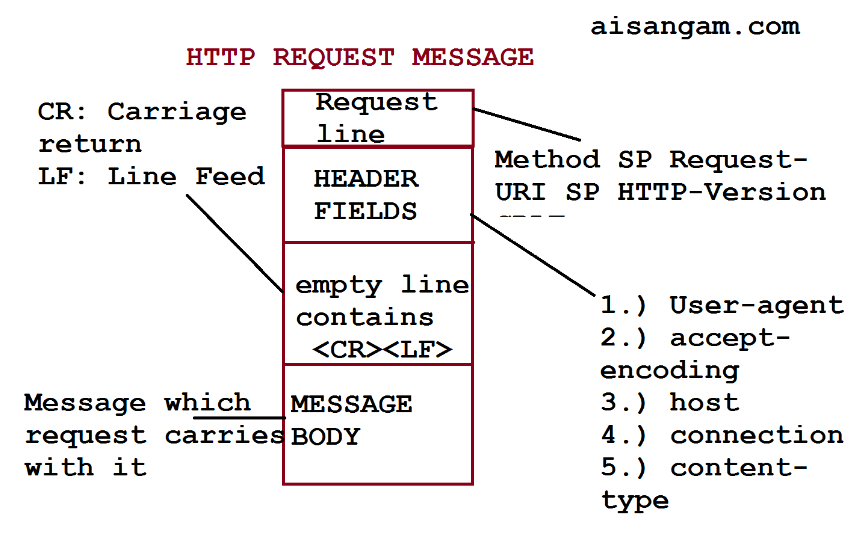
출처 https://www.aisangam.com/blog/http-request-message-format-well-explained/
Http Requset message는 Request line, Header, Body 구조
-
Requset Line(Start line)
GET http://aa.com/main/index.html HTTP/1.1HTTP method, 요청 타겟(URL), HTTP version을 명시
-
Header
- 대소문자 구분 없는 문자열과
:그리고 해당 값으로 구성된 key-value 형식 - Header는 Request Header, General Header, Representation Header로 구성
- Request Header는 Accept-Encoding 등 request의 내용을 구체화 시키며
- General Header는 request, response 모두에 적용되며, request body의 데이터와는 관련이 없는 내용을 포함
- 네트워크 접속을 유지하는 Connection: keep-alive, Protocol을 변경하는 Upgrade 등
- Representation header는 requset body에 전송될 데이터를 표현하는 내용을 포함
- Content-Type, Content-Language 등
- 대소문자 구분 없는 문자열과
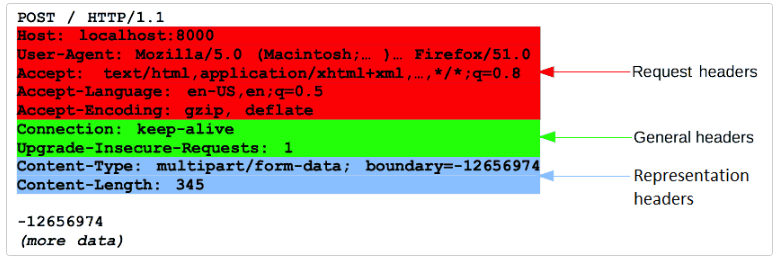
- Body는 request에서 전송할 데이터를 포함하며, header의 끝에 empty line으로 header와 구분된다
Http Request message 주요 요소
모든 내용이 주요한 요소이지만 웹 개발을 하며 특히 신경 쓰게 되는 요소들이 있다.
- HTTP method Server 측에서 명시한 method를 당연히 따라야 한다. GET, PUT, POST 등 RESTApi에서 사용하는 method가 있으며, 직접 호출하지는 않지만 browser가 SOP에 따라 pre-flight에 사용하는 OPTIONS method 등 다양한 method가 존재한다.
- Content-Type 웹 개발을 하다 보면 json 데이터 뿐 아니라, 이미지 등 binary 데이터를 request에 담아 전송하게 된다. application/json 뿐 아니라 multipart/form-data, application/octet-stream 등 필요에 따라 타입을 지정해주어야 한다.
잘못하면 415본다.
Http Response message
HTTP/1.1 200 OK														// 시작줄
Connection: keep-alive												 // 헤더
Content-Encoding: gzip
Content-Length: 35653
Content-Type: text/html;

<!DOCTYPE html><html lang="ko" data-reactroot=""><head><title...
Http Response message는 status line, header, body 구조이다.
- status line(Start line)
- HTTP version, Status code, status text를 포함한다 - Header
- 기본적으로 resquest message의 header와 유사하며, User-Agent나 Server와 같이 request와 response에서 만 사용되는 값이 있다. - Body
- response에서 전송할 데이터를 담고있다.
Http Response status code
크게 2xx, 3xx, 4xx, 5xx으로 나눌 수 있으며, 각각 success, redirection, client-error, server-error를 의미하며, 자세한 상태는 xx를 통해 나타낸다. (1xx도 있다)
대표적으로 자주 사용되는 status code와 message는 아래와 같다.
2xx - success
- 200 : Ok
- 201 : Created
- 204 : No Content
- 206 : Partial Content
3xx - redirection
- 301 : Moved Permanently
- 304 : Not Modified
4xx - client error
- 400 : Bad Request
- 401 : Unauthorized
- 403 : Forbidden
- 404 : Not Found
- 405 : Method Not Allowed
- 409 : Conflict
- 415 : Unsupported Media Type
418 : I'm a teapot
5xx - server error
- 500 : Internal Server Error
- 502 : Bad Gateway

.