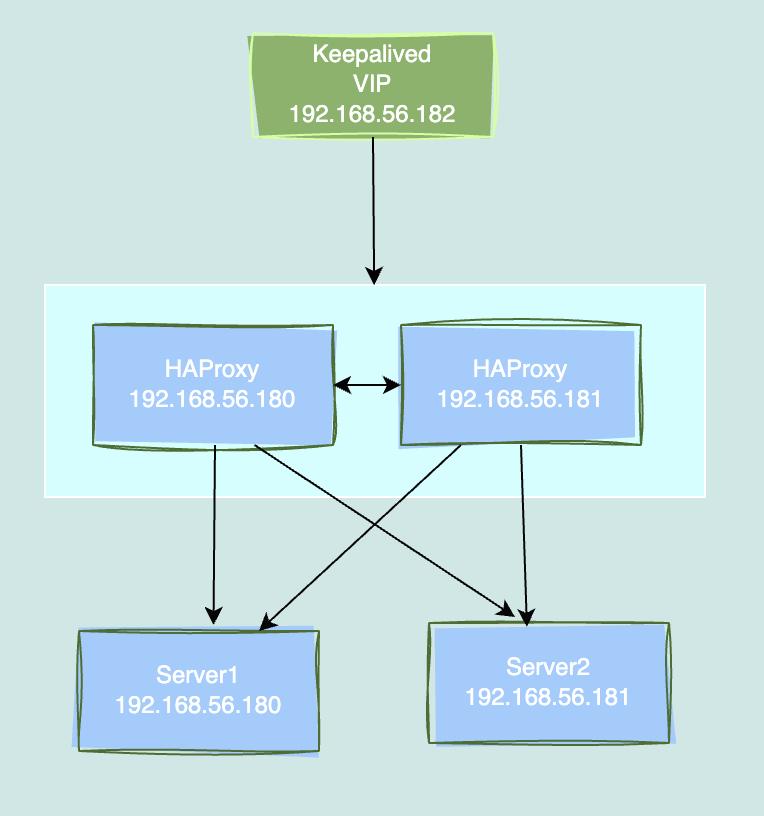
환경
- Rocky Linux release 8.10
- HAProxy
구성
- VIP 192.168.56.182
- HAProxy 192.168.56.180
- HAProxy 192.168.56.181
HAProxy 설치
$ sysctl -w net.ipv4.tcp_keepalive_time=110	// TCP 연결이 유휴 상태가 된 후 처음 keepalive 패킷을 보내기까지의 시간(초 단위)
$ sysctl -w net.ipv4.tcp_keepalive_intvl=30	// keepalive 패킷 사이의 간격을 설정
$ sysctl -w net.ipv4.tcp_keepalive_probes=3	// keepalive 탐지 패킷의 최대 수를 설정
$ yum -y install make gcc perl pcre-devel zlib-devel openssl-devel libgudev1 systemd-devel rsyslog socat nc
$ yum install lua
$ sudo mkdir -p /var/log/haproxy
$ sudo mkdir /var/run/haproxy
$ groupadd --gid 1555 haproxy
$ useradd -M -s /sbin/nologin -g haproxy -u 1555 haproxy
$ sudo chown haproxy:haproxy /var/log/haproxy
$ sudo chown haproxy:haproxy /var/run/haproxy

**로그 설정**
$ vi /etc/rsyslog.d/haproxy.conf
# Collect log with UDP
$ModLoad imudp
$UDPServerAddress 127.0.0.1
$UDPServerRun 514

# Creating separate log files based on the severity
local0.* /var/log/haproxy/haproxy-traffic.log
local0.notice /var/log/haproxy/haproxy-admin.log

**HAProxy 설치후 다운**
$ systemctl restart rsyslog.service
$ wget https://www.haproxy.org/download/2.5/src/haproxy-2.5.14.tar.gz
$ make install
$ wget https://www.haproxy.org/download/2.5/src/haproxy-2.5.14.tar.gz
$ yum install wget
$ cd /data/
$ cd haproxy-2.5.14/
$ make TARGET=linux-glibc USE_PCRE=1 USE_OPENSSL=1 USE_ZLIB=1 USE_SYSTEMD=1 USE_PROMEX=1
$ make install
$ haproxy -vv
$ make admin/halog/halog
$ cp admin/halog/halog /usr/local/sbin/
$ cd admin/halog/
$ touch haproxy.log
$ halog -srv -H < haproxy.log | column -t
$ /usr/local/sbin/haproxy -v
$ curl "http://git.haproxy.org/?p=haproxy-2.3.git;a=blob_plain;f=contrib/systemd/haproxy.service.in" -o /etc/systemd/system/haproxy.service

**Systemctl 등록**
$ vi /etc/systemd/system/haproxy.service
[Unit]
Description=HAProxy Load Balancer
After=network-online.target
Wants=network-online.target

[Service]
EnvironmentFile=-/etc/default/haproxy
EnvironmentFile=-/etc/sysconfig/haproxy
Environment="CONFIG=/etc/haproxy/haproxy.cfg" "PIDFILE=/run/haproxy.pid" "EXTRAOPTS=-S /run/haproxy-master.sock"
ExecStartPre=/usr/local/sbin/haproxy -Ws -f $CONFIG -c -q $EXTRAOPTS
ExecStart=/usr/local/sbin/haproxy -Ws -f $CONFIG -p $PIDFILE $EXTRAOPTS
ExecReload=/usr/local/sbin/haproxy -Ws -f $CONFIG -c -q $EXTRAOPTS
ExecReload=/bin/kill -USR2 $MAINPID
KillMode=mixed
Restart=always
SuccessExitStatus=143
Type=notify

# The following lines leverage SystemD's sandboxing options to provide
# defense in depth protection at the expense of restricting some flexibility
# in your setup (e.g. placement of your configuration files) or possibly
# reduced performance. See systemd.service(5) and systemd.exec(5) for further
# information.

# NoNewPrivileges=true
# ProtectHome=true
# If you want to use 'ProtectSystem=strict' you should whitelist the PIDFILE,
# any state files and any other files written using 'ReadWritePaths' or
# 'RuntimeDirectory'.
# ProtectSystem=true
# ProtectKernelTunables=true
# ProtectKernelModules=true
# ProtectControlGroups=true
# If your SystemD version supports them, you can add: @reboot, @swap, @sync
# SystemCallFilter=~@cpu-emulation @keyring @module @obsolete @raw-io

[Install]
WantedBy=multi-user.target


$ cd /etc
$ mkdir haproxy
$ vi /etc/haproxy/haproxy.cfg
--
global
    log           127.0.0.1:514 local2
    chroot        /
    external-check
    insecure-fork-wanted
    stats socket  /var/run/haproxy/stats.sock mode 660 group haproxy level admin expose-fd listeners
    stats timeout 30s
    pidfile       /var/run/haproxy/haproxy.pid
    ulimit-n      655350
    maxconn       100000
    user          haproxy
    group         haproxy
    daemon
    nbthread      4
defaults
    mode                    http
    log                     global
    option                  tcplog
    option                  dontlognull
    option  tcpka
    timeout queue           1m
    timeout connect         5s
    timeout client          480m
    timeout server          480m
    timeout check           5s
listen stats
    bind *:9400
    mode  http
    option dontlog-normal
    stats enable
    stats realm Haproxy\ Statistics
    stats uri /haproxy
    http-request use-service prometheus-exporter if { path /metrics }
frontend http-front
    bind *:80
    mode http
    default_backend http-backend
backend http-backend
    balance roundrobin
    mode http
    option forwardfor
    option httpchk GET /
    http-check expect string OK
    http-request set-header X-Forwarded-Port %[dst_port]
    server server1 192.168.56.180:{port} check inter 1s fastinter 500ms rise 1 fall 1 weight 1
    server server2 192.168.56.180:{port} check inter 1s fastinter 500ms rise 1 fall 1 weight 1

$ sudo lsof -i :80
$ systemctl daemon-reload
$ systemctl enable haproxy
$ systemctl start haproxy

$ /var/log/haproxy log경로

$ vi /etc/rsyslog.conf
*.info;mail.none;authpriv.none;cron.none;local2.none                /var/log/messages

======================
keepalive

echo 'net.ipv4.ip_nonlocal_bind=1' >> /etc/sysctl.conf
yum install keepalived
sudo sysctl -p
HAProxy Active
global_defs {
   router_id java_L4_A
}

# haproxy process를 체크하여 down되면 priority 값을 60 줄임 (150-60=90)
# 따라서 haproxy가 down되면 HAProxy_L4_B의 값 100 보다 10이 작게 되어 HAProxy_L4_B가 Active됨

vrrp_track_process track_haproxy {
    process haproxy
    weight -60
}

# nopreempt 옵션을 이용하여 자동 failback 안되도록 구성
# nopreempt 사용시 state를 `BACKUP` 으로 설정해야 함
# HAProxy_L4_A를 Active로 설정하려면 HAProxy_L4_B의 keepalived를 stop or restart 하면 됨
vrrp_instance VI_1 {
    state MASTER
    interface ens18
    virtual_router_id 144
    priority 100
    advert_int 1
    authentication {
        auth_type PASS
        auth_pass java_171
    }
    virtual_ipaddress {
        192.168.56.182
    }
    track_process {
        track_haproxy
    }

}
HAProxy Standby
global_defs {
   router_id java_L4_B
}

vrrp_track_process track_haproxy {
    process haproxy
    weight -60
}


vrrp_instance VI_1 {
    state BACKUP
    interface ens18
    virtual_router_id 144
    priority 99
    advert_int 1
    authentication {
        auth_type PASS
        auth_pass java_171
    }
    virtual_ipaddress {
        192.168.56.182
    }
}
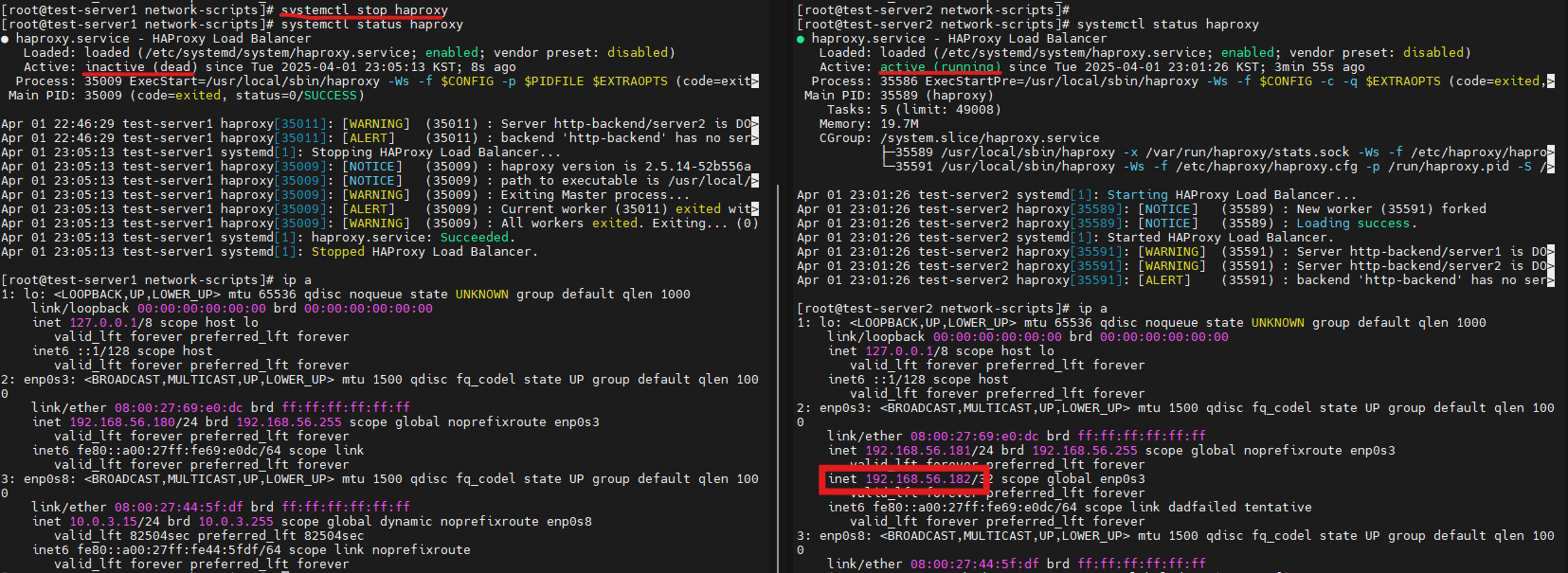
failover 테스트


https://ghskdneh99.tistory.com/ 블로그 이전하였습니다