
주요 사용처
- 상품 이미지 등록
- 리뷰 사진 첨부
- Q&A 이미지 첨부
- 프로필 사진 업로드
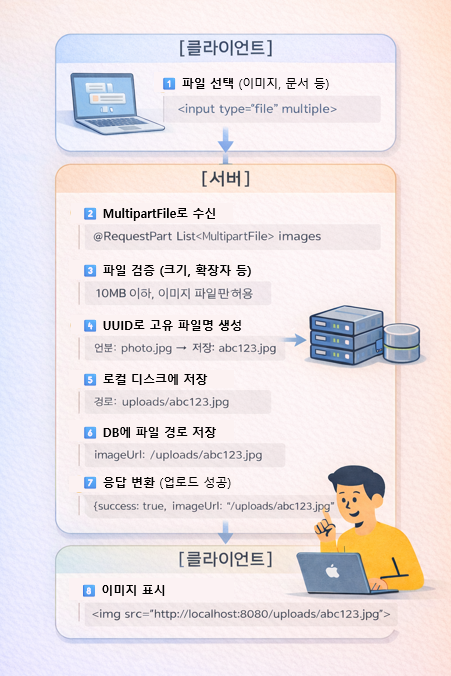
파일 업로드 흐름
1. 프로젝트 설정
application.properties
# 파일 업로드 경로
file.upload-dir=uploads

# 파일 크기 제한 (10MB)
spring.servlet.multipart.max-file-size=10MB
spring.servlet.multipart.max-request-size=10MB
spring.servlet.multipart.enabled=true

# 정적 리소스 경로
spring.web.resources.static-locations=classpath:/static/,file:uploads/
WebConfig.java
@Configuration
public class WebConfig implements WebMvcConfigurer {

    /**
     * 업로드된 파일 접근 경로 설정
     */
    @Override
    public void addResourceHandlers(ResourceHandlerRegistry registry) {
        // /uploads/** 요청을 uploads/ 폴더로 매핑
        registry.addResourceHandler("/uploads/**")
                .addResourceLocations("file:uploads/");
    }
}
2. FileStorageService
@Service
public class FileStorageService {

    private final Path uploadPath;

    public FileStorageService(@Value("${file.upload-dir}") String uploadDir) {
        this.uploadPath = Paths.get(uploadDir).toAbsolutePath().normalize();

        try {
            Files.createDirectories(this.uploadPath); // 폴더 생성
        } catch (IOException e) {
            throw new RuntimeException("업로드 디렉터리를 생성할 수 없습니다.", e);
        }
    }

    /**
     * 파일 저장 후 접근 URL 반환
     */
    public String storeFile(MultipartFile file) {
        if (file == null || file.isEmpty()) {
            throw new IllegalArgumentException("업로드할 파일이 없습니다.");
        }

        // 원본 파일명
        String originalFilename = StringUtils.cleanPath(file.getOriginalFilename());

        // 확장자 추출
        String ext = "";
        int dotIndex = originalFilename.lastIndexOf('.');
        if (dotIndex != -1) {
            ext = originalFilename.substring(dotIndex + 1);
        }

        // UUID로 고유 파일명 생성
        String uuid = UUID.randomUUID().toString().replace("-", "");
        String storedFilename = uuid + (ext.isEmpty() ? "" : "." + ext);

        try {
            Path targetLocation = this.uploadPath.resolve(storedFilename);
            Files.copy(file.getInputStream(), targetLocation,
                      StandardCopyOption.REPLACE_EXISTING);
        } catch (IOException e) {
            throw new RuntimeException("파일 저장 중 오류가 발생했습니다.", e);
        }

        // 브라우저에서 접근 가능한 URL 반환
        return "/uploads/" + storedFilename;
    }
}
핵심 포인트
1. UUID 사용 이유
// ❌ 원본 파일명 그대로 저장 (중복 위험)
"photo.jpg" → "photo.jpg"

// -> UUID로 고유 파일명 생성
"photo.jpg" → "a1b2c3d4e5f6.jpg"
2. 파일 경로
물리적 위치: D:/project/uploads/a1b2c3d4e5f6.jpg
브라우저 접근: http://localhost:8080/uploads/a1b2c3d4e5f6.jpg
DB 저장 값: /uploads/a1b2c3d4e5f6.jpg
3. Controller 적용
QnaRestController.java
@RestController
@RequestMapping("/api/qna")
@RequiredArgsConstructor
public class QnaRestController {

    private final QnaService qnaService;
    private final FileStorageService fileStorageService;
    private final QnaImageRepository qnaImageRepository;

    /**
     * Q&A 등록 (이미지 첨부)
     */
    @PostMapping(
        value = "/with-images",
        consumes = MediaType.MULTIPART_FORM_DATA_VALUE
    )
    public ResponseEntity<Map<String, Object>> createQnaWithImages(
            @RequestParam Long productId,
            @RequestParam String question,
            @RequestParam(required = false) String title,
            @RequestParam(required = false) List<MultipartFile> images,
            @RequestHeader("Authorization") String authHeader) {

        Map<String, Object> response = new HashMap<>();
        try {
            // 1. 사용자 인증
            String writer = getUserFromToken(authHeader);
            if (writer == null) {
                response.put("success", false);
                response.put("message", "로그인이 필요합니다.");
                return ResponseEntity.status(401).body(response);
            }

            // 2. 상품 조회
            Product product = productRepository.findById(productId)
                    .orElseThrow(() -> new IllegalArgumentException(
                        "상품을 찾을 수 없습니다."));

            // 3. Q&A 생성 및 저장
            Qna qna = new Qna();
            qna.setProduct(product);
            qna.setQuestion(question);
            qna.setWriter(writer);
            qna.setTitle(title != null ? title : "상품 문의");

            Qna savedQna = qnaService.save(qna);

            // 4. 이미지 저장
            if (images != null && !images.isEmpty()) {
                for (MultipartFile file : images) {
                    if (file.isEmpty()) continue;

                    // 파일 저장 후 URL 반환
                    String imageUrl = fileStorageService.storeFile(file);

                    // DB에 이미지 정보 저장
                    QnaImage qnaImage = new QnaImage();
                    qnaImage.setQna(savedQna);
                    qnaImage.setImageUrl(imageUrl);
                    qnaImageRepository.save(qnaImage);
                }
            }

            response.put("success", true);
            response.put("message", "Q&A가 등록되었습니다.");
            response.put("data", convertToDTO(savedQna));
            return ResponseEntity.ok(response);

        } catch (Exception e) {
            response.put("success", false);
            response.put("message", "Q&A 등록 중 오류가 발생했습니다.");
            return ResponseEntity.status(500).body(response);
        }
    }
}
4. API 테스트
Postman 테스트
요청
POST http://localhost:8080/api/qna/with-images
Content-Type: multipart/form-data
Authorization: Bearer eyJhbGciOiJIUzI1NiJ9...

Body (form-data):
- productId: 1
- question: 배송은 언제 되나요?
- title: 배송 문의
- images: [파일1.jpg, 파일2.jpg]
응답
{
  "success": true,
  "message": "Q&A가 등록되었습니다.",
  "data": {
    "id": 10,
    "productId": 1,
    "question": "배송은 언제 되나요?",
    "title": "배송 문의",
    "writer": "user123",
    "images": [
      {
        "id": 1,
        "imageUrl": "/uploads/a1b2c3d4e5f6.jpg"
      },
      {
        "id": 2,
        "imageUrl": "/uploads/f6e5d4c3b2a1.jpg"
      }
    ],
    "createdAt": "2025-01-15T10:30:00"
  }
}
5. Entity 구조
QnaImage.java
@Entity
@Getter
@Setter
@Table(name = "qna_image")
public class QnaImage {

    @Id
    @GeneratedValue(strategy = GenerationType.IDENTITY)
    private Long id;

    @ManyToOne(fetch = FetchType.LAZY)
    @JoinColumn(name = "qna_id")
    private Qna qna;

    @Column(nullable = false)
    private String imageUrl;  // /uploads/abc123.jpg
}
Qna.java
@Entity
@Getter
@Setter
public class Qna {

    @Id
    @GeneratedValue(strategy = GenerationType.IDENTITY)
    private Long id;

    private String title;
    private String question;
    private String writer;

    @ManyToOne(fetch = FetchType.LAZY)
    @JoinColumn(name = "product_id")
    private Product product;

    // 이미지 목록 (1:N 관계)
    @OneToMany(mappedBy = "qna", cascade = CascadeType.ALL)
    private List<QnaImage> images = new ArrayList<>();
}
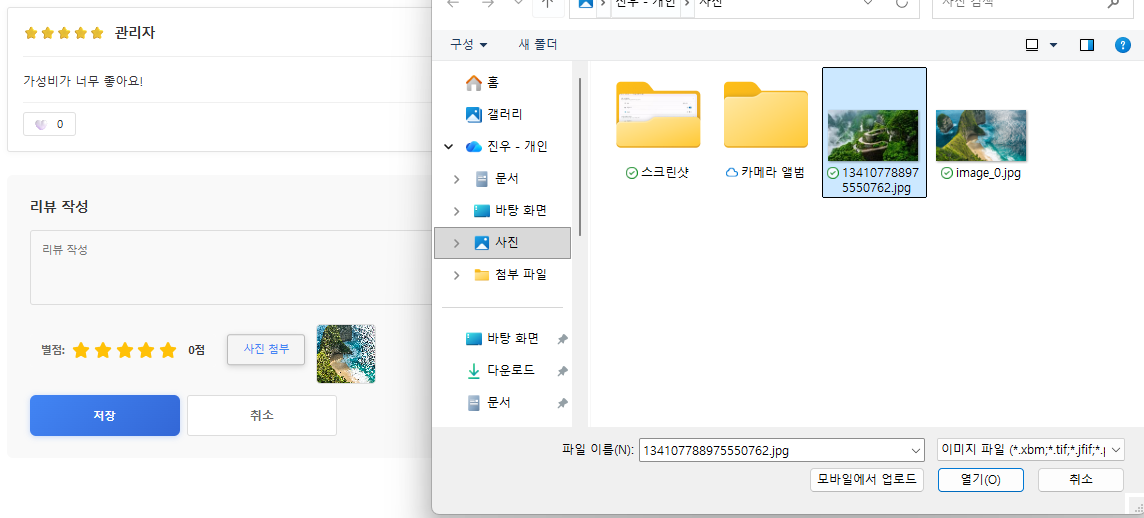
실제 구현 화면
정리 및 요약
파일 업로드 구현 단계
1. application.properties 설정
   - file.upload-dir 지정
   - 파일 크기 제한
   ↓
2. WebConfig 설정
   - /uploads/** 경로 매핑
   ↓
3. FileStorageService 구현
   - UUID로 파일명 생성
   - 로컬 디스크에 저장
   ↓
4. Controller 적용
   - @RequestParam MultipartFile
   - consumes = MULTIPART_FORM_DATA_VALUE
   ↓
5. DB에 경로 저장
   - imageUrl: /uploads/abc123.jpg