📧 SMTP란?
SMTP(Simple Mail Transfer Protocol)는 이메일을 전송하기 위한 인터넷 표준 프로토콜입니다.
SMTP 동작 과정
애플리케이션 → SMTP 서버 연결 → 이메일 정보 전달 → 수신자 메일 서버 전송 → 메일함 도착
Gmail SMTP 서버 정보
- 호스트: smtp.gmail.com
- 포트: 587 (TLS) / 465 (SSL)
- 보안: TLS/SSL 암호화 지원
사전 준비사항
Gmail 앱 비밀번호 발급
발급 방법
- Google 계정 관리 페이지 접속
- 보안 → 2단계 인증 활성화
- 앱 비밀번호 생성 (기타 → 사용자 지정 이름 입력)
- 생성된 16자리 비밀번호 복사 및 보관
전체 구조
인증 흐름도
[이메일 발송]
- Client → 이메일 입력 → POST /api/email/send
- 6자리 랜덤 코드 생성
- DB 저장 (5분 만료)
- Gmail SMTP로 이메일 발송
[이메일 인증]
- Client → 인증 코드 입력 → POST /api/email/verify
- DB 조회 (이메일 + 코드)
- 만료 시간 확인
- 인증 성공/실패 응답
[회원가입 완료]
- 인증 완료 → 회원가입 진행 → JWT 발급
구현 과정
1. 의존성 추가 (build.gradle)
dependencies {
    // Spring Boot Starter Mail
    implementation 'org.springframework.boot:spring-boot-starter-mail'
}
2. application.properties
# SMTP 설정
spring.mail.host=smtp.gmail.com
spring.mail.port=587
spring.mail.username=${MAIL_USERNAME}
spring.mail.password=${MAIL_PASSWORD}
spring.mail.properties.mail.smtp.auth=true
spring.mail.properties.mail.smtp.starttls.enable=true
spring.mail.properties.mail.smtp.starttls.required=true
spring.mail.properties.mail.smtp.connectiontimeout=5000
spring.mail.properties.mail.smtp.timeout=5000
spring.mail.properties.mail.smtp.writetimeout=5000

# 인증 코드 만료 시간 (분)
email.verification.expiration=5
3. EmailVerificationCode 엔티티
@Entity
@Table(name = "email_verification_codes")
@Getter
@Setter
@NoArgsConstructor
@AllArgsConstructor
@Builder
public class EmailVerificationCode {

    @Id
    @GeneratedValue(strategy = GenerationType.IDENTITY)
    private Long id;

    @Column(nullable = false, length = 100)
    private String email;

    @Column(nullable = false, length = 6)
    private String code;  // 6자리 인증 코드

    @Column(nullable = false)
    private LocalDateTime createdAt;

    @Column(nullable = false)
    private LocalDateTime expiresAt;

    @Column(nullable = false)
    private boolean verified;

    @PrePersist
    protected void onCreate() {
        createdAt = LocalDateTime.now();
    }

    // 만료 확인 메서드
    public boolean isExpired() {
        return LocalDateTime.now().isAfter(expiresAt);
    }
}
핵심 필드
code: 6자리 랜덤 숫자expiresAt: 만료 시간 (생성 + 5분)verified: 인증 완료 여부
4. EmailVerificationCodeRepository
public interface EmailVerificationCodeRepository
        extends JpaRepository<EmailVerificationCode, Long> {

    // 이메일로 가장 최근 인증 코드 조회
    Optional<EmailVerificationCode> findTopByEmailOrderByCreatedAtDesc(String email);

    // 이메일과 코드로 조회
    Optional<EmailVerificationCode> findByEmailAndCode(String email, String code);

    // 이메일로 모든 인증 코드 삭제
    void deleteByEmail(String email);
}
5. EmailService
@Service
@RequiredArgsConstructor
@Slf4j
public class EmailService {

    private final JavaMailSender mailSender;
    private final EmailVerificationCodeRepository codeRepository;

    @Value("${spring.mail.username}")
    private String fromEmail;

    @Value("${email.verification.expiration}")
    private int expirationMinutes;


    // 인증 코드 생성 (6자리 랜덤 숫자)
    private String generateVerificationCode() {
        Random random = new Random();
        return String.format("%06d", random.nextInt(1000000));
    }


    // 인증 이메일 발송
    @Transactional
    public void sendVerificationEmail(String toEmail) {
        try {
            // 기존 인증 코드 삭제
            codeRepository.deleteByEmail(toEmail);

            // 새 인증 코드 생성
            String code = generateVerificationCode();
            LocalDateTime expiresAt = LocalDateTime.now()
                    .plusMinutes(expirationMinutes);

            // DB 저장
            EmailVerificationCode verificationCode = EmailVerificationCode.builder()
                    .email(toEmail)
                    .code(code)
                    .expiresAt(expiresAt)
                    .verified(false)
                    .build();
            codeRepository.save(verificationCode);

            // 이메일 작성
            MimeMessage message = mailSender.createMimeMessage();
            MimeMessageHelper helper = new MimeMessageHelper(message, true, "UTF-8");

            helper.setFrom(fromEmail);
            helper.setTo(toEmail);
            helper.setSubject("On&Home 이메일 인증");

            // 이메일 본문 (간단한 텍스트 버전)
            String emailContent = String.format(
                "안녕하세요!\n\n" +
                "On&Home 회원가입을 위한 이메일 인증 코드입니다.\n\n" +
                "인증 코드: %s\n\n" +
                "이 인증 코드는 5분간 유효합니다.\n" +
                "본인이 요청하지 않은 경우, 이 이메일을 무시하세요.\n\n" +
                "감사합니다.\n" +
                "On&Home 드림",
                code
            );

            helper.setText(emailContent, false);

            // 이메일 발송
            mailSender.send(message);
            log.info("인증 이메일 발송 완료: {}", toEmail);

        } catch (MessagingException e) {
            log.error("이메일 발송 실패: {}", e.getMessage());
            throw new RuntimeException("이메일 발송에 실패했습니다.");
        }
    }


    // 인증 코드 검증
    @Transactional
    public boolean verifyCode(String email, String code) {
        Optional<EmailVerificationCode> optionalCode =
                codeRepository.findByEmailAndCode(email, code);

        if (optionalCode.isEmpty()) {
            return false;
        }

        EmailVerificationCode verificationCode = optionalCode.get();

        // 만료 확인
        if (verificationCode.isExpired()) {
            log.warn("만료된 인증 코드: {}", email);
            return false;
        }

        // 이미 인증된 코드인지 확인
        if (verificationCode.isVerified()) {
            log.warn("이미 사용된 인증 코드: {}", email);
            return false;
        }

        // 인증 완료 처리
        verificationCode.setVerified(true);
        codeRepository.save(verificationCode);

        log.info("이메일 인증 성공: {}", email);
        return true;
    }


    // 이메일 인증 여부 확인
        public boolean isEmailVerified(String email) {
        Optional<EmailVerificationCode> optionalCode =
                codeRepository.findTopByEmailOrderByCreatedAtDesc(email);

        return optionalCode.isPresent() &&
               optionalCode.get().isVerified() &&
               !optionalCode.get().isExpired();
    }
}
핵심 메서드
sendVerificationEmail(): 6자리 코드 생성 → DB 저장 → 이메일 발송verifyCode(): 코드 검증 → 만료 확인 → 인증 완료isEmailVerified(): 이메일 인증 여부 확인
6. EmailController
@RestController
@RequestMapping("/api/email")
@RequiredArgsConstructor
@Slf4j
public class EmailController {

    private final EmailService emailService;

    // 인증 이메일 발송
    @PostMapping("/send")
    public ResponseEntity<?> sendVerificationEmail(
            @RequestBody Map<String, String> request) {

        String email = request.get("email");

        if (email == null || email.isBlank()) {
            return ResponseEntity.badRequest()
                    .body(Map.of("message", "이메일을 입력해주세요."));
        }

        try {
            emailService.sendVerificationEmail(email);
            return ResponseEntity.ok(Map.of(
                    "message", "인증 코드가 발송되었습니다.",
                    "email", email
            ));
        } catch (Exception e) {
            log.error("이메일 발송 실패: {}", e.getMessage());
            return ResponseEntity.status(HttpStatus.INTERNAL_SERVER_ERROR)
                    .body(Map.of("message", "이메일 발송에 실패했습니다."));
        }
    }

    // 인증 코드 검증
    @PostMapping("/verify")
    public ResponseEntity<?> verifyCode(
            @RequestBody Map<String, String> request) {

        String email = request.get("email");
        String code = request.get("code");

        if (email == null || code == null) {
            return ResponseEntity.badRequest()
                    .body(Map.of("message", "이메일과 인증 코드를 입력해주세요."));
        }

        boolean isVerified = emailService.verifyCode(email, code);

        if (isVerified) {
            return ResponseEntity.ok(Map.of(
                    "message", "인증이 완료되었습니다.",
                    "verified", true
            ));
        } else {
            return ResponseEntity.status(HttpStatus.BAD_REQUEST)
                    .body(Map.of(
                    "message", "인증 코드가 일치하지 않거나 만료되었습니다.",
                    "verified", false
            ));
        }
    }
}
7. UserService 수정 (회원가입 시 이메일 인증 확인)
@Service
@RequiredArgsConstructor
public class UserService {

    private final UserRepository userRepository;
    private final EmailService emailService;
    private final BCryptPasswordEncoder passwordEncoder;

    @Transactional
    public void signUp(SignUpDto signUpDto) {
        // 이메일 인증 확인
        if (!emailService.isEmailVerified(signUpDto.getEmail())) {
            throw new IllegalArgumentException("이메일 인증이 완료되지 않았습니다.");
        }

        // 중복 체크
        if (userRepository.findByUsername(signUpDto.getUsername()).isPresent()) {
            throw new IllegalArgumentException("이미 사용중인 아이디입니다.");
        }

        // 회원가입 진행
        User user = User.builder()
                .username(signUpDto.getUsername())
                .password(passwordEncoder.encode(signUpDto.getPassword()))
                .email(signUpDto.getEmail())
                .role(UserRole.ROLE_USER)
                .build();

        userRepository.save(user);
    }
}
프론트엔드 구현 (React)
SignUp 컴포넌트
import React, { useState } from 'react';
import axios from 'axios';

function SignUp() {
    const [email, setEmail] = useState('');
    const [code, setCode] = useState('');
    const [isCodeSent, setIsCodeSent] = useState(false);
    const [isVerified, setIsVerified] = useState(false);
    const [timer, setTimer] = useState(300); // 5분 = 300초

    // 인증 이메일 발송
    const handleSendCode = async () => {
        try {
            await axios.post('/api/email/send', { email });
            setIsCodeSent(true);
            alert('인증 코드가 발송되었습니다.');
            startTimer();
        } catch (error) {
            alert('이메일 발송에 실패했습니다.');
        }
    };

    // 타이머 시작
    const startTimer = () => {
        const interval = setInterval(() => {
            setTimer((prev) => {
                if (prev <= 1) {
                    clearInterval(interval);
                    return 0;
                }
                return prev - 1;
            });
        }, 1000);
    };

    // 인증 코드 검증
    const handleVerifyCode = async () => {
        try {
            const response = await axios.post('/api/email/verify', {
                email,
                code
            });

            if (response.data.verified) {
                setIsVerified(true);
                alert('인증이 완료되었습니다.');
            }
        } catch (error) {
            alert('인증 코드가 일치하지 않거나 만료되었습니다.');
        }
    };

    // 시간 포맷팅
    const formatTime = (seconds) => {
        const min = Math.floor(seconds / 60);
        const sec = seconds % 60;
        return `${min}:${sec.toString().padStart(2, '0')}`;
    };

    return (
        <div className="signup-container">
            <h2>회원가입</h2>

            {/* 이메일 입력 */}
            <div className="form-group">
                <label>이메일 *</label>
                <div className="input-with-button">
                    <input
                        type="email"
                        value={email}
                        onChange={(e) => setEmail(e.target.value)}
                        placeholder="onandhome@gmail.com"
                        disabled={isVerified}
                    />
                    <button
                        onClick={handleSendCode}
                        disabled={isVerified || !email}
                        className="btn-primary"
                    >
                        {isCodeSent ? '재전송' : '인증'}
                    </button>
                </div>
            </div>

            {/* 인증 코드 입력 (이메일 발송 후 표시) */}
            {isCodeSent && !isVerified && (
                <div className="verification-box">
                    <p>이메일로 받으신 인증 코드를 입력해주세요.</p>
                    <div className="input-with-button">
                        <input
                            type="text"
                            value={code}
                            onChange={(e) => setCode(e.target.value)}
                            placeholder="인증 코드 6자리"
                            maxLength={6}
                        />
                        <button
                            onClick={handleVerifyCode}
                            className="btn-secondary"
                        >
                            확인
                        </button>
                    </div>
                    <p className="timer">
                        남은 시간: <span>{formatTime(timer)}</span>
                    </p>
                </div>
            )}

            {/* 인증 완료 메시지 */}
            {isVerified && (
                <div className="success-message">
                    이메일 인증이 완료되었습니다.
                </div>
            )}
        </div>
    );
}

export default SignUp;
실제 화면
회원가입 페이지
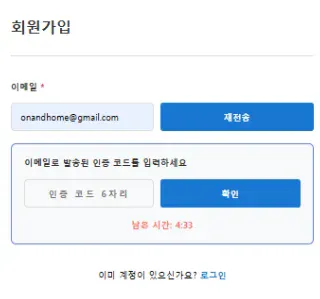
이메일 입력 후 인증 버튼 클릭 → 인증 코드 입력 UI 표시
인증 이메일
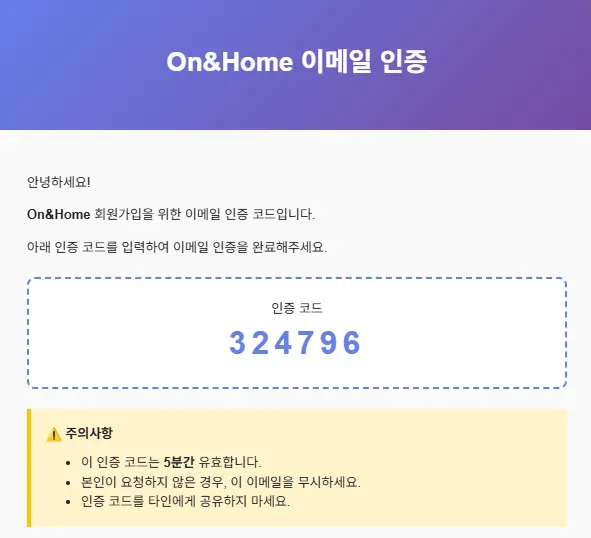
Gmail로 받은 인증 코드 (324796) - 5분간 유효
전체 동작 흐름
1. 인증 코드 발송
Client → POST /api/email/send { email: "user@gmail.com" }
→ EmailService.sendVerificationEmail()
→ 6자리 랜덤 코드 생성
→ DB 저장
→ Gmail SMTP로 이메일 발송
→ 응답: { message: "인증 코드가 발송되었습니다." }
2. 인증 코드 검증
Client → POST /api/email/verify { email: "user@gmail.com", code: "324796" }
→ EmailService.verifyCode()
→ DB 조회 (email + code 일치 확인)
→ 만료 시간 확인
→ verified = true로 업데이트
→ 응답: { verified: true, message: "인증이 완료되었습니다." }
3. 회원가입 완료
Client → POST /api/signUp { username, password, email }
→ UserService.signUp()
→ EmailService.isEmailVerified(email) 확인
→ 인증 완료된 경우에만 회원가입 진행
→ JWT 토큰 발급
API 테스트
1. 인증 이메일 발송
POST http://localhost:8080/api/email/send
Content-Type: application/json

{
  "email": "onandhome@gmail.com"
}
응답:
{
  "message": "인증 코드가 발송되었습니다.",
  "email": "onandhome@gmail.com"
}
2. 인증 코드 검증
POST http://localhost:8080/api/email/verify
Content-Type: application/json

{
  "email": "onandhome@gmail.com",
  "code": "324796"
}
성공 응답:
{
  "message": "인증이 완료되었습니다.",
  "verified": true
}
실패 응답:
{
  "message": "인증 코드가 일치하지 않거나 만료되었습니다.",
  "verified": false
}