Install Laravel with Flowbite
모든 코드는 VSCode에서 작성.
Terminal에서 명령어 입력.
composer global require laravel/installer
Laravel installer를 설치해서 어디에서든 Laravel을 전역으로 설치할 수 있게 한다.
이미 한번 설치한 적이 있으면 Pass.
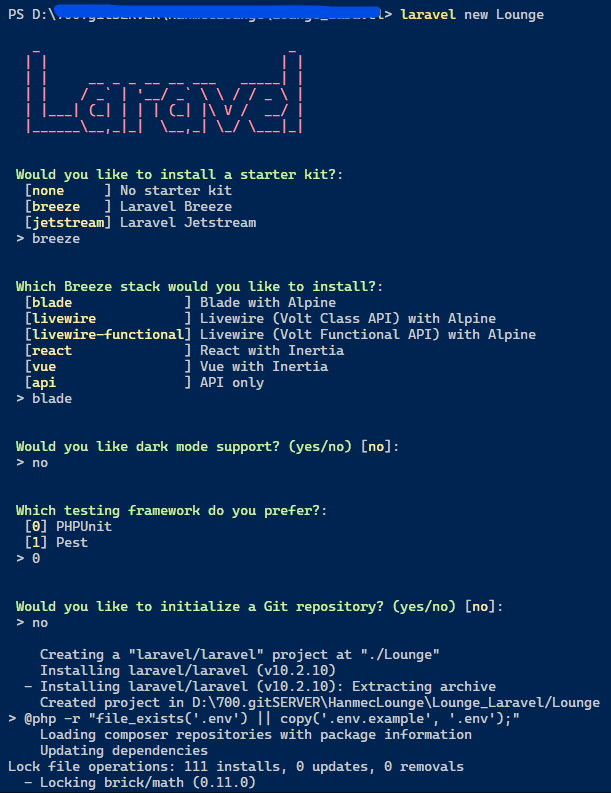
새 Laravel 프로젝트 생성.
laravel new [myproject-name]
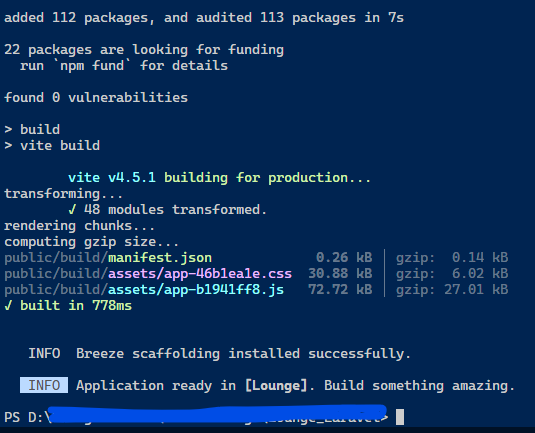
명령어 입력시 starter kit, stack을 선택하는 화면이 나타난다.
프로젝트 폴더로 이동
cd [myproject-name]
Flowbite설치
npm i flowbite
tailwindcss.config.js 수정
const defaultTheme = require('tailwindcss/defaultTheme');

/** @type {import('tailwindcss').Config} */
module.exports = {
    content: [
        './vendor/laravel/framework/src/Illuminate/Pagination/resources/views/*.blade.php',
        './storage/framework/views/*.php',
        './resources/views/**/*.blade.php',
        "./node_modules/flowbite/**/*.js"
    ],

    theme: {
        extend: {
            fontFamily: {
                sans: ['Nunito', ...defaultTheme.fontFamily.sans],
            },
        },
    },

    plugins: [require('@tailwindcss/forms'),require('flowbite/plugin')],
};
resources\views\layouts\app.blade.php 의 head에 vite지시어 추가
    <!-- Scripts -->
    @vite(['resources/css/app.css','resources/js/app.js'])
resources\js\app.js에 flowbite 추가
import './bootstrap';
import 'flowbite'; // flowbite 추가

import Alpine from 'alpinejs';

window.Alpine = Alpine;

Alpine.start();
node_modules폴더에 있는 js파일들을 컴파일해서 public\build\assets 경로에 빌드한다.
# Run the Vite development server...
npm run dev

# Build and version the assets for production...
npm run build
실행
php artisan serve