1. 기능구현 - 회원가입
-
공식문서 : createUserWithEmailAndPassword
https://firebase.google.com/docs/reference/js/v8/firebase.auth.Auth?authuser=0#createuserwithemailandpassword -
firebase 설정
읽기는 모두 가능하나 쓰기(수정)는 본인만 가능하도록
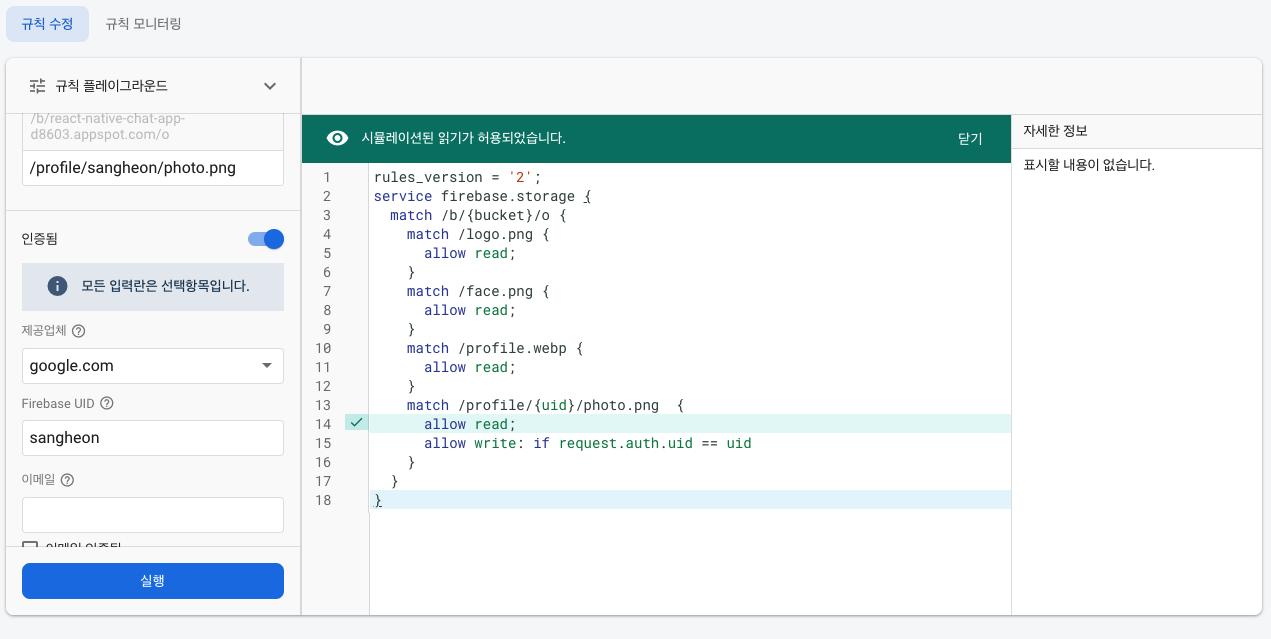
-
회원가입 함수 코드
한번에는 이해가 안가니 천천히 살펴보자
// src/firebase.tsx
import { initializeApp } from 'firebase/app';
import config from '../firebase.json';
import {
  getAuth,
  signInWithEmailAndPassword,
  createUserWithEmailAndPassword,
  updateProfile,
  signOut,
} from 'firebase/auth';
import { getDownloadURL, getStorage, ref, uploadBytes } from 'firebase/storage';

const app = initializeApp(config);

const Auth = getAuth(app);

export const signin = async ({
  email,
  password,
}: {
  email: string;
  password: string;
}) => {
  const { user } = await signInWithEmailAndPassword(Auth, email, password);
  return user;
};

// ⭐️⭐️⭐️⭐️ profile용 이미지 업로드 함수
const uploadImage = async (uri: string) => {
  if (uri.startsWith('https')) {
    return uri;
  }

  const response = await fetch(uri);
  const blob = await response.blob();

  // const { uid } = Auth.currentUser;
  const storage = getStorage(app);
  const storageRef = ref(storage, `profile/${Auth.currentUser?.uid}/photo.png`);
  await uploadBytes(storageRef, blob, { contentType: 'image/png' });

  return await getDownloadURL(storageRef);
};

type signupType = {
  name: string;
  email: string;
  password: string;
  photo: string;
};

// ⭐️⭐️⭐️⭐️ 회원가입 함수
export const signup = async ({ name, email, password, photo }: signupType) => {
  const { user } = await createUserWithEmailAndPassword(Auth, email, password);
  const photoURL = await uploadImage(photo);
  // await updateProfile(Auth.currentUser, { displayName: name, photoURL });
  // 회원가입 후 name과 프로필 이미지 업데이트
  await updateProfile(user, { displayName: name, photoURL });
  return user;
};
- 회원가입 작성 내용 유효성 검사
// src/screens/signup.tsx
import React, { useState, useRef, useEffect } from 'react';
import styled from 'styled-components/native';
import { themeType } from '../theme';
import { Button, Image, Input, ErrorMessage } from '../components';
import { useSafeAreaInsets } from 'react-native-safe-area-context';
import { TextInput, Alert } from 'react-native';
import { KeyboardAwareScrollView } from 'react-native-keyboard-aware-scroll-view';
import { signup } from '../firebase';
import { StackNavigationProp } from '@react-navigation/stack';
import { AuthStackParamList } from '../navigations/Auth';
import { validateEmail, removeWhitespace } from '../utils';

... 생략

const Signup = ({ navigation }: Props) => {
  const insets = useSafeAreaInsets();

  const [name, setName] = useState('');
  const [email, setEmail] = useState('');
  const [password, setPassword] = useState('');
  const [passwordConfirm, setPasswordConfirm] = useState('');
  const [errorMessage, setErrorMessage] = useState('');
  const [disabled, setDisabled] = useState(true);

  const refEmail = useRef<TextInput | null>(null);
  const refPassword = useRef<TextInput | null>(null);
  const refPasswordConfirm = useRef<TextInput | null>(null);

  const [photo, setPhoto] = useState(DEFAULT_Photo);

  // ⭐️⭐️⭐️⭐️
  useEffect(() => {
    setDisabled(
      !(name && email && password && passwordConfirm && !errorMessage),
    );
  }, [name, email, password, passwordConfirm, errorMessage]);

  // ⭐️⭐️⭐️⭐️
  useEffect(() => {
    let error: string = '';
    if (!name) {
      error = 'Please enter your name';
    } else if (!email) {
      error = 'Please enter your email';
    } else if (!validateEmail(email)) {
      error = 'Please verify your email';
    } else if (password.length < 6) {
      error = 'The password must contain 6 characters at least';
    } else if (password !== passwordConfirm) {
      error = 'The password need to match';
    } else {
      error = '';
    }
    setErrorMessage(error);
  }, [name, email, password, passwordConfirm]);

  // ⭐️⭐️⭐️⭐️
  const _handleSingupBtnPress = () => {
    try {
      const user = signup({ name, email, password, photo });
      navigation.navigate('Profile', { user });
    } catch (e) {
      Alert.alert('Signup Error');
    }
    // console.log('signup');
  };

  return (
    <KeyboardAwareScrollView extraScrollHeight={20} enableOnAndroid={true}>
      <Conatiner insets={insets}>
        <Image showButton={true} url={photo} onChanePhoto={setPhoto} />
        <Input
          label="Name"
          value={name}
          placeholder="Name"
          onChangeText={setName}
          returnKeyType="next"
          maxLength={20}
          textContentType="none"
          onSubmitEditing={() => refEmail.current?.focus()}
          onBlur={() => setName(name.trim())} // ⭐️⭐️⭐️⭐️ 공백 방지
        />
        <Input
          ref={refEmail}
          label="Email"
          value={email}
          placeholder="Email"
          onChangeText={setEmail}
          returnKeyType="next"
          maxLength={20}
          textContentType="none"
          onSubmitEditing={() => refPassword.current?.focus()}
          onBlur={() => setEmail(removeWhitespace(email))} // ⭐️⭐️⭐️⭐️공백 방지
        />
        <Input
          ref={refPassword}
          label="Password"
          value={password}
          placeholder="Password"
          onChangeText={setPassword}
          returnKeyType="next"
          maxLength={20}
          textContentType="none"
          isPassword={true}
          onSubmitEditing={() => refPasswordConfirm.current?.focus()}
          onBlur={() => setPassword(removeWhitespace(password))} // ⭐️⭐️⭐️⭐️ 공백 방지
        />
        <Input
          ref={refPasswordConfirm}
          label="Password Confirm"
          value={passwordConfirm}
          placeholder="Password"
          onChangeText={setPasswordConfirm}
          returnKeyType="done"
          maxLength={20}
          textContentType="none"
          isPassword={true}
          onSubmitEditing={_handleSingupBtnPress}
          onBlur={() => setPasswordConfirm(removeWhitespace(passwordConfirm))} // ⭐️⭐️⭐️⭐️ 공백 방지
        />
        <ErrorMessage message={errorMessage} />
        <Button
          title="Sign up"
          onPress={_handleSingupBtnPress}
          disabled={disabled}
        />
      </Conatiner>
    </KeyboardAwareScrollView>
  );
};

export default Signup;
