cmdlet
cmdlet은 Powershell에서 명령을 실행하기 위한 동사-명사로 표현되는 명령어이다. cmdlet은 .net framework로 개발된 명령어이며 .net framework의 클래스 인스턴스로 System.Management.Automation.Cmdlet, System.Management.Automation.PSCmdlet 클래스에서 파생한다.
Powershell에서 다음 명령어를 실행하면 기본 제공되는 cmdlet을 확인할 수 있다.
Get-Command -CommandType CmdletPowershell에서 CmdletBinding 특성을 사용하면 이런 cmdlet 기능을 상속하여 고급 기능으로 작성할 수 있다.
CmdletBinding 특성
다음은 CmdletBinding 특성에서 사용할 수 있는 구문이다.
{
    [CmdletBinding(ConfirmImpact=<String>,
    DefaultParameterSetName=<String>,
    HelpURI=<URI>,
    SupportsPaging=<Boolean>,
    SupportsShouldProcess=<Boolean>,
    PositionalBinding=<Boolean>)]

    Param ($myparam)
    Begin{}
    Process{}
    End{}
}
단순히 CmdletBinding 특성을 사용하면 cmdlet 기능 및 매개변수에 액세스할 수 있다.
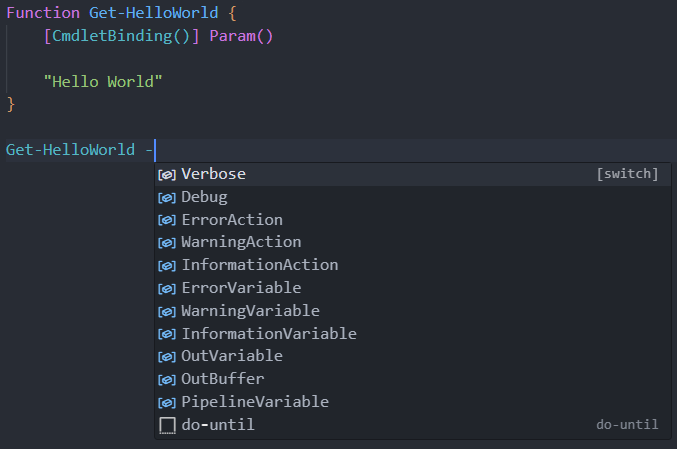
예를들어 verbose 매개변수를 사용하면 다음과 같다.
verbose, Debug, ErrorAction 등의 매개변수 사용은 기본 설정 변수인 $VerbosePreference, $DebugPreference등의 설정이 SilentlyContinue로 설정되어 있어야 한다. 기본 설정 변수의 설정이 Continue인 경우 매개변수와 상관없이 동작한다.
Function Get-HelloWorld {
    [CmdletBinding()] Param()

    Write-Verbose "Write verbose using verbose parameter"
    "Hello World"
}
Get-HelloWorld

## Print
## Hello World

Get-HelloWorld -Verbose
## Output
## 자세한 정보 표시: Write verbose using verbose parameter
## Hello World
CmdletBinding 특성 사용
ShouldContinue 메서드
이 메서드를 사용하면 사용자에게 확인 요청을 할 수 있다.
Function Get-HelloWorld {
    [CmdletBinding(SupportsShouldProcess=$true)] Param()

    Write-Verbose "Write verbose using verbose parameter"

    if($PSCmdlet.ShouldContinue("Continue?", "ShouldContinue"))
    {
        "Hello World with ShouldContinue"
    }
    else
    {
        "Hello World"
    }

}

Get-HelloWorld -Verbose

## Output
## 자세한 정보 표시: Write verbose using verbose parameter

## ShouldContinue
## Continue?
## [Y] 예(Y)  [N] 아니요(N)  [S] 일시 중단(S)  [?] 도움말 (기본값은 "Y"):