문제
| 문제 | 레벨 | 정답률 |
|---|---|---|
| 숫자 문자열과 영단어 | Lv.1 | 71% |
My Code
import java.util.*;

class Solution {
    public int solution(String s) {
        HashMap<String, Integer> hashMap = new HashMap<>();
        String result = "";

        hashMap.put("zero", 0);
        hashMap.put("one", 1);
        hashMap.put("two", 2);
        hashMap.put("three", 3);
        hashMap.put("four", 4);
        hashMap.put("five", 5);
        hashMap.put("six", 6);
        hashMap.put("seven", 7);
        hashMap.put("eight", 8);
        hashMap.put("nine", 9);

        String str = "";
        for(int i = 0; i<s.length(); i++){
            if(Character.isDigit(s.charAt(i))){
                result+=s.charAt(i);
            } else{
                str += s.charAt(i);
                if(hashMap.containsKey(str)){
                    result += hashMap.get(str);
                    str = "";
                }
            }

        }

        return Integer.parseInt(result);
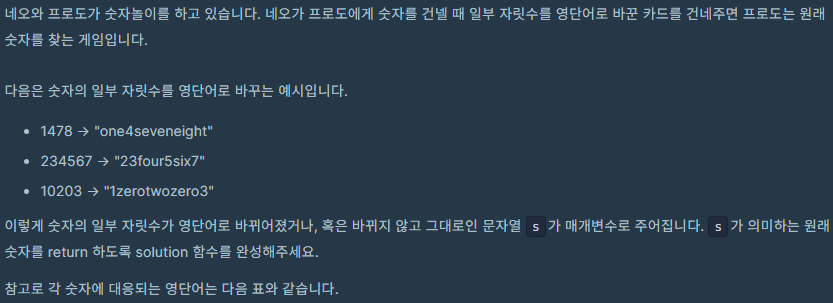
- 키와 값 쌍으로 저장하기 위해 HashMap 사용
- s 문자열에서 한글자씩 읽어오면서 숫자인지 판별
- 숫자라면 result에 그대로 추가 / 아니라면 str이라는 문자열에 추가
- 현재까지의 str이 hashMap에 저장되어 있는 키인지 여부 확인 -> 있으면 value인 숫자로 바꿔서 result에 추가
- result 숫자형식으로 바꿔서 return
최적화 코드
import java.util.*;

class Solution {
    public int solution(String s) {
        // 숫자 단어와 대응하는 정수를 저장할 HashMap 생성
        HashMap<String, Integer> hashMap = new HashMap<>();

        hashMap.put("zero", 0);
        hashMap.put("one", 1);
        hashMap.put("two", 2);
        hashMap.put("three", 3);
        hashMap.put("four", 4);
        hashMap.put("five", 5);
        hashMap.put("six", 6);
        hashMap.put("seven", 7);
        hashMap.put("eight", 8);
        hashMap.put("nine", 9);

        StringBuilder result = new StringBuilder();
        StringBuilder str = new StringBuilder();

        // 입력 문자열을 한 글자씩 확인
        for(int i = 0; i < s.length(); i++){
            char ch = s.charAt(i);
            // 숫자 문자는 그대로 결과 문자열에 추가
            if(Character.isDigit(ch)){
                result.append(ch);
            } else {
                // 숫자 단어를 완성하기 위해 문자 추가
                str.append(ch);
                // HashMap에 숫자 단어가 있는 경우 결과 문자열에 숫자로 추가
                if(hashMap.containsKey(str.toString())){
                    result.append(hashMap.get(str.toString()));
                    str.setLength(0); // str 초기화
                }
            }
        }

        // 결과 문자열을 정수로 변환하여 반환
        return Integer.parseInt(result.toString());
    }
}
- String 문자열 대신 StringBuilder 사용 -> 속도 개선
- str 초기화: setLength(0) 사용해서 불필요한 객체 생성 x
추가풀이
class Solution {
    public int solution(String s) {
        String[] strArr = {"zero", "one", "two", "three", "four", "five", "six", "seven", "eight", "nine"};
        for(int i = 0; i < strArr.length; i++) {
            s = s.replaceAll(strArr[i], Integer.toString(i));
        }
        return Integer.parseInt(s);
    }
}
replaceAll()
String replaceAll(String regex, String replacement)
문자열에서 특정 패턴을 찾아 다른 문자열로 대체하는 기능 제공
String 클래스에 포함
-> 형변환 뿐만 뿐만 아니라 일치하는 모든 내용을 변경
public class ReplaceAllExample {
    public static void main(String[] args) {
        String s = "one two three";
        String[] strArr = {"zero", "one", "two", "three", "four"};

        for (int i = 0; i < strArr.length; i++) {
            s = s.replaceAll(strArr[i], Integer.toString(i));
        }

        System.out.println(s); // "1 2 3"
    }
}
Developer's Logbook