
문제
| 문제 | 레벨 | 정답률 |
|---|---|---|
| 할인행사 | Lv.2 | 66% |
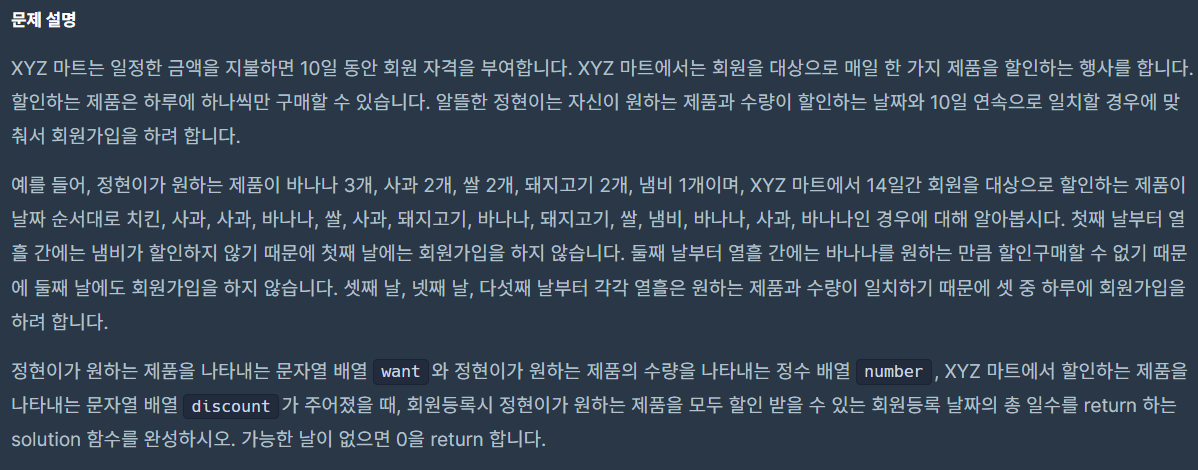
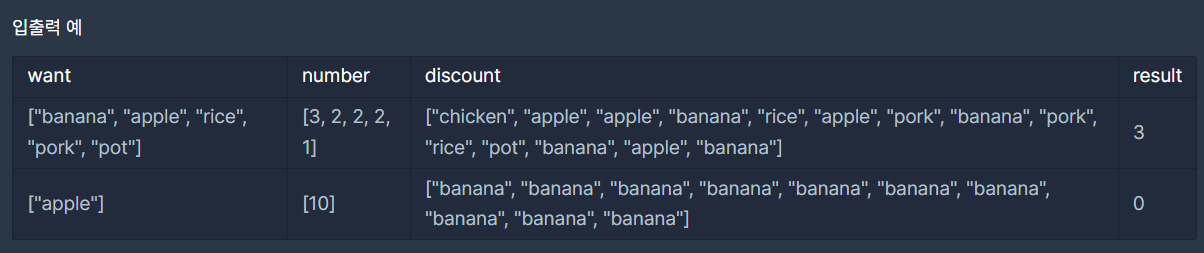
My Code
import java.util.*;

class Solution {
    public int solution(String[] want, int[] number, String[] discount) {
        int result = 0;

        Map<String, Integer> wantMap = new HashMap<>();
        for(int i = 0; i<want.length; i++){
            wantMap.put(want[i], number[i]);
        }

        for(int i = 0; i < discount.length - 10 + 1; i++){
            Map<String, Integer> discountMap = new HashMap<>();

            for(int j = i; j < i + 10;j++){
                int num = discountMap.getOrDefault(discount[j], 0);
                discountMap.put(discount[j], ++num);
            }

            int cnt = 0;
            for(int j = 0; j<wantMap.size(); j++){
                String str = want[j];

                if(wantMap.containsKey(str) && discountMap.containsKey(str) &&
                   wantMap.get(str) <= discountMap.get(str)){
                    cnt++;
                }
            }

            if(cnt == want.length){
                result++;
            }
        }

        return result;
    }
}- key/value 맵에 저장
- 10개씩 잘라서 각 제품 개수 count
- 일치 여부 확인
-
wantMap이라는 Map에 want, number 배열 저장
-
10개씩 잘라서 for문 돌기
-
discountMap이라는 Map에 10개의 discount 정보 저장
이미 존재하는 key라면 value++ -
wantMap과 discountMap에 want 배열의 값이 존재하고, 개수가 discountMap이 더 크거나 같을 경우 cnt++
-
결과적으로 cnt와 want의 길이가 같으면 result++
🍃 getOrDefault()
지정 키에 대한 값을 가져오되, 키가 맵에 존재하지 않으면 기본값 반환
=> null 반환을 막기 위해 사용
최적화 코드
import java.util.*;

class Solution {
    public int solution(String[] want, int[] number, String[] discount) {
        int result = 0;

        // 원하는 제품과 필요한 수량을 맵에 저장
        Map<String, Integer> wantMap = new HashMap<>();
        for (int i = 0; i < want.length; i++) {
            wantMap.put(want[i], number[i]);
        }

        // 첫 번째 10일 간의 할인 목록을 맵에 저장
        Map<String, Integer> discountMap = new HashMap<>();
        for (int i = 0; i < 10; i++) {
            discountMap.put(discount[i], discountMap.getOrDefault(discount[i], 0) + 1);
        }

        // 첫 번째 10일간의 할인 목록이 원하는 것과 일치하는지 확인
        if (matches(wantMap, discountMap)) {
            result++;
        }

        // 슬라이딩 윈도우 기법 사용
        for (int i = 10; i < discount.length; i++) {
            // 윈도우의 첫 번째 아이템 제거
            String toRemove = discount[i - 10];
            discountMap.put(toRemove, discountMap.get(toRemove) - 1);
            if (discountMap.get(toRemove) == 0) {
                discountMap.remove(toRemove);
            }

            // 윈도우의 마지막에 새 아이템 추가
            String toAdd = discount[i];
            discountMap.put(toAdd, discountMap.getOrDefault(toAdd, 0) + 1);

            // 현재 윈도우가 원하는 것과 일치하는지 확인
            if (matches(wantMap, discountMap)) {
                result++;
            }
        }

        return result;
    }

    // 두 맵이 일치하는지 확인하는 메서드
    private boolean matches(Map<String, Integer> wantMap, Map<String, Integer> discountMap) {
        for (String key : wantMap.keySet()) {
            if (discountMap.getOrDefault(key, 0) < wantMap.get(key)) {
                return false;
            }
        }
        return true;
    }
}
-> discountMap이 매번 새롭게 만들어지는 단점 보완
🍃 슬라이딩 윈도우 기법
배열/리스트 등의 선형 자료구조에서 일정 범위의 데이터를 효율적으로 처리하기 위해 사용되는 알고리즘 기법
[로직]
- 고정된 크기의 윈도우 설정
- 윈도우의 처음 위치에서 초기 계산
- 윈도우 이동 & 값 업데이트
- 왼쪽 끝 요소를 빼고, 오른쪽 끝에 요소를 새롭게 포함된 값을 더함
=> 전체 데이터를 다시 계산하지 x, 필요한 부분만 업데이트

Developer's Logbook