
📖 학습한 내용
- 프로젝트 : 사용자 맞춤형 키오스크
📖 핵심내용
📌 프로젝트 : 사용자 맞춤형 키오스크
데이터셋 구축
- 한국인 얼굴 합성을 위한 발화 모습 이미지
- https://www.aihub.or.kr/aihubdata/data/view.do?currMenu=115&topMenu=100&dataSetSn=71427
- EST 공유 데이터에 없는 놀람, 무표정, 혐오, 두려움의 감정표현이 담긴 얼굴을 이미지 데이터를 다운하여 사용
- 목표 : EST공유데이터(약 8,000개) + AIhub데이터(약 8,000개) + UTK(약 4,000개) 로 20,000개의 데이터셋 구축
- 사용 : 성별분류 모델, 나이분류 모델, 인종분류 모델, 감정분류 모델
최종 데이터셋 구성
-
감정 분류
(val)
Emotion Count: Counter({'surprise': 300, 'neutral': 300, 'fear': 300, 'disgust': 300, 'sad': 300, 'angry': 300, 'happy': 300})
Emotion Ratio: {'surprise': 0.14285714285714285, 'neutral': 0.14285714285714285, 'fear': 0.14285714285714285, 'disgust': 0.14285714285714285, 'sad': 0.14285714285714285, 'angry': 0.14285714285714285, 'happy': 0.14285714285714285}(train)
Emotion Count: Counter({'neutral': 1500, 'fear': 1500, 'disgust': 1500, 'sad': 1500, 'angry': 1500, 'surprise': 1499, 'happy': 1495})
Emotion Ratio: {'surprise': 0.14284352963598246, 'happy': 0.14246235944349153, 'neutral': 0.1429388221841052, 'fear': 0.1429388221841052, 'disgust': 0.1429388221841052, 'sad': 0.1429388221841052, 'angry': 0.1429388221841052}(test)
Emotion Count: Counter({'surprise': 300, 'neutral': 300, 'fear': 300, 'disgust': 300, 'happy': 300, 'sad': 300, 'angry': 300})
Emotion Ratio: {'surprise': 0.14285714285714285, 'neutral': 0.14285714285714285, 'fear': 0.14285714285714285, 'disgust': 0.14285714285714285, 'happy': 0.14285714285714285, 'sad': 0.14285714285714285, 'angry': 0.14285714285714285} -
성별 연령 인종 분류
(val)
Gender Count: Counter({'F': 1368, 'M': 1232})
Gender Ratio: {'M': 0.47384615384615386, 'F': 0.5261538461538462}Age Count: Counter({1: 1917, 2: 526, 0: 157})
Age Ratio: {2: 0.2023076923076923, 1: 0.7373076923076923, 0: 0.060384615384615384}Race Count: Counter({'oriental': 2183, 'other': 417})
Race Ratio: {'other': 0.16038461538461538, 'oriental': 0.8396153846153847}(train)
Gender Count: Counter({'F': 7086, 'M': 6008})
Gender Ratio: {'F': 0.5411638918588667, 'M': 0.45883610814113335}Age Count: Counter({1: 9514, 2: 2883, 0: 697})
Age Ratio: {0: 0.0532304872460669, 2: 0.22017718038796397, 1: 0.7265923323659691}Race Count: Counter({'oriental': 10928, 'other': 2166})
Race Ratio: {'other': 0.16541927600427678, 'oriental': 0.8345807239957233}(test)
Gender Count: Counter({'F': 1410, 'M': 1190})
Gender Ratio: {'M': 0.4576923076923077, 'F': 0.5423076923076923}Age Count: Counter({1: 1900, 2: 571, 0: 129})
Age Ratio: {0: 0.04961538461538462, 2: 0.21961538461538463, 1: 0.7307692307692307}Race Count: Counter({'oriental': 2184, 'other': 416})
Race Ratio: {'other': 0.16, 'oriental': 0.84}
Aihub에서 데이터를 다운 받아서 사용하기 위한 시도
- 압축해제
ubuntu로 분할 압축 파일을 zip파일로 만들었어도 손상되었다고 나옴.
별수 없이 분할압축파일 하나 풀고 필요한 것 이외는 지운 뒤, 다시 분할압축파일을 푸는 것을 반복하는 방식으로 진행. 시간이 오래걸리며 컴퓨터 용량도 많이 소모한다.
7-zip의 명령어 subprocess.run([seven_zip_path, 'x', part_file_path, f'-o{temp_extract_dir}', '-y'], stdout=subprocess.PIPE, stderr=subprocess.PIPE) 을 사용.
DDAMFN++ 파인튜닝
- 파인튜닝
데이터 셋이 완성되었으므로, 감정 분류모델을 파인 튜닝함.
(감정 매핑 작업)
class EmotionDataset(Dataset):
    def __init__(self, json_file, image_dir, transform=None):
        # JSON 파일 로드
        with open(json_file, 'r') as f:
            self.annotations = json.load(f)

        self.image_dir = image_dir
        self.transform = transform

        # 감정 라벨 맵핑
        self.emotion_mapping = {
            "neutral": 0,
            "happy": 1,
            "sad": 2,
            "surprise": 3,
            "fear": 4,
            "disgust": 5,
            "angry": 6
        }

model = DDAMNet(num_class=7, num_head=2, pretrained=True).to(device)

# 손실 함수와 옵티마이저 정의
criterion = nn.CrossEntropyLoss()
optimizer = optim.Adam(model.parameters(), lr=1e-4)

# 학습률 스케줄러 설정
scheduler = optim.lr_scheduler.StepLR(optimizer, step_size=5, gamma=0.1) - wandb
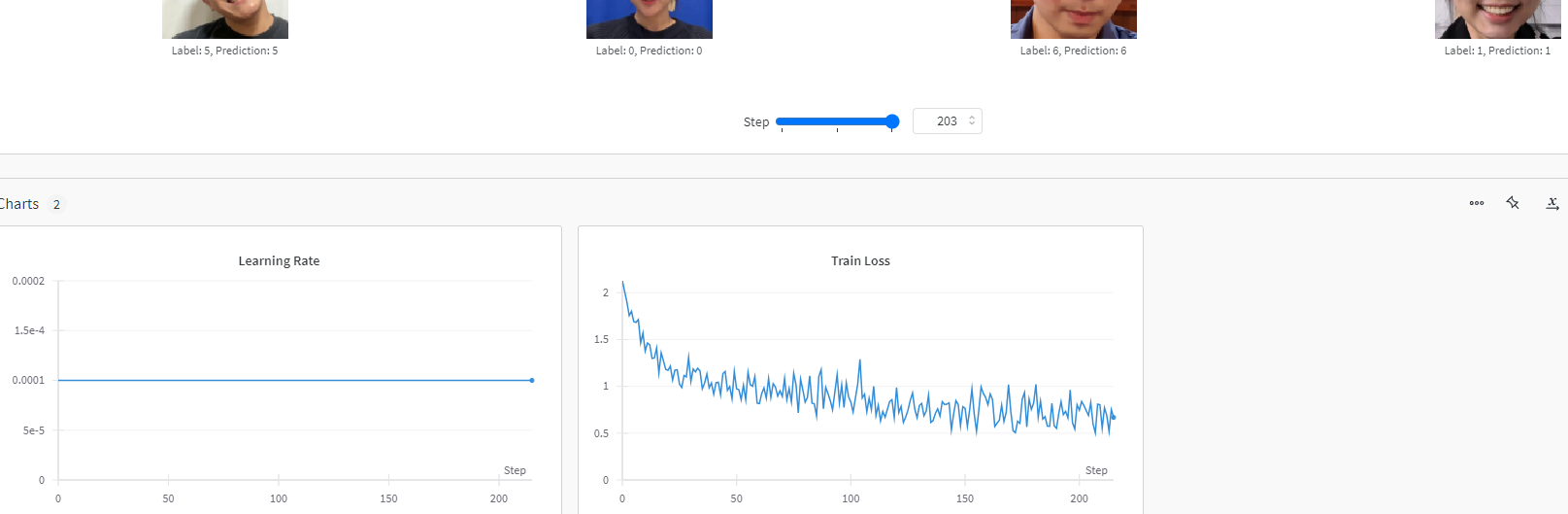
에폭 당 손실 출력
학습 손실 및 학습률 로깅
학습 중간에 이미지와 예측값 로깅
예측값과 정확도 계산
검증 성능 및 이미지와 예측 결과 로깅
Confusion Matrix 로깅
📖 흥미로운 점 / 새로 알게된 점
-
part1, part2.. 순서대로 있으면 subprocess.run()의 'e'를 사용하여서 원하는 목록만 압축해제 할 수 있다.
-
스케줄러
학습률 스케줄러(Learning Rate Scheduler)는 모델을 학습할 때 학습률(learning rate을 동적으로 조정해주는 기법 -
스케줄러 사용이유
효율적 학습: 초반에는 학습률을 크게 설정해 빠르게 수렴하도록 하다가, 학습이 진행됨에 따라 학습률을 점차 작게 줄여서 더 안정적인 수렴을 유도합니다.
오버슈팅 방지: 학습률이 계속 크다면 최적점을 지나쳐 버릴 수 있으므로, 학습을 마무리할 때 학습률을 줄여서 정확한 최적점을 찾습니다.
과적합 방지: 학습 후반부에서 학습률을 줄이면 과적합을 줄이는 데 도움이 됩니다.
scheduler = optim.lr_scheduler.StepLR(optimizer, step_size=5, gamma=0.1)- 런타임 종료시키기 os._exit(0)
모델 학습 및 작업이 모두 완료된 후 실행
코랩 런타임을 종료시켜서 컴퓨팅단위를 절약할 수 있다.
import os
print("작업이 완료되었습니다. 런타임을 해제합니다.")

os._exit(0)
📖 어려운 부분
- 압축해제하는데 정말 어려움이 많았다. 이래도안되고 저래도안되고 다방면으로 많이 해봤지만, 결국 오래걸리고 비효율적인 방법으로 하게되었다. 500기가의 데이터 크기도 문제였다. 용량이 너무 커서 원하는 것만 받고 싶었는데, 아무리해도 파일이 손상되었다고해서 원하는것만 받을 수는 없었다.
결국 압축파일 하나풀고 필요한것 남기고 지우는 방식으로 진행했다.
📖 이후 학습 계획
- streamlit 키오스크 백엔드
