react
useState
- 컴포넌트에서 보여줘야 하는 내용이 사용자 인터랙션에 따라 바뀌어야 할 때 useState 라는 함수를 사용해보게 되는데, 이게 바로 리액트의 Hooks 중 하나
리액트에서 엘리먼트에 이벤트를 설정해줄때에는 on이벤트이름={실행하고싶은함수} 형태로 설정해야 합니다.
여기서 주의하셔야 하는 점은, 함수형태를 넣어주어야 하지, 함수를 다음과 같이 실행하시면 안됩니다.
onClick={onIncrease()}이렇게 하면 렌더링되는 시점에서 함수가 호출되버리기 때문입니다. 이벤트를 설정할때에는 함수타입의 값을 넣어주어야 한다는 것, 주의해주세요.
- useState 사용하기
import React, { useState } from 'react';이 코드는 리액트 패키지에서 useState 라는 함수를 불러와줍니다.
useState 를 사용 할 때에는 상태의 기본값을 파라미터로 넣어서 호출해줍니다. 이 함수를 호출해주면 배열이 반환되는데요, 여기서 첫번째 원소는 현재 상태, 두번째 원소는 Setter 함수입니다.
배열 비구조화 할당을 통하여 각 원소를 추출해줍니다
  const onIncrease = () => {
    setNumber(number + 1);
  }

  const onDecrease = () => {
    setNumber(number - 1);
  }
Setter & Getter
객체 안에 'Getter' 함수와 'Setter' 함수를 설정할 수 있다.
'Getter' 함수는 함수 앞에 get이라는 키워드를, 'Setter' 함수는 함수 앞에 set이라는 키워드를 붙여 선언한다.
Getter
Getter 함수는 특정 값을 조회하려고 할 때 사용한다. get 함수 안의 특정 코드를 실행하고 연산된 값을 받아 리턴을 하는 형식이다. Getter 함수는 리턴이 반드시 있어야 한다.
const numbers = {
  a: 1,
  b: 2,
  get sum() {
    return this.a + this.b;
  }
};

console.log(numbers.sum);//3
numbers.b = 5;
console.log(numbers.sum);//6
다음과 같이 return 되는 값이 변하는 것을 알 수 있다.
Setter
Setter 함수는 set이라는 키워드를 붙여 함수를 선언한다.
Setter함수는 파라미터(매개변수)로 무조건 어떤 값을 설정해 주어야 한다.
const dog = {
  _name: "멍멍이",
  set name(value) {
    this._name = value;
  }
};

console.log(dog._name);//멍멍이
dog._name = "뭉뭉이";
console.log(dog._name);//뭉뭉이
다음과 같이 사용할 수 있다. Setter 함수는 파라미터를 설정해 주어야 한다.
똑같은 이름의 Getter 함수와 Setter 함수를 넣어줄 수 있다.
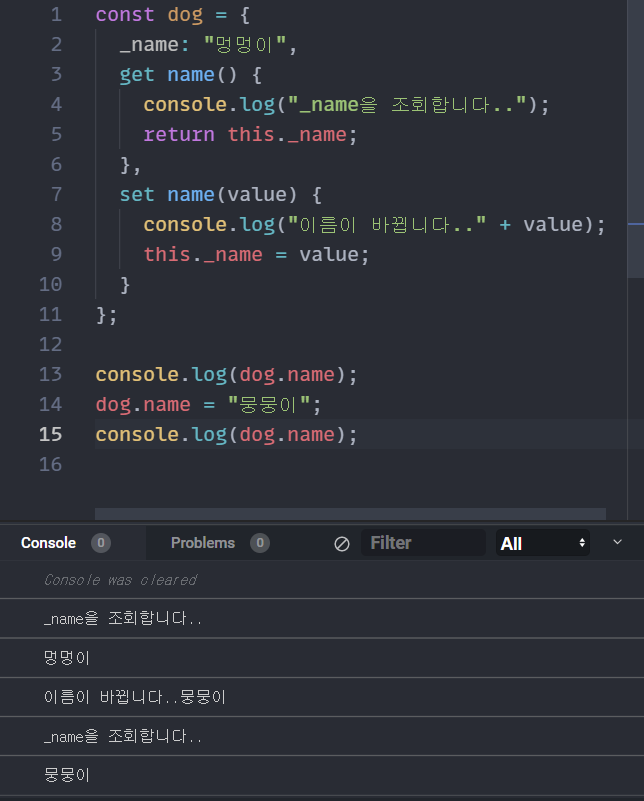
Getter 함수는 특정값을 조회할 때 마다 함수를 호출하는 것이고,
Setter 함수는 특정값을 설정할 때마다 파라미터로 받아와 설정할 수 있고 추가적으로 코드를 실행할 수 있다.
Getter 함수와 Setter 함수를 알아둔다면 나중에 효율적으로 코드를 작성할 수 있을 것이다.
구조분해할당
Q. Why does the people doing 'Destructuring assignment' in Javascript?
A. Destructuring assignment is a feature in JavaScript that allows you to extract values from arrays or objects and assign them to variables in a more concise and readable way. It can make your code more expressive and easier to understand, especially when dealing with complex data structures.
(구조분해할당은 배열 또는 개체에서 값을 추출하여 보다 간결하고 읽기 쉬운 방법으로 변수에 할당할 수 있는 Javascript의 기능이다. 특히 복잡한 데이터 구조를 다룰 때 코드를 더욱 이해하기 쉽고, 표현하기 쉽게 만든다.)
One of the main benefits of destructuring assignment is that it reduces the amount of boilerplate code you need to write. Instead of manually assigning each value from an array or object to a separate variable, you can use destructuring assignment to do it all in one line. This can help make your code more readable and less error-prone.
(구조분해할당의 주요 이점 중 하나는 작성해야하는 보일러 플레이트 코드의 양을 줄일 수 있다는 것이다. 배열 또는 객체의 값을 개별 변수에 수동으로 할당하는 대신, 구조분해할당을 이용하여 모든 작업을 한 줄로 수행할 수 있다. 이를 통해 코드를 보다 쉽게 읽을 수 있고 오류 발생률을 줄일 수 있다.)
For example, consider the following object:
const person = {
  name: 'John',
  age: 30,
  occupation: 'Engineer'
};
If you want to extract the name and age properties and assign them to variables, you could do it like this:
const name = person.name;
const age = person.age;
With destructuring assignment, you can do it more concisely:
const { name, age } = person;This assigns the values of person.name and person.age to the variables name and age, respectively.
(person.name가 -> name으로, person.age가 age로 할당된다)
Destructuring assignment can also be used with arrays, and can even be nested to extract values from nested objects or arrays. Overall, it's a powerful and convenient feature in JavaScript that can make your code more concise and expressive.
(구조분해할당은 배열과 함께 사용할 수도 있으며 중첩된 개체 또는 배열에서 값을 추출하기 위해 중첩될 수도 있다. 전체적으로 이것은 Javascript의 강력하고 편리한 기능으로 코드를 보다 간결하고 표현력 있게 만든다)
구조분해할당(비구조화할당)을 사용하면, 객체 안에 있는 값을 추출하여 변수 혹은 상수로 바로 선언해 줄 수 있음
chatGPT & 파파고 감사
const object = { a: 1, b: 2 };

const { a, b } = object;

console.log(a); // 1
console.log(b); // 2
이렇게만 하면 미래의 내가 이해가 안갈 것 같아서 적는 추가글
객체 안에
key : value 형태로 값이 들어가 있는데,
이거를 이제 변수로 key를 객체명으로 선언을 하면
저렇게 구조분해가 가능하다~
함수의 파라미터에서도 구조분해할당
const object = { a: 1, b: 2 };

function print({ a, b }) {
  console.log(a);
  console.log(b);
}

print(object);
//1
//2
그런데 여기서 만약 b 값이 주어지지 않았다고 가정해봅시다.
const object = { a: 1 };

function print({ a, b }) {
  console.log(a);
  console.log(b);
}

print(object);
// 1
// undefined
두번째 출력에서 undefined가 나타날 것.
이러한 상황에 b 값에 기본 값을 주고 싶다면
function print({ a, b = 2 }) {
  console.log(a);
  console.log(b);
}
함수 선언 할 때 매개변수로 할당해버리기
const object = { a: 1 };

const { a, b = 2 } = object;

console.log(a); // 1
console.log(b); // 2
함수형태 말고도 구조분해에서도 이렇게 해줄 수 있다는거~
구조분해할당을 하는 과정에서 선언할 값의 이름을 바꾸는 방법
const animal = {
  name: '멍멍이',
  type: '개'
};

const nickname = animal.name;

console.log(nickname); // 멍멍이
위 코드에서는 animal.name 값을 nickname 값에 담고 있는데요, 이름이 같다면 그냥 우리가 이전에 배웠던 대로 비구조화 할당을 쓰면 되는데 지금은 이름이 서로 다릅니다.
const animal = {
  name: '멍멍이',
  type: '개'
};

const { name: nickname } = animal
console.log(nickname);
위 코드는 'animal 객체 안에 있는 name 을 nickname 이라고 선언하겠다.' 라는 의미입니다.
이건 아직 쓸모를 모르겠다
리액트의 Hooks
React 공식문서 / Hook 설명 - React 공식
Hook을 이용하여 기존 Class 바탕의 코드를 작성할 필요 없이 상태값과 여러 React의 기능을 사용할 수 있다.
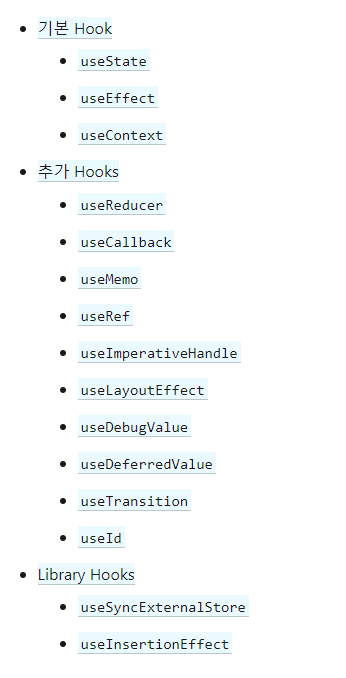
커스텀도 가능