ORACLE 19.27 RAC 설치 가이드 - OS
OS 환경 : Oracle Linux 7.9
설치 목적 : Oracle 19.27 RAC 설치
방법 : Oracle DBMS설치를 위한 OEL7.9 환경 구성
본문에서는 vsphere 서버에 Oracle RAC 설치를 위한 OS 기초 환경 구성 방법을 설명함.
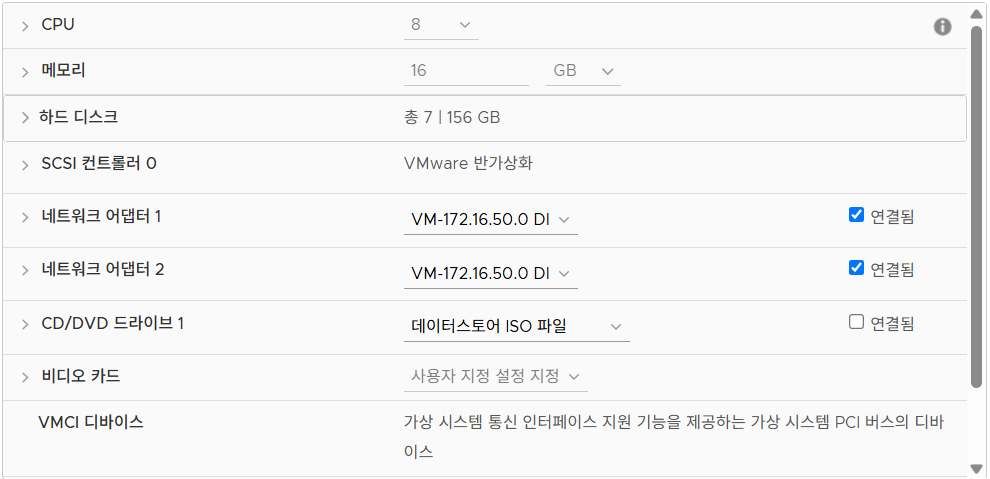
물리 장치 설정
- network adapter (2개)
- public
- private
- HHD
    - main		: 100 GB
    - OCR_VOTE	: 2 GB * 3
    - DATA		: 30 GB
    - ARCH		: 10 GB
- ACFS : 10 GB- 메모리 (8GB 이상)
디스크 파티션 설정
- /boot : 1024 MIB
- swap 	: 8 GIB
- / 	: 91 GIB
OS 환경 설정
시스템 정리
사용하지 않는 시스템 메모리 사용량을 위해 정리
[root@RAC1 ~]# systemctl stop bluetooth
[root@RAC1 ~]# systemctl disable bluetooth
Removed symlink /etc/systemd/system/dbus-org.bluez.service.
Removed symlink /etc/systemd/system/bluetooth.target.wants/bluetooth.service.

[root@RAC1 ~]# systemctl stop firewalld
[root@RAC1 ~]# systemctl disable firewalld
Removed symlink /etc/systemd/system/multi-user.target.wants/firewalld.service.
Removed symlink /etc/systemd/system/dbus-org.fedoraproject.FirewallD1.service.

[root@RAC1 ~]# systemctl stop ntpdate
[root@RAC1 ~]# systemctl disable ntpdate
[root@RAC1 ~]# systemctl stop avahi-daemon
Warning: Stopping avahi-daemon.service, but it can still be activated by:
  avahi-daemon.socket

[root@RAC1 ~]# systemctl disable avahi-daemon
Removed symlink /etc/systemd/system/multi-user.target.wants/avahi-daemon.service.
Removed symlink /etc/systemd/system/sockets.target.wants/avahi-daemon.socket.
Removed symlink /etc/systemd/system/dbus-org.freedesktop.Avahi.service.

[root@RAC1 ~]# systemctl stop avahi-daemon.socket
[root@RAC1 ~]# systemctl disable avahi-daemon.socket

[root@RAC1 ~]# systemctl stop libvirtd
[root@RAC1 ~]# systemctl disable libvirtd
Removed symlink /etc/systemd/system/multi-user.target.wants/libvirtd.service.
Removed symlink /etc/systemd/system/sockets.target.wants/virtlogd.socket.
Removed symlink /etc/systemd/system/sockets.target.wants/virtlockd.socket.
-
avahi-daemon
-
libvirtd
virtualization platforms을 관리하기 위한 도구
SWAP 설정
swap을 마운트 해서 쓸 필요가 없다.
[root@RAC1 ~]# cat /etc/fstab

#
# /etc/fstab
# Created by anaconda on Thu Jun 19 10:19:36 2025
#
# Accessible filesystems, by reference, are maintained under '/dev/disk'
# See man pages fstab(5), findfs(8), mount(8) and/or blkid(8) for more info
#
/dev/mapper/ol-root     /                       xfs     defaults        0 0
UUID=0bbdbdba-03ed-4bb3-b50d-3e92a73516f9 /boot                   xfs     defaults        0 0
#/dev/mapper/ol-swap     swap                    swap    defaults        0 0
/dev/mapper/ol-swap     none                    swap    sw              0 0

[디바이스 정보] [마운트 지점] [파일 시스템 타입] [마운트 옵션] [dump 여부 설정] [파일 시스템 검사 순서] - dump 여부 설정
0 : 백업 X
1 : dump 명령어로 백업 가능 - 파일 시스템 검사 순서
0 : 검사하지 않음
[root@RAC1 ~]# free -m
              total        used        free      shared  buff/cache   available
Mem:          16004         530       15098          13         374       15179
Swap:          8191           0        8191
/etc/hosts 설정
[root@RAC1 ~]# cat /etc/hosts
127.0.0.1   localhost localhost.localdomain localhost4 localhost4.localdomain4
::1         localhost localhost.localdomain localhost6 localhost6.localdomain6


#public
172.16.50.110   RAC1
172.16.50.111   RAC2
#private
172.16.50.110   RAC1-priv
172.17.50.111   RAC2-priv
#vip
172.16.50.112   RAC-vip
#scan-ip
172.16.50.113   RAC-scan
[root@RAC1 ~]# hostname
RAC1
Transparent HugePages 설정

오라클 권장 사항은 설치 전 해당 기능을 Disabled 시키는 것이다.
[root@RAC1 ~]# cat /etc/default/grub
GRUB_TIMEOUT=5
GRUB_DISTRIBUTOR="$(sed 's, release .*$,,g' /etc/system-release)"
GRUB_DEFAULT=saved
GRUB_DISABLE_SUBMENU=true
GRUB_TERMINAL_OUTPUT="console"
### 수정
GRUB_CMDLINE_LINUX="rd.lvm.lv=ol/root rd.lvm.lv=ol/swap rhgb quiet transparent_hugepage=never"
###
GRUB_DISABLE_RECOVERY="true"

###적용
[root@RAC1 ~]# grub2-mkconfig -o /boot/grub2/grub.cfg
Generating grub configuration file ...
Found linux image: /boot/vmlinuz-5.4.17-2102.201.3.el7uek.x86_64
Found initrd image: /boot/initramfs-5.4.17-2102.201.3.el7uek.x86_64.img
Found linux image: /boot/vmlinuz-3.10.0-1160.el7.x86_64
Found initrd image: /boot/initramfs-3.10.0-1160.el7.x86_64.img
Found linux image: /boot/vmlinuz-0-rescue-0fa3c6215fae4a1380718af1aedd5e5c
Found initrd image: /boot/initramfs-0-rescue-0fa3c6215fae4a1380718af1aedd5e5c.img
done

[root@RAC1 ~]# cat /sys/kernel/mm/transparent_hugepage/enabled
[always] madvise never
preinstall 수동 수행
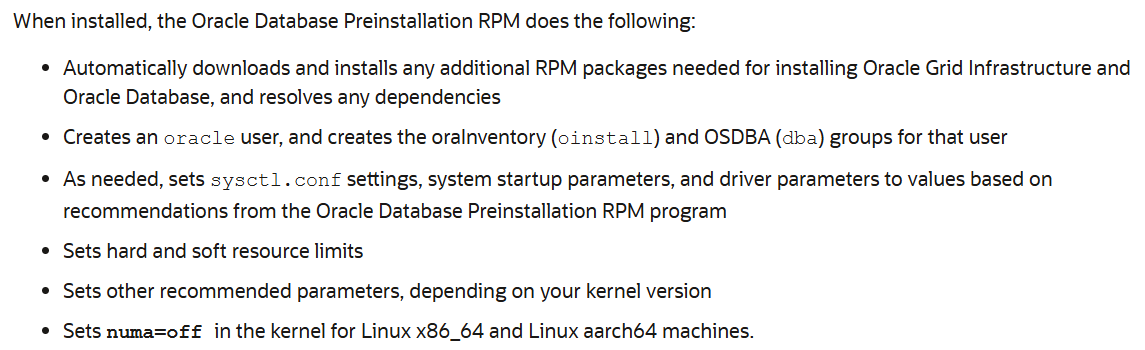
OS User, Group 생성
### 유저 / 그룹
[root@RAC1 ~]# groupadd oinstall
[root@RAC1 ~]# groupadd dba
[root@RAC1 ~]#
[root@RAC1 ~]# useradd -g oinstall -G dba oracle
[root@RAC1 ~]# useradd -g oinstall -G dba grid

### bash_profile
필수 패키지 설치
bc
binutils
compat-libcap1
compat-libstdc++-33
elfutils-libelf
elfutils-libelf-devel
fontconfig-devel
glibc
glibc-devel
ksh
libaio
libaio-devel
libXrender
libXrender-devel
libX11
libXau
libXi
libXtst
libgcc
libstdc++
libstdc++-devel
libxcb
make
policycoreutils
policycoreutils-python
smartmontools
sysstat

net-tools (for Oracle RAC and Oracle Clusterware)
nfs-utils (for Oracle ACFS)
python (for Oracle ACFS Remote)
python-configshell (for Oracle ACFS Remote)
python-rtslib (for Oracle ACFS Remote)
python-six (for Oracle ACFS Remote)
targetcli (for Oracle ACFS Remote)
sysctl 관리
[root@RAC1 ~]# cat /etc/sysctl.conf
# oracle-database-preinstall-19c setting for fs.file-max is 6815744
fs.file-max = 6815744

# oracle-database-preinstall-19c setting for kernel.sem is '250 32000 100 128'
kernel.sem = 250 32000 100 128

# oracle-database-preinstall-19c setting for kernel.shmmni is 4096
kernel.shmmni = 4096

# oracle-database-preinstall-19c setting for kernel.shmall is 1073741824 on x86_64
kernel.shmall = 1073741824

# oracle-database-preinstall-19c setting for kernel.shmmax is 4398046511104 on x86_64
kernel.shmmax = 4398046511104

# oracle-database-preinstall-19c setting for kernel.panic_on_oops is 1 per Orabug 19212317
kernel.panic_on_oops = 1

# oracle-database-preinstall-19c setting for net.core.rmem_default is 262144
net.core.rmem_default = 262144

# oracle-database-preinstall-19c setting for net.core.rmem_max is 4194304
net.core.rmem_max = 4194304

# oracle-database-preinstall-19c setting for net.core.wmem_default is 262144
net.core.wmem_default = 262144

# oracle-database-preinstall-19c setting for net.core.wmem_max is 1048576
net.core.wmem_max = 1048576

# oracle-database-preinstall-19c setting for net.ipv4.conf.all.rp_filter is 2
net.ipv4.conf.all.rp_filter = 2

# oracle-database-preinstall-19c setting for net.ipv4.conf.default.rp_filter is 2
net.ipv4.conf.default.rp_filter = 2

# oracle-database-preinstall-19c setting for fs.aio-max-nr is 1048576
fs.aio-max-nr = 1048576

# oracle-database-preinstall-19c setting for net.ipv4.ip_local_port_range is 9000 65500
net.ipv4.ip_local_port_range = 9000 65500
resource limit 설정
[root@RAC1 ~]# cat /etc/security/limits.conf

# oracle-database-preinstall-19c setting for nofile soft limit is 1024
oracle   soft   nofile    1024

# oracle-database-preinstall-19c setting for nofile hard limit is 65536
oracle   hard   nofile    65536

# oracle-database-preinstall-19c setting for nproc soft limit is 16384
# refer orabug15971421 for more info.
oracle   soft   nproc    16384

# oracle-database-preinstall-19c setting for nproc hard limit is 16384
oracle   hard   nproc    16384

# oracle-database-preinstall-19c setting for stack soft limit is 10240KB
oracle   soft   stack    10240

# oracle-database-preinstall-19c setting for stack hard limit is 32768KB
oracle   hard   stack    32768

# oracle-database-preinstall-19c setting for memlock hard limit is maximum of 128GB on x86_64 or 3GB on x86 OR 90 % of RAM
oracle   hard   memlock    134217728

# oracle-database-preinstall-19c setting for memlock soft limit is maximum of 128GB on x86_64 or 3GB on x86 OR 90% of RAM
oracle   soft   memlock    134217728

# oracle-database-preinstall-19c setting for data soft limit is 'unlimited'
oracle   soft   data    unlimited

# oracle-database-preinstall-19c setting for data hard limit is 'unlimited'
oracle   hard   data    unlimited


grid   soft   nofile    1024
grid   hard   nofile    65536
grid   soft   nproc    16384
grid   hard   nproc    16384
grid   soft   stack    10240
grid   hard   stack    32768
grid   hard   memlock    134217728
grid   soft   memlock    134217728
numa(Non-Uniform Memory Access) off 설정
[root@RAC1 ~]# cat /etc/default/grub
GRUB_TIMEOUT=5
GRUB_DISTRIBUTOR="$(sed 's, release .*$,,g' /etc/system-release)"
GRUB_DEFAULT=saved
GRUB_DISABLE_SUBMENU=true
GRUB_TERMINAL_OUTPUT="console"
### 수정
GRUB_CMDLINE_LINUX="rd.lvm.lv=ol/root rd.lvm.lv=ol/swap rhgb quiet transparent_hugepage=never"
###
GRUB_DISABLE_RECOVERY="true"

###적용
[root@RAC1 ~]# grub2-mkconfig -o /boot/grub2/grub.cfg
Generating grub configuration file ...
Found linux image: /boot/vmlinuz-5.4.17-2102.201.3.el7uek.x86_64
Found initrd image: /boot/initramfs-5.4.17-2102.201.3.el7uek.x86_64.img
Found linux image: /boot/vmlinuz-3.10.0-1160.el7.x86_64
Found initrd image: /boot/initramfs-3.10.0-1160.el7.x86_64.img
Found linux image: /boot/vmlinuz-0-rescue-0fa3c6215fae4a1380718af1aedd5e5c
Found initrd image: /boot/initramfs-0-rescue-0fa3c6215fae4a1380718af1aedd5e5c.img
done

[root@RAC1 ~]# cat /sys/kernel/mm/transparent_hugepage/enabled
[always] madvise never