1. CSS 개요
- Cascading Style Sheets
- HTML 태그에 옷(=디자인)을 입혀주는 기법
- 문서 전체의 일관성을 유지할 수 있고, 세세한 스타일 지정의 필요를 줄여준다.
2. CSS 적용하기
(1) CSS 코드 위치
<style> </style>: 사이에 CSS코드 적용- CSS는 HTML 문서 내의 어느 위치에나 가능 , 일반적으로
<head>태그 안에
(2) 기본 셀렉터의 종류
- CSS에서 셀렉터를 작성하는 방법은 기본적으로 HTML의 태그이름, 클래스속성, id 속성에 대한 명시가 있다.
1) 태그이름
- selector{..CSS본문...}
- 특정 태그를 가리킨다. HTML 내에 동일 태그가 존재할 경우 모든 태그요소를 일괄처리한다.
div{width: 200px; height: 50px;}2) 클래스
- .selector{...CSS본문...}
- 셀렉터 이름 앞에 점(.)을 붙여 표시
.box2{background-color: powderblue;} 3) id
- #selector{..CSS본문..}
- 셀렉터 이름 앞에 (#)을 붙여 표시
#box1{background-color: tomato;}4) 조합형 셀렉터
- tag.class{..CSS속성..}
- tag#id{...CSS속성..}
💡 예시
<!DOCTYPE html>
<html lang="en">
<head>
    <meta charset="UTF-8">
    <meta http-equiv="X-UA-Compatible" content="IE=edge">
    <meta name="viewport" content="width=device-width, initial-scale=1.0">
    <title>Document</title>
    <style>
       div{width: 200px; height: 50px;}
       #box1{background-color: tomato;}
       .box2{background-color: powderblue;}
    </style>
</head>
<body>
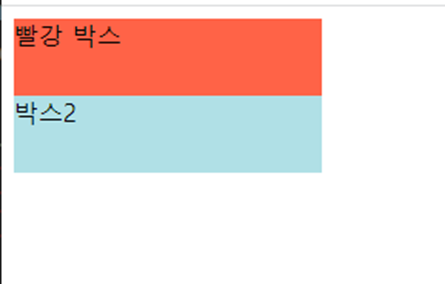
    <div id="box1">빨강 박스</div>
    <div class="box2">박스2</div>
</body>
</html>
🕜 결과
(3) link와 import
- 외부 파일 불러오기
1) html 태그로 하는 법
<link rel="stylesheet" href="style.css">2) css로 style태그에서 하는 법
<style>
	@import url("style.css")
</style>
- import는 중첩으로 가능 style.css안에 임포트로 style2.css 가능- css파일은 네트워크 비용이 늘어나도 꼭 따로 만들것
💡 예시
<!DOCTYPE html>
<html lang="en">
<head>
    <meta charset="UTF-8">
    <meta http-equiv="X-UA-Compatible" content="IE=edge">
    <meta name="viewport" content="width=device-width, initial-scale=1.0">
    <title>Document</title>
    	<link rel="stylesheet" href="style.css"/>
    <style>
        @import url("style22.css");
    </style>
</head>
<body>
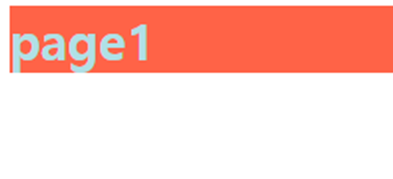
    <h1>page1</h1>
</body>
</html>
-> style.css
@charset "UTF-8";

h1{
    color: powderblue;
}
-> style22.css
h1{
    background-color: tomato;
}
🕜 결과
4. Bootstrap 사용
- bootstrap이라는 만들어져 있는 css파일을 추출해서 사용
- 링크로만 연결해도 됨
Bootstrap 사용법
- 부트스트랩 사이트에서 예시 보기 및 다운 가능
<head></head>사이에 다음 링크 연결
<link href="https://cdn.jsdelivr.net/npm/bootstrap@5.3.0-alpha1/dist/css/bootstrap.min.css" rel="stylesheet" integrity="sha384-GLhlTQ8iRABdZLl6O3oVMWSktQOp6b7In1Zl3/Jr59b6EGGoI1aFkw7cmDA6j6gD" crossorigin="anonymous">

출처 : https://getbootstrap.kr/</body>직전에 다음 링크 연결
<script src="https://cdn.jsdelivr.net/npm/bootstrap@5.3.0-alpha1/dist/js/bootstrap.bundle.min.js" integrity="sha384-w76AqPfDkMBDXo30jS1Sgez6pr3x5MlQ1ZAGC+nuZB+EYdgRZgiwxhTBTkF7CXvN" crossorigin="anonymous"></script>

출처 : https://getbootstrap.kr/- 사이트에서 원하는 코드 ```에 넣고 수정해서 사용

안녕하세요, 한보람입니다.