👍 자바스크립트 기본형식
- 선언문은 자바스크립트 코드를 작성할 영역을 선언하는 것이라고 이해하면 된다.
<script>~</script>스크립트 영역 <head>태그 영역 또는<body>태그 영역에 선언
head안에 삽입되는 경우 무거운 스크립트가 실행될 때
브라우저 화면 노출이 지연될 수 있다.
</body>앞에 삽입될 경우 브라우저 화면이 노출된 상태에서
스크립트가 실행되기 때문에 브라우저 지연이 적다.
✍ 실습하기 !
<!DOCTYPE html>
<html lang="ko">
<head>
	<meta charset="UTF-8">
    <meta http-equiv="X-UA-Compatible" content="IE=edge">
    <meta name="viewport" content="width=devicd-width, initial-scale=1.0">
    <title>글자색 바꾸기</title>
    <style>
    	<body>{text-align:center;}
        #heading{color: blue;}
        #text{color: gray;font-size: 15px}
    </style>
</head>
<body>
	<h1 id="heading">자바스크립트</h1>
    <p id="text">위 텍스트를 클릭해 보세요.</p>

    <script>
    	let heading = document.querySelector("#heading");
        heading.onclick = function(){
        	heading.style.color = 'red';
        }
	</script>
</body>
</html>
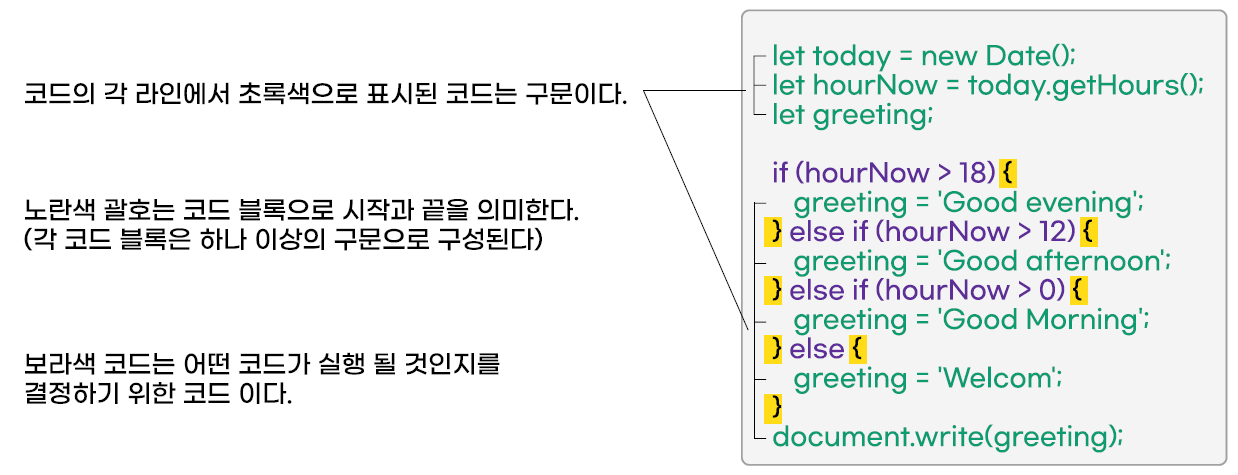
👉 구문(Statement)
- 스크립트는 컴퓨터가 단계별로 수행할 수 있는 일련의 명령이다. 이 중 각각의 명령이나 단계를 구문이라고 한다. 구문은 세미콜론(;)으로 끝나야 한다.
✍ 실습하기 !
<body>
    <script>
    	let age = prompt('당신의 나이는 ?')
        if(age >= 20){
        	document.write('당신은 성인입니다.');
        } else {
        	document.write('당신은 미성년자입니다.');
        }
	</script>
</body>
</html>
👉 기본 규칙
- 규칙 1 : 대소문자를 구별하여 소스를 작성한다.
- 규칙 2 : 읽기 쉽게 들여 쓰는 습관을 들인다.
- 규칙 3 : 세미콜론으로 문장을 구분한다.
- 규칙 4 : 메모를 하려면 주석을 사용한다.
- 규칙 5 : 식별자는 정해진 규칙을 지켜 작성한다.
- 식별자는 앞으로 공부할 변수, 함수, 속성 등을 구별하기 위한 단어임 - 규칙 6 : 예약어는 식별자로 사용할 수 없다.
- aruments, breake, case, continue, default, do, else, false, for, function, if, null, return, super, swich, this, true, try, typeof, void, while, with
👉 기본 명령어
| 분류 | 명령어 |
|---|---|
| 입력 | prompt('입력제목','입력내용') |
| 출력 - 웹브라우저 | document.write('출력내용') |
| 출력 - 알림 | alert('출력내용') |
| 출력 - 콘솔창 | console.log('출력내용') |
| 확인 | confirm('확인내용') |
✍ 실습하기 !
<body>
    <script>
    	prompt('출력 페이지 수를 입력하세요 !','0')
        alert('자바스크립트');
        document.write('자바스크립트');
        console.log('자바스크립트');
        confirm('정말로 삭제하시겠습니까?');
	</script>
</body>
</html>
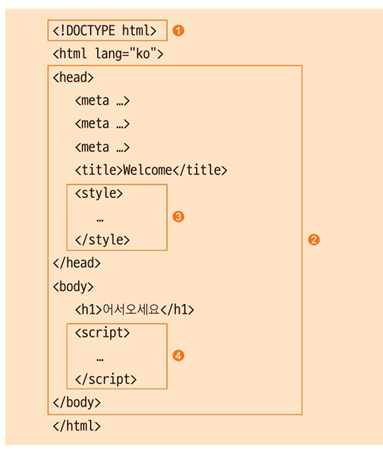
👉 자바스크립트 프로그램은 어떻게 실행될까요 ?
-
1번줄의 은 HTML 문서의 시작을 알리는 HTML 태그입니다.
크롬 브라우저는 바로 이 태그를 보고 여러분이 작성한 소스가 HTML 문서라는 사실을 알게 되죠.
따라서<html>태그 사이의 내용을 HTML 분석기로 HTML5 표준에 맞춰 해석하기 시작합니다. -
HTML 분석기는 주로 HTML 태그의 순서와 포함 관계를 확인합니다.
즉 HTML 분석기를 통해 크롬 브라우저의<head>태그 안에는 3개의<meta>태그와<title>,<style>태그가 있고<body>태그 안에는<h1>,<script>태그가 있다는 것을 알게 됩니다. -
CSS 분석기는 HTML 분석기가 태그 분석을 끝낸 다음
<style>태그 사이의 스타일 정보를 분석합니다. -
마지막으로 자바스크립트 해석기가
<script>태그 사이의 자바스크립트 소스를 해석합니다.

하면 된다. | 좋은 FE 개발자 되기