Proxy란?
Server-Client 통신을 중계하는 서버/소프트웨어
Client가 Server로 바로 요청을 보내지 않고 Proxy에게 요청을 보낸다.
⇒ Proxy가 해당 요청을 Server로 전달하고 응답을 Client에게 전송한다.
종류
-
Forward Proxy
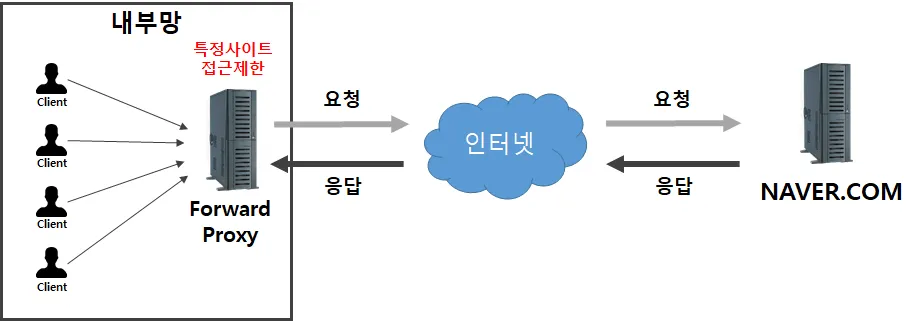
Forward Proxy
- Server 입장에서 Client가 누군지 모르게 하는 방식 (Server가 받는 IP = Proxy의 IP)

Caching
자주 요청되는 컨텐츠를 Cache로 저장하여 원본 서버 대신 응답을 하는 기능
=> Server의 부하가 줄어든다. (속도 증가)

익명성
Server가 받는 IP가 실제 Client IP가 아닌 Proxy의 IP를 받기 때문에
Client의 신원을 숨길 수 있다.

엑세스 제어
관리자가 특정 웹사이트나 서비스에 대한 접근을 제한하거나 허용하는 기능
=> 내부망에서 외부망으로 나가는 요청을 관리
-
Reverse Proxy
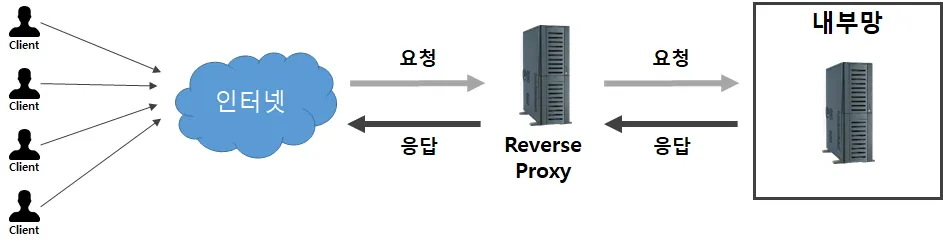
Reverse Proxy
- Client 입장에서 Server의 IP를 모르게 하는 방식

부하분산 (Load-Balancing)
Proxy 뒤쪽으로 같은 서비스를 제공하는 Server를 여러개 둠으로써, 사용자의 요청을 분산
하여 처리한다.

보안
Server 입장에서 직접적인 접근을 차단하여 보안을 강화한다.

Caching
자주 요청되는 컨텐츠를 Cache로 저장하여 원본 서버 대신 응답을 하는 기능

Application 관리
여러 서비스를 하나의 도메인 아래에 통합하여 제공하고 관리할 수 있다.
=> 하나의 IP로 다수의 Service할 수 있기 때문에 IPv4를 절약할 수 있다
HAproxy (Reverse Proxy)
Load-Balancing VS Hot/Standby
- Load-Balancing : 연결된 서버가 모두 동시에 서비스를 제공
- Hot-Standby : Hot(Active) 상태인 Server가 우선 응답 하고 Active Server에 문제가 생기면 그때 Standby Server가 응답한다
실습 (Hot/Standby)
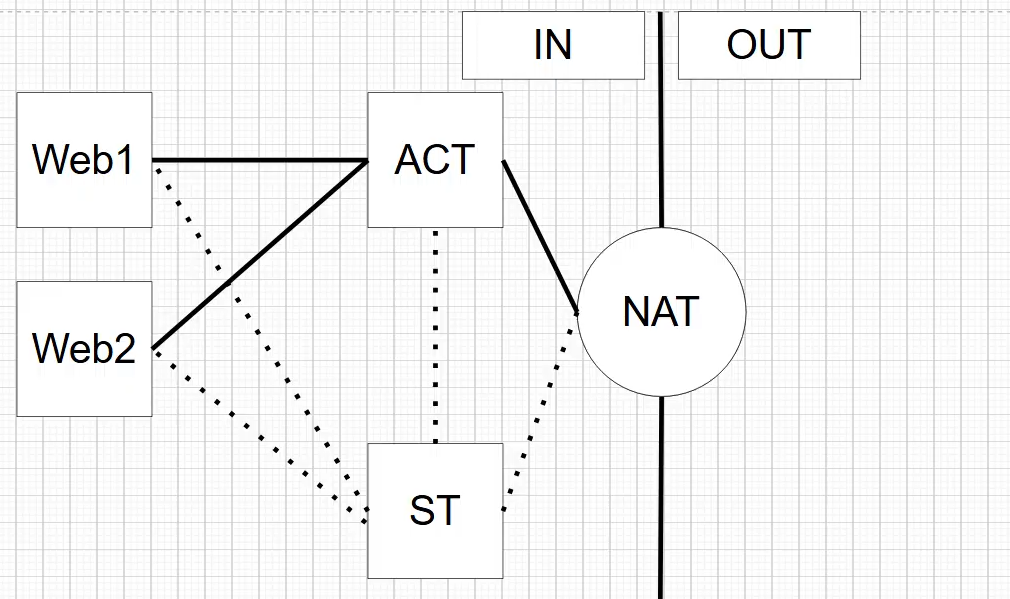
Web1
	ens160
		ip: 192.168.9.80/24
		gw: 192.168.9.100

Web2
	ens160
		ip: 192.168.9.81/24
		gw: 192.168.9.100

ACT (active)
	ens160
		ip: 172.9.0.2/16
		gw: 172.9.0.1
	ens192
		ip: 192.168.9.1/24

ST (standby)
	ens160
		ip: 172.9.0.3
		gw: 172.9.0.1
	ens192
		ip: 192.168.9.2/24

NAT
	ens0
		ip: 192.168.9.250/8
		ip: 192.168.9.80/8
	ens1
		ip: 172.9.0.1/16
# haproxy, keepalived 패키지 설치
dnf install -y haproxy
dnf install -y keepalivedActive / Standby
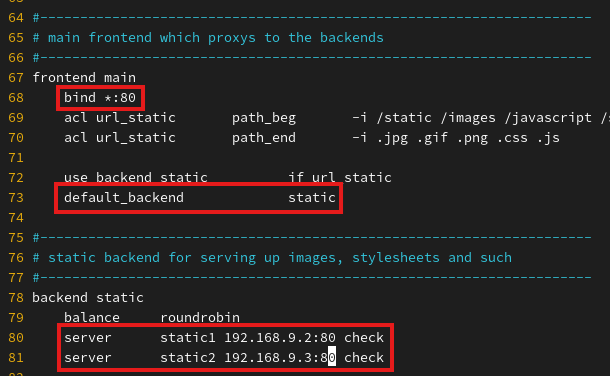
/etc/haproxy/haproxy.cfg
active, standby
/etc/sysctl.conf
active, standby
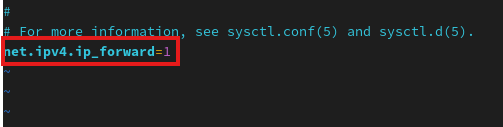
# sysctl 적용
sysctl -p
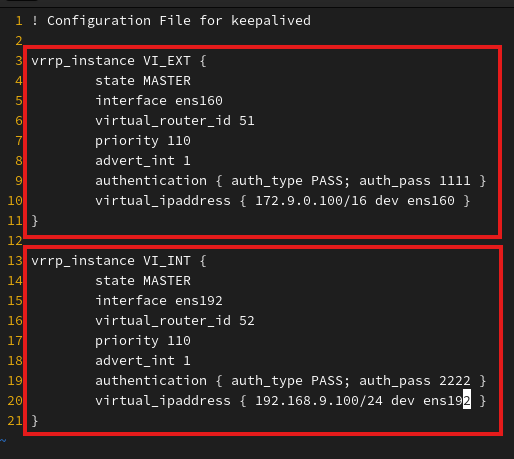
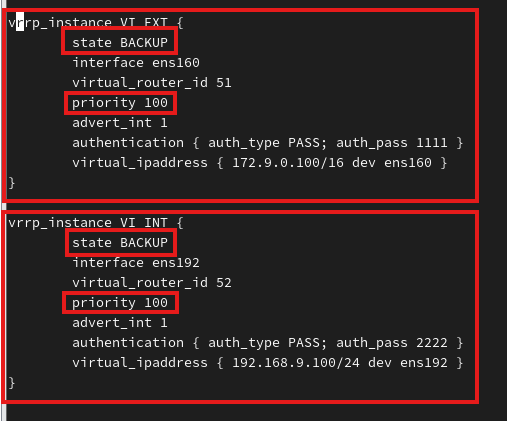
/etc/keepalived/keepalived.conf
active
standby
# 위 작업 후 실행
systemctl start haproxy.service
systemctl start keepalived.service
NAT
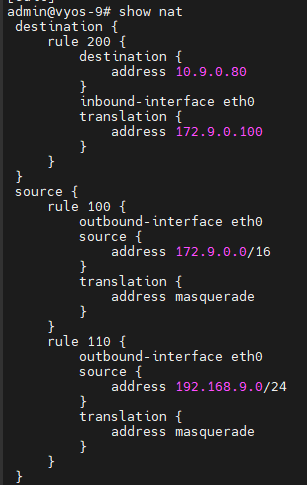
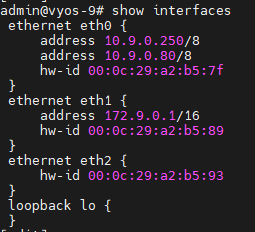
### Ethernet
set interfaces ethernet eth0 address 10.9.0.250/8
set interfaces ethernet eth0 address 10.9.0.80/8

set interfaces ethernet eth1 address 172.9.0.1/16

-------------

### NAT
# SNAT 172.9.0.0
set nat source rule 100 source address 172.9.0.0/16
set nat source rule 100 outbound-interface eth0
set nat source rule 100 translation address masquerade

# SNAT 192.168.9.0
set nat source rule 110 source address 192.168.9.0/24
set nat source rule 110 outbound-interface eth0
set nat source rule 110 translation address masquerade

# DNAT 172.9.0.0
set nat destination rule 200 destination address 10.9.0.80
set nat destination rule 200 inbound-interface eth0
set nat destination rule 200 translation address 172.9.0.100
최종 Proxy 확인

- standby (active keepalived 중지)


정리 블로그