1. 배열 예제(2)
- 1초마다 전광판 색깔이 바뀌는 프로그램
<!DOCTYPE html>
<html lang="en">
  <head>
    <meta charset="UTF-8" />
    <meta name="viewport" content="width=device-width, initial-scale=1.0" />
    <title>Document</title>
    <script>
      function move() {
        var temp = document.getElementById("x2").getAttribute("bgcolor");
        console.log(temp);
        for (var i = 2; i > 0; i--) {
          document
            .getElementById("x" + i)
            .setAttribute(
              "bgcolor",
              document.getElementById("x" + (i - 1)).getAttribute("bgcolor")
            );
        }
        document.getElementById("x0").setAttribute("bgcolor", temp);
      }
      window.onload = function () {
        var intervalId = setInterval(move, 1000);
      };
    </script>
  </head>
  <body>
    <table border="1" width="300" height="100">
      <tr>
        <td id="x0" bgcolor="red"></td>
        <td id="x1" bgcolor="blue"></td>
        <td id="x2" bgcolor="green"></td>
      </tr>
    </table>
  </body>
</html>
(1) 응용: 알러뷰 전광판 만들기
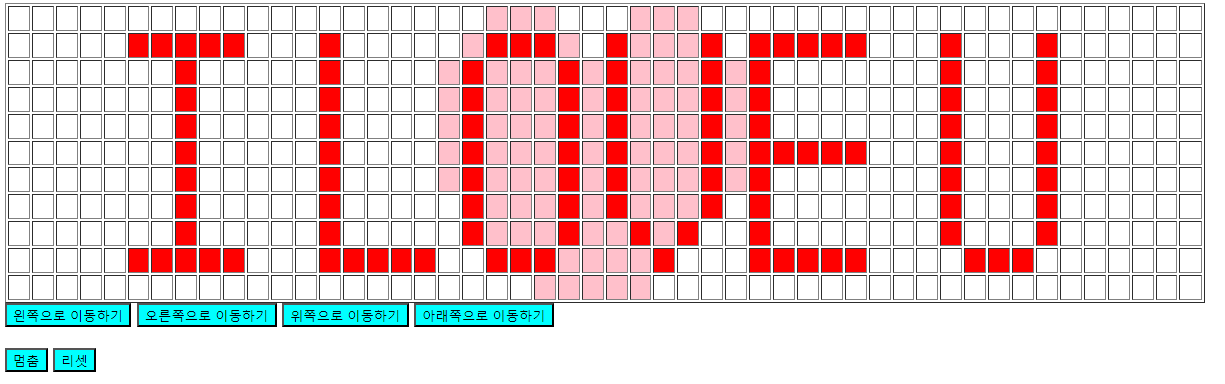
<!DOCTYPE html>
<html lang="en">
  <head>
    <meta charset="UTF-8" />
    <meta name="viewport" content="width=device-width, initial-scale=1.0" />
    <title>Document</title>
    <script>
      var tableArray = [
        [
          0, 0, 0, 0, 0, 0, 0, 0, 0, 0, 0, 0, 0, 0, 0, 0, 0, 0, 0, 0, 2, 2, 2,
          0, 0, 0, 2, 2, 2, 0, 0, 0, 0, 0, 0, 0, 0, 0, 0, 0, 0, 0, 0, 0, 0, 0,
          0, 0, 0, 0,
        ],
        [
          0, 0, 0, 0, 0, 1, 1, 1, 1, 1, 0, 0, 0, 1, 0, 0, 0, 0, 0, 2, 1, 1, 1,
          2, 0, 1, 2, 2, 2, 1, 0, 1, 1, 1, 1, 1, 0, 0, 0, 1, 0, 0, 0, 1, 0, 0,
          0, 0, 0, 0,
        ],
        [
          0, 0, 0, 0, 0, 0, 0, 1, 0, 0, 0, 0, 0, 1, 0, 0, 0, 0, 2, 1, 2, 2, 2,
          1, 2, 1, 2, 2, 2, 1, 2, 1, 0, 0, 0, 0, 0, 0, 0, 1, 0, 0, 0, 1, 0, 0,
          0, 0, 0, 0,
        ],
        [
          0, 0, 0, 0, 0, 0, 0, 1, 0, 0, 0, 0, 0, 1, 0, 0, 0, 0, 2, 1, 2, 2, 2,
          1, 2, 1, 2, 2, 2, 1, 2, 1, 0, 0, 0, 0, 0, 0, 0, 1, 0, 0, 0, 1, 0, 0,
          0, 0, 0, 0,
        ],
        [
          0, 0, 0, 0, 0, 0, 0, 1, 0, 0, 0, 0, 0, 1, 0, 0, 0, 0, 2, 1, 2, 2, 2,
          1, 2, 1, 2, 2, 2, 1, 2, 1, 0, 0, 0, 0, 0, 0, 0, 1, 0, 0, 0, 1, 0, 0,
          0, 0, 0, 0,
        ],
        [
          0, 0, 0, 0, 0, 0, 0, 1, 0, 0, 0, 0, 0, 1, 0, 0, 0, 0, 2, 1, 2, 2, 2,
          1, 2, 1, 2, 2, 2, 1, 2, 1, 1, 1, 1, 1, 0, 0, 0, 1, 0, 0, 0, 1, 0, 0,
          0, 0, 0, 0,
        ],
        [
          0, 0, 0, 0, 0, 0, 0, 1, 0, 0, 0, 0, 0, 1, 0, 0, 0, 0, 2, 1, 2, 2, 2,
          1, 2, 1, 2, 2, 2, 1, 2, 1, 0, 0, 0, 0, 0, 0, 0, 1, 0, 0, 0, 1, 0, 0,
          0, 0, 0, 0,
        ],
        [
          0, 0, 0, 0, 0, 0, 0, 1, 0, 0, 0, 0, 0, 1, 0, 0, 0, 0, 0, 1, 2, 2, 2,
          1, 2, 1, 2, 2, 2, 1, 0, 1, 0, 0, 0, 0, 0, 0, 0, 1, 0, 0, 0, 1, 0, 0,
          0, 0, 0, 0,
        ],
        [
          0, 0, 0, 0, 0, 0, 0, 1, 0, 0, 0, 0, 0, 1, 0, 0, 0, 0, 0, 1, 2, 2, 2,
          1, 2, 2, 1, 2, 1, 0, 0, 1, 0, 0, 0, 0, 0, 0, 0, 1, 0, 0, 0, 1, 0, 0,
          0, 0, 0, 0,
        ],
        [
          0, 0, 0, 0, 0, 1, 1, 1, 1, 1, 0, 0, 0, 1, 1, 1, 1, 1, 0, 0, 1, 1, 1,
          2, 2, 2, 2, 1, 0, 0, 0, 1, 1, 1, 1, 1, 0, 0, 0, 0, 1, 1, 1, 0, 0, 0,
          0, 0, 0, 0,
        ],
        [
          0, 0, 0, 0, 0, 0, 0, 0, 0, 0, 0, 0, 0, 0, 0, 0, 0, 0, 0, 0, 0, 0, 2,
          2, 2, 2, 2, 0, 0, 0, 0, 0, 0, 0, 0, 0, 0, 0, 0, 0, 0, 0, 0, 0, 0, 0,
          0, 0, 0, 0,
        ],
      ];

      function madeTable(y, x) {
        var str = "";
        str += "<table border=1 width=1200 height=300>";
        for (var i = 0; i < y; i++) {
          str += "<tr>";
          for (var j = 0; j < x; j++) {
            str += `<td id=y${i}x${j}>`;
            str += "</td>";
          }
          str += "</tr>";
        }
        str += "</table>";
        return str;
      }

      function drawArray(arr) {
        var y = arr.length;
        var x = arr[0].length;
        for (var i = 0; i < y; i++) {
          for (var j = 0; j < x; j++) {
            var cellId = "y" + i + "x" + j;
            var cellElement = document.getElementById(cellId);
            if (arr[i][j] == 1) {
              cellElement.style.backgroundColor = "red";
            } else if (arr[i][j] == 2) {
              cellElement.style.backgroundColor = "pink";
            } else {
              cellElement.style.backgroundColor = "";
            }
          }
        }
      }

      function moveLeft() {
        clearInterval(moveRight);
        clearInterval(moveUp);
        clearInterval(moveDown);
        clearInterval(moveLeft);
        moveLeft = setInterval(function () {
          for (var i = 0; i < tableArray.length; i++) {
            var temp1 = tableArray[i].shift();
            tableArray[i].push(temp1);
          }

          document.getElementById("table").innerHTML = madeTable(
            tableArray.length,
            tableArray[0].length
          );

          drawArray(tableArray);
        }, 60);
      }

      function moveRight() {
        clearInterval(moveLeft);
        clearInterval(moveUp);
        clearInterval(moveDown);
        clearInterval(moveRight);
        moveRight = setInterval(function () {
          for (var i = 0; i < tableArray.length; i++) {
            var temp2 = tableArray[i].pop();
            tableArray[i].unshift(temp2);
          }
          document.getElementById("table").innerHTML = madeTable(
            tableArray.length,
            tableArray[0].length
          );
          drawArray(tableArray);
        }, 60);
      }
      function moveUp() {
        clearInterval(moveLeft);
        clearInterval(moveRight);
        clearInterval(moveDown);
        clearInterval(moveUp);
        moveUp = setInterval(function () {
          var temp3 = tableArray.shift();
          tableArray.push(temp3);
          document.getElementById("table").innerHTML = madeTable(
            tableArray.length,
            tableArray[0].length
          );
          drawArray(tableArray);
        }, 60);
      }

      function moveDown() {
        clearInterval(moveUp);
        clearInterval(moveRight);
        clearInterval(moveLeft);
        clearInterval(moveDown);
        moveDown = setInterval(function () {
          var temp4 = tableArray.pop();
          tableArray.unshift(temp4);
          document.getElementById("table").innerHTML = madeTable(
            tableArray.length,
            tableArray[0].length
          );
          drawArray(tableArray);
        }, 60);
      }

      function stopMovement() {
        clearInterval(moveUp);
        clearInterval(moveRight);
        clearInterval(moveLeft);
        clearInterval(moveDown);
      }

      function reset() {
        clearInterval(moveLeft);
        clearInterval(moveRight);
        clearInterval(moveDown);
        clearInterval(moveUp);
        tableArray = [
          [
            0, 0, 0, 0, 0, 0, 0, 0, 0, 0, 0, 0, 0, 0, 0, 0, 0, 0, 0, 0, 2, 2, 2,
            0, 0, 0, 2, 2, 2, 0, 0, 0, 0, 0, 0, 0, 0, 0, 0, 0, 0, 0, 0, 0, 0, 0,
            0, 0, 0, 0,
          ],
          [
            0, 0, 0, 0, 0, 1, 1, 1, 1, 1, 0, 0, 0, 1, 0, 0, 0, 0, 0, 2, 1, 1, 1,
            2, 0, 1, 2, 2, 2, 1, 0, 1, 1, 1, 1, 1, 0, 0, 0, 1, 0, 0, 0, 1, 0, 0,
            0, 0, 0, 0,
          ],
          [
            0, 0, 0, 0, 0, 0, 0, 1, 0, 0, 0, 0, 0, 1, 0, 0, 0, 0, 2, 1, 2, 2, 2,
            1, 2, 1, 2, 2, 2, 1, 2, 1, 0, 0, 0, 0, 0, 0, 0, 1, 0, 0, 0, 1, 0, 0,
            0, 0, 0, 0,
          ],
          [
            0, 0, 0, 0, 0, 0, 0, 1, 0, 0, 0, 0, 0, 1, 0, 0, 0, 0, 2, 1, 2, 2, 2,
            1, 2, 1, 2, 2, 2, 1, 2, 1, 0, 0, 0, 0, 0, 0, 0, 1, 0, 0, 0, 1, 0, 0,
            0, 0, 0, 0,
          ],
          [
            0, 0, 0, 0, 0, 0, 0, 1, 0, 0, 0, 0, 0, 1, 0, 0, 0, 0, 2, 1, 2, 2, 2,
            1, 2, 1, 2, 2, 2, 1, 2, 1, 0, 0, 0, 0, 0, 0, 0, 1, 0, 0, 0, 1, 0, 0,
            0, 0, 0, 0,
          ],
          [
            0, 0, 0, 0, 0, 0, 0, 1, 0, 0, 0, 0, 0, 1, 0, 0, 0, 0, 2, 1, 2, 2, 2,
            1, 2, 1, 2, 2, 2, 1, 2, 1, 1, 1, 1, 1, 0, 0, 0, 1, 0, 0, 0, 1, 0, 0,
            0, 0, 0, 0,
          ],
          [
            0, 0, 0, 0, 0, 0, 0, 1, 0, 0, 0, 0, 0, 1, 0, 0, 0, 0, 2, 1, 2, 2, 2,
            1, 2, 1, 2, 2, 2, 1, 2, 1, 0, 0, 0, 0, 0, 0, 0, 1, 0, 0, 0, 1, 0, 0,
            0, 0, 0, 0,
          ],
          [
            0, 0, 0, 0, 0, 0, 0, 1, 0, 0, 0, 0, 0, 1, 0, 0, 0, 0, 0, 1, 2, 2, 2,
            1, 2, 1, 2, 2, 2, 1, 0, 1, 0, 0, 0, 0, 0, 0, 0, 1, 0, 0, 0, 1, 0, 0,
            0, 0, 0, 0,
          ],
          [
            0, 0, 0, 0, 0, 0, 0, 1, 0, 0, 0, 0, 0, 1, 0, 0, 0, 0, 0, 1, 2, 2, 2,
            1, 2, 2, 1, 2, 1, 0, 0, 1, 0, 0, 0, 0, 0, 0, 0, 1, 0, 0, 0, 1, 0, 0,
            0, 0, 0, 0,
          ],
          [
            0, 0, 0, 0, 0, 1, 1, 1, 1, 1, 0, 0, 0, 1, 1, 1, 1, 1, 0, 0, 1, 1, 1,
            2, 2, 2, 2, 1, 0, 0, 0, 1, 1, 1, 1, 1, 0, 0, 0, 0, 1, 1, 1, 0, 0, 0,
            0, 0, 0, 0,
          ],
          [
            0, 0, 0, 0, 0, 0, 0, 0, 0, 0, 0, 0, 0, 0, 0, 0, 0, 0, 0, 0, 0, 0, 2,
            2, 2, 2, 2, 0, 0, 0, 0, 0, 0, 0, 0, 0, 0, 0, 0, 0, 0, 0, 0, 0, 0, 0,
            0, 0, 0, 0,
          ],
        ];

        drawArray(tableArray);
      }
      window.onload = function () {
        var intervalId;
        var speed = 1000;
        var state = "";

        document.getElementById("table").innerHTML = madeTable(
          tableArray.length,
          tableArray[0].length
        );
        drawArray(tableArray);
        document.getElementById("left").onclick = function () {
          state: left;
          clearInterval(intervalId);
          intervalId = setInterval(moveLeft, speed);
        };

        document.getElementById("right").onclick = function () {
          state: right;
          clearInterval(intervalId);
          intervalId = setInterval(moveRight, speed);
        };
        document.getElementById("up").onclick = function () {
          state: up;
          clearInterval(intervalId);
          intervalId = setInterval(moveUp, speed);
        };
        document.getElementById("down").onclick = function () {
          state: down;
          clearInterval(intervalId);
          intervalId = setInterval(moveDown, speed);
        };
        document.getElementById("stop").onclick = function () {
          state: stop;
          clearInterval(intervalId);
          stopMovement();
        };
        document.getElementById("reset").onclick = function () {
          clearInterval(intervalId);
          reset();
        };
      };
    </script>
  </head>
  <body>
    <div id="table"></div>
    <button id="left" style="background-color: aqua">왼쪽으로 이동하기</button>
    <button id="right" style="background-color: aqua">
      오른쪽으로 이동하기
    </button>
    <button id="up" style="background-color: aqua">위쪽으로 이동하기</button>
    <button id="down" style="background-color: aqua">
      아래쪽으로 이동하기
    </button>
    <br />
    <br />
    <button id="stop" style="background-color: aqua">멈춤</button>
    <button id="reset" style="background-color: aqua">리셋</button>
  </body>
</html>
2. DOM을 이용한 CSS 변경
<!DOCTYPE html>
<html lang="en">
  <head>
    <meta charset="UTF-8" />
    <meta name="viewport" content="width=device-width, initial-scale=1.0" />
    <title>Document</title>
    <style>
      #div1 {
        border: 1px solid blue;
      }
    </style>
    <script>
      // javascript로 css 변경하기
      // 그동안 변경한것들을 속성으로 변경한 것.
      // html태그 속성중에 style를 통해서 css를 변경할 수 있다.
      window.onload = function () {
        var myButton = document.getElementById("b1");
        myButton.addEventListener("click", function () {
          var myDiv = document.getElementById("div1");
          myDiv.style.backgroundColor = "yellow";
          myDiv.style.width = "400px";
          // 클릭할 때마다 높이를 50px 증가시키기
          console.log(myDiv.style.height);
          console.log(parseInt(myDiv.style.height));
          myDiv.style.height = parseInt(myDiv.style.height) + 50 + "px";
          // hello1를 빨간색으로 바꿔보자
          var mySpan = document.querySelectorAll("#div1 span");
          console.log(mySpan);
          mySpan[0].style.color = "red";
        });
      };
    </script>
  </head>
  <body>
    <div id="div1" style="height: 100px"><span>hello1</span> world</div>
    <button id="b1"><span>change style</span></button>
  </body>
</html>
IT 개발자가 되기 위한 기록