예외처리
에러(error)와 예외(exception)
- 에러 : 프로그램 코드에 의해서 수습될 수 없는 심각한 오류
- 예외 : 프로그램 코드에 의해서 수습될 수 있는 다소 미약한 오류
ExceptionTest01, 프로그램 실행 중에 예외가 발생하는 상황
-
Exception클래스들 : 사용자의 실수같은 외적인 요인에 의해 발생하는 예외
-
RunTimeException클래스들 : 프로그래머의 실수로 발생하는 예외
-
try~catch문
try {
예외가 발생할 가능성이 있는 코드를 try블럭 안에 정의
}catch(FileNotFoundException e) {
예외가 발생되면 실행될 코드
}catch(IOException e) {
예외가 발생되면 실행될 코드
}
package exception;

import java.io.FileNotFoundException;
import java.io.FileReader;
import java.io.IOException;
import java.util.Scanner;

class Super{

}
class Sub extends Super{

}
public class ExceptionTest01 {
	public static void main(String[] args){
		//1.개발자가 실수할 수 있는 부분
		System.out.println("***********프로그램시작***********");
		System.out.println(10/0);//java.lang.ArithmeticException
		System.out.println(args[0]);//java.lang.ArrayIndexOutOfBoundsException:
		String str = null;
		str.length();//java.lang.NullPointerException

		Super obj = new Super();
		Sub obj2 =(Sub)obj;//java.lang.ClassCastException
		System.out.println("************");

		//2.외부요인이나 사용자의 실수로 발생할 수 있는 익셉션
		Scanner key = new Scanner(System.in);
		System.out.println("값입력:");
		int data = key.nextInt();
		System.out.println("사용자가 입력한 값=>"+data);
        //java.util.InputMismatchException
		//숫자만 입력가능한데 문자 입력하는 경우

		//3.API에서 문법적으로 예외처리를 컴파일타입에 요구하는 경우
		//=>메소드 선언부에 XXXException을 throws하는 것은 이 메소드를 사용하면서 XXXException이 발생할 수 있다는 의미
		//=>Exception에 대한 처리를 RuntimeException의 하위같은 경우 문법적으로 제약하지 않는다
		//	그러나 RuntimeException의 하위가 아니라 Exception의 하위 Exception들은 컴파일 시점에 체크하므로
		//예외처리를 할 수 있도록 문법적으로 제약하므로	반드시 익셉션에 대한 처리를 해야한다
		//=> 런타임익셉션의 하위이거나 아니거나 예외발생 가능성이 있는 코드는 무조건 예외를 처리
		try {
			//예외가 발생할 가능성이 있는 코드를 try블럭 안에 정의
			FileReader fr = new FileReader("test.txt");
			System.out.println((char)fr.read());
			System.out.println(Integer.parseInt("100")+200);
			System.out.println("step1종료");
		}catch(FileNotFoundException e) {
			//예외가 발생되면 실행될 코드
			System.out.println("파일경로가 틀림");
			System.out.println("파일을 다시 선택하세요");
		}catch(IOException e) {
			System.out.println("파일엑세스 오류 발생");
		}
		System.out.println("프로그램 종료");
	}
}
ExceptionTest02
- .getMessage() : 개발자가 실수할 수 있는 부분을 찾아서 처리할 수 있도록 메세지를 출력
- .printStackTrace() : 예외를 추적해서 화면에 예외가 발생한 메소드의 라인넘버까지 출력하므로 개발시에 많이 사용
예외발생 당시의 호출스택에 있었던 메서드의 정보와 예외 메세지를 화면에 출력한다
package exception;

public class ExceptionTest02 {
	public static void main(String[] args){
		try {
			System.out.println("try블럭시작");
			System.out.println(10/0);
			System.out.println("try블럭종료");
		}catch(ArithmeticException e) {
			//예외가 발생하면 처리할 문장을 구현
			//개발자가 실수할 수 있는 부분을 찾아서 처리할 수 있도록 메세지를 출력
			System.out.println("예외발생");
			System.out.println("예외메세지:"+e.getMessage());

			//예외를 추적해서 화면에 예외가 발생한 메소드의 라인넘버까지 출력하므로 개발시에 많이 사용
			e.printStackTrace();

		}
	}
}

ExceptionTest03, while문 사용시 Exception에 대한 처리
- while문 안의 try~catch블럭-> while문이 조건이 끝날때까지 실행됨
- try~catch블럭 안의 while문->예외가 발생하는 순간 프로그램 종료
package exception;

import java.util.Scanner;
//while문 사용시 Exception에 대한 처리
public class ExceptionTest03 {
	public static void main(String[] args) {
		Scanner key = new Scanner(System.in);
		//while문을 사용하는 경우 while문 밖에서 예외처리를 정의하면 예외가 발생하는 경우 반복문이 모두 실행되지 않고 프로그램이 종료된다.
//		try {
//			int i = 10;
//			while(i<=13) {
//				System.out.println("나누기할 숫자:");
//				int num = key.nextInt();
//				System.out.println("값:"+i/num);
//				i++;
//			}
//		}catch(Exception e) {
//			System.out.println("예외발생");
//		}

		//while문 안에서 예외를 처리하면 오류가 발생되는 상황만 catch블럭의 코드가 실행되고 와일문이 멈추지않는다
		//에러체크돼도 while문은 설정값까지 계속가야 끝남
		int i = 10;
		while(i<=13) {
			System.out.println("나누기할 숫자:");
			int num = key.nextInt();
			try {
			System.out.println("값:"+i/num);
			}catch(ArithmeticException e) {
				System.out.println("0으로 나누면 error!!!");
			}
			i++;
		}
	}
}
ExceptionTest04, 다중 catch 사용하기
- 예외처리 : try~catch~catch...
- 각각의 예외가 발생할때마다 다르게 처리하고싶은 경우 catch블럭을 여러개 정의하고 사용할 수 있다.
- 단 상위 익셉션은 가장 아래에 정의한다.
- Exception 예외클래스는 모든 예외클래스의 상위클래스이므로 예외가 발생됐을때 동일한 처리를 하려면 상위타입으로 정의해서 작업
- 다 다른 종류의 익셉션을 상위 익셉션 하나로 묶음 =>다형성
package exception;

import java.util.InputMismatchException;
import java.util.Scanner;

public class ExceptionTest04 {
	public static void main(String[] args) {
		Scanner key = new Scanner(System.in);
		String str = null;
		try {
			//예외발생 가능성이 있는 코드
			System.out.println("시작");
			System.out.println("숫자입력:");
			int num1 = key.nextInt();
			System.out.println("나눌 숫자 입력:");
			int num2 = key.nextInt();
			System.out.println("결과=>"+(num1/num2));
			if(num1%2==0) {
				System.out.println(args[0]);//짝수
			}else {
				System.out.println("종료:"+str.length());//홀수
			}
		}catch(ArithmeticException e) {
			System.out.println("0으로 나눔");
		}catch(InputMismatchException e) {
			System.out.println("사용자가 문자를 입력함");
		}catch(NullPointerException e) {
			System.out.println("널이야......");
		}catch(Exception e) {
			System.out.println("기타오류...");
		}//상위타입은 앞에서 먼저 안걸러지게 마지막으로..

		//Exception 예외클래스는 모든 예외클래스의 상위클래스이므로 예외가 발생됐을때 동일한 처리를 하려면 상위타입으로 정의해서 작업
//		try {
//			//System.out.println(10/0);
//			String str = null;
//			//str.lastIndexOf(10);
//			System.out.println(args[0]);
//		}catch(Exception e) {//다 다른 종류의 익셉션을 상위 익셉션 하나로 묶음 =>다형성
//			System.out.println("예외발생");
//		}

	}
}
ExceptionTest04_2, 다중 catch의 다른표현
package exception;
//다중 catch의 다른표현
public class ExceptionTest04_2 {

	public static void main(String[] args) {
		try {
			System.out.println(10/0);
			System.out.println(args[0]);
		}catch(ArithmeticException | ArrayIndexOutOfBoundsException e) {
			System.out.println("예외발생: "+e.getMessage());
			if(e instanceof ArithmeticException) {
				System.out.println("0으로 나누지마");
			}else {
				System.out.println("배열선언안함");
			}
		}

	}

}
ExceptionTest05, try~catch~finally
- finally블럭 : 예외의 발생여부에 상관없이 실행되어야할 코드를 포함시킬 목적으로 사용
package exception;
//try~catch~finally
public class ExceptionTest05 {
	public static void main(String[] args) {
		try {
			System.out.println("프로그램시작");
			System.out.println("디비연동");
			System.out.println("디비처리진행중..."+10/0);
			System.out.println("완료");
			//System.out.println("자원반납코드");
		}catch(Exception e) {
			System.out.println("오류코드확인");
		}finally {
			//예외가 발생되거나 발생되지 않거나 무조건 실행되는 코드
			System.out.println("자원반납코드");
		}

	}
}
ThrowsTest1,2 throws를 이용해서 예외를 처리하는 방법
- 예외가 발생한 곳에서 예외를 처리
- 호출한 곳에서 예외가 발생된 것을 알 수 없다.
- 예외가 발생되면 예외에 대한 모든 처리가 모두 끝난 상태로 실행되므로 호출한 곳에서 다양하게 처리할 수 없다.
- 예외가 발생된 곳에서 처리하지 않고 호출한 곳에서 처리하도록 예외를 넘기기
- public void 메소드명() throws 예외클래스1, 예외클래스2,...{}
package exception;

import java.io.FileInputStream;
import java.io.FileNotFoundException;

//throws를 이용해서 예외를 처리하는 방법
public class ThrowsTest1 {
	//1.예외가 발생한 곳에서 예외를 처리
	//=>호출한 곳에서 예외가 발생된 것을 알 수 없다.
	//=>예외가 발생되면 예외에 대한 모든 처리가 모두 끝난 상태로 실행되므로 호출한 곳에서 다양하게 처리할 수 없다.
	//=>
	public void test(String fileName) {
		try {
			FileInputStream fis = new FileInputStream(fileName);
		}catch(FileNotFoundException e) {
			//예외를 처리
			System.out.println("지정한 파일을 찾을 수 없습니다.!!");
		}
	}

	//2.예외가 발생된 곳에서 처리하지 않고 호출한 곳에서 처리하도록 예외를 넘기기
	//public void 메소드명() throws 예외클래스1, 예외클래스2,...{}
	public void test2(String fileName) throws FileNotFoundException,ArithmeticException{
		FileInputStream fis = new FileInputStream(fileName);
		System.out.println(10/0);
	}


	public static void main(String[] args) {
		//예외가 발생될 메소드인 test()를 호출해서 사용하는곳
		//1.예외가 발생되지만 이미 발생된 곳에서 예외처리가 끝난 test 메소드를 호출
		ThrowsTest1 obj = new ThrowsTest1();
		obj.test("test2.txt");

		//2.예외를 발생한 곳에서 처리하지 않고 호출한 곳에서 처리
		try {
			obj.test2("test2.txt");
		}catch(FileNotFoundException e) {
			//호출한 곳에서 상황에 맞게 예외에 대한 처리를 할 수 있다.
			System.out.println("파일명이 틀렸으므로 파일을 다시 선택할 수 있는 대화상자를 출력");
		}

	}
}
package exception;
import java.io.FileNotFoundException;
public class ThrowsTest2 {
public static void main(String[] args) {
ThrowsTest1 obj = new ThrowsTest1();
obj.test("test2.txt");
//2.예외를 발생한 곳에서 처리하지 않고 호출한 곳에서 처리
try {
obj.test2("test2.txt");
}catch(FileNotFoundException e) {
//호출한 곳에서 상황에 맞게 예외에 대한 처리를 할 수 있다.
System.out.println("파일선택의 기회는 한번..종료");
}
}
}MyException, Test, 사용자정의로 클래스를 예외클래스의 하위클래스로 작업
- 예외가 발생되는 상황 : JVM이 인지하는 예외상황이 아니므로 인위적으로 exception을 발생시킬것
- 문법
throw new Exception클래스생성자()
package exception;
//잔액이 0원일때 발생하는 exception
//사용자정의로 클래스를 예외클래스의 하위클래스로 작업
public class MyException extends Exception{
	public MyException(String message) {
		super(message);
        //Exception 생성자중 메세지호출있어서 슈퍼로받음
	}
}
package exception;
import java.util.Scanner;
public class MyExceptionTest {
public static void main(String[] args) {
Scanner key = new Scanner(System.in);
int money = 1000;
System.out.println("********인터넷뱅킹**********");
System.out.println("출금하기");
System.out.println("출금할 금액 입력:");
int money2 = key.nextInt();//출금금액
//money2가 money보다 크면 출금을 할 수 없는 상황이므로 익셉션 발생시키기
if(money2>money) {
//예외가 발생되는 상황 - JVM이 인지하는 예외상황이 아니므로 인위적으로 익셉션을 발생시킬것
//문법 throw new Exception클래스생성자()
try{
throw new MyException("잔액이 0원, 출금불가");
}catch(Exception e) {
System.out.println("잔액이없어서 출금할수없습니다.");
System.out.println(e.getMessage());
}
}else {
//정상상황
System.out.println("정상상황의 step");
}
}
}ExceptionExam01 -> 다시 해보기 아직 헷갈림

package exception;

import java.util.Scanner;
public class ExceptionExam01 {
	//필요할 경우 다음의 메서드 선언부분(메서드 시그너처)을 수정하시기 바랍니다.
	public static void main(String[] args) {
		Scanner scan= new Scanner(System.in);
		System.out.println("숫자로 변환할 문자열을 입력바랍니다.");
		String str= scan.nextLine();

		//여기를 작성하십시오.

		try {
			int result= convert(str);
			System.out.println("변환된 숫자는 "+result+" 입니다.");
		}catch(IllegalArgumentException e){
		//	System.out.println("예외가 발생되었습니다. 문자열을 입력하지 않고 Enter키를 누르셨습니다.");
			System.out.println(e.getMessage());
		}
	}

	//필요할 경우 다음의 메서드 선언부분(메서드 시그너처)을 수정하시기 바랍니다.
	private static int convert(String str) throws IllegalArgumentException{
		int result = 0;

		if(str==null | str.length()==0) {
			// throw new IllegalArgumentException();//예외발생시키는 코드
			 throw new IllegalArgumentException("예외가 발생되었습니다. 문자열을 입력하지 않고 Enter키를 누르셨습니다.");
		}

		result = Integer.parseInt(str);
		return result;
	}

}
TestAccount
Account
package exception;

public class Account {
	private String accId;
	private long balance;
	private String ownerName;

	public Account() {

	}

	public Account(String accId, long balance, String ownerName) {
		super();
		this.accId = accId;
		this.balance = balance;
		this.ownerName = ownerName;
	}

	//입금하기
	public void deposit(long amount) {
		balance = balance + amount;
	}

	//출금하기
	public void withdraw(long amount) {
		balance = balance - amount;
	}

	public String getAccId() {
		return accId;
	}

	public void setAccId(String accId) {
		this.accId = accId;
	}

	public long getBalance() {
		return balance;
	}

	public void setBalance(long balance) {
		this.balance = balance;
	}

	public String getOwnerName() {
		return ownerName;
	}

	public void setOwnerName(String ownerName) {
		this.ownerName = ownerName;
	}

}
BankException
package exception;

public class BankException extends Exception {
	public BankException(String msg) {
		super(msg);//Exception을 발생시키면서 전달하는 문자열이 Exception객체의 message로 셋팅될 수 있도록 처리
					//1. Exception이 발생될때 메세지로 출력될수있도록 하기 위해
					//2. getMessage()메소드 호출하면 출력
	}
}
CheckingAccount
package exception;

public class CheckingAccount extends Account {
	private String cardNo;

	public CheckingAccount() {

	}

	public CheckingAccount(String accId, long balance, String ownerName,String cardNo) {
		super(accId,balance,ownerName);
		this.cardNo = cardNo;
	}

	public void pay(long amount,String cardNo) throws BankException {//여기
		//String은 참조형이니까 ==은 주소 비교하는것
		//문자열을 비교하는 경우 무조건 equals=>대소문자까지 비교
		if(amount<=getBalance() & this.cardNo.equals(cardNo)) {
			//super는 메소드명이 부모클래스와 동일할때 쓰면댕
			//구매가 가능하도록 - 지불할수있도록 작업
			withdraw(amount);
		}
		else{
			//오류가 발생하는 상황
			//step1 Exception객체를 생성
			BankException exception = new BankException("지불이 불가능 합니다.");
			//step2 스텝원에서 생성한 객체를 익셉션이 ㅏㄹ생된 것으로 처리
			throw exception;
			//	throw new BankException("지불이 불가능합니다.")
		}
	}

	public String getCardNo() {
		return cardNo;
	}

	public void setCardNo(String cardNo) {
		this.cardNo = cardNo;
	}


}
TestAccount
package exception;

public class TestAccount {
	public static void main(String[] args) {
		CheckingAccount acc1 =
			new CheckingAccount("111-222-333",1000000,"장동건","1234-5647-8888");
		try{
			acc1.pay(500000,"1234-5678-8888");
		}catch (Exception e) {
			System.out.println(e.getMessage());
		}

		System.out.println("현재잔액====>"+acc1.getBalance());
		String cardNo = new String("1234-5647-8888");//객체방식
		String cardNo2 = "1234-5647-8888";//리터럴
		try{
			acc1.pay(500000,cardNo);
		}catch (Exception e) {
			System.out.println(e.getMessage());
		}

		System.out.println("현재잔액====>"+acc1.getBalance());
//		try {
//			acc1.pay(500000,cardNo);
//		} catch (BankException e) {
//			// TODO Auto-generated catch block
//			e.printStackTrace();
//		}

	}
}
GUI
GUITest
package gui;

import java.awt.BorderLayout;
import java.awt.Container;

import javax.swing.JButton;
import javax.swing.JFrame;
import javax.swing.JLabel;
import javax.swing.JPanel;
import javax.swing.JScrollPane;
import javax.swing.JTextArea;
import javax.swing.JTextField;
//로그인창 클래스
class MyLoginView extends JFrame{//is a관계
	JTextField text;
	JButton btn;
	JTextArea content;

	MyLoginView(String title) {
		super(title);
		//화면디자인
		display();
		//이벤트연결
		eventStart();
		this.setSize(400, 300);//JFrame의 사이즈 결정
		this.setVisible(true);//JFrame창을 화면에 출력
		//x버튼 누르면 프로그램이 종료되도록 작업하기
		setDefaultCloseOperation(JFrame.EXIT_ON_CLOSE);
	}
	public void display() {
		Container c = this.getContentPane();
		content = new JTextArea(5,30);
		JScrollPane scroll = new JScrollPane(content);
		c.add(scroll,BorderLayout.CENTER);
		JPanel p1 = new JPanel();
		JLabel label = new JLabel("텍스트입력");
		text = new JTextField(20);
		btn = new JButton("전송");
		p1.add(label);
		p1.add(text);
		p1.add(btn);
		c.add(p1,BorderLayout.SOUTH);
	}
	public void eventStart() {
		//이벤트연결
		btn.addActionListener(new ActionEventListener(this));
	}
}
public class GUITest {
	public static void main(String[] args) {
		MyLoginView loginview = new MyLoginView("로그인");

	}
}
ActionEventListener
package gui;

import java.awt.event.ActionEvent;
import java.awt.event.ActionListener;

//버튼을 클릭하는 이벤트가 발생하면 호출될 메소드를 갖고있는 클래스
public class ActionEventListener implements ActionListener{

	MyLoginView mainView;

	public ActionEventListener(MyLoginView mainView) {
		super();
		this.mainView = mainView;
	}

	@Override
	public void actionPerformed(ActionEvent e) {
		if(e.getSource()==mainView.text |
				e.getSource()==mainView.btn){
			mainView.content.append(mainView.text.getText()+"\n");
			mainView.text.setText("");
		}
	}

}
API.lang
ObjectTest, Person
package api.lang;

public class Person {
	private String name;
	private String addr;
	private int age;
	public Person() {

	}
	public Person(String name, String addr, int age) {
		super();
		this.name = name;
		this.addr = addr;
		this.age = age;
	}
//	public String toString() {
//		return "name:"+name+",addr:"+addr+",age"+age;
//	}
	public String getName() {
		return name;
	}
	@Override
	public String toString() {
		return "Person [name=" + name + ", addr=" + addr + ", age=" + age + "]";
	}
	//source-제너레이트 투스트링

	public void setName(String name) {
		this.name = name;
	}
	public String getAddr() {
		return addr;
	}
	public void setAddr(String addr) {
		this.addr = addr;
	}
	public int getAge() {
		return age;
	}
	public void setAge(int age) {
		this.age = age;
	}

}
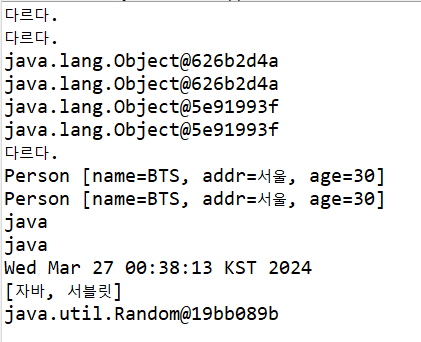
package api.lang;

import java.util.ArrayList;
import java.util.Date;
import java.util.Random;

public class ObjectTest {

	public static void main(String[] args) {
		// equals는 하위클래스에서 객체의 속성을 비교해서 같은 객체인지 여부를 boolean으로 리턴하도록 재정의해서 주로 사용
		Object obj1 = new Object();
		Object obj2 = new Object();
		Person p1 = new Person("BTS","서울",30);
		Person p2 = new Person("BTS","서울",30);
		if(obj1==obj2) {
			System.out.println("같다.");
		}else {
			System.out.println("다르다.");
		}
		if(obj1.equals(obj2)) {
			System.out.println("같다.");
		}else {
			System.out.println("다르다.");
		}

		//Object클래스의 메소드
		//toString메소드가 객체가 갖는 기본메소드 - 기본메소드는 생략이 가능
		System.out.println(obj1);
		System.out.println(obj1.toString());//위와같은데 그냥 생략된거, 출력해보면 주소같음을 알 수 있음.
		System.out.println(obj2);
		System.out.println(obj2.toString());

		if(p1.equals(p2)) {
			System.out.println("같다.");
		}else {
			System.out.println("다르다.");
		}
		System.out.println(p1);
		System.out.println(p2);

		String str = new String("java");
		System.out.println(str);
		System.out.println(str.toString());//세임세임~ 투스트링 생략되어있는것뿐, 얘는 이미 오버라이딩 api에서 되어있음..그래서

		Date date = new Date();
		System.out.println(date);

		ArrayList<String> list = new ArrayList<>();
		list.add("자바");
		list.add("서블릿");
		System.out.println(list);

		Random rand = new Random();
		System.out.println(rand);//toString 오버라이팅 api에서 안되어있는애들은 주소값뜸
	}

}
본 포스팅은 멀티캠퍼스의 멀티잇 백엔드 개발(Java)의 교육을 수강하고 작성되었습니다.