스프링컨트롤러에서 데이터 공유하기
스프링컨트롤러의 요청 방식 구분하기
[스프링MVC구조]
- 스프링MVC는 역할을 분리
- 기본으로 frontcotroller패턴이 적용
- 이 모든 구성요소가 내부에서 웹 요청을 위해 동작하고 각각의 상황에 맞게 작업할 수 있도록 HandlerMapping, ViewResolver, HandlerAdapter, View 등이 동작하며 다양한 상황을 반영할 수 있도록 여러개의 하위들이 존재
- 사용자가 설정파일에 정의하지 않으면 기본으로 실행되는 구성요소들이 미리 정해져서 실행되고 있음
- 뷰를 요청하는 것도 스프링컨트롤러를 통해서 실행되도록 처리
=> 모든 작업이 스프링 내부에서 처리될 수 있도록
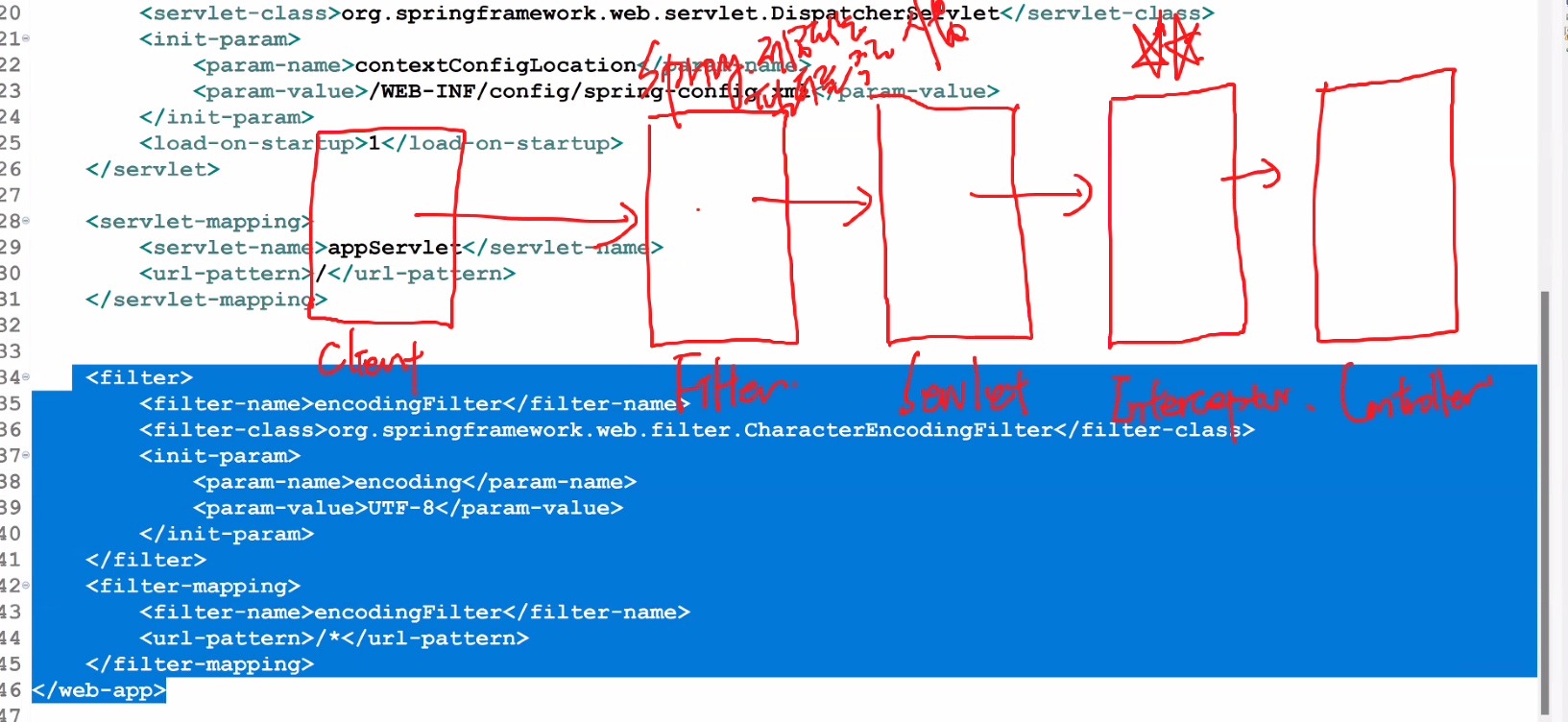
1. DispatcherServlet
: 클라이언트의 요청을 받아서 요청을 분석하고 spring mvc구조를 구성하는 구성요소들이 실행될 수 있도록 처리
(FrontServlet의 역할)
2. HadlerMapping
: DispatcherServlet이 넘겨준 요청 path를 이용해서 실행할 컨트롤러를 찾아서 DispatcherServlet에 전달
(RequestMapping 역할)
3. HandlerAdapter
: DispatcherServlet에서 전달받은 컨트롤러를 호출해서 실행하고 실행결과를 DispatcherServlet에 넘겨주는 작업
ModelAndView객체(Model과 View에 대한 정보를 담고 있는 객체)로 만들어서 리턴
4. Controller
: 개발자가 웹에서 처리하고 싶은 내용을 기술(서블릿에서 작업했던 내용을 컨트롤러에서 처리 - Action들)
@Controller어노테이션이 추가되어야 컨트롤러로 인식
컨트롤러 -> 서비스 -> DAO
5. VeiwResolver
: DispatcherServlet이 넘겨준 뷰 정보를 기반으로 설정파일에서 어떤 뷰를 만들어야 하는지 찾아서 리턴
6. View
: 뷰정보를 기반으로 뷰를 만들어서 리턴
[컨트롤러 만들기]
- spring mvc프레임워크에서 서비스되도록 하려면 컨트롤러를 만들어야 한다.
- 컨트롤러로 인식되기 위해서는 @Controller를 클래스 위에 선언
- 메소드를 정의해서 처리하고 싶은 일들을 처리하도록 작업
- view를 실행하기 위한 작업도 jsp를 직접 실행할 수 없고 컨트롤러를 통해서 실행
1. 메소드를 정의
1) 메소드명은 사용자정의로 작성
public 리턴타입 메소드명(매개변수...){
 	//서블릿에서 처리하는 작업을 구현
 }
2) 메소드 선언부 위에 매핑정보를 정의
- @RequestMapping("/path")
3) 매개변수
- 허용되는 타입 안에서 원하는 타입을 정의
(1) HttpServletRequest : 요청객체를 통해 요청정보 직접 엑세스하거나 request가 제공하는 메소드를 사용하는 경우
(2) String : view에서 전달되는 값인 파라미터 추출용
4) 리턴타입
- 허용되는 타입 안에서 원하는 타입을 정의
(1) String : view에 대한 정보만 명시
(2) ModelAndView : model(웹페이지에서 공유할 데이터)과 view의 정보가 모두 저장된 객체
spring-config.xml
<?xml version="1.0" encoding="UTF-8"?>
<beans:beans xmlns="http://www.springframework.org/schema/mvc"
	xmlns:xsi="http://www.w3.org/2001/XMLSchema-instance"
	xmlns:beans="http://www.springframework.org/schema/beans"
	xmlns:context="http://www.springframework.org/schema/context"
	xsi:schemaLocation="http://www.springframework.org/schema/mvc https://www.springframework.org/schema/mvc/spring-mvc.xsd
		http://www.springframework.org/schema/beans https://www.springframework.org/schema/beans/spring-beans.xsd
		http://www.springframework.org/schema/context https://www.springframework.org/schema/context/spring-context.xsd">

	<!-- DispatcherServlet Context: defines this servlet's request-processing infrastructure -->

	<!-- Enables the Spring MVC @Controller programming model -->
	<annotation-driven />

	<!-- Handles HTTP GET requests for /resources/** by efficiently serving up static resources in the ${webappRoot}/resources directory -->
	<!-- /resources/로 요청하면 실제 /resources/위치에서 찾아서 실행하겠다는 의미
	mapping은 요청path, location은 실제 파일이 저장된 위치
	-->
	<!-- 이미지파일,css,js등 리소스 경로 -->
	<resources mapping="/images/**" location="/resources/images/" />
	<resources mapping="/common/css/**" location="/resources/common/css/" />
	<resources mapping="/common/js/**" location="/resources/common/js/" />

	<!-- Resolves views selected for rendering by @Controllers to .jsp resources in the /WEB-INF/views directory -->
	<beans:bean class="org.springframework.web.servlet.view.InternalResourceViewResolver">
		<beans:property name="prefix" value="/WEB-INF/" />
		<beans:property name="suffix" value=".jsp" />
		<beans:property name="order" value="2"/>
	</beans:bean>

	<!-- annotation을 사용하기 위해서 스프링 IoC컨테이너가 스캔할 패키지 등록 -->
	<context:component-scan base-package="com.multi.springmvc" />
	<context:component-scan base-package="main"/>
	<context:component-scan base-package="test"/>
	<context:component-scan base-package="member"/>
	<context:component-scan base-package="dept"/>
	<context:component-scan base-package="tiles"/>

	<!-- =====================스프링jdbc연동을 위해서 필요한 라이브러리===================== -->
	<!-- jdbc에서 DriverManager방식으로 커넥션을 생성해서 관리(요청이 들어오면 커넥션을 만들어서 넘겨주는 방식) -->
	<beans:bean id="ds" class="org.springframework.jdbc.datasource.DriverManagerDataSource">
		<beans:property name="driverClassName" value="oracle.jdbc.driver.OracleDriver"/>
		<beans:property name="url" value="jdbc:oracle:thin:@127.0.0.1:1521:xe"/>
		<beans:property name="username" value="scott"/>
		<beans:property name="password" value="tiger"/>
	</beans:bean>

	<!-- sql을 실행할 수 있는 기능을 제공하는 클래스 -->
	<beans:bean id="template" class="org.springframework.jdbc.core.JdbcTemplate">
		<beans:constructor-arg ref="ds"/>
	</beans:bean>

	<!-- ==========tiles를 기반으로 뷰정보를 만들수있도록 ViewResolver등록========== -->
	<!-- 1. tiles설정파일을 스프링 내부에서 인식할 수 있도록 등록 -->
	<beans:bean id="tilesConfigurer" class="org.springframework.web.servlet.view.tiles3.TilesConfigurer">
		<beans:property name="definitions">
			<beans:list>
				<beans:value>/WEB-INF/**/*-tiles.xml</beans:value>
			</beans:list>
		</beans:property>
	</beans:bean>
	<!-- 2. tiles기반으로 뷰를 만들수있도록 ViewResolver등록 -->
	<beans:bean id="tilesViewResolver" class="org.springframework.web.servlet.view.UrlBasedViewResolver">
		<beans:property name="viewClass" value="org.springframework.web.servlet.view.tiles3.TilesView"/>
		<beans:property name="order" value="1"/>
	</beans:bean>
</beans:beans>
frontController 프로젝트
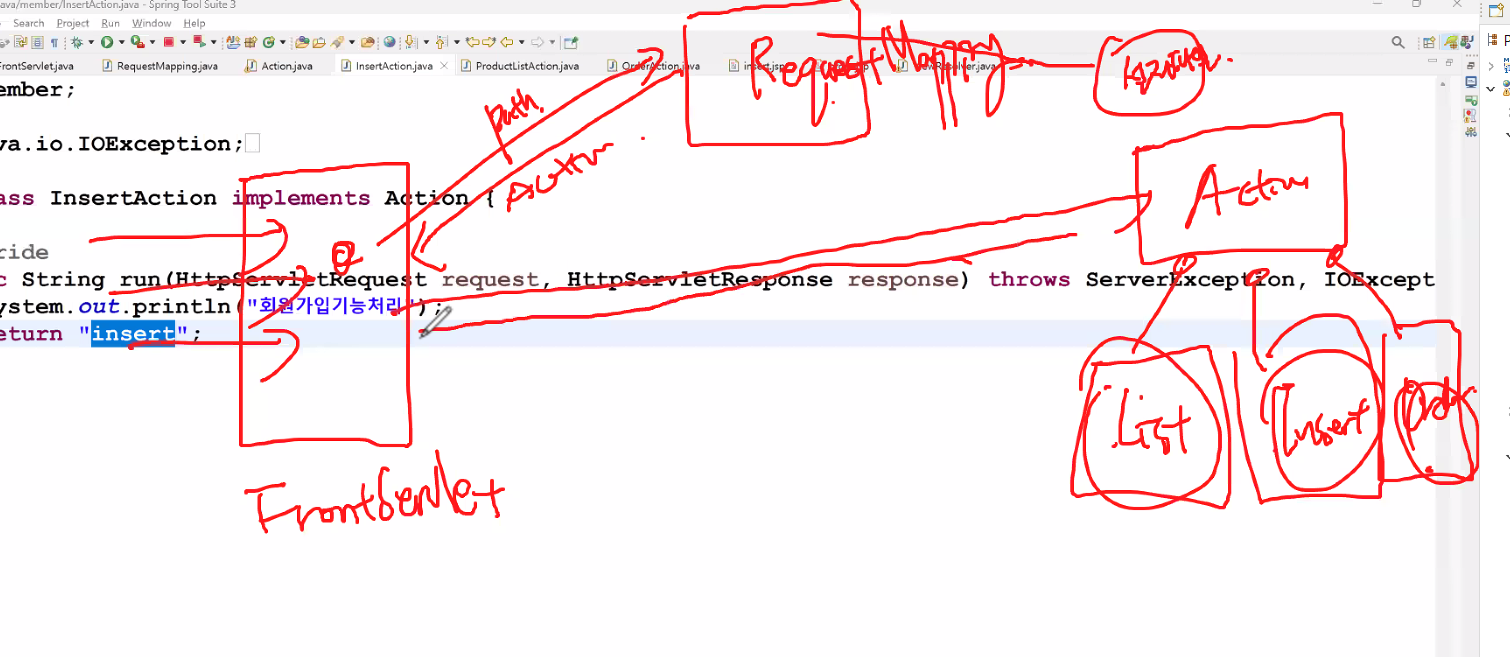
- frontController패턴은 j2ee 패턴(자바엔터프라이즈에디션)
모든걸 frontController패턴으로 받기위해
이렇게 프레임웍화해놓으면 확장할수록 실제 개발자들이 해야하는 모든작업이 이 단에서 처리돼서 할일이 줄어듦 - 커맨드패턴은 액션에서 적용된거..?(GoF고프, 일반언어에서 적용)
web.xml
<?xml version="1.0" encoding="UTF-8"?>
<web-app xmlns:xsi="http://www.w3.org/2001/XMLSchema-instance" xmlns="http://xmlns.jcp.org/xml/ns/javaee" xsi:schemaLocation="http://xmlns.jcp.org/xml/ns/javaee http://xmlns.jcp.org/xml/ns/javaee/web-app_4_0.xsd" id="WebApp_ID" version="4.0">
  <display-name>frontController</display-name>
  <welcome-file-list>
    <welcome-file>index.html</welcome-file>
    <welcome-file>index.htm</welcome-file>
    <welcome-file>index.jsp</welcome-file>
    <welcome-file>default.html</welcome-file>
    <welcome-file>default.htm</welcome-file>
    <welcome-file>default.jsp</welcome-file>
  </welcome-file-list>
  <servlet>
  	<servlet-name>front</servlet-name>
  	<servlet-class>fw.FrontServlet</servlet-class>
  	<init-param>
		<param-name>contextConfigLocation</param-name>
		<param-value>/WEB-INF/config/servlet-config.xml</param-value>
	</init-param>
  </servlet>

  <servlet-mapping>
  	<servlet-name>front</servlet-name>
  	<url-pattern>/</url-pattern>
  </servlet-mapping>
</web-app>
fw 패키지
FrontServlet
- 사이트를 운영하는 동안 모든 요청이 FrontServlet을 통해서 들어올 수 있도록 설정
// url패턴 여러개 줄 수 있음. 주소표시줄? do로 끝나는 모든 것, html으로 하는 모든 것
// "/"만 주면 모든게 여기로 들어올거다라는거, 이거만 쓰면 모든게 다 커버, 그냥 여러개 쓰는거 보여줄려고
//@WebServlet(name = "front", urlPatterns = {"*.do","*.html","*.jsp","/"})
public class FrontServlet extends HttpServlet {

	@Override
	public void init() throws ServletException {

/*
서블릿이 생성되면서 스프링MVC DispatcherServlet내부에서는
WebApplicationContext가 설정파일(xml, 어노테이션,빈)에 등록된 모든 객체를 생성해서 빈으로 등록하는 작업이 처리
 => di에서 매번 등록했던거 서블릿으로 할거다~라는말(init param등록하는작업)
요청되는 서블릿을 등록할때 설정파일에 대한 정보를 같이 등록하면 된다.
(보통 이런 작업은 초기화 파라미터를 통해 전달)
초기화파라미터 => <init-param>으로 등록, 서블릿이 생성될때 서블릿에 전달
*/
		String val = getInitParameter("contextConfigLocation");
		//예측
		//ApplicationContext factory = new ClassPathXmlApplicationContext(val);
		//웹에선 이런코드 이제 안쓸거임. 매번 쓸순없으니까 프레임웍에서 처리할수있게,
		System.out.println("초기화파라미터=>"+val);
	}

	protected void service(HttpServletRequest request, HttpServletResponse response)
			throws ServletException, IOException {

		//1. 요청정보를 분석해서 추출 - 어떤 path로 요청이 들어왔는지 분석하기
		System.out.println("FrontServlet패턴");
		System.out.println("request.getContextPath() => "+request.getContextPath());
		System.out.println("request.getRequestURI() => "+request.getRequestURI());
		System.out.println("request.getRequestURL() => "+request.getRequestURL());
		System.out.println("request.getRemoteAddr() => "+request.getRemoteAddr());

		String contextPath = request.getContextPath();
		String uri = request.getRequestURI();
		String path = uri.substring(contextPath.length());
		System.out.println("path=>"+path);

		//2. 추출한 요청 path로 등록된 클래스를 찾아서 가져오는 작업
		RequestMapping mapping = new RequestMapping();
		Action action = mapping.mapping(path);
		String view = action.run(request, response);

		//3. Action을 실행하면서 리턴받은 뷰의 정보를 가지고 어떤 뷰를 실행해야 하는지 뷰명을 리턴
		ViewResolver resolver = new ViewResolver();
		String viewpath = resolver.makeview(view);

		//4. 전달받은 뷰로 forward
		RequestDispatcher rd = request.getRequestDispatcher(viewpath);
		rd.forward(request, response);
	}

}
RequestMapping
-
FrontServlet이 넘겨준 요청 path를 가지고 실제 실행할 클래스의 객체를 찾아서 리턴하는 작업을 처리
=> 미리 요청 path별 실행할 실제 클래스를 등록한 설정파일을 보고 찾는다.
=> xml이나 properties파일이나 annotation으로 등록한 빈이 미리 만들어져서 내부의 Map같은 자료구조에 저장되어있다. -
그러나 우리는 frontController패턴이 어떻게 동작하는지 보는 것으므로 if else if로 직접 만들어서 리턴
public class RequestMapping {
	public Action mapping(String path) {
		Action action = null;
		//매개변수로 전달된 path를 이용해서 등록된 객체를 찾아서 리턴하는 코드
		if(path.startsWith("/member/insert.do")) {//InsertAction
			//해당path로 등록된 객체를 찾아서 리턴할 수 있도록 코드를 구현해야 하나 울는 생성해서 전달
			action = new InsertAction();
		}else if(path.startsWith("/product/list.do")) {
			action = new ProductListAction();
		}else if(path.startsWith("/order/order.do")) {
			action = new OrderAction();
		}
		return action;
	}
}
ViewResolver
- 매개변수로 전달받은 어떤 종류의 뷰를 실행해야 하는지 설정파일을 보고 정보를 리턴하나 우리는 직접 스트링으로 리턴
public class ViewResolver {
	public String makeview(String view){
		return "/views/"+view+".jsp";
	}
}
interface Action
public interface Action {
	String run(HttpServletRequest request, HttpServletResponse response)
		throws ServerException, IOException;
}
member패키지-InsertAction
public class InsertAction implements Action {
	@Override
	public String run(HttpServletRequest request, HttpServletResponse response) throws ServerException, IOException {
		System.out.println("회원가입기능처리");
		return "insert";
	}
}
order패키지 - OrderAction
public class OrderAction implements Action{
	@Override
	public String run(HttpServletRequest request, HttpServletResponse response) throws ServerException, IOException {
		System.out.println("주문기능");
		return "order";
	}
}
product패키지 - ProductListAction
public class ProductListAction implements Action {
	@Override
	public String run(HttpServletRequest request, HttpServletResponse response) throws ServerException, IOException {
		System.out.println("상품조회기능");
		return "list";
	}
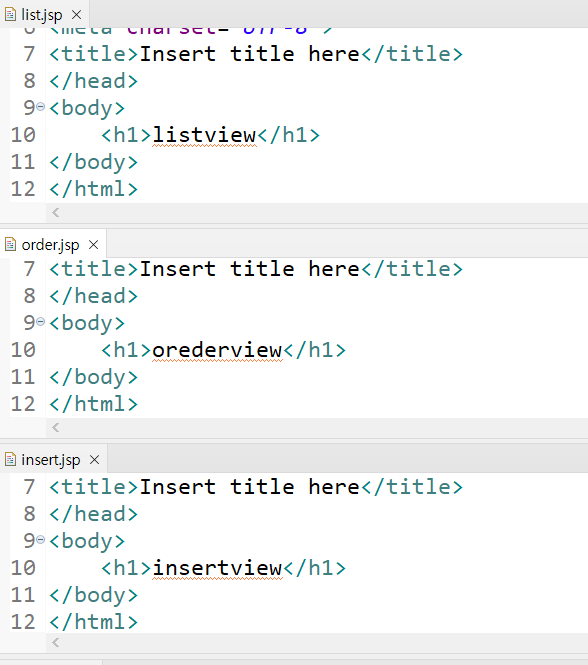
}
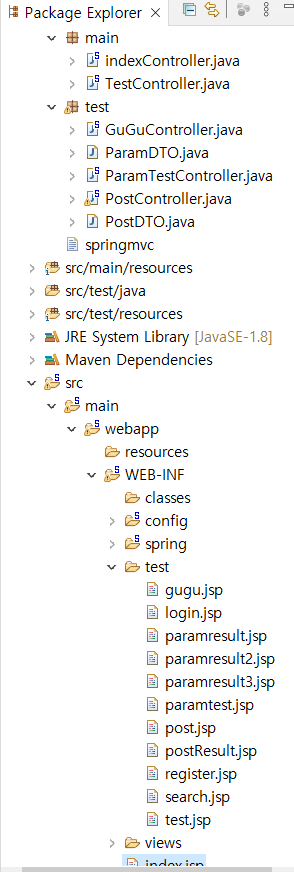
springmvc 프로젝트
120p~ springmvc
125p~ springmvc controller
http://localhost:8089/springmvc/index.html
web.xml
<?xml version="1.0" encoding="UTF-8"?>
<web-app version="2.5" xmlns="http://java.sun.com/xml/ns/javaee"
	xmlns:xsi="http://www.w3.org/2001/XMLSchema-instance"
	xsi:schemaLocation="http://java.sun.com/xml/ns/javaee https://java.sun.com/xml/ns/javaee/web-app_2_5.xsd">

	<!-- The definition of the Root Spring Container shared by all Servlets and Filters -->
	<context-param>
		<param-name>contextConfigLocation</param-name>
		<param-value>/WEB-INF/spring/root-context.xml</param-value>
	</context-param>

	<!-- Creates the Spring Container shared by all Servlets and Filters -->
	<listener>
		<listener-class>org.springframework.web.context.ContextLoaderListener</listener-class>
	</listener>

	<!-- Processes application requests -->
	<servlet>
		<servlet-name>appServlet</servlet-name>
		<servlet-class>org.springframework.web.servlet.DispatcherServlet</servlet-class>
		<init-param>
			<param-name>contextConfigLocation</param-name>
			<param-value>/WEB-INF/config/servlet-config.xml</param-value>
		</init-param>
		<load-on-startup>1</load-on-startup>
	</servlet>

	<servlet-mapping>
		<servlet-name>appServlet</servlet-name>
		<url-pattern>/</url-pattern>
	</servlet-mapping>

	<filter>
		<filter-name>encodingFilter</filter-name>
		<filter-class>org.springframework.web.filter.CharacterEncodingFilter</filter-class>
		<init-param>
			<param-name>encoding</param-name>
			<param-value>UTF-8</param-value>
		</init-param>
	</filter>
	<filter-mapping>
		<filter-name>encodingFilter</filter-name>
		<url-pattern>/*</url-pattern>
	</filter-mapping>

</web-app>
indexController
@Controller
public class indexController {
	@RequestMapping("/index.html")
	public String index() {
		return "index";
	}
}
index.jsp
<%@ page language="java" contentType="text/html; charset=UTF-8"
    pageEncoding="UTF-8"%>
<!DOCTYPE html>
<html>
<head>
<meta charset="UTF-8">
<title>Insert title here</title>
</head>
<body>
	<h1>첫화면</h1>
	<hr/>
	<h3><a href="/springmvc/test.html">테스트컨트롤러요청</h3>
	<h3><a href="/springmvc/gugu">구구요청</h3>
	<h3><a href="/springmvc/showview">파라미터테스트뷰</h3>
	<h3><a href="/springmvc/showpost">post 테스트</h3>
	<h3><a href="/springmvc/insert">회원가입</h3>
	<form method="post" action="/springmvc/test.html">
		<input type="submit" value="테스트컨트롤러요청">
	</form>

	<form method="get" action="/springmvc/gugu">
		<input type="submit" value="구구요청">
	</form>
</body>
</html>
ParamTestController
- 클라이언트의 요청정보 추출
- get방식과 post방식에 따라 각각 요청하기
- 한글처리
=> 필터에 등록 - ModelAndView에 데이터공유
- 뷰정보를 ModelAndView에 셋팅
- Command객체 활용하기
*get방식은 주소대로 입력하면 화면이 나오지만,
post방식은 주소대로 입력해도 화면이 나오지 않고 버튼을 눌러서 들어가야함..
@Controller
public class ParamTestController {
	//뷰를 리턴하는 경우엔 스트링
	@RequestMapping("/showview")
	public String showpage() {
		//뷰를 실행하기 위한 컨트롤러
		return "test/paramtest";
	}

	//뷰에 대한 정보를 지정하지 않으면 요청 path와 동일한 뷰가 response된다.
	//get방식으로 /springmvc/paramtest로 요청하면 실행되는 메소드
	//method속성에 RequestMethod.GET으로 지정하면 get방식으로 요청
	//4.3이후 @Getmapping, @PostMapping을 각각지원
	@RequestMapping(value = "/paramtest", method = RequestMethod.GET)
	public ModelAndView paramtest(HttpServletRequest request, @RequestParam("data") String data2, String info2) {
		String param = request.getParameter("data");
		System.out.println("data=>"+data2);
		System.out.println("info=>"+info2);
		System.out.println("param=>"+param);
		//뷰정보와 뷰에서 출력할 데이터를 공유
		ModelAndView mav = new ModelAndView("test/paramresult");
		//데이터 공유하기 - request.setAttribute("name",공유객체)
		mav.addObject("msg", "스프링이 공유해준 데이터");
		mav.addObject("data",data2);
		return mav;
	}


	//스프링에서 파라미터추출하기 -post버튼을 눌렀을때 요청정보를 추출해서 sysout으로 출력하기
	//메소드명 posttest
	//post방식으로 /springmvc/paramtest로 요청하면 실행되는 메소드

	//파라미터로 전달받은 값을 공유하고 출력할 수 있도록 메소드를 수정(paramresult2.jsp로 작업 - EL로 출력하기)
	@RequestMapping(value = "/paramtest", method = RequestMethod.POST)
	public ModelAndView posttest(String data, String id, String pass) {
		System.out.println("data : "+data);
		System.out.println("id : "+id);
		System.out.println("pass : "+pass);
		ModelAndView mav = new ModelAndView();
		mav.setViewName("test/paramresult2");
		mav.addObject("data", data);
		mav.addObject("id", id);
		mav.addObject("pass", pass);

		return mav;
	}

	@RequestMapping(value = "/cmdtest", method = RequestMethod.POST)
	public ModelAndView cmdtest(ParamDTO dto) {
		System.out.println(dto);
		ModelAndView mav = new ModelAndView("test/paramresult3");
		mav.addObject("dto",dto);
		return mav;
	}
paramtest.jsp
<%@ page language="java" contentType="text/html; charset=UTF-8"
    pageEncoding="UTF-8"%>
<!DOCTYPE html>
<html>
<head>
<meta charset="UTF-8">
<title>paramtest</title>
</head>
<body>
	<h1>1. 파라미터 테스트</h1>
	<h3><a href="/springmvc/paramtest?data=first&info=1000">파라미터추출하기</a></h3>
	<!-- 파라미터 : 폼태그에서 선택/입력하는 값들을 서블릿에서 파라미터라부름(겟파라미터 추출도했었음) -->
	<form method="post" action="/springmvc/paramtest">
		데이터 : <input type="text" name="data">
		아이디 : <input type="text" name="id">
		패스워드 : <input type="text" name="pass">
		<input type="submit" value="스프링에서 파라미터 추출하기-post">
	</form>

	<form method="get" action="/springmvc/paramtest">
		데이터 : <input type="text" name="data">
		아이디 : <input type="text" name="id">
		패스워드 : <input type="text" name="pass">
		<input type="submit" value="스프링에서 파라미터 추출하기-get">
	</form>

	<hr/>
	<h1>2. 파라미터 테스트(command객체 활용하기) => 가장 많이 사용됨</h1>
	<form method="post" action="/springmvc/cmdtest">
		데이터 : <input type="text" name="data">
		아이디 : <input type="text" name="id">
		패스워드 : <input type="text" name="pass">
		<input type="submit" value="command객체로 테스트하기">
	</form>

</body>
</html>
paramresult.jsp
<%@ page language="java" contentType="text/html; charset=UTF-8"
    pageEncoding="UTF-8"%>
<!DOCTYPE html>
<html>
<head>
<meta charset="UTF-8">
<title>paramresult</title>
</head>
<body>
	<h2>response되는 뷰 (스프링이 공유해준 데이터 출력하기)</h2>
	<hr/>
	<h3>jsp코드로 출력하기 : <%=request.getAttribute("msg") %></h3>
	<h3>EL로 출력 : ${msg}</h3>
	<h3>data : ${data}</h3>
	<h4>EL(expression Language)은 공유한 이름을 $기호와 함께 {}안에 적용
		공유한 이름을 page scope에서 찾고 없으면 request scope -> session scope - application scope에서 찾는다.
		모든 scope에서 공유된 객체를 찾지 못하면 그냥 출력하지 않는다.
	</h4>
</body>
</html>
paramresult2.jsp
<%@ page language="java" contentType="text/html; charset=UTF-8"
    pageEncoding="UTF-8"%>
<!DOCTYPE html>
<html>
<head>
<meta charset="UTF-8">
<title>Insert title here</title>
</head>
<body>
	<h2>결과</h2>
	<hr/>
	<h3>데이터 : ${data }</h3>
	<h3>아이디 : ${id }</h3>
	<h3>패스워드 : ${pass }</h3>
</body>
</html>
ParamDTO
public class ParamDTO {
	private String data;
	private String id;
	private String pass;
	public ParamDTO() {
		System.out.println("기본생성자");
	}
	public ParamDTO(String data, String id, String pass) {
		super();
		this.data = data;
		this.id = id;
		this.pass = pass;
	}

	@Override
	public String toString() {
		return "ParamDTO [data=" + data + ", id=" + id + ", pass=" + pass + "]";
	}

	public String getData() {
		System.out.println("getData");
		return data;
	}

	public void setData(String data) {
		System.out.println("setData");
		this.data = data;
	}

	public String getId() {
		return id;
	}

	public void setId(String id) {
		this.id = id;
	}

	public String getPass() {
		return pass;
	}

	public void setPass(String pass) {
		this.pass = pass;
	}
}
paramresult3.jsp
<%@page import="javax.sound.midi.SysexMessage"%>
<%@page import="test.ParamDTO"%>
<%@ page language="java" contentType="text/html; charset=UTF-8"
    pageEncoding="UTF-8"%>
<!DOCTYPE html>
<html>
<head>
<meta charset="UTF-8">
<title>Insert title here</title>
</head>
<body>
	<% System.out.println("=============");
	ParamDTO dto = (ParamDTO)request.getAttribute("dto"); %>
	<h3>DTO에서 데이터 꺼내기</h3>
	<hr/>
	<h3>아이디 : <%=dto.getId() %></h3>
	<h3>EL에서 dto.data는 getter 메소드에서 get을 없애고 첫글자를 소문자로 바꾼 이름을 정의(즉, getter메소드가 호출됨)</h3>
	<h3>데이터 : ${dto.data }</h3>
	<h3>패스워드 : ${dto.pass }</h3>
</body>
</html>
실습
요청정보를 추출해서 결과를 출력할 수 있도록 작업해주세요.
- 컨트롤러명 : PostController
- 패키지 : test패키지에 작업하기
- 메소드명 : 메소드명, 리턴타입, 매개변수는 적절하게 처리하세요
① index.jsp에서 "post테스트" 하이퍼링크가 선택되면 post.jsp가 response되도록 처리해주세요. (path=/showpost)
② post.jsp에서 정보를 입력하고 submit버튼을 누르면 입력한 정보가 출력될 수 있도록 postResult.jsp가 response될 수 있도록 처리하세요 (path=/showform)
③ 파라미터는 DTO를 이용해서 작업하세요(PostDTO)
PostController
@Controller
public class PostController {
	@RequestMapping(value="/showpost", method = RequestMethod.GET)
	public String showpost() {
		return "test/post";
	}

	@RequestMapping(value="/showform", method = RequestMethod.POST)
	public ModelAndView runpost(PostDTO post) {
		ModelAndView mav = new ModelAndView("test/postResult");
		mav.addObject("post",post);
		return mav;
	}
}
PostDTO
public class PostDTO {
	private String userId;
	private String userName;
	private String passwd;
	private String nickname;
	private String gender;
	private String job;

	public PostDTO() {
		super();
		System.out.println("기본생성자 - PostDTO");
	}

	public PostDTO(String userId, String userName, String passwd, String nickname, String gender, String job) {
		super();
		this.userId = userId;
		this.userName = userName;
		this.passwd = passwd;
		this.nickname = nickname;
		this.gender = gender;
		this.job = job;
	}

	public String getUserId() {
		return userId;
	}

	public void setUserId(String userId) {
		this.userId = userId;
	}

	public String getUserName() {
		return userName;
	}

	public void setUserName(String userName) {
		this.userName = userName;
	}

	public String getPasswd() {
		return passwd;
	}

	public void setPasswd(String passwd) {
		this.passwd = passwd;
	}

	public String getNickname() {
		return nickname;
	}

	public void setNickname(String nickname) {
		this.nickname = nickname;
	}

	public String getGender() {
		return gender;
	}

	public void setGender(String gender) {
		this.gender = gender;
	}

	public String getJob() {
		return job;
	}

	public void setJob(String job) {
		this.job = job;
	}

	@Override
	public String toString() {
		return "PostDTO [userId=" + userId + ", userName=" + userName + ", passwd=" + passwd + ", nickname=" + nickname
				+ ", gender=" + gender + ", job=" + job + "]";
	}
}
post.jsp
<%@ page language="java" contentType="text/html; charset=UTF-8"
    pageEncoding="UTF-8"%>
<!DOCTYPE html>
<html>
<head>
<meta charset="UTF-8">
  </head>
  <body>
    <h1>customer</h1><br/>
    <form method="post" action="/springmvc/showform">
      <table>
        <tr>
          <td>user ID</td>
          <td><input type="text" name="userId" size="10"/></td>
        </tr>
        <tr>
          <td>name </td>
          <td><input type="text" name="userName" size="10"/></td>
        </tr>
        <tr>
          <td>password </td>
          <td><input type="password" name="passwd" size="10"/></td>
        </tr>
        <tr>
          <td>nickname </td>
          <td><input type="text" name="nickname" size="10"/></td>
        </tr>
        <tr>
          <td>gender</td>
          <td><input type="radio" name="gender" value="male"/>male
              <input type="radio" name="gender" value="female"/>female</td>
        </tr>
        <tr>
          <td>JOB</td>
          <td><select name="job">
                <option value="salary">Salary</option>
                <option value="houseKeeper" selected >HouseKeeper</option>
                <option value="student">Student</option>
                <option value="other">Other</option>
              </select></td>
        </tr>

      </table><p/>
      <input type="submit" value="입력완료"/>
      <input type="reset" value="재입력"/>
    </form>
  </body>
</html>
postresult.jsp
<%@ page language="java" contentType="text/html; charset=UTF-8"
    pageEncoding="UTF-8"%>
<!DOCTYPE html>
<html>
<head>
<meta charset="UTF-8">
<title>Insert title here</title>
</head>
<body>
	<h2>가입정보</h2>
	<hr/>
	<h2>성명 : ${post.userName }</h2>
	<h2>아이디 : ${post.userId }</h2>
	<h2>패스워드 : ${post.passwd }</h2>
	<h2>닉네임 : ${post.nickname }</h2>
	<h2>성별 : ${post.gender }</h2>
	<h2>직업 : ${post.job }</h2>
</body>
</html>
미션
register.jsp도 post와 동일하게 동작할 수 있도록 MemberController를 member패키지에 만들어주세요
- 컨트롤러명 : MemberController
- 패키지 : member패키지에 작업하기
- 메소드명 : 메소드명, 리턴타입, 매개변수는 적절하게 처리하세요
① index.jsp에서 "회원가입" 하이퍼링크가 선택되면 register.jsp가 response되도록 처리해주세요.(path=/insert)
② register.jsp에서 정보를 입력하고 submit버튼을 누르면 입력한 정보가 출력될 수 있도록 insertResult.jsp가 response될 수 있도록 처리하세요
path=/insert
③ 파라미터는 DTO를 이용해서 작업하세요(MemberDTO)
MemberController
@Controller
@RequestMapping("/member")
public class MemberController {
	MemberService service;

	@Autowired
	public MemberController(MemberService service) {
		super();
		this.service = service;
	}

	@RequestMapping(value = "/insert", method = RequestMethod.GET)
	public String showpage() {
		return "member/register";
	}

	@RequestMapping(value = "/insert", method = RequestMethod.POST)
	public ModelAndView insert(MemberDTO user) {
		System.out.println(user);
		int result = service.insert(user);
		ModelAndView mav = new ModelAndView("member/insertResult");
		mav.addObject("user", user);
		return mav;
	}
}
MemberDTO
public class MemberDTO {
	private String id;
	private String pass;
	private String name;
	private String addr;
	private Date regDate;
	private int point;
	private String info;
	public MemberDTO() {

	}
	//select용
	public MemberDTO(String id, String pass, String name, String addr, Date regDate, int point, String info) {
		this(id, pass, name, addr, info);
		this.regDate = regDate;
		this.point = point;

	}
	//update용
	public MemberDTO(String id, String addr, String info) {
		super();
		this.id = id;
		this.addr = addr;
		this.info = info;
	}
	//insert용
	public MemberDTO(String id, String pass, String name, String addr, String info) {
		super();
		this.id = id;
		this.pass = pass;
		this.name = name;
		this.addr = addr;
		this.info = info;
	}


	@Override
	public String toString() {
		return "MemberDTO [id=" + id + ", pass=" + pass + ", name=" + name + ", addr=" + addr + ", regDate=" + regDate
				+ ", point=" + point + ", info=" + info + "]";
	}
	public String getId() {
		return id;
	}
	public void setId(String id) {
		this.id = id;
	}
	public String getPass() {
		return pass;
	}
	public void setPass(String pass) {
		this.pass = pass;
	}
	public String getName() {
		return name;
	}
	public void setName(String name) {
		this.name = name;
	}
	public String getAddr() {
		return addr;
	}
	public void setAddr(String addr) {
		this.addr = addr;
	}
	public Date getRegDate() {
		return regDate;
	}
	public void setRegDate(Date regDate) {
		this.regDate = regDate;
	}
	public int getPoint() {
		return point;
	}
	public void setPoint(int point) {
		this.point = point;
	}
	public String getInfo() {
		return info;
	}
	public void setInfo(String info) {
		this.info = info;
	}

}
interface MemberService
public interface MemberService {
	int insert(MemberDTO user);
	List<MemberDTO> getMemberList();
}
MemberServiceImpl
- 컨트롤러가 전달한 클라이언트에서 넘어온 데이터를 가공해서 DB에 넘겨주거나 DB에서 받은 데이터를 가공해서 컨트롤러에 넘겨주는 일을 담당
- DAO의 메소드를 호출
- 비즈니스로직을 처리
- 트랜잭션처리를 할수있다.
@Service
public class MemberServiceImpl implements MemberService {
	MemberDAO dao;

	@Autowired
	public MemberServiceImpl(MemberDAO dao) {
		super();
		this.dao = dao;
	}

	//회원가입
	@Override
	public int insert(MemberDTO user) {
		int result = dao.insert(user);
		System.out.println(result+"개 처리 성공!");
		return result;
	}

	//회원전체목록조회
	@Override
	public List<MemberDTO> getMemberList() {
		return dao.select();
	}

}
register.jsp
<%@ page language="java" contentType="text/html; charset=UTF-8"
    pageEncoding="UTF-8"%>
<!DOCTYPE html>
<html>
<head>
<meta charset="UTF-8">
<title>Insert title here</title>
 <link rel="stylesheet" href="http://maxcdn.bootstrapcdn.com/bootstrap/3.3.6/css/bootstrap.min.css">
  <script src="https://ajax.googleapis.com/ajax/libs/jquery/1.12.0/jquery.min.js"></script>
  <script src="http://maxcdn.bootstrapcdn.com/bootstrap/3.3.6/js/bootstrap.min.js"></script>
</head>
<body>
	<div class="container-fluid">
			<div class="col-lg-10">
				<a href="/springmvc/member/list"><h1>회원목록보기</h1></a>
				<form role="form" class="form-horizontal"
					action="/springmvc/member/insert" method="POST"
					name="myform">
					<fieldset>
						<div id="legend">
							<legend>아래 양식을 작성해주세요.</legend>
						</div>
						<div class="form-group">
							<!-- 부서코드 -->
							<label class="control-label col-sm-2" for="orgcode">아이디</label>
							<div class="col-sm-3">
								<input type="text" id="id" name="id"
									placeholder="아이디" class="form-control"
									 required>
							</div>
						</div>
						<div class="form-group">
							<!-- 패스워드-->
							<label class="control-label col-sm-2" for="pass">패스워드</label>
							<div class="col-sm-3">
								<input type="text" id="pass" name="pass"
									placeholder="패스워드" class="form-control" minlength="4" >

							</div>
						</div>


						<div class="form-group">
							<!-- 성명-->
							<label class="control-label col-sm-2" for="orgname">성명</label>
							<div class="col-sm-3">
								<input type="text" id="orgname" name="name"
									placeholder="성명" class="form-control" minlength="3" required>

							</div>
						</div>

						<div class="form-group">
							<!-- 주소-->
							<label class="control-label col-sm-2" for="addr">주소</label>
							<div class="col-sm-3">
								<input type="text" id="addr" name="addr"
								placeholder="주소"
									class="form-control" minlength="4" required>

							</div>
						</div>
						<div class="form-group">
							<!-- 기타사항-->
							<label class="control-label col-sm-2" for="info">기타사항</label>
							<div class="col-sm-3">
								<input type="text" id="info" name="info"
								placeholder="기타사항"
									class="form-control" minlength="4" required>

							</div>
						</div>
						<hr/>
						<div class="form-group">
							<!-- Button -->
							<div class="col-sm-3 col-sm-offset-2">
								<input type="submit" value="가입하기" class="btn btn-success"/>
							</div>
						</div>
					</fieldset>
				</form>
			</div>
		</div>

</body>
</html>
insertResult.jsp
<%@ page language="java" contentType="text/html; charset=UTF-8"
    pageEncoding="UTF-8"%>
<!DOCTYPE html>
<html>
<head>
	<meta charset="UTF-8">
	<title>Insert title here</title>
	<link rel="stylesheet" href="/springmvc/common/css/mystyle.css">
	<script type="text/javascript" src="/springmvc/common/js/myjs.js"></script>
</head>
<body onload="test()">
	<h1>가입</h1>
	<hr/>
	<img src="/springmvc/images/c1.jpg"/>
	<h2>아이디:${user.id}</h2>
	<h2>패스워드:${user.pass}</h2>
	<h2>성명:${user.name}</h2>
	<h2>주소:${user.addr}</h2>
	<h2>기타:${user.info}</h2>
</body>
</html>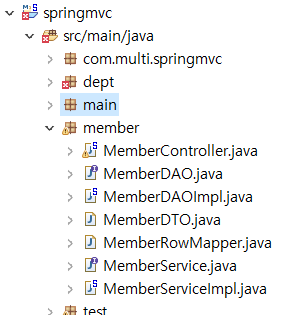
springJDBC프로젝트 파일 옮겨서 오류나는 부분 해결
springmvc/pom.xml
<!-- spring jdbc -->
		<!-- https://mvnrepository.com/artifact/org.springframework/spring-jdbc -->
		<dependency>
		    <groupId>org.springframework</groupId>
		    <artifactId>spring-jdbc</artifactId>
		    <version>4.2.4.RELEASE</version>
		</dependency>
		 <!-- https://mvnrepository.com/artifact/com.oracle.database.jdbc/ojdbc6 -->
		<dependency>
		    <groupId>com.oracle.database.jdbc</groupId>
		    <artifactId>ojdbc6</artifactId>
		    <version>11.2.0.4</version>
		</dependency>
이미지파일 매핑, 스프링 jdbc연동, sql연결
이런식으로 내가 원하는대로 매핑 설정할수있음
매핑한대로 insultResult.jsp 파일에 설정
	<!-- 이미지파일 -->
	<resources mapping="/images/**" location="/resources/images/" />
	<resources mapping="/common/css/**" location="/resources/common/css/" />
	<resources mapping="/common/js/**" location="/resources/common/js/" />
<!-- =====================스프링jdbc연동을 위해서 필요한 라이브러리===================== -->
	<!-- jdbc에서 DriverManager방식으로 커넥션을 생성해서 관리(요청이 들어오면 커넥션을 만들어서 넘겨주는 방식) -->
	<beans:bean id="ds" class="org.springframework.jdbc.datasource.DriverManagerDataSource">
		<beans:property name="driverClassName" value="oracle.jdbc.driver.OracleDriver"/>
		<beans:property name="url" value="jdbc:oracle:thin:@127.0.0.1"/>
		<beans:property name="username" value="scott"/>
		<beans:property name="password" value="tiger"/>
	</beans:bean>

	<!-- sql을 실행할 수 있는 기능을 제공하는 클래스 -->
	<beans:bean id="template" class="org.springframework.jdbc.core.JdbcTemplate">
		<beans:constructor-arg ref="ds"/>
	</beans:bean>
미션
dept패키지의 모든 작업이
- controller -> service -> dao 순으로 실행될 수 있도록 클래스를 수정
- DeptController작성하기
get : /dept/insert
post : /dept/insert
메소드의 매개변수, 메소드명, 리턴타입은 사용자정의 - 부서등록이 실행될 수 있도록 작업하기
- 결과: deptResult.jsp만들고 forward되도록 작업하기
- index.jsp에 "부서등록" 하이퍼링크 추가하고 작업하기
- 모든 작업을 member와 동일하게 동작하도록 작업
- DeptService, DeptServiceImpl
- 실행화면캡쳐,파일첨부
DeptController
@Controller
@RequestMapping("/dept")
public class DeptController {
	DeptService service;

	@Autowired
	public DeptController(DeptService service) {
		super();
		this.service = service;
	}

	@RequestMapping(value = "/insert", method = RequestMethod.GET)
	public String showpage() {
		return "dept/register";
	}

	@RequestMapping(value = "/insert", method = RequestMethod.POST)
	public ModelAndView insert(DeptDTO dept) {
		service.insert(dept);
		ModelAndView mav = new ModelAndView("dept/insertResult");
		mav.addObject("dept",dept);
		return mav;
	}
}
interface DeptService
public interface DeptService {
	int insert(DeptDTO dept);
	List<DeptDTO> getDeptList();
}
DeptServiceImpl
@Service
public class DeptServiceImpl implements DeptService {
	DeptDAO dao;

	@Autowired
	public DeptServiceImpl(DeptDAO dao) {
		super();
		this.dao = dao;
	}

	@Override
	public int insert(DeptDTO dept) {
		int result = dao.insert(dept);
		System.out.println(result+"개 처리 성공");
		return result;
	}

	@Override
	public List<DeptDTO> getDeptList() {
		return dao.getDeptList();
	}

}
DeptDTO
public class DeptDTO {
	String deptCode;
	String deptName;
	String tel;
	String addr;
	public DeptDTO(){

	}
	public DeptDTO(String deptCode, String deptName, String tel, String addr) {
		super();
		this.deptCode = deptCode;
		this.deptName = deptName;
		this.tel = tel;
		this.addr = addr;
	}
	public String getDeptCode() {
		return deptCode;
	}
	public void setDeptCode(String deptCode) {
		this.deptCode = deptCode;
	}
	public String getDeptName() {
		return deptName;
	}
	public void setDeptName(String deptName) {
		this.deptName = deptName;
	}
	public String getTel() {
		return tel;
	}
	public void setTel(String tel) {
		this.tel = tel;
	}
	public String getAddr() {
		return addr;
	}
	public void setAddr(String addr) {
		this.addr = addr;
	}
	@Override
	public String toString() {
		return "DeptDTO [deptCode=" + deptCode + ", deptName=" + deptName + ", tel=" + tel + ", addr=" + addr + "]";
	}


}
register.jsp
<%@ page language="java" contentType="text/html; charset=UTF-8"
    pageEncoding="UTF-8"%>
<!DOCTYPE html>
<html>
<head>
<meta charset="UTF-8">
<title>Insert title here</title>
 <link rel="stylesheet" href="http://maxcdn.bootstrapcdn.com/bootstrap/3.3.6/css/bootstrap.min.css">
  <script src="https://ajax.googleapis.com/ajax/libs/jquery/1.12.0/jquery.min.js"></script>
  <script src="http://maxcdn.bootstrapcdn.com/bootstrap/3.3.6/js/bootstrap.min.js"></script>
</head>
<body>
	<div class="container-fluid">
			<div class="col-lg-10">
				<a href="/springmvc/member/list"><h1>부서목록보기</h1></a>
				<form role="form" class="form-horizontal"
					action="/springmvc/dept/insert" method="POST"
					name="myform">
					<fieldset>
						<div id="legend">
							<legend>아래 양식을 작성해주세요.</legend>
						</div>
						<div class="form-group">
							<!-- 부서코드 -->
							<label class="control-label col-sm-2" for="deptCode">부서번호</label>
							<div class="col-sm-3">
								<input type="text" id="deptCode" name="deptCode"
									placeholder="부서번호" class="form-control"
									 required>
							</div>
						</div>
						<div class="form-group">
							<!-- 패스워드-->
							<label class="control-label col-sm-2" for="deptName">부서이름</label>
							<div class="col-sm-3">
								<input type="text" id="deptName" name="deptName"
									placeholder="부서이름" class="form-control" minlength="1" >

							</div>
						</div>


						<div class="form-group">
							<!-- 성명-->
							<label class="control-label col-sm-2" for="tel">전화번호</label>
							<div class="col-sm-3">
								<input type="text" id="tel" name="tel"
									placeholder="전화번호" class="form-control" minlength="1" required>

							</div>
						</div>

						<div class="form-group">
							<!-- 주소-->
							<label class="control-label col-sm-2" for="addr">주소</label>
							<div class="col-sm-3">
								<input type="text" id="addr" name="addr"
								placeholder="주소"
									class="form-control" minlength="1" required>

							</div>
						</div>
						<hr/>
						<div class="form-group">
							<!-- Button -->
							<div class="col-sm-3 col-sm-offset-2">
								<input type="submit" value="가입하기" class="btn btn-success"/>
							</div>
						</div>
					</fieldset>
				</form>
			</div>
		</div>

</body>
</html>
insultResult.jsp
<%@ page language="java" contentType="text/html; charset=UTF-8"
    pageEncoding="UTF-8"%>
<!DOCTYPE html>
<html>
<head>
<meta charset="UTF-8">
<title>Insert title here</title>
</head>
<body>
<h1>부서등록</h1>
	<hr/>
	<h2>부서번호 : ${dept.deptCode }</h2>
	<h2>부서이름 : ${dept.deptName }</h2>
	<h2>전화번호 : ${dept.tel }</h2>
	<h2>주소 : ${dept.addr }</h2>
</body>
</html>
본 포스팅은 멀티캠퍼스의 멀티잇 백엔드 개발(Java)의 교육을 수강하고 작성되었습니다.