package 패키지명
import java.util.Scanner;
public class 클래스명 {
public void 스캐너 별칭() {
Scanner sc = new Scanner(System.in); //sc는 별칭(이하 sc로 한다)
int num = sc.nextInt();
/* sc.nextInt() : 키보드 입력을 기다림
콘솔에 키보드값 입력 후 엔터를 치면 입력된 값을 정수로 읽어옴.
nextInt에는 정수 외의 값을 넣으면 InputMismatchException 에러가 발생
double dNum = sc.nextDouble();
/ sc.nextDouble() : 키보드 입력을 기다림
키보드 값 입력 후 엔터를 치면 입력된 값을 실수로 읽어봄
실수로 변환할 수 없는 값을 입력하면 에러 발생 /
String str = sc.nextLine();
띄어쓰기가 포함된 문자열을 입력받는 메서드
버퍼에 남아있는 엔터를 제거하는 용도
앞에 버퍼가 없을 때에는 필요 없다.
앞에 버퍼가 있을 때에는 버퍼에 남아있는 엔터를 제거하는 용도로
sc.nextLine();
String str2 = sc.nextLine();
이런식으로 제거하는 줄 한번 입력 후 메서드 적어준다.*/
string str = sc.next();
sc.next(): 문자열을 입력받는 메소드.
단, 띄어쓰기가 포함된 문자열은 띄어쓰기 이전까지만 인식
char chr = sc.next().charAt(0);;
// 입력받은 문자열(sc.next()) 중 첫번째 글자만 문자로 추출.
문자를 바로 받는 scan 기능이 없어서 이렇게 써야함
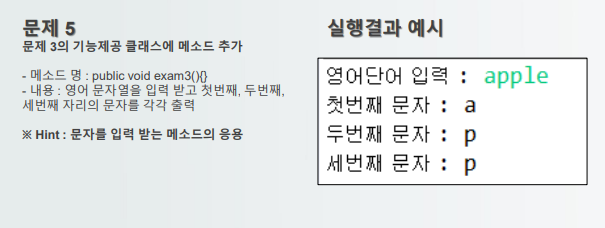
public void exam3(){
Scanner sc = new Scanner(System.in);
System.out.print("영어단어 입력:");
String fruit = sc.next(); //문자열로 입력받고
char fr = fruit.charAt(0); // 변수선언이 꼭 필요한 것은 아니다.
char fr2 = fruit.charAt(1);
char fr3 = fruit.charAt(2);
System.out.println("ch: "+fr);
System.out.println("ch: "+fr2);
System.out.println("ch: "+fruit.charAt(2)); // 한 번만 쓰고 말거면
//위에 변수 선언 fr, fr2, fr3 굳이 할 필요없이 바로 println에서 frui.tcharAt( )하면 된다
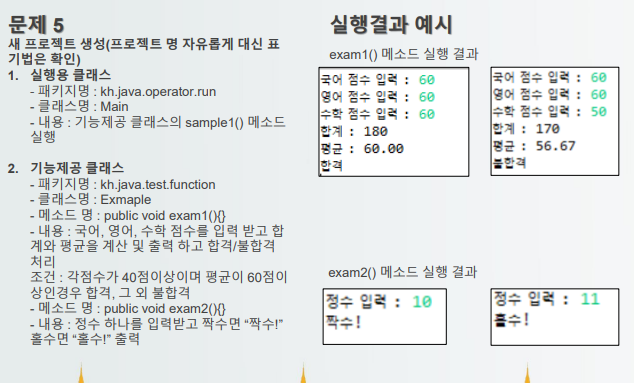
package kh.java.test.fuction;
import java.util.Scanner;
public class Example {
public void exam1() {
Scanner sc = new Scanner(System.in);
System.out.print("국어 점수 입력: ");
double kor = (int)sc.nextInt();
System.out.print("영어 점수 입력: ");
double eng = (int)sc.nextInt();
System.out.print("수학 점수 입력: ");
double math = (int)sc.nextInt();
int sum = (int)(kor+eng+math);
double avg = sum/3.0 ;
System.out.printf("합계:%d\n", sum);
System.out.printf("평균:%.2f\n", avg);
String str = (kor >=40) && (eng >= 40) && (math >=40) && (avg>=60)? "합격" : "불합격";
System.out.println(str);