-
IoC, Inversion of Control
제어의 역전
개발자가 프로그램을 제어하지 않고 , Framework 가 프로그램을 제어하는 것을 의미함
객체 생성 의존관계 설정 (Dependency), 생명주기(등을 Framework 가 직접 관리하는 것을 말함) -
IoC 컨테이너
컨테이너 (Container): 객체의 생명주기를 관리하고 생성된 인스턴스를 관리함
Spring Framework 에서 객체를 생성과 소멸을 담당하고 의존성을 관리하는 컨테이너를 IoC 컨테이너라고 함
IoC 컨테이너 = 스프링 컨테이너
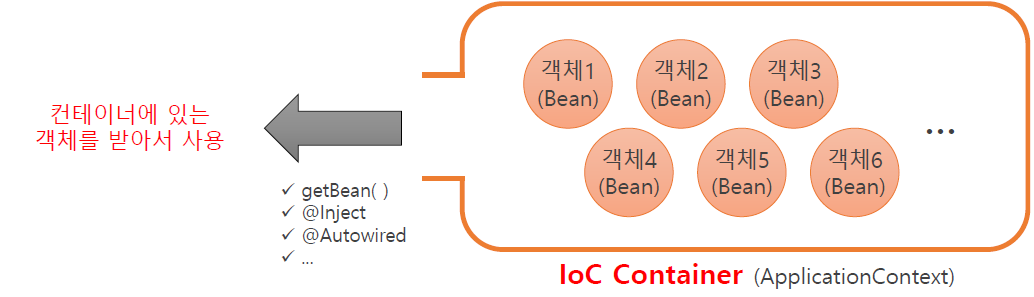
- IoC 컨테이너 구조

Ioc 컨테이너 주요 종류
BeanFactory
스프링 빈 설정 파일 (Spring Bean Configuration 에
등록된 bean 을 생성하고 관리하는 가장 기본적인 컨테이너
클라이언트 요청에 의해서 bean 을 생성함
ApplicationContext
트랜잭션 관리 메시지 기반 다국어 처리 등 추가 기능을 제공
bean 으로 등록된 클래스들을 객체 생성 즉시 로딩시키는 방식으로 동작
GenericXmlApplicationContext
파일 시스템 또는 클래스 경로에 있는 XML 설정 파일을 로딩하여
<bean> 태그로 등록된 bean 을 생성하는 컨테이너
AnnotationConfigApplicationContext
자바 애너테이션 (Java Annotation) 에 의해서 bean 으로 등록된
bean 을 생성하는 컨테이너
@ Configuration,@Bean 애너테이션 등이 필요함
- GenericXmlApplicationContext 활용 예제
int a, int b를 전달 받아 단순 사칙연산의 기능을 가진 메소드로 이루어진 Calculator 클래스가 있다.
Java에서는
Calculator calc = new Calculator();
calc.add(1, 2);
형식이고 new 키워드로 생성자 호출 뒤 메소드를 사용하지만
스프링에서는 <bean>태그로 객체 생성 후 new 키워드 없이 사용할 수 있다.
이 때 기본적으로 Singleton Pattern으로 생성된다.
호출(사용)은 <bean>태그가 있는 xml을 읽어들인 뒤(동시에 객체 생성), 정의된 객체를 가져온다.
<bean>태그들은 반드시 <beans> 태그 안에서 작성되어야 함
사칙연산 클래스
public class Calculator {

  // no field

  // default constructor  :  new Calculator()

  // method
  public void add(int a, int b) {
    System.out.println(a + "+" + b + "=" + (a + b));
  }
  public void sub(int a, int b) {
    System.out.println(a + "-" + b + "=" + (a - b));
  }
  public void mul(int a, int b) {
    System.out.println(a + "*" + b + "=" + (a * b));
  }
  public void div(int a, int b) {
    System.out.println(a + "/" + b + "=" + (a / b));
  }
}
src/main/resources 위치에 package추가하고
Spring Bean Configuration File 만든 후
<bean>태그로 객체만들기
<?xml version="1.0" encoding="UTF-8"?>
<beans xmlns="http://www.springframework.org/schema/beans"
	xmlns:xsi="http://www.w3.org/2001/XMLSchema-instance"
	xsi:schemaLocation="http://www.springframework.org/schema/beans http://www.springframework.org/schema/beans/spring-beans.xsd">

  <!-- Calculator calc = new Calculator(); -->
  <bean class="com.gdu.app01.xml01.Calculator" id="calc" scope="singleton"></bean>

</beans>
객체 사용
public class MainWrapper {

  public static void main(String[] args) {

    // app-context.xml 파일 읽기 (여기에서 <bean> 태그로 정의해 둔 객체가 생성된다.
    AbstractApplicationContext ctx = new GenericXmlApplicationContext("xml01/app-context.xml");

    // <bean> 태그로 정의된 객체 가져오기
    Calculator calculator = (Calculator)ctx.getBean("calc");  // ctx.getBean("calc", Calculator.class) 코드도 동일함

    // 객체 사용해 보기
    calculator.add(1, 2);
    calculator.sub(3, 4);
    calculator.mul(5, 6);
    calculator.div(7, 8);

    // app-context.xml 파일 닫기
    ctx.close();
  }
}
Person 클래스
import lombok.AllArgsConstructor;
import lombok.Data;
import lombok.NoArgsConstructor;

@NoArgsConstructor
@AllArgsConstructor
@Data
public class Person {
  private String name;
  private int age;
  private Calculator calculator;
}
app-context.xml에서 <bean>태그로 bean(객체)생성
<beans> 태그 내부에 작성
  <!--
    1. 디폴트 생성자 + setter
      Person man = new Person();
      man.setName("뽀로로");
      man.setAge(20);
      man.setCalculator(calc);
  -->
  <!-- property 태그는 객체의 getter/setter 기준으로 동작하기 때문에 만들어둬야 사용할 수 있다 -->
  <bean class="com.gdu.app01.xml01.Person" id="man">
    <property name="name" value="뽀로로"/>
    <property name="age" value="20"/>
    <property name="calculator" ref="calc"/>
  </bean>
  <!-- Namespaces탭의 "p"옵션을 사용하면 <bean> 태그에 속성으로 <property> 태그를 작성할 수 있다
  <bean class="com.gdu.app01.xml01.Person" id="man" p:name="뽀로로" p:age=:"20" p:calculator-ref="calc"/>
  -->


  <!--
    2. 필드를 이용한 생성자
      Person woman = new Person("루피", 20, calc);
  -->
  <!-- 생성과 함깨 인수를 전달할 땐 <constructor-arg> 태그를 사용한다 -->
  <bean class="com.gdu.app01.xml01.Person" id="woman">
    <constructor-arg value="루피"/>
    <constructor-arg value="20"/>
    <constructor-arg ref="calc"/>
  </bean>
객체 사용 확인하기
  public static void ex02() {

    // app-context.xml 파일 읽어서 <bean> 태그로 정의된 객체 만들기
    AbstractApplicationContext ctx = new ClassPathXmlApplicationContext("xml01/app-context.xml");

    // 객체 가져오기
    // 객체 타입으로 캐스팅하거나,
    Person man = (Person)ctx.getBean("man");
    // .getBean으로 불러올때 타입을 지정한다.
    Person woman = ctx.getBean("woman", Person.class);

    // 객체 확인
    System.out.println(man.getName() + ", " + man.getAge());
    man.getCalculator().add(1, 2);
    System.out.println(woman.getName() + ", " + woman.getAge());
    woman.getCalculator().add(3, 4);

    // app-context.xml 파일 닫기
    ctx.close();
  }

  /* 결과
  뽀로로, 20
  1+2=3
  루피, 20
  3+4=7
  */
List, Set, Map 타입의 field를 가진 Student 클래스
import java.util.List;
import java.util.Map;
import java.util.Set;

import lombok.AllArgsConstructor;
import lombok.Data;
import lombok.NoArgsConstructor;

@NoArgsConstructor
@AllArgsConstructor
@Data
public class Student {
  private List<String> subjects;
  private Set<String> contacts;
  private Map<String, String> friends;
}
List, Set, Map의 타입을 가진 <bean>생성
   <!-- List -->
    <property name="subjects">
      <list>
        <value>국어</value>
        <value>영어</value>
        <value>수학</value>
      </list>
    </property>

    <!-- Set(동일한 값 중복저장 불가) -->
    <property name="contacts">
      <set>
        <value>010-0000-0000</value>
        <value>010-0000-0000</value>
        <value>031-9999-9999</value>
      </set>
    </property>

    <!-- Map -->
    <property name="friends">
      <map>
        <entry key="동네친구" value="루피"></entry>
        <entry key="학교친구" value="뚜비"></entry>
        <entry key="사회친구" value="포비"></entry>
      </map>
    </property>

  </bean>
결과 확인
public class MainWrapper {

  public static void main(String[] args) {

    // app-context.xml에 정의된 <bean>태그를 객체로 생성
    AbstractApplicationContext ctx = new GenericXmlApplicationContext("xml03/app-context.xml");

    // 객체 가져오기
    Student s = ctx.getBean("student", Student.class);

    // 확인
    for(String subject : s.getSubjects()) {
      System.out.println(subject);
    }
    for(String contact : s.getContacts()) {
      System.out.println(contact);
    }
    for(Entry<String, String> entry : s.getFriends().entrySet()) {
      System.out.println(entry.getKey() + ", " + entry.getValue());
    }

    // app-context.xml 닫기
    ctx.close();
  }
}
/* 결과
국어
영어
수학
010-0000-0000
031-9999-9999
동네친구, 루피
학교친구, 뚜비
사회친구, 포비
*/
@NoArgsConstructor
@AllArgsConstructor
@Data
위 Annotation은 Lombok라이브러리의 기능이다.
