#음성인식 API
카카오 Speech To Text API, 네이버 클로바API , Google Cloud Platform Speech API 등 각 IT 기업의 기술을 발견할 수 있었고, 가능한 형태로 연동해보려고 했다
webkitSpeechRecognition는 크롬 브라우저를 사용해 쉽게 구현 가능하고, 비교적 잘 작동하는 라이브러리로 알려져있다
#html
<!DOCTYPE html>
<html lang="en">
<head>
    <meta charset="UTF-8">
    <meta http-equiv="X-UA-Compatible" content="IE=edge">
    <meta name="viewport" content="width=device-width, initial-scale=1.0">
    <script src="/home/main.js" defer></script>
    <title>Document</title>
</head>
<body>
    <text>
        "음성 인식 api/lib를 통한 음성을 Text로 변형, 제 2가공으로 처리하는 프로그램을 작성"<br>
        "Voice > Text > another Languagee"
    </text>
    <br>
    <button id="rcdStart" >Record</button>
    <button id="rcdStop">Stop</button>
    <input type="text" id="resultList" value="undefined" size="80"/>
</body>
</html>
-간단하게 녹음/중지 버튼과 결과값을 보여줄 input창을 만들었다
#자바스크립트
   if(!("webkitSpeechRecognition") in window){
        alert("Connect in Chrome Browser");
    }else{
        const speech = new webkitSpeechRecognition;

        document.getElementById("rcdStart").addEventListener("click",()=>{
            speech.start();
        });
        document.getElementById("rcdStop").addEventListener("click",()=>{
            speech.stop();
        });

        speech.addEventListener("result", (event)=>{
            console.log(event);
            const { transcript } = event["results"][0][0];
            console.log(transcript);
            resultListView(transcript);
        });

        function resultListView(transcript){
            document.getElementById("resultList").value = transcript;
        }
    }
-이벤트 발생 후 event객체로 접근해, 결과값을 가져오면 된다
#테스트

Record 버튼 > 음성 > Stop > Result 결과값을 input value로 변경
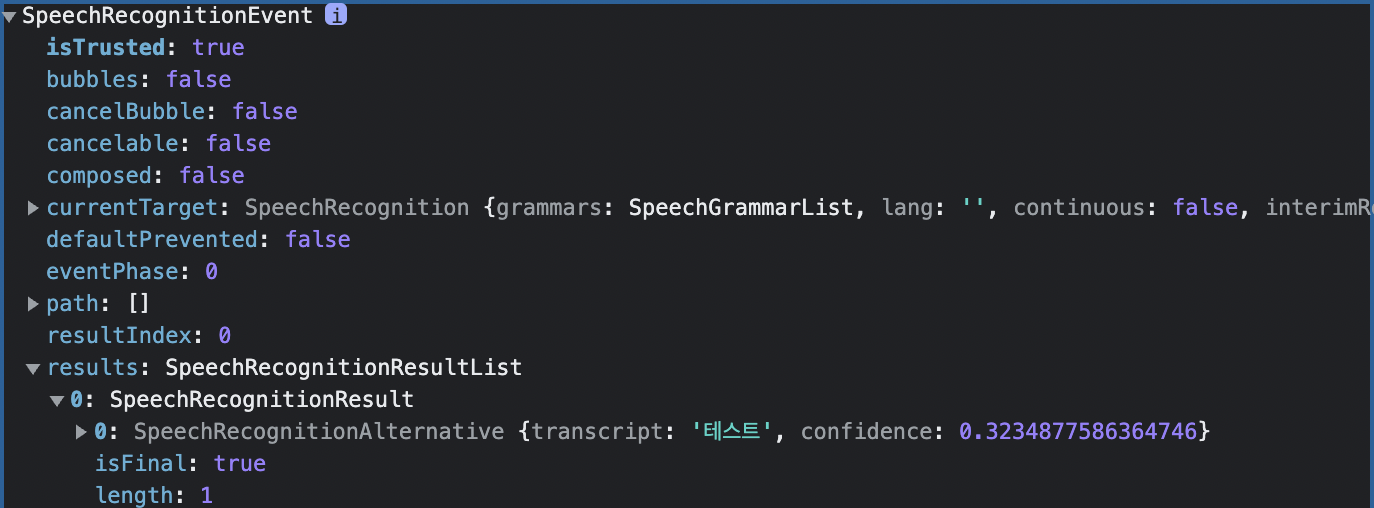
speech에 접근해보면 아래와 같이, transcript로 Speech To Text 된 값을 볼수 있다
#Speech synthesis
Speech synthesis 를 이용하면 Text To Speech도 가능하다