강사님이 알려주신 CSS 게임이 생각보다 재밌다
연습하는데 도움도 되고 좋은듯👍
분명 모르는게 나와서 수업에서 안배운것도 많이 나왔다고 생각했는데
정리한거 보니까 다 배운 내용이었네… (/-᷄ ᴗ -᷅\ *)💦그리고 요즘 스크럼할때 팀원분들이 재밌는 알고리즘 문제가 있다고 하나씩 가져오시는데, 나빼고 다 관심있어 하는 것 같아서 그럴때마다 살짝 머쓱해진다..ㅎ 일단 알고리즘 문제를 재밌어 한다는 사실이 나한테는 너무 신기하고,, 다들 열심히 푸시는데 정말 대단한 것 같다. 그러니까 그렇게 다 잘하시는거겠지? 하…난 쳐다도 보기 싫어서 저리 치워두는데… 하지만 어쩔 수 없이 해야 된다는 슬픈 현실
CSS
CSS 연습 게임
https://flukeout.github.io/
https://flexboxfroggy.com/#ko
https://cssgridgarden.com/#ko
선택자
■ 전체 선택자
전체 요소를 선택하며 핵심 기호는 *
/* 전체 선택자 */

* {
	font-size: 16px;
  }
■ 태그 선택자
핵심 기호 없이 태그명만 입력
/* 태그 선택자 */

p {
	font-size: 16px;
  }
■ 클래스 선택자
클래스명을 입력하며 앞에 class를 나타내는 핵심 기호 . 을 붙여줌.
/* 클래스 선택자 */

.class {
	font-size: 16px;
  }
■ 아이디 선택자
id명을 입력하며 앞에 id를 나타내는 핵심 기호 #을 붙여줌
❗️HTML 문서에서 중복되어 사용할 수 없다.
/* 아이디 선택자 */

#id {
	font-size: 16px;
  }
결합자
자손 결합자
h1 p
공백으로 표시
- 특정 요소의 모든 하위 요소를 포함
.box p {
  color: red;
}<div class="box"><p>Text in .box</p></div>
<p>Text not in .box</p>자식 결합자
h1 > p
‘>’으로 표시
- 직계 자식한테만 적용
인접 형제 결합자
h1 + p
- ‘+’로 표시
- 인접해 있는 첫번째 형제만 적용된다.
일반 형제 결합자
h1 ~ p
- ‘~’로 표현
- 조건에 맞는 모든 형제들에게 적용
선언
선언부에는 속성과 속성값이 있다.
박스 모델
마진>테두리>패딩>컨텐츠
display
- block : 한 줄을 다 차지
- inline : 자신의 크기만큼만 차지
- inline-block :
- none : 시각적으로 보이지 않음
Flex
가상의 가로축과 세로축을 두고 기준으로 컨테이너 안에 있는 요소들을 옮겨줌
- 제일 상위에 container를 만들어주고 flex를 적용시켜줌
Grid
2차원 레이아웃
- 그리드 셀과 갭으로 이루어져있음
- 그리드 라인 - 열 번호, 행 번호
실습
글자 관련
 @font-face {
            font-family: 'LINESeedKR-Bd';
            src: url('https://fastly.jsdelivr.net/gh/projectnoonnu/noonfonts_11-01@1.0/LINESeedKR-Bd.woff2') format('woff2');
            font-weight: 700;
            font-style: normal;
        }

        .font-applied {
            font-family: 'LINESeedKR-Bd', sans-serif;
        }

        .i {
            font-size: italic;
        }

        .font-bold {
            font-weight: 700;
        }

        /* Font-size
        px
        em (상위)-> px와 16배 차이
        ex) 상위 클래스가 32px이고 내가 2em이면 64px
        rem (최상위)

        */

        .text-3xl {
            font-size:30px;
        }

        /*
        text-align -> 텍스트 정렬

        */
커서 관련
.cursor-loading {
            cursor: pointer;
        }
FLEX
.container {
            display: flex;
            /*
            flex-direction -> 아이템의 배치 방향을 결정
            flex container에 설정해줘야 함
            */
            flex-direction: row-reverse;

            /*
            justify-content: 주축(가로축)에서 아이템의 정렬 방식

            */
            justify-content: space-between;

        }
.container {
display: flex;
justify-content: center;
/*
align-items -> 교차축에서 아이템 정렬방식을 설정
*/
align-items: baseline;
}.container {
display: flex;
justify-content: center;
width: 300px;
border: .3px dashed gray;
/*
flex-wrap
줄바꿈을 어떻게 할지
*/
flex-wrap: wrap;
}.container {
display: flex;
justify-content: center;
border: 0.3px dashed gray;
}
/*
flex-grow
*/
.flex-grow-1{
flex-grow: 1;
}
.flex-grow-2{
flex-grow: 2;
}
/*
flex-basis
최소한의 사이즈를 보장하고 flex로 처리하고 싶을 때 사용
*/
.flex-basis {
flex-basis: 300px;
}그리드
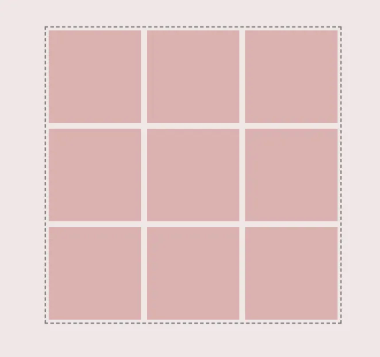
.container {
            display: grid;
            /*
            grid-template-columns (fr을 주면 균일하게 크기 지정 가능)
            grid-template-rows (auto는 행에 따라 자동으로 크기를 가져감)
            -> 아이템의 열과 행너비를 직접 지정
            */
            /* grid-template-columns: 1fr 1fr 1fr; */
            /* grid-template-rows: auto auto auto; */
            grid-template-columns: repeat(3, 1fr); /*반복*/
            grid-template-rows: repeat(3, auto);
            gap: 10px;
        }
예쁘다…ㅎㅎ🌸
- 열 / 행 크기와 개수 설정
.container {
            display: grid;
            gap: 5px;
            grid-template-columns: repeat(4, auto);
            grid-template-rows: repeat(4, auto);

        }
        .row-2-4{
        /*줄번호를 이용해 아이템이 차지하는 크기를 변경 가능 - 시작번호, 끝번호*/
            /* grid-column-start: 2; */
            /* grid-column-end: 4; */
            grid-column: 2 / 4;
        }

        .row-1{
        /*열과 행의 개수 설정 가능*/
        grid-row: 2 / span 2;
        grid-column: 1 / span 3;
}- 그리드로 레이아웃 설정
body {
            padding: 10rem;
        }

        .container {
            display: grid;

            grid-template-columns: repeat(3, 1fr);
            grid-auto-rows: 200px;

            gap: 10px;
        /*
        grid-template-areas
        - 구역별로 이름을 붙여놓고 영역을 지정해서
        그 영역만큼 아이템이 차지할 수 있도록 함
        */

            grid-template-areas:

                'tea1 tea1 tea1'
                'tree tree tea2'
                'tea3 tea3 tea4'
                'tea5 tea5 tea4'
            ;
        }

        .img {
            width: 100%;
            height: 100%;
            /* 커버는 일부분만 보여줌*/
            object-fit: cover;
        }


        .tea1{
            grid-area: tea1;
        }

        .tea2{
            grid-area: tea2;
        }

        .tea3{
            grid-area: tea3;
        }

        .tea4{
            grid-area: tea4;
        }

        .tea5{
            grid-area: tea5;
        }

        .tea1{
            grid-area: tree;
}- 그리드로 레이아웃 설정 - 활용
body {
            display: grid;
            width: 100vw;
            height: 100vh;

            margin: 0;

            grid-template-columns: 1fr 4fr;
            grid-template-rows: 100px auto 200px;

            grid-template-areas:
            'header header'
            'nav sec'
            'footer footer'
            ;

        }

        header{
            grid-area: header;
            background-color: #B1D5C2;
            height: 100%;
            width: 100%;
        }

        aside{
            grid-area: nav;
            background-color: #f0ebc8;
            height: 100%;
            width: 100%;
        }

        section{
            grid-area: sec;
            background-color: #cce4c3;
            height: 100%;
            width: 100%;
        }

        footer{
            grid-area: footer;
            background-color: #b1d5c2;
            height: 100%;
            width: 100%;
        }
Thymeleaf
- 템플릿 엔진
DOM
웹 문서의 구조를 객체로 표현한 것으로, 프로그래밍 언어가 웹 페이지의 요소를 조작할 수 있도록 해주는 인터페이스
- HTML이나 XML 문서의 콘텐츠, 구조, 스타일 요소를 구조화해서 표현
- 주로 자바스크립트에서 웹 페이지의 요소를 선택, 수정, 추가 또는 제거할 때 사용
DOM의 렌더링 과정
브라우저의 렌더링 엔진은 웹 문서를 로드한 후, 파싱하여 웹 문서를 브라우저가 이해할 수 있는 구조로 구성하여 메모리에 적재
th:text
- 요소 내의 텍스트를 동적으로 삽입할 때 사용
- HTML 내의 텍스트 노드를 대체
th:value
- <'input>, <'option>, <'textarea> 등에서 value 속성을 동적으로 설정
<input type="text" th:value="${user.name}" />th:href / th:src
- 링크나 이미지를 동적으로 다룰때 사용
<a th:href="@{/home}">home</a>
<img th:src="@{/images/logo}" alt="logo"/>
th:if / th:unless
- ${} 안에 조건식이 옴 → 조건식이 참이 아니면 렌더링을 하지 않음
<p th:if="${user != null}">Hello, <span th:text="${user.name}"></span>!</p>
<p th:unless="${user != null}">Please log in.</p>
th:each
- 컬렉션을 반복할 때 → for each문과 같은 역할
<ul>
    <li th:each="item : ${items}" th:text="${item.name}"></li>
</ul>
th:action
th.object
- 필드가 있는것처럼 객체에 접근 가능
<form th:object="${user}">
    <input type="text" th:field="*{name}" />
</form>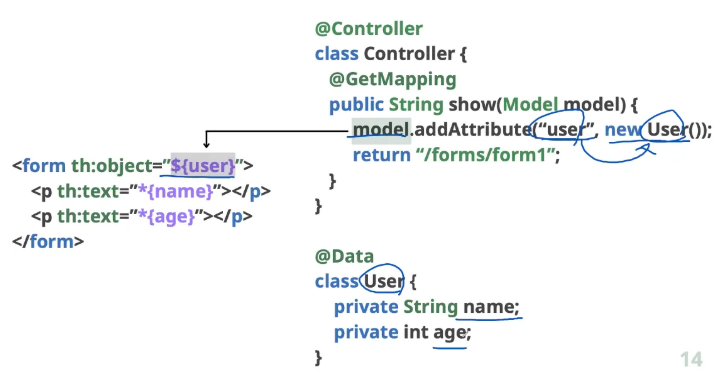
- user가 있을때만 User의 name과 age 값을 넣음
- 자료형 상관없이 text로만 받음
링크 URL 표현식
<a th:href="@{/user/profile/{id}(id=${user.id})}">Profile</a>- user.id에 있는 id가 소괄호의 id에 들어가고 다시 그 id가 중괄호의 id로 들어감
텍스트 대체 표현식
<p th:text="|Hello, ${user.name}!|">Origin Text</p>- ‘|’을 쓰고 바꾸고 싶은곳만 중괄호만 써주면 입력받은 내용으로 대체됨
<script th:inline="javascript">
const userName = /*[[${session.user.name}]]*/ "user1";
console.log(*userName : ${userName}*);
</script>- JS코드를 치환
/*[[${session.user.name}]]*/→ 타임리프 표현식 / 렌더링 할 때 주석 부분을 지움