자바스크립트 개발자 도구 : 크롬
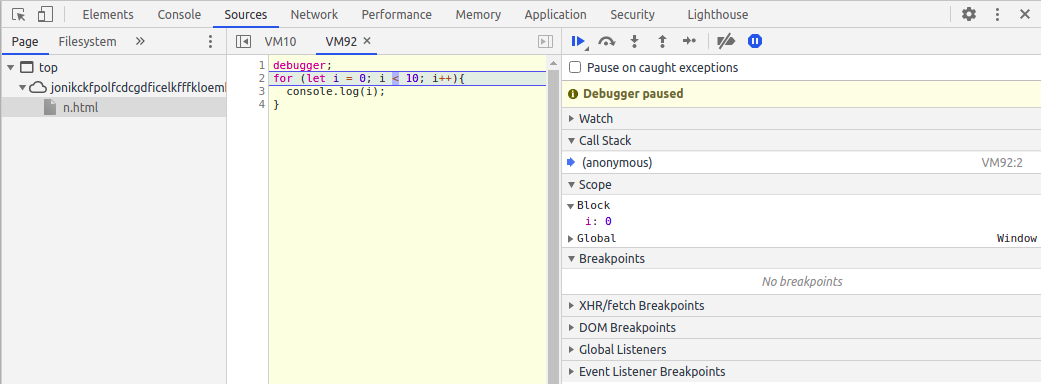
- 개발자 도구를 통해 디버깅을 확인할 수 있다.
[디버깅 방법]
debugger;
for (let i = 0; i < 10; i++){
  console.log(i);
}
[개발자 도구를 통해 for loop의 동작과정을 확인할 수 있다.]
[console.log]
- console.log() : 괄호안에 값을 출력해주는 함수이다.
let value = 10;
console.log(value); //결과 : 10

function foo(value){
  return value;
}

console.log(foo(10)); //결과 : 10
[console.table]
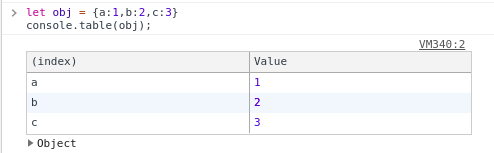
- 값을 출력할 때 테이블 형식으로 출력한다.
let obj = {a:1,b:2,c:3}
console.table(obj);| [출력 결과] |
|---|
 |
많이 발생했던 에러
ReferenceError : 정의되지 않은 변수 사용 시 에러
TypeError : 구문이 잘못되었을 때 발생하는 에러
SyntaxError: 괄호가 빠지거나 잘못 사용할 경우 발생하는 에러
변수 선언과 변수 타입
변수 선언
let variable;
console.log(variable); //결과 : undefined
변수에 값 할당
variable = 10;
console.log(variable); // 결과 : 10
변수 선언과 값 할당(변수 초기화)
let variable2 = 'Test';
console.log(variable2); // 결과 : Test
변수에 값 재할당
variable = 12;
console.log(variable); // 결과 : 11
변수 타입 확인
function foo(){}
let obj = {}
let arr = []

console.log(typeof 1); // 결과 : number
console.log(typeof '1'); // 결과 : string
console.log(typeof true); //결과 : boolean
console.log(typeof foo()); // 결과 : function
console.log(typeof obj); //결과 : object
console.log(typeof arr); //결과 : object
reference type과 primity type 정리 링크 참조
shallow copy와 deep copy 정리 링크 참조
var, const, let 키워드의 차이점을 알고 있다.
- var는 ES6(ECMAScript 2015)가 나오기 전에 사용했던 변수 선언 방식이다.(Function Scope)
- let은 ES6에서 사용하는 변수 선언 방법이다. restricted scope로 인해 var보다 이점이 많다.(Block Scope)
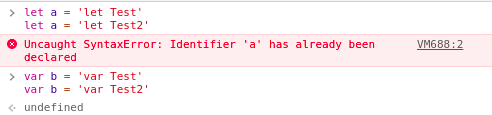
- var는 변수이름을 재선언 해도 에러 발생이 없다. 그래서 주로 let keyword를 사용한다.
| var vs let keyowrd의 차이점 |
|---|
 |
- const keyword는 값을 재할당 불가능하다.(Block Scope)
const c = 10
c = 11 //에러 발생 Uncaught TypeError: Assignment to constant variable.
함수란
- 하나의 작은 기능의 단위이다.
- 함수는 호출 시 입력하는 값을 전달인자(arguments), 함수 선언 시 사용하는 변수를 매개변수(parameter)라고 한다.
- 함수 선언과 함수 표현식의 차이점을 알고 있다.
- 함수 선언식은 호이스팅이 가능하지만 표현식은 불가능하다.
- 호이스팅은 함수 안에 선언들을 모두 끌어올려서 해당 함수 유효 범위의 최상단에 선언하는 것
매개변수(parameter)와 전달인자(arguments)
function identity(val){ // val이 매개변수(parameter)
  return val;
}

identity(10) // 10이 전달인자(arguments)이다.- 전달인자가 유동적일 경우 매개변수에 ...를 사용한다.
- 위의 예시에서 매개변수를 ...val로 하면 전달인자가 여러개일 경우 모두 배열로 출력한다.
- arguments라는 유사배열을 통해 전달인자가 유동적일 경우 사용할 수 있다.
function identity(){
  console.log(arguments);
  console.log(arguments[0]);
  console.log(arguments[1]);
}

identity(1,'10');
// 결과
// Arguments(2) [1,'10',callee: f, Symbol (Symbol.iterator): f]
// 1
// '10'
함수 선언문 (function declaration)
identity(10); // 결과 : 10, 호이스팅
function identity(val){
	return val;
}
함수 표현식 (function expression)
identity(10); // Uncaught SyntaxError: Missing initializer in const declaration
const identity = function (val){
  return val;
}
identity(10); // Uncaught SyntaxError: Missing initializer in const
var vs let 호이스팅 차이점
//var 호이스팅
varHoisting = 6;
varHoisting + 7;
var varHoisting;
// 결과 : 13


//let 호이스팅
letHoisting = 6;
letHoisting + 7;
let letHoisting;
// 결과 : Uncaught ReferenceError: Cannot access 'letHoisting' before initialization
IIFE란
- IIFE(Immediately Invoked Function Expressions: “Iffy”라고 발음)는 즉시 호출 함수 표현식의 줄임말입니다.
- IIFE란 정의와 동시에 즉시 실행되는 함수를 의미한다.
- IIFE를 사용하는 방법
- Global Scope를 오염 시키지 않기 위해서 사용한다.
- IIFE를 사용하는 주된 이유는 변수를 전역으로 선언하는 것을 피하기 위해서이다.
(shift = function (val){
  console.log(val || 'IIFE');
})()

shift('Goal'); // Goal
shift(); // IIFE
조건문이란
- if문으로 조건식을 만들어 사용할 수 있다.
if(조건식){
   // do run stuff
   }

// "옷사려면 버스타야되고 아니면 집가려면 지하철을 타야한다 아니면 밥을 먹는다"를 if문으로 작성한다면
if(옷){
  //버스를 탄다
}else if(집){
  // 지하철을 탄다
}else{
  // 밥 먹는다
}
** Equality (==) vs Identity (===) Operators
- ==는 비교 하기 전에 같은 타입으로 값을 변경한다.
- ===는 타입 변환하지 않고 비교 중인 두 값의 타입이 모두 동일한 경우에만 true를 반환한다.
let one = 1;
let oneStr = '1';

one == oneStr // 결과 : true
one === oneStr //  결과 : false
truthy와 falsy의 차이점을 알고 있다.
- truthy 값은 falsy인 값만 알면된다. falsy 값이 아닌 값을 truthy 값이라고 하기 때문이다.
- 조건식이 true인 값(truthy)일 때, if문이 실행 된다.
| falsy값 |
|:------:|
|null|
|undefined|
|0|
|false|
|NaN|
|''|
문자열이란
- 특정 문자 가져오기
- 특정 문자 가져오기가 되지만 변경은 불가능하다.(read-only)
let str = "Hello";
console.log(str[0]); //  H
str[1] = 'o';
console.log(str); // Hello- length 속성: 문자열의 길이(Number)를 반환한다.
let str = "Hello"
console.log(str); //결과 : 5
Methods
- indexOf : 찾고자하는 문자열을 앞에서부터 찾아 index값으로 반환한다.
- lastIndexOf : 찾고자 하는 문자열을 뒤에서부터 찾아 index값으로 반환한다.
let str = 'canada';
console.log(str.indexOf('n')); // 결과 : 2
console.log(str.lastIndexof('a')); // 결과 : 5
console.log(str.indexOf('b')); // 결과 : -1
console.log(str.lastIndexOf('b')); // 결과 : -1- split: 문자열을 분리 기준으로 분리하여 배열로 반환한다.
let str = 'Hello from the other side';
console.log(str.split(' '));
// ['Hello', 'from', 'the', 'other', 'side']
- substirng / slice: 문자열 추출
- 구문: str.substring(start, end); / str.slice(start, end)
- substring 특징
- start > end이면 start와 end를 swap한다.
- NaN,0,false를 입력하면 전체 문자열을 가져온다.
- end 값이 음수일 경우 빈값을 반환한다.
- slice 특징
- end 값이 생략되거나 문자열의 길이보다 클 경우 start부터 끝까지 반환한다.
- start > end일 때, 빈 문자열을 반환한다.
- 음수 값을 입력하면 문자열의 맨 뒤에서 부터 반환한다.
// substring
var str = 'abcdefghij';
console.log(str.substring(0, 3));  // 'abc'
console.log(str.substring(3, 0));  // 'abc'
console.log(str.substring(1, 4));  // 'bcd'
console.log(str.substring(-1, 4)); // 'abcd', 음수는 0으로 취급
console.log(str.substring(0, 20)); // 'abcdefghij', index 범위를 넘을 경우 마지막 index로 취급
console.log(str.substring(0, -1)); // 빈 문자열
console.log(str.substring(-100)); // 'abcdefghij' 음수값은 모든 문자열 출력

// slice
console.log(str.slice(0, 3));  // 'abc'
console.log(str.slice(3, 0));  // 빈 문자열
console.log(str.slice(1, 4));  // 'bcd'
console.log(str.slice(-1, 4)); // 빈 문자열
console.log(str.slice(0, 20)); // 'abcdefghij', index 범위를 넘을 경우 마지막 index로 취급
console.log(str.slice(-1)); // "i"
console.log(str.slice(0, -1)); // "abcdefghi"
console.log(str.slice(-100)); // 'abcdefghij' 음수값은 모든 문자열 출력- toLowerCase / toUpperCase
- 소문자 / 대문자로 반환해주는 메서드
let str = 'abCdEFg';
console.log(str.toLowerCase()); // abcdefg
console.log(str.toUpperCase()); // ABCDEFG- replace : 문자열 중 원하는 문자 변경(replace 적용한 문자열은 변경되지 않는다.)
let str = "Hello";
let changeStr = str.replace('e','o');
console.log(changeStr); //결과 : Hollo
console.log(str); // 결과 : Hello- includes : 원하는 문자열이 있을 경우 true를 반환한다.
let str = "Hello Word!";
console.log(str.includes("Word")); //결과 : true
문자열 합치기(concat method / + operation)
let str = "Hello";
let strSum = str.concat(" Word!");
console.log(str); // Hello
console.log(strSum); // Hell Word!

let str = "Hello"
let strSum = str + " Word!"

console.log(str); // Hello
console.log(strSum); // Hell Word!
문자열과 다른 데이터 유형 합치기
let str = '1'
let result = str + 2
console.log(result); // 결과 : '12'
result = str + true
console.log(result); // 결과 : '1true'
result = str + undefined
console.log(result); // 결과 : '1undefined'
반복문이란
- 대량의 데이터를 반복적으로 처리할 때 사용한다.
- for 구문 : for(초기값; 조건식; 증감값){...}
- while 구문 : while(조건식){증감값 ...}
- continue : 다음 순서의 반복문을 실행한다.
- break : 반복문을 빠져 나온다.
for(let i = 0; i < 10; i++){
    if( i === 2 ) continue
    console.log('i의 값 : ',i);
}
// 결과

// i의 값 :  0
// i의 값 :  1
// i의 값 :  3
// i의 값 :  4
// i의 값 :  5
// i의 값 :  6
// i의 값 :  7
// i의 값 :  8
// i의 값 :  9


for(let i = 0; i < 10; i++){
    if( i === 2 ) break
    console.log('i의 값 : ',i);
}

// 결과

// i의 값 :  0
// i의 값 :  1
배열이란
- 순서가 있는 값으로 index와 element로 구성되어 있다.
- index는 0부터 시작하고 마지막 인덱스는 배열의 길이의 -1이다.
let arr = [1,2,3,4]
for(let i = 0; i < arr.length; i++){
  console.log('index : ', i);
  cnosole.log('element : ', arr[i]);
}
//index :  0
//element :  1
//index :  1
//element :  2
//index :  2
//element :  3
//index :  3
//element :  4
Method
- includes : 원하는 요소가 있을 경우 true를 반환한다.
- indexOf : 찾고자하는 요소를 입력하여 해당 인덱스를 반환한다.
- slice : 원하는 요소를 추출하여 복사본을 생성하여 배열을 반환한다.
- concat : 배열 합치기
- push : 배열의 맨 뒤에 요소 추가
let arr = [1,2,3,4];
console.log(arr.push(5)); // 결과 : 5, 요소가 추가된 배열의 길이를 출력
console.log(arr); // 결과 : [1,2,3,4,5]- pop : 배열의 맨 뒤에 요소를 삭제
let arr = [1,2,3,4];
console.log(arr.pop()); // 결과 : 4, 삭제 전 배열의 길이를 출력
console.log(arr); // 결과 : [1,2,3]- unshift : 배열의 맨 앞에 요소를 추가
let arr = [1,2,3,4];
console.log(arr.unshift(0)); // 결과 : 5, 요소가 추가된 배열의 길이를 출력
console.log(arr); // 결과 : [0,1,2,3,4]- shift : 배열의 맨 앞의 요소를 삭제
let arr = [1,2,3,4];
console.log(arr.shift()); // 결과 : 1, 삭제된 요소를 출력
console.log(arr); // 결과 : [2,3,4]- splice : 배열의 원하는 위치에 요소를 삭제 및 추가
- 구문 : splice(start, deleteCount, item1,item2, ...)- deleteCount가 0이고 item 항목에 값을 넣으면 요소가 추가된다.
- deleteCount가 1이상이면 start지점부터 요소를 삭제한다.
let arr = [1,5,6];
// 원하는 위치에 요소 추가
console.log(arr.splice(1,0,2,3,4)); // []
console.log(arr); //[1,2,3,4,5,6]

// 삭제
console.log(arr.splice(2,2)); // [3,4], 삭제된 요소들을 배열로 출력
console.log(arr); // [1,2,5,6]
객체
- 회원 정보, 주소록처럼 입력하는 입력란은 같지만 입력하는 값이 다를때 사용한다.
- 객체는 key-value, 콜론(:)으로 이루어져 있다.
- 객체 속성은 중복 입력 안됩니다.
- 정의된 속성에 해당하는 키 값을 입력받은 경우, 입력받은 값을 덮어씁니다.
- 객체 속성 값을 객체 또는 함수도 넣을 수 있다. 즉, 객체 안에 객체도 들어갈 수 있다.
- 객체 안에 함수를 불러올 때 이를 method라고 한다.
let obj = { method:
 function(val){
   console.log(val);
 }
}
console.log(obj.method(1)); // 결과 : 1- 속성 삭제시 delete연산자를 사용한다.
객체를 사용하는 경우
- 여러 개의 변수를 선언해야될 경우 많은 변수 선정과 관계없는 변수만 많이 생성된다.
- 배열은 인덱스에 접근해야 되서 가독성이 떨어진다. 인덱스의 어떤 정보를 의미하고 있는지 미리 알고 있어야 한다.
- 배열과 객체의 차이점은 인덱스와 키 차이다.
- 속성의 키는 문자열이다.
객체의 값을 사용하는 방법
- Dot notation
let obj = {}
obj.one = 1;
console.log(obj);
// {one: 1}- Bracket notation
let obj = {}
obj['one'] = 1;
console.log(obj);
// {one: 1}
Dot notation vs Bracket notation
- Dot notation은 객체 안에 키값이 있어야 속성 값을 불러올 수 있다.
- Bracket notation은 변수를 사용하여 for loop로 속성을 여러개 불러올 수 있다.
- for ... in 으로 객체를 순회하는 방법도 있다.
let obj = {one: 1, two: 2, three: 3}
for(let key in obj){
	console.log(obj.key);
}
//결과 : (3) undefined, obj 객체 안에 key라는 키값을 가지는 속성이 없기 때문이다.

for(let key in obj){
  console.log(obj[key]);
}
// 결과
// 1
// 2
// 3
객체의 속성 개수를 세는 법
- Object.keys / Object.values 메서드를 사용하여 객체의 길이를 구할 수 있다.
let obj = {one: 1, two: 2, three: 3}
let key = Object.keys(obj)
let value = Object.values(obj);
console.log(key); // 결과 : ['one','two','three']
console.log(value); // 결과 : [1,2,3]
console.log(key.length) // 결과 : 3
console.log(value.length) // 결과 : 3
알고리즘이란
- 문제를 푸는 방법을 알고리즘이라고 한다.
- 요구사항이 하나 이상인 문제를 여러개로 쪼개서 생각할 수 있어야한다.
- 문제를 일상적인 문장으로 표현할 수 있어야한다.
- 잘개 쪼갠 특정 문제를 JavaScript의 어떤 개념과 연관되는지 생각할 수 있어야 한다.
예를 들어, 간단한 알고리즘을 만들어보자
1 ~ 10의 합을 구하는 문제에서 알고리즘은
- 결과를 출력할 변수를 0으로 초기화한다.
- 반복문으로 값을 연산자를 통해 합을 구하고 변수에 대입하고 출력한다.
let sum = 0;
for(let i = 1; i <= 10; i++){
  sum += i;
}
console.log(sum); // 결과 : 15
Scope
- 변수 접근 규칙에 따른 유효 범위
- 종류 : Global Scope, Local Scope
- Global Scope는 함수 밖에서 선언된 변수이다. {} 밖에서 선언
- Global Scope는 최상단 scope이다. 제일 바깥쪽에 있다.
- Local Scope는 특정 지역(함수,for문의 초기값 등)에서만 사용할 수 있는 변수이다. {} 안에서 선언
- Local scope는 바깥의 변수나 함수를 접근할 수 있지만 외부에서 접근 불가능하다.
- Local Scope는 function scope와 block scope가 있다.
- 함수가 선언되는 동시에 자신만의 scope를 가진다.
- 지역 변수는 함수 내에서 전역 변수보다 더 높은 우선순위를 가집니다.
1. Global Scope vs Local Scope
//Global Scope
==============================================
let greeting = 'Hello';

//Local Scope
---------------------------------------
function greetSomeone() {
let firstName = 'Josh';
return greeting + ' ' + firstName;
}
--------------------------------------

greetSomeone(); // => 'Hello Josh'
firstName; // => ReferenceError
==============================================
2. Function Scope vs Block Scope
- function scope는 var keyword, 함수 단위로 자신만의 Scope를 가진다.
- block scope는 let, const keyword
- Block ({}): 중괄호로 시작하고, 끝나는 단위
Function Scope와 Block Scope의 차이점을 잘 몰랐었는데 예시를 보고 이해하게 되었다. 사실, block이라는 개념이 잘 이해되지 않았었다.
if() {} // {}, block
for() {} // {}, block

// block
-----------------------
{
  console.log('Block');
}
-----------------------
// 1. function scope
function foo(val){
var feed = 'orange'
if( feed === 'orange'){
var greeting = 'thanks'
}
return greeting + ' ' + val;
}
foo('mom'); // 결과 : "thanks mom"
// foo함수에는 변수가 feed, val, greeting이 있다.
// 2. Block Scope로 인한 에러
function foo(val){
var feed = val;
for(let i = 0; i < 10; i++){ // let keyword로 정의된 count 변수는 for문의 block 범위 내에서만 사용 가능하다.
let count = i;
}
console.log('final i : ', i); // i는 block scope이여서 i is defined 에러, var keyword 사용 시 10으로 출력된다.
return feed + ' ' + count; // count는 foo함수 내에서 선언된 변수가 아니고 for문의 block에 선언된 변수이다. 그래서 count의 범위는 foo함수 내의 변수인데 선언된 것이 없어 결과는 count is defined로 나온것이다.
//여기서 function scope의 차이점은 count 변수를 var keyword로 선언하면 return 값은 orange 9가 된다.
// foo 함수 내에서 var keyword로 변수 선언 시 block({})에 상관없이 사용 가능하다.
// 함수 단위라고 생각하면된다.
}
foo('orange') // 결과 : Uncaught ReferenceError: count is not defined
// 3. 함수 안의 함수일 때 var keyword의 scope
function varFunc1(){
var scope1 = 10;
function varFunc2() { // Closure
var scope2 = 20;
}
return scope1 + scope2;
}
varFunc(); // 결과 scope2 is defined, varFunc2 안의 scope2 변수 선언 시 let keyword를 사용해도 똑같은 결과지만 의미가 다르다 let keyword는 Block scope 범위({})이고 var keyword는 function scope이다.
3. 전역 변수와 window 객체
- 전역 범위에 너무 많은 변수를 선언하지 않도록 주의하자.
- let keyword는 전역변수가 안된다.
- var keyword를 사용한다.
4. 변수 선언 키워드 사용없이 변수 선언시 전역 변수와 같다.
- 이를 방지하기 위해 Strict Mode를 사용한다.
var value = 10;
window.value = value // 결과 : true

function foo(){
	age = 56;
}
window.age // 56


'use strict' // JavaScript 최상단에 작성
function foo(){
	age = 56;
}
foo(); // ReferrenceError : age is defined
Closure
- 외부함수의 변수에 접근할 수 있는 내부 함수를 의미한다.
- 클로저는 자신의 Block 내의 정의된 변수, 외부 함수의 변수에 대한 접근, 전역 변수에 대한 3가지 접근이 가능하다.
유용한 클로저 예제
- 커링 : 함수 호출 시 여러개의 전달인자를 받는 대신에 전달인자 개수만큼 내부함수를 return 값으로 만들어 각각의 인자를 받게 하는 방법
- 특정 값을 고정해놓고 재사용할 수 있다. 템플릿 함수처럼 사용가능하다
// 여러개의 전달 인자를 받는 방법
function adder(x,y){
  return x + y;
}

adder(2,3) // 결과 : 5

//커링
function adder(x){
  return function (y){
    return x + y;
  }
}
adder(2)(3) // 결과 : 5

let add100 = adder(100) // 100을 고정
add100(2) // 102
add100(3) // 103- 클로저 모듈 패턴: 변수를 스코프 안쪽에 가두어 함수 밖으로 노출 시키지 않는 방법
- 함수 내부에 변수를 사용하지 못하도록 할때 사용한다.- 여러개의 인스턴스를 생성하면 각각의 인스턴스의 변수는 독립적이다.
function makeCounter() {
	let privateCounter = 0; //외부에서 호출 및 수정 불가능

	return {
		increment: function() {
			privateCounter++;
		},
		decrement: function() {
			privateCounter--;
		},
		getValue: function() {
			return privateCounter;
		}
	}
}

let counter1 = makeCounter();
counter1.increment();
counter1.increment();
counter1.getValue(); //2


counter2 = makePayment();
counter2.increment();
counter2.increment();
counter2.increment();
counter2.increment();
counter2.getValue(); // 4
// counter1의 privateCounter 변수와 counter2의 privateCounter변수는 독립적이다.


//type='장난감 동전'이라고 초기화 해도 외부(global scope)의 변수에 영향이 없도록 하는 것을 클로저 모듈 함수라고 한다.
function makePayment() {
	let type = '현금'; //반드시 '현금' 또는 '카드'여야 함,

	return {
		payWithCash: function(amount) {
			type = '현금'; // 외부 함수의 변수(type)
			console.log(type + '으로 ' + amount + '만큼 지불합니다.');
		},
		payWithCard: function(amount) {
			type = '카드'; // 외부 함수의 변수(type)
			console.log(type + '으로 ' + amount + '만큼 지불합니다.');
		}
	}
}

let pay = makePayment()
pay.payWithCard(10)  // 결과 : 카드으로 10만큼 지불합니다.
var type = '장난감 현금'
pay.payWithCash(100) // 결과 : 현금으로 100만큼 지불합니다.
객체지향 JavaScript
- 차라는 class로 avante, mini, beetles라는 차들의 instance를 여러개 만들 수 있다.
- new keyword를 사용하여 instance를 만들 수 있다.
- ES5에서 클래스는 함수로 정의할 수 있다.
- ES6에서 class라는 키워드를 사용하여 클래스를 정의할 수 있다.
- 클래스의 함수 이름 정의 시 첫 글자를 대문자로 만든다.
//ES5
function Car(brand, name, color) {
//do run stuff
}

//ES6
class Car() {
  constructor(brand, name, color) {
    //do run stuff
  }
}

//instance 생성
let avante = new Car('','','');
속성과 메소드
- 속성과 메서드를 정의하여 인스터스에서 사용한다.
- 클래스에서 속성과 메소드를 정의하지 않고 인스턴스에서 정의하여 사용한다.
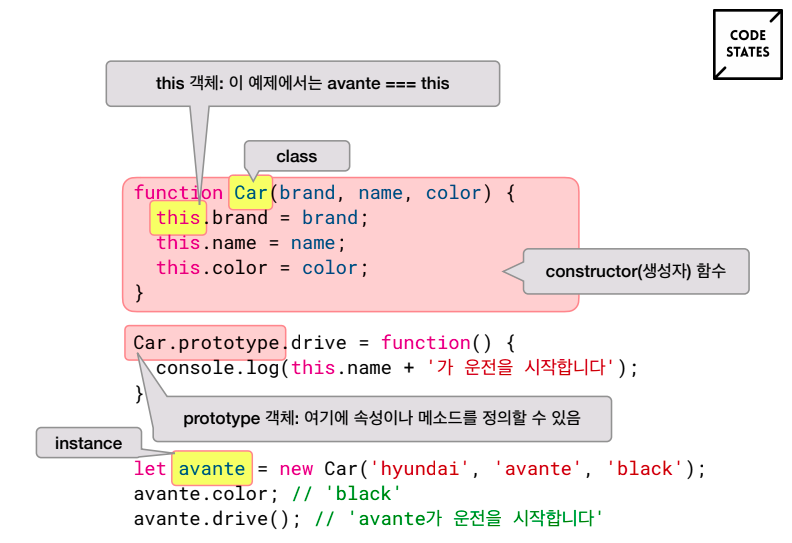
- this의 특징 중 Construction invocation(생성자 함수)에 해당하여 this는 인스턴스이다.
- 속성은 인스턴스 정의 시 같이 정의한다. 속성은 각 인스턴스마다 값이 다르다.
- 메서드는 인스턴스 정의후 메서드를 정의한다. 메서드는 모든 인스턴스에서 사용이 가능하다.
- constructor는 인스턴스 초기화 시 실행되는 생성자 함수
- this는 실행 context,
- prototype은 속성이나 메서드를 정의할 때 사용하는 객체이다.
| 용어 | 정의 |
|---|---|
| prototype | 모델의 청사진을 만들 때 쓰는 원형 객체 |
| constructor | 인스턴스가 초기화 될 때 실행하는 생성자 함수 |
| this | 함수가 실행 될 때, 해당 scope마다 생성되는 고유한 실행 context (execution context) |
| new 키워드로 인스턴스를 생성했을 때에는 해당 인스턴스가 this의 값 |
//class 정의
class Car(){
  constructor(brand, model, color){
    this.brand = brand; // this.brand는 생성된 인스턴스의 brand이고 값으로 할당되는 brand는 constructor에서 매개변수에 있는 brand이다.
    this.model = model; // this.model은 생성된 인스턴스의 model이고 값으로 할당되는 model은 constructor에서 매개변수에 있는 model이다.
    this.color = color; // this.color는 생성된 인스턴스의 color이고 값으로 할당되는 color는 constructor에서 매개변수에 있는 model이다.
  }
}
---------------------------------------------------------------------------
  //클래스: 속성 정의
// new keyword를 사용하여 인스턴스와 속성을 정의한다.
let avanteInstance = new Car('hyundai','avante','black')
// avanteInstance가 인스턴스이고 'hyundai','avante','black'이 속성을 정의한 것이다.

---------------------------------------------------------------------------
//클래스: 메서드 정의

//ES5
function Car(brand,name,color){}

Car.prototype.refuel = function() {
do run stuff
}

//ES6
class  Car() {
  constructor(brand, name, color) {}

  refuel() {
  }

  drive() {
  }
}

Car.prototype.drive = function() {
  console.log(this.model + ' ' + '출발')
}

avanteInstance.drive()
// 결과 : avante 출발
배열에서도 확인 가능한 class와 속성 및 메서드
- 배열 선언 시 new keyword와 []로 정의하는 것은 같다.
- 배열의 class는 Array이고 배열의 속성 중 length가 있고, 메서드느 push()가 있다.
let arr1 = [1,2,3,4]
let arr2 = new Array(1,2,3,4)

console.log(arr1.length) // 4
arr1.push(5)
console.log(arr1) // [1,2,3,4,5]
고차 함수
underbar 과제 정리
업데이트 예정
JavaScript의 this 5가지 특성
call, apply를 사용할 수 있다.
재귀 함수
recursion 과제 정리
업데이트 예정
GIT 개발자 도구
JavaScriptKoans 과제 정리
테스트 주도 개발(TDD)이란
업데이트 예정
testbuilder 과제 정리
업데이트 예정
HTML/CSS
DOM
twittler 과제 정리
업데이트 예정