📚 개념
✔ HTTP 기본 인증(Basic Authentication)
HTTP header를 사용하는 인증 방법헤더에 아이디와 비밀번호 정보를 보내서 인증을 받는 방법
▶ 이 정보를 그대로 보내면 누구나헤더를 보고 이 정보를 가로챌 수 있다
▶ 암호화하자!- 아이디와 비밀번호를 Base64로 인코딩하여
요청 헤더에 담아 보낸다
▶ 디코딩이 매우 쉽다는 단점 - 기본 인증 헤더
▶ 인가 정보가 없음(사용자 접근, 역할 등)
▶ 만료일이 없음
🔐 인증 과정
- 클라이언트 -> 서버 : 리소스 요청
- 서버 -> 클라이언트 : username/password 요청
- 클라이언트 -> 서버 : username/password 전송
- 서버 -> 클라이언트 : 리소스 전송
credentials를 plaintext로 보내기 때문에 헤더의 내용을 읽으면 디코딩하여 username과 password를 알아낼 수 있기 때문에 보안상 적합하지 않음
🖋 참고글
https://engineerinsight.tistory.com/69
📚 구현
InMemoryUserDetailsManager나JdbcUserDetailsManager를 사용하지 않고, 개발에 이용중인 데이터베이스와 엔티티를 사용할 수 있도록 구현
✔ 기본 설정
📝 build.gradle
- 의존성 설정
dependencies {
	implementation 'org.springframework.boot:spring-boot-starter-web'
    // db조작을 위해서
	implementation 'org.springframework.boot:spring-boot-starter-data-jpa'
	implementation 'org.springframework.boot:spring-boot-starter-jdbc'
    // 인증을 위해서
	implementation 'org.springframework.boot:spring-boot-starter-security'

    // model 클래스 작성의 편리화를 위해서
	compileOnly 'org.projectlombok:lombok'
    // 파일 변경 저장 후 자동 실행을 위해서
	developmentOnly 'org.springframework.boot:spring-boot-devtools'
    // mysql 연결을 위해서
	runtimeOnly 'com.mysql:mysql-connector-j'
	annotationProcessor 'org.projectlombok:lombok'
	testImplementation 'org.springframework.security:spring-security-test'
	testImplementation 'org.springframework.boot:spring-boot-starter-test'
}
📝 application.properties
- 데이터베이스 연결
spring.datasource.driver-class-name=com.mysql.cj.jdbc.Driver
spring.datasource.url=jdbc:mysql://localhost:[포트번호]/[데이터베이스 이름]
spring.datasource.username=[사용자 이름]
spring.datasource.password=[비밀번호]

spring.jpa.hibernate.ddl-auto=update
spring.jpa.properties.hibernate.dialect=org.hibernate.dialect.MySQL8Dialect
spring.jpa.show-sql=true
spring.jpa.properties.hibernate.format_sql=true
✔ config
📝 SecurityConfiguration.js
import org.springframework.context.annotation.Bean;
import org.springframework.context.annotation.Configuration;
import org.springframework.security.config.annotation.web.builders.HttpSecurity;
import org.springframework.security.crypto.bcrypt.BCryptPasswordEncoder;
import org.springframework.security.crypto.password.PasswordEncoder;
import org.springframework.security.web.SecurityFilterChain;

@Configuration
public class SecurityConfiguration {

	// (1) 필터단 설정
    @Bean
    public SecurityFilterChain securityFilterChain(HttpSecurity http) throws Exception {
		http.authorizeHttpRequests(
						auth -> {
							auth.anyRequest()
							.authenticated();
		}); // 모든 http 요청에 대해 인증 받도록 설정
		http.httpBasic(); // basic authentication
		http.csrf().disable(); // csrf protection을 잠시 해제
		return http.build();
	}


    // (2) 커스텀한 UserDetailsService 반환
    @Bean
	public MyUserDetailsService myUserDetailsService() {
		return new MyUserDetailsService();
	}


    // (3) 패스워드 인코딩 방법을 bcrypt 방식으로 설정
    @Bean
    public PasswordEncoder passwordEncoder() {
        return new BCryptPasswordEncoder();
    }
}-
필터단 설정
▶ 유저가credentials를 보내면, 이를인증하기 위해 가장 먼저 거치는 것이SecurityFilterChain이다
▶ 여기서http 인증에 대한 기본적인 설정들을 조정할 수 있다 -
UserDetailsService 반환
public interface UserDetailsService {

   UserDetails loadUserByUsername(String username) throws UsernameNotFoundException;
}
▶ UserDetailsService는 AuthenticationProvider가 사용할 수 있도록 사용자 정보를 불러오는 역할을 한다
▶ 입력받은 username과 이름이 일치하는 사용자가 있는지 확인하여 반환한다
▶ 이때 반환되는 사용자 정보는 UserDetails의 형태이다
▶ 커스텀한 UserDetailsService인 MyUserDetailsService를 생성하여 반환한다
- 패스워드 인코딩 방식 설정
public interface PasswordEncoder {

	String encode(CharSequence rawPassword);

	boolean matches(CharSequence rawPassword, String encodedPassword);

	default boolean upgradeEncoding(String encodedPassword) {
		return false;
	}
}
▶ 사용자 정보를 생성할 때 패스워드를 저장(encode)하거나, 입력받은 패스워드와 사용자 정보에서 불러온 패스워드를 비교할 때(matches) 사용할 수 있다.
▶ 패스워드 인코딩 방식을 bcrypt로 설정하였다
(다른 방식도 사용할 수 있다.)
✔ model
model
.....↳ Member.java
.....↳ MemberDetails.java
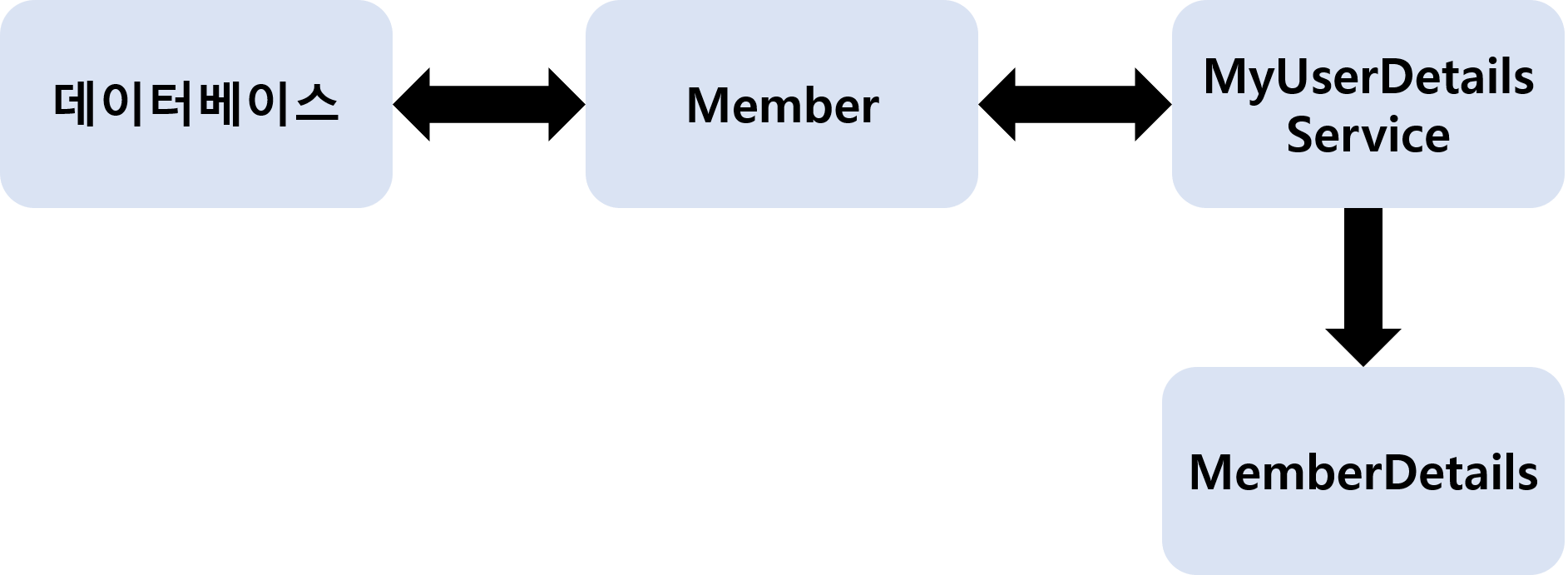
- MyUserDetailsService에서는 입력받은
username,password정보가 데이터베이스에 존재하는 사용자 정보와 일치하는지 알고 싶다 - 그러기 위해선 입력받은
username을 들고, DB에 해당username을 갖는 데이터가 있는지 확인해야 한다 - MyUserDetailsService의
loadByUsername메소드는 Member 클래스를 통해서 DB와 통신하여,MemberRepository.findByUsername(username)이 Member 객체를 반환할 경우(DB에 해당 유저가 존재할 경우) 반환받은 Member 객체를 스프링 시큐리티가 읽을 수 있는 형태인 UserDetails로 변환하여 이를 반환한다. - DB에서 해당 유저를 찾지 못했을 경우
UsernameNotFoundException에러를 던진다.
▶ Member와 MemberDetails 클래스를 만드는 것은 이 과정을 위한 것이라고 대략적으로 알아두면 됨
📝 Member.js
import jakarta.persistence.Entity;
import jakarta.persistence.GeneratedValue;
import jakarta.persistence.GenerationType;
import jakarta.persistence.Id;
import jakarta.persistence.Table;
import lombok.Builder;
import lombok.Getter;
import lombok.NoArgsConstructor;

@Getter
@NoArgsConstructor
@Entity
@Table(name="member")
public class Member {

	@Id
	@GeneratedValue(strategy = GenerationType.IDENTITY)
	private Long id;

	private String email;

	private String pwd;

	private String role;

	@Builder
	public Member(String email, String pwd, String role) {
        this.email = email;
        this.pwd = pwd;
        this.role = role;
    }
}- 원래
role은 여러 개의 값을 갖기에 List의 형태로 저장하지만, 구현의 편의성을 위해String형으로 선언 - 이때 데이터베이스에 저장된
pwd도 bcrypt로 인코딩된 상태여야 함
📝 MemberDetails.js
import java.util.ArrayList;
import java.util.Collection;
import java.util.List;

import org.springframework.security.core.GrantedAuthority;
import org.springframework.security.core.authority.SimpleGrantedAuthority;
import org.springframework.security.core.userdetails.UserDetails;

public class MemberDetails implements UserDetails {

	private final Member member;

    public MemberDetails(Member member) {
        this.member = member;
    }

    @Override
    public Collection<? extends GrantedAuthority> getAuthorities() {
        List<GrantedAuthority> authorities = new ArrayList<>();
        authorities.add(new SimpleGrantedAuthority(member.getRole()));
        return authorities;
    }

    @Override
    public String getPassword() {
        return member.getPwd();
    }

    @Override
    public String getUsername() {
        return member.getEmail();
    }

    @Override
    public boolean isAccountNonExpired() {
        return true;
    }

    @Override
    public boolean isAccountNonLocked() {
        return true;
    }

    @Override
    public boolean isCredentialsNonExpired() {
        return true;
    }

    @Override
    public boolean isEnabled() {
        return true;
    }
}- 이 파일에 작성된 메소드는 UserDetails를 구현하면서 필수로 Override 해야하는 메소드들이다.
- 우선은 모두
true를 반환하도록 해서 인증이 거부되는 일이 없게 한다
✔ Repository
Repository
.....↳ MemberRepository.class
📝 MemberRepository.js
import java.util.List;
import java.util.Optional;

import org.springframework.data.jpa.repository.JpaRepository;
import org.springframework.stereotype.Repository;

@Repository
public interface MemberRepository extends JpaRepository<Member, Long> {

	public Optional<Member> findByEmail(String email);

}- 실제 DB에 저장된
member테이블에는username이email애트리뷰트로 저장되어 있으므로(역할적으로 대응된다는 말...) DB에서 데이터를 조회할 때email애트리뷰트에서 찾는다.
✔ service
service
.....↳ MyUserDetailsSerivce.class
📝 MyUserDetailsService.js
import org.springframework.beans.factory.annotation.Autowired;
import org.springframework.security.core.userdetails.UserDetails;
import org.springframework.security.core.userdetails.UserDetailsService;
import org.springframework.security.core.userdetails.UsernameNotFoundException;
import org.springframework.stereotype.Service;

@Service
public class MyUserDetailsService implements UserDetailsService {

	@Autowired
	private MemberRepository memberRepository;

	@Override
	public UserDetails loadUserByUsername(String username) throws UsernameNotFoundException {
		Member member = memberRepository.findByEmail(username)
						.orElseThrow(()->new UsernameNotFoundException("Could not found user" + username));

		return new MemberDetails(member);
	}
}loadByUsername에서 찾은 사용자 정보를 찾아서new MemberDetails(찾은 사용자 정보)를 반환한다
🖋 참고글
<공식문서>
Basic Authentication
Servlet Authentication Architecture
UserDetailsService
<블로그>
[스프링 시큐리티 무작정 따라하기] 1. Hello Spring Security
Spring Security - 4. UserDetailsService 구현 해보기
Spring Security with JDBC(UserDetailsService)
Spring Security 메모 - 인증과정 커스터 마이징
📚 실행
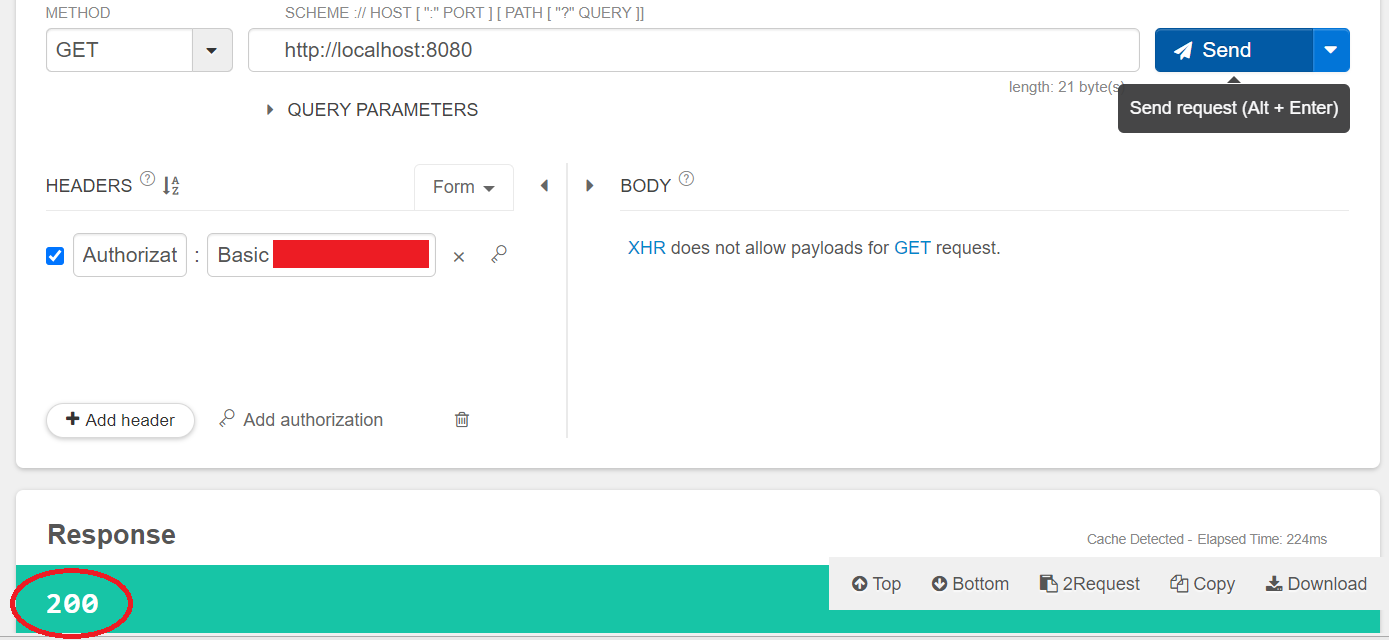
HEADERS의Authorization에Basic [아이디:비밀번호]를 base64로 인코딩한 문자열을 입력하여 요청을 보내면 인증 성공!!!
🦝 여담
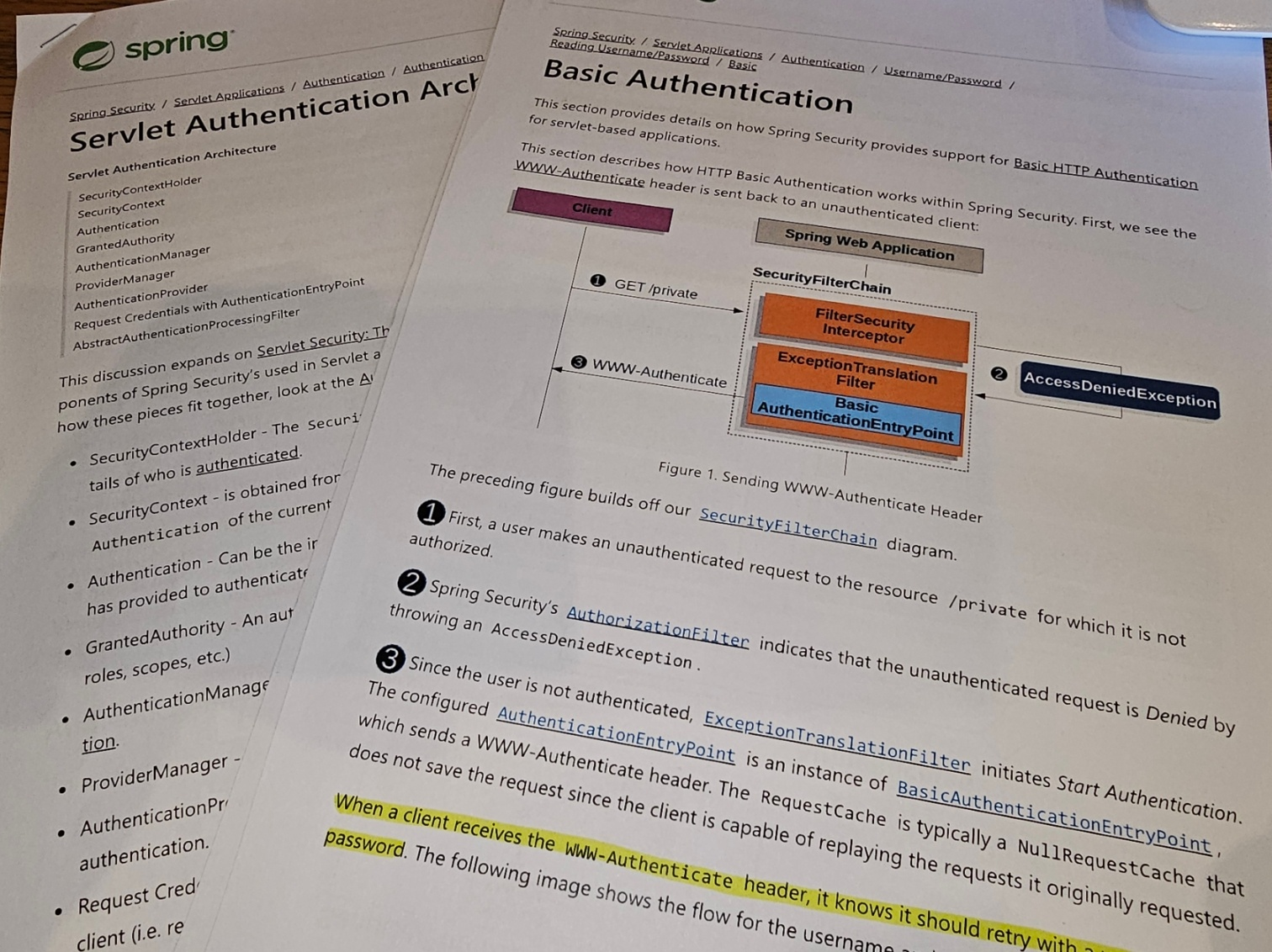
- 책이나 인강을 보고도 이해가 안가서 (도대체 뭘 어떻게 작동한다는거야...?) 공식문서를 정독했는데 확실히 이해는 이쪽이 빠른 것 같다,,
- 확실히 인증은 어렵다....
- WebSecurityConfigurerAdapter 대신 SecurityFilterChain을 사용하도록 업데이트된건 비교적 최근인듯하다