BGP를 활용한 Cilium 네트워크 환경 구성 해보기
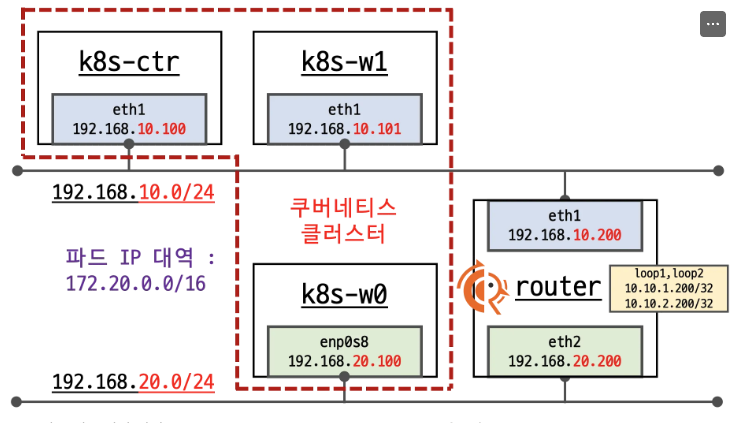
네트워크 구성 요약
nic
- eth1 k8s 통신용
- eth0 외부 통신용
쿠버네티스 클러스터 (왼쪽)
- k8s-ctr (컨트롤 플레인): 192.168.10.100
- k8s-w1 (워커 노드): 192.168.10.101
- k8s-w0 (워커 노드): 192.168.20.100
- 파드 네트워크: 172.20.0.0/16
네트워크 세그먼트
- 192.168.10.0/24: 상단 네트워크 (k8s-ctr, k8s-w1 연결)
- 192.168.20.0/24: 하단 네트워크 (k8s-w0 연결)
FRRouting 라우터 (오른쪽)
- eth1: 192.168.10.200 (상단 네트워크 연결)
- eth2: 192.168.20.200 (하단 네트워크 연결)
- Loopback 인터페이스:
- loop1: 10.10.1.200/32
- loop2: 10.10.2.200/32
목적
이 구성은 FRRouting을 사용하여
- 두 개의 분리된 네트워크 세그먼트를 연결
- 쿠버네티스 클러스터 간 통신 라우팅
- 동적 라우팅 프로토콜을 통한 네트워크 관리 방법을 학습한다.
FRRouting (FRR)이란?
FRRouting은 Linux 및 Unix 플랫폼을 위한 무료 오픈소스 인터넷 라우팅 프로토콜 스윗.
주요 특징
다양한 라우팅 프로토콜 지원
-cBGP (Border Gateway Protocol)
- OSPF (Open Shortest Path First)
- ISIS (Intermediate System to Intermediate System)
- RIP (Routing Information Protocol)
- PIM (Protocol Independent Multicast)
- LDP (Label Distribution Protocol)
- BFD (Bidirectional Forwarding Detection)
핵심 구성요소
- Zebra: 커널 라우팅 테이블 관리 데몬
- 각 프로토콜별 데몬: bgpd, ospfd, isisd, ripd 등
- vtysh: 통합 CLI 인터페이스
실습환경배포
vagrant 배포
mkdir cilium-lab && cd cilium-lab
curl -O https://raw.githubusercontent.com/gasida/vagrant-lab/refs/heads/main/cilium-study/5w/Vagrantfile
vagrant up
worker netpaln 설정 잠시 확인,
- 내부망 통신 eth2로 들어오면 -> eth1 나가도록 설정
- 나머지는 BGP통신
  cat <<EOT>> /etc/netplan/50-vagrant.yaml
      routes:
      - to: 192.168.20.0/24
        via: 192.168.10.200
Helm cilium 설치 내용
helm install cilium cilium/cilium --version $2 --namespace kube-system \
--set k8sServiceHost=192.168.10.100 --set k8sServicePort=6443 \
--set ipam.mode="cluster-pool" --set ipam.operator.clusterPoolIPv4PodCIDRList={"172.20.0.0/16"} --set ipv4NativeRoutingCIDR=172.20.0.0/16 \
--set routingMode=native --set autoDirectNodeRoutes=false --set bgpControlPlane.enabled=true \
--set kubeProxyReplacement=true --set bpf.masquerade=true --set installNoConntrackIptablesRules=true \
--set endpointHealthChecking.enabled=false --set healthChecking=false \
--set hubble.enabled=true --set hubble.relay.enabled=true --set hubble.ui.enabled=true \
--set hubble.ui.service.type=NodePort --set hubble.ui.service.nodePort=30003 \
--set prometheus.enabled=true --set operator.prometheus.enabled=true --set hubble.metrics.enableOpenMetrics=true \
--set hubble.metrics.enabled="{dns,drop,tcp,flow,port-distribution,icmp,httpV2:exemplars=true;labelsContext=source_ip\,source_namespace\,source_workload\,destination_ip\,destination_namespace\,destination_workload\,traffic_direction}" \
--set operator.replicas=1 --set debug.enabled=true >/dev/null 2>&1
설치 내용 상세 설명
cilium 설치 기본 설정
- k8sServiceHost: 192.168.10.100 (API 서버 주소)
- k8sServicePort: 6443 (API 서버 포트)
- namespace: kube-system
IPAM 설정
- ipam.mode: cluster-pool (중앙 집중식 IP 관리,cilium이 Ipam 관리)
- clusterPoolIPv4PodCIDRList: 172.20.0.0/16 (Pod IP 풀)
- ipv4NativeRoutingCIDR: 172.20.0.0/16 (네이티브 라우팅 대역)
라우팅 설정
- routingMode: native (커널 라우팅 테이블 사용)
- autoDirectNodeRoutes: false (수동 라우트 관리)
- bgpControlPlane.enabled: true (BGP 컨트롤 플레인 활성화)
kube-proxy 대체
- kubeProxyReplacement: true (kube-proxy 기능 대체)
- bpf.masquerade: true (eBPF 기반 NAT)
- installNoConntrackIptablesRules: true (conntrack 규칙 비활성화)
- conntrack (Connection Tracking)
- Linux 커널의 네트워크 연결 추적 기능
- 각 네트워크 연결의 상태를 메모리에 저장하고 관리
- iptables의 stateful 방화벽 기능을 지원
- 옵션 효과
- installNoConntrackIptablesRules: true 설정 시:
- bash# 기본적으로 생성되는 conntrack 관련 iptables 규칙들이 설치되지 않음
- 예시 규칙들:
- -A KUBE-FORWARD -m conntrack --ctstate RELATED,ESTABLISHED -j ACCEPT
- -A KUBE-FORWARD -m conntrack --ctstate INVALID -j DROP
- 사용 목적
- 성능 향상
- conntrack 테이블 오버헤드 감소
- 대용량 트래픽 환경에서 성능 개선
- 메모리 사용량 절약
- 연결 상태 추적 정보 저장 공간 절약
- 많은 동시 연결이 있는 환경에서 유용
헬스체킹
- endpointHealthChecking.enabled: false
- healthChecking: false
Hubble 관측성
- hubble.enabled: true (네트워크 관측성)
- hubble.relay.enabled: true (Hubble 릴레이)
- hubble.ui.enabled: true (웹 UI)
- hubble.ui.service.type: NodePort
- hubble.ui.service.nodePort: 30003
메트릭 및 모니터링
- prometheus.enabled: true (Prometheus 메트릭)
- operator.prometheus.enabled: true (오퍼레이터 메트릭)
- hubble.metrics.enableOpenMetrics: true
- hubble.metrics.enabled: DNS, Drop, TCP, Flow, Port-- distribution, ICMP, HTTPv2 메트릭
기타 설정
- operator.replicas: 1 (오퍼레이터 복제본)
- debug.enabled: true (디버그 모드)
핵심 포인트
- BGP 기능
- Cilium BGP 컨트롤 플레인으로 외부 라우터와 피어링 가능
- Pod CIDR (172.20.0.0/16)을 BGP로 광고
- FRRouting과 연동하여 동적 라우팅 구현
- 네이티브 라우팅
- 오버레이 네트워크 없이 직접 라우팅
- 성능 최적화 및 네트워크 가시성 향상
- autoDirectNodeRoutes=false로 BGP를 통한 라우트 학습
- 관측성
- Hubble UI: http://노드IP:30003
- Prometheus 메트릭 수집
- 상세한 네트워크 플로우 추적
배포 확인
(⎈|HomeLab:N/A) root@k8s-ctr:~# cat /etc/hosts
...
127.0.2.1 k8s-ctr k8s-ctr
192.168.10.100 k8s-ctr
192.168.10.200 router
192.168.20.100 k8s-w0
192.168.10.101 k8s-w1
(⎈|HomeLab:N/A) root@k8s-ctr:~# k get nodes
NAME      STATUS   ROLES           AGE   VERSION
k8s-ctr   Ready    control-plane   39m   v1.33.2
k8s-w0    Ready    <none>          22m   v1.33.2
k8s-w1    Ready    <none>          38m   v1.33.2
pod cidr 확인
(⎈|HomeLab:N/A) root@k8s-ctr:~# kubectl get nodes -o jsonpath='{range .items[*]}{.metadata.name}{"\t"}{.spec.podCIDR}{"\n"}{end}'
k8s-ctr 10.244.0.0/24
k8s-w0  10.244.2.0/24
k8s-w1  10.244.1.0/24
(⎈|HomeLab:N/A) root@k8s-ctr:~# kubectl get ciliumnode -o json | grep podCIDRs -A2
                    "podCIDRs": [
                        "172.20.0.0/24"
                    ],
--
                    "podCIDRs": [
                        "172.20.2.0/24"
                    ],
--
                    "podCIDRs": [
                        "172.20.1.0/24"
                    ],
(⎈|HomeLab:N/A) root@k8s-ctr:~# cilium config view | grep ^ipam
ipam                                              cluster-pool
ipam-cilium-node-update-rate                      15s
- cilium cluster-pool 을 쓰므로 172.20.x.0 대역으로 pod 생성
[k8s-ctr] cilium 설치 정보 확인
BGP 설정만 확인
(⎈|HomeLab:N/A) root@k8s-ctr:~# cilium config view | grep -i bgp
...
enable-bgp-control-plane                          true
...
네트워크 정보 확인 autoDirectNodeRoutes=false
router 네트워크 인터페이스 정보 확인
- p -br -c -4 addr : 시스템의 네트워크 인터페이스 IPv4 주소를 간략하고 컬러로 표시 (-br:간략출력, -c:컬러, -4:IPv4만, addr:주소정보)
vagrant@k8s-ctr:~$ sshpass -p 'vagrant' ssh vagrant@router ip -br -c -4 addr
lo               UNKNOWN        127.0.0.1/8
eth0             UP             10.0.2.15/24 metric 100
eth1             UP             192.168.10.200/24
eth2             UP             192.168.20.200/24
loop1            UNKNOWN        10.10.1.200/24
loop2            UNKNOWN        10.10.2.200/24
(⎈|HomeLab:N/A) root@k8s-ctr:~# for i in w1 w0 ; do echo ">> node : k8s-i ip -c -4 addr show dev eth1; echo; done
node : k8s-w1
3: eth1: <BROADCAST,MULTICAST,UP,LOWER_UP> mtu 1500 qdisc fq_codel state UP group default qlen 1000
    altname enp0s9
    inet 192.168.10.101/24 brd 192.168.10.255 scope global eth1
       valid_lft forever preferred_lft forever
node : k8s-w0
3: eth1: <BROADCAST,MULTICAST,UP,LOWER_UP> mtu 1500 qdisc fq_codel state UP group default qlen 1000
    altname enp0s9
    inet 192.168.20.100/24 brd 192.168.20.255 scope global eth1
       valid_lft forever preferred_lft forever
#### 노드별 PodCIDR 라우팅이 없는거 확인
- autoDirectNodeRoutes=false로 설정했기 때문에 cilium이 자동 설정 안해줌
(⎈|HomeLab:N/A) root@k8s-ctr:~# ip -c routedefault via 10.0.2.2 dev eth0 proto dhcp src 10.0.2.15 metric 100 10.0.2.0/24 dev eth0 proto kernel scope link src 10.0.2.15 metric 100 10.0.2.2 dev eth0 proto dhcp scope link src 10.0.2.15 metric 100 10.0.2.3 dev eth0 proto dhcp scope link src 10.0.2.15 metric 100 172.20.0.0/24 via 172.20.0.73 dev cilium_host proto kernel src 172.20.0.73 172.20.0.73 dev cilium_host proto kernel scope link 192.168.10.0/24 dev eth1 proto kernel scope link src 192.168.10.100 192.168.20.0/24 via 192.168.10.200 dev eth1 proto static(⎈|HomeLab:N/A) root@k8s-ctr:~# for i in w1 w0 ; do echo ">> node : k8s-i ip -c route; echo; done
#>> node : k8s-w1 <<
default via 10.0.2.2 dev eth0 proto dhcp src 10.0.2.15 metric 100
10.0.2.0/24 dev eth0 proto kernel scope link src 10.0.2.15 metric 100
10.0.2.2 dev eth0 proto dhcp scope link src 10.0.2.15 metric 100
10.0.2.3 dev eth0 proto dhcp scope link src 10.0.2.15 metric 100
172.20.1.0/24 via 172.20.1.220 dev cilium_host proto kernel src 172.20.1.220
172.20.1.220 dev cilium_host proto kernel scope link
192.168.10.0/24 dev eth1 proto kernel scope link src 192.168.10.101
192.168.20.0/24 via 192.168.10.200 dev eth1 proto static
#>> node : k8s-w0 <<
default via 10.0.2.2 dev eth0 proto dhcp src 10.0.2.15 metric 100
10.0.2.0/24 dev eth0 proto kernel scope link src 10.0.2.15 metric 100
10.0.2.2 dev eth0 proto dhcp scope link src 10.0.2.15 metric 100
10.0.2.3 dev eth0 proto dhcp scope link src 10.0.2.15 metric 100
172.20.2.0/24 via 172.20.2.128 dev cilium_host proto kernel src 172.20.2.128
172.20.2.128 dev cilium_host proto kernel scope link
192.168.10.0/24 via 192.168.20.200 dev eth1 proto static
192.168.20.0/24 dev eth1 proto kernel scope link src 192.168.20.100
(⎈|HomeLab:N/A) root@k8s-ctr:~# k get pod -owide
NAME                      READY   STATUS    RESTARTS   AGE    IP             NODE      NOMINATED NODE   READINESS GATES
curl-pod                  1/1     Running   0          3m4s   172.20.0.105   k8s-ctr   <none>           <none>
webpod-697b545f57-7qt27   1/1     Running   0          3m4s   172.20.2.127   k8s-w0    <none>           <none>
webpod-697b545f57-84swn   1/1     Running   0          3m4s   172.20.0.3     k8s-ctr   <none>           <none>
webpod-697b545f57-rnb77   1/1     Running   0          3m4s   172.20.1.67    k8s-w1    <none>           <none>
통신 문제 확인
노드 내의 파드들 끼리만 되는지 다른 노드와도 통신되는지 보자
(⎈|HomeLab:default) root@k8s-ctr:~# kubectl exec -it curl-pod -- sh -c 'while true; do curl -s --connect-timeout 1 webpod | grep Hostname; echo "---" ; sleep 1; done'
---
Hostname: webpod-697b545f57-84swn
---
Hostname: webpod-697b545f57-84swn
---
---
---
---
Hostname: webpod-697b545f57-84swn
---
---
Hostname: webpod-697b545f57-84swn
---
Hostname: webpod-697b545f57-84swn
---
---
Hostname: webpod-697b545f57-84swn
---
- 됐다 안됐다 함.
(⎈|HomeLab:default) root@k8s-ctr:~# k get po -owide |grep webpod-697b545f57-84swnwebpod-697b545f57-84swn 1/1 Running 0 5d14h 172.20.0.3 k8s-ctr <none> <none>
- 자기 자신 pod만 응답이 왔다.
BGP 를통한 문제 해결
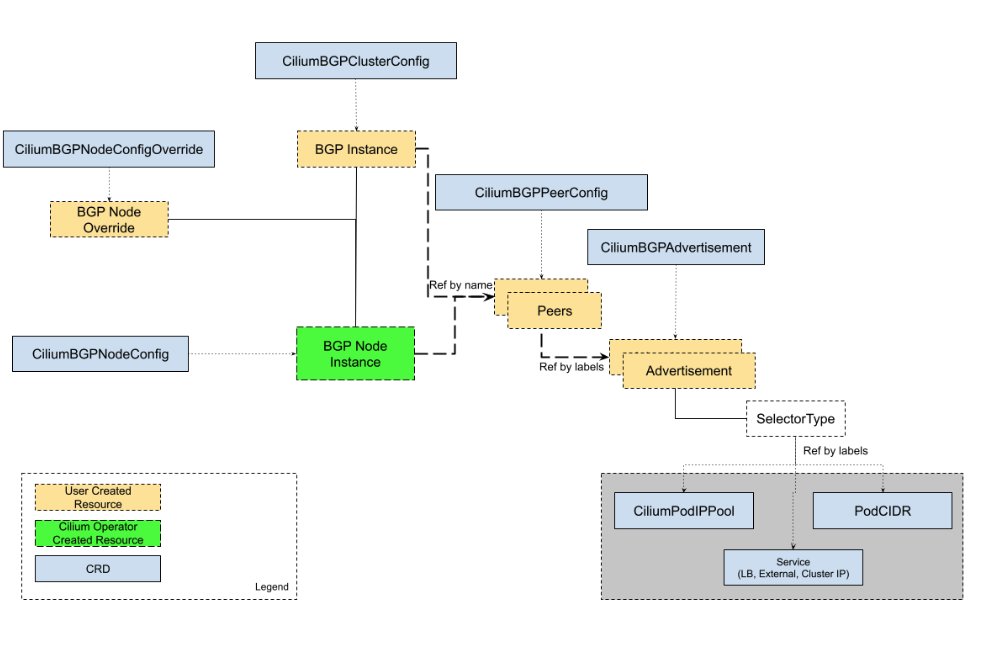
Cilium BGP Control Plane 설명
- CiliumBGPClusterConfig → BGP Instance (전체 정책)
- CiliumBGPNodeConfigOverride → BGP Node Override (노드별 예외)
- CiliumBGPPeerConfig → Peers (피어 설정)
- CiliumBGPAdvertisement → Advertisement (광고 설정)
frr 스위치 설정 확인
root@router:~# ss -tnlp | grep -iE 'zebra|bgpd'
LISTEN 0      4096         0.0.0.0:179       0.0.0.0:*    users:(("bgpd",pid=4202,fd=22))
LISTEN 0      3          127.0.0.1:2605      0.0.0.0:*    users:(("bgpd",pid=4202,fd=18))
LISTEN 0      3          127.0.0.1:2601      0.0.0.0:*    users:(("zebra",pid=4197,fd=23)
현재 라우터 설정 확인
root@router:~# vtysh -c 'show running'
Building configuration...
Current configuration:
!
frr version 8.4.4
frr defaults traditional
hostname router
log syslog informational
no ipv6 forwarding
service integrated-vtysh-config
!
router bgp 65000
 bgp router-id 192.168.10.200
 no bgp ebgp-requires-policy
 bgp graceful-restart
 bgp bestpath as-path multipath-relax
 !
 address-family ipv4 unicast
  network 10.10.1.0/24
  maximum-paths 4
 exit-address-family
exit
!
- AS Number: 65000 (Private ASN 범위)
- Router ID: 192.168.10.200 (이 BGP 스피커의 고유 식별자)
root@router:~# vtysh -c 'show ip bgp summary'
% No BGP neighbors found in VRF defaultroot@router:~# vtysh -c 'show ip bgp'
BGP table version is 1, local router ID is 192.168.10.200, vrf id 0
Default local pref 100, local AS 65000
Status codes:  s suppressed, d damped, h history, * valid, > best, = multipath,
               i internal, r RIB-failure, S Stale, R Removed
Nexthop codes: @NNN nexthop's vrf id, < announce-nh-self
Origin codes:  i - IGP, e - EGP, ? - incomplete
RPKI validation codes: V valid, I invalid, N Not found
   Network          Next Hop            Metric LocPrf Weight Path
*> 10.10.1.0/24     0.0.0.0                  0         32768 i
Displayed  1 routes and 1 total paths
- 아직 자기 자신(10.10.1.0/24) 만 광고한 상황
router 에 BGP 설정 하기
root@router:~# cat /etc/frr/frr.conf
# default to using syslog. /etc/rsyslog.d/45-frr.conf places the log in
# /var/log/frr/frr.log
#
# Note:
# FRR's configuration shell, vtysh, dynamically edits the live, in-memory
# configuration while FRR is running. When instructed, vtysh will persist the
# live configuration to this file, overwriting its contents. If you want to
# avoid this, you can edit this file manually before starting FRR, or instruct
# vtysh to write configuration to a different file.
log syslog informational
!
router bgp 65000
  bgp router-id 192.168.10.200
  bgp graceful-restart
  no bgp ebgp-requires-policy
  bgp bestpath as-path multipath-relax
  maximum-paths 4
  network 10.10.1.0/24
  neighbor CILIUM peer-group
  neighbor CILIUM remote-as external
  neighbor 192.168.10.100 peer-group CILIUM
  neighbor 192.168.10.101 peer-group CILIUM
  neighbor 192.168.20.100 peer-group CILIUM
root@router:~# systemctl daemon-reexec && systemctl restart frr
root@router:~# systemctl status frr --no-pager --full
● frr.service - FRRouting
     Loaded: loaded (/usr/lib/systemd/system/frr.service; enabled; preset: enabled)
     Active: active (running) since Sat 2025-08-16 12:49:57 KST; 2s ago
       Docs: https://frrouting.readthedocs.io/en/latest/setup.html
    Process: 6903 ExecStart=/usr/lib/frr/frrinit.sh start (code=exited, status=0/SUCCESS)
   Main PID: 6914 (watchfrr)
     Status: "FRR Operational"
      Tasks: 13 (limit: 553)
     Memory: 19.2M (peak: 26.9M)
        CPU: 79ms
     CGroup: /system.slice/frr.service
             ├─6914 /usr/lib/frr/watchfrr -d -F traditional zebra bgpd staticd
             ├─6927 /usr/lib/frr/zebra -d -F traditional -A 127.0.0.1 -s 90000000
             ├─6932 /usr/lib/frr/bgpd -d -F traditional -A 127.0.0.1
             └─6939 /usr/lib/frr/staticd -d -F traditional -A 127.0.0.1
Aug 16 12:49:57 router watchfrr[6914]: [YFT0P-5Q5YX] Forked background command [pid 6915]: /usr/lib/frr/watchfrr.sh restart all
Aug 16 12:49:57 router zebra[6927]: [VTVCM-Y2NW3] Configuration Read in Took: 00:00:00
Aug 16 12:49:57 router staticd[6939]: [VTVCM-Y2NW3] Configuration Read in Took: 00:00:00
Aug 16 12:49:57 router bgpd[6932]: [VTVCM-Y2NW3] Configuration Read in Took: 00:00:00
Aug 16 12:49:57 router watchfrr[6914]: [QDG3Y-BY5TN] zebra state -> up : connect succeeded
Aug 16 12:49:57 router watchfrr[6914]: [QDG3Y-BY5TN] bgpd state -> up : connect succeeded
Aug 16 12:49:57 router watchfrr[6914]: [QDG3Y-BY5TN] staticd state -> up : connect succeeded
Aug 16 12:49:57 router watchfrr[6914]: [KWE5Q-QNGFC] all daemons up, doing startup-complete notify
Aug 16 12:49:57 router frrinit.sh[6903]:  * Started watchfrr
Aug 16 12:49:57 router systemd[1]: Started frr.service - FRRouting.
BGP Peer Group 설정 추가 내용
- CILIUM이라는 peer group을 생성하고 3개의 BGP neighbor를 구성
설정 내용:
- Peer Group: CILIUM
- External BGP (eBGP) 연결로 설정 (remote-as external)
- BGP Neighbors:
- 192.168.10.100 → CILIUM peer group에 할당
- 192.168.10.101 → CILIUM peer group에 할당
- 192.168.20.100 → CILIUM peer group에 할당
- 목적
- Kubernetes의 Cilium CNI와 BGP 연동
- 각 IP는 Kubernetes 노드들의 BGP endpoint,
- 네트워크 정책 및 서비스 라우팅을 위한 BGP 피어링을 설정
3개의 외부 BGP 피어와 연결하여 라우팅 정보를 교환
k8s-ctr(master,controlplane)에서 cilium 에 bgp 설정
(⎈|HomeLab:default) root@k8s-ctr:~# kubectl label nodes k8s-ctr k8s-w0 k8s-w1 enable-bgp=true
node/k8s-ctr labeled
node/k8s-w0 labeled
node/k8s-w1 labeled
(⎈|HomeLab:default) root@k8s-ctr:~# kubectl get node -l enable-bgp=true
NAME      STATUS   ROLES           AGE     VERSION
k8s-ctr   Ready    control-plane   5d17h   v1.33.2
k8s-w0    Ready    <none>          5d17h   v1.33.2
k8s-w1    Ready    <none>          5d17h   v1.33.2
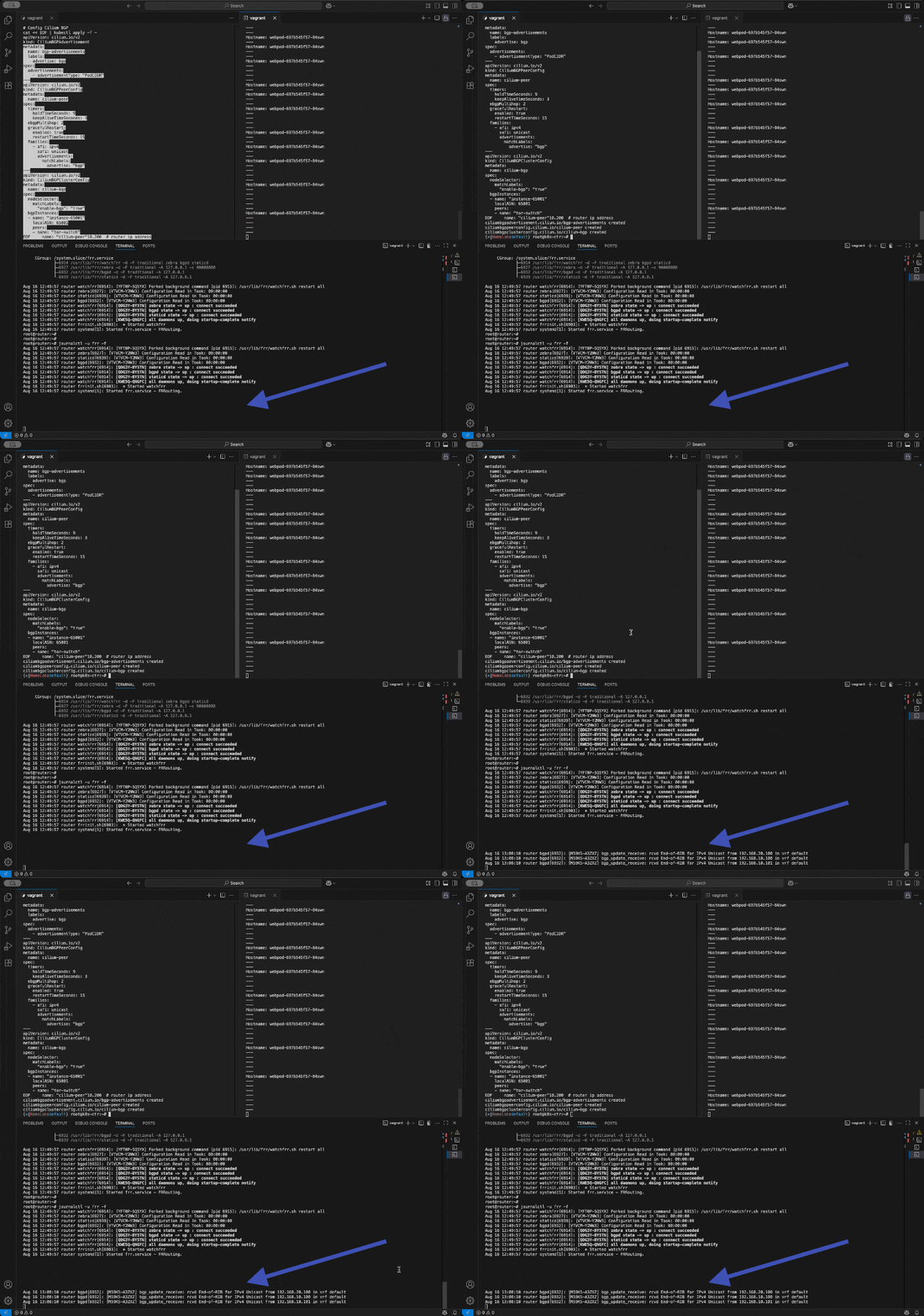
신규 터미널 1 (router) : 모니터링 걸어두기!
##### journalctl -u frr -f신규 터미널 2 (k8s-ctr) : 반복 호출
##### kubectl exec -it curl-pod -- sh -c 'while true; do curl -s --connect-timeout 1 webpod | grep Hostname; echo "---" ; sleep 1; done'BGP 동작할 노드를 위한 label 설정
kubectl label nodes k8s-ctr k8s-w0 k8s-w1 enable-bgp=true**
kubectl get node -l enable-bgp=true
#### Config Cilium BGP
cat << EOF | kubectl apply -f -
apiVersion: cilium.io/v2
kind: CiliumBGPAdvertisement
metadata:
  name: bgp-advertisements
  labels:
    advertise: bgp**
spec:
  advertisements:
    - advertisementType: "PodCIDR"
---
apiVersion: cilium.io/v2
kind: **CiliumBGPPeerConfig**
metadata:
  name: cilium-peer
spec:
  timers:
    holdTimeSeconds: 9
    keepAliveTimeSeconds: 3
  **ebgpMultihop**: 2
  **gracefulRestart**:
    enabled: true
    restartTimeSeconds: 15
  **families**:
    - afi: **ipv4**
      safi: **unicast**
      advertisements:
        matchLabels:
          **advertise: "bgp"**
---
apiVersion: cilium.io/v2
kind: **CiliumBGPClusterConfig**
metadata:
  name: cilium-bgp
spec:
  nodeSelector:
    matchLabels:
      "**enable-bgp": "true"**
  **bgpInstances**:
  - name: "instance-65001"
    **localASN**: **65001**
    **peers**:
    - name: "**tor-switch**"
      **peerASN**: **65000**
      peerAddress: **192.168.10.200**  # router ip address
      peerConfigRef:
        name: "cilium-peer"
EOF
Cilium BGP 설정 (3개 리소스)
1번: CiliumBGPAdvertisement
"뭘 알려줄지 정하기"
PodCIDR을 광고 = "우리 앱들의 IP 주소 범위를 다른 곳에 알려줘!"
advertise: bgp 라벨로 표시2번: CiliumBGPPeerConfig
"어떻게 대화할지 정하기"
9초마다 "살아있니?" 확인 (holdTime)
3초마다 "안녕!" 인사 (keepAlive)
ebgpMultihop: 2 = "직접 연결 안 되어도 2단계까지는 OK"
gracefulRestart = "재시작할 때 연결 끊지 말고 기다려줘"3번: CiliumBGPClusterConfig
"실제 연결하기"
우리팀: AS 65001 (쿠버네티스)
상대팀: AS 65000 (ToR 스위치)
상대 주소: 192.168.10.200
누가 참여: enable-bgp=true 라벨 있는 노드들만전체 흐름
라벨 있는 노드들이
스위치(192.168.10.200)와 친구 맺고
"우리 앱들 여기 있어요!" 하고 자동으로 알려주기
결과: 외부에서 쿠버네티스 앱으로 자동으로 길찾기 가능!
즉, Kubernetes 노드들(AS 65001)이 ToR 스위치(AS 65000)와 BGP 피어링을 맺어 Pod CIDR 정보를 자동으로 라우팅 테이블에 광고하는 설정
통신 확인 : 179 가 bgp router listen port
(⎈|HomeLab:default) root@k8s-ctr:~# ss -tnp | grep 179
ESTAB 0 0 192.168.10.100:59273 192.168.10.200:179 users:(("cilium-agent",pid=5623,fd=69))(⎈|HomeLab:default) root@k8s-ctr:~# cilium bgp peers
Node      Local AS   Peer AS   Peer Address     Session State   Uptime   Family         Received   Advertised
k8s-ctr   65001      65000     192.168.10.200   established     18m46s   ipv4/unicast   4          2
k8s-w0    65001      65000     192.168.10.200   established     18m45s   ipv4/unicast   4          2
k8s-w1    65001      65000     192.168.10.200   established     18m45s   ipv4/unicast   4          2
(⎈|HomeLab:default) root@k8s-ctr:~# cilium bgp routes available ipv4 unicast
Node      VRouter   Prefix          NextHop   Age      Attrs
k8s-ctr   65001     172.20.0.0/24   0.0.0.0   18m50s   [{Origin: i} {Nexthop: 0.0.0.0}]
k8s-w0    65001     172.20.2.0/24   0.0.0.0   18m50s   [{Origin: i} {Nexthop: 0.0.0.0}]
k8s-w1    65001     172.20.1.0/24   0.0.0.0   18m50s   [{Origin: i} {Nexthop: 0.0.0.0}]
BGP 연결 상태 확인 결과 정리
BGP 피어 연결 상태
3개 노드 모두 성공적으로 연결됨!
- k8s-ctr, k8s-w0, k8s-w1 모두 established (연결 완료)
- 18분 46초 동안 안정적으로 유지
- 각 노드마다 4개 받고, 2개 보냄
광고하는 라우트 정보
각 노드가 자신의 Pod IP 대역을 알려주고 있음:
노드: k8s-ctr, Pod 대역: 172.20.0.0/24, 의미: "우리 컨트롤러 노드 앱들은 여기!"
노드: k8s-w0, Pod 대역: 172.20.2.0/24, 의미: "워커0 노드 앱들은 여기!"
노드: k8s-w1, Pod 대역: 172.20.1.0/24, 의미: "워커1 노드 앱들은 여기!"결과 해석
- NextHop: 0.0.0.0 = "우리가 직접 처리할게!"
- Origin: i = "우리가 만든 정보야!"
- Age: 18m50s = 18분 전부터 광고 시작
- 외부에서 이제 각 노드의 Pod들로 직접 접근할 수 있는 자동 길찾기가 완성
- 스위치가 "172.20.x.x로 가려면 해당 쿠버네티스 노드로 보내면 돼!" 라고 알게 된 상태
router 에서 확인해보기
root@router:~# ip -c route | grep bgp
172.20.0.0/24 nhid 33 via 192.168.10.100 dev eth1 proto bgp metric 20
172.20.1.0/24 nhid 34 via 192.168.10.101 dev eth1 proto bgp metric 20
172.20.2.0/24 nhid 32 via 192.168.20.100 dev eth2 proto bgp metric 20
- 알아서 정보 잘 올라왔다.
(⎈|HomeLab:default) root@k8s-ctr:~# cilium bgp peers
Node      Local AS   Peer AS   Peer Address     Session State   Uptime   Family         Received   Advertised
k8s-ctr   65001      65000     192.168.10.200   established     18m46s   ipv4/unicast   4          2
k8s-w0    65001      65000     192.168.10.200   established     18m45s   ipv4/unicast   4          2
k8s-w1    65001      65000     192.168.10.200   established     18m45s   ipv4/unicast   4          2
(⎈|HomeLab:default) root@k8s-ctr:~# cilium bgp routes available ipv4 unicast
Node      VRouter   Prefix          NextHop   Age      Attrs
k8s-ctr   65001     172.20.0.0/24   0.0.0.0   18m50s   [{Origin: i} {Nexthop: 0.0.0.0}]
k8s-w0    65001     172.20.2.0/24   0.0.0.0   18m50s   [{Origin: i} {Nexthop: 0.0.0.0}]
k8s-w1    65001     172.20.1.0/24   0.0.0.0   18m50s   [{Origin: i} {Nexthop: 0.0.0.0}]
라우터(스위치) 측 BGP 상태 확인
BGP 피어 요약
라우터가 3개 쿠버네티스 노드와 성공적으로 연결됨:
연결 상태:
- 192.168.10.100 (k8s-ctr): 26분 18초 연결 유지, 1개 받음/4개 보냄
- 192.168.10.101 (k8s-w0): 26분 17초 연결 유지, 1개 받음/4개 보냄
- 192.168.20.100 (k8s-w1): 26분 17초 연결 유지, 1개 받음/4개 보냄
BGP 라우팅 테이블
라우터가 학습한 경로 정보:
로컬 네트워크:
- 10.10.1.0/24: 라우터 자체 네트워크 (Weight: 32768)
쿠버네티스에서 받은 Pod 네트워크:- 172.20.0.0/24 → 192.168.10.100 (k8s-ctr)으로 전달
- 172.20.1.0/24 → 192.168.10.101 (k8s-w0)으로 전달
- 172.20.2.0/24 → 192.168.20.100 (k8s-w1)으로 전달
결과 분석
완벽한 양방향 통신 설정 완료!
- 쿠버네티스 노드들이 각자의 Pod CIDR을 라우터에 광고
- 라우터가 이 정보를 받아서 라우팅 테이블에 등록
- 이제 외부에서 172.20.x.x 대역으로 오는 트래픽이 올바른 쿠버네티스 노드로 자동 전달됨
BGP를 통한 자동 네트워크 관리가 성공적으로 작동 중!
여전히 동작 안한다.
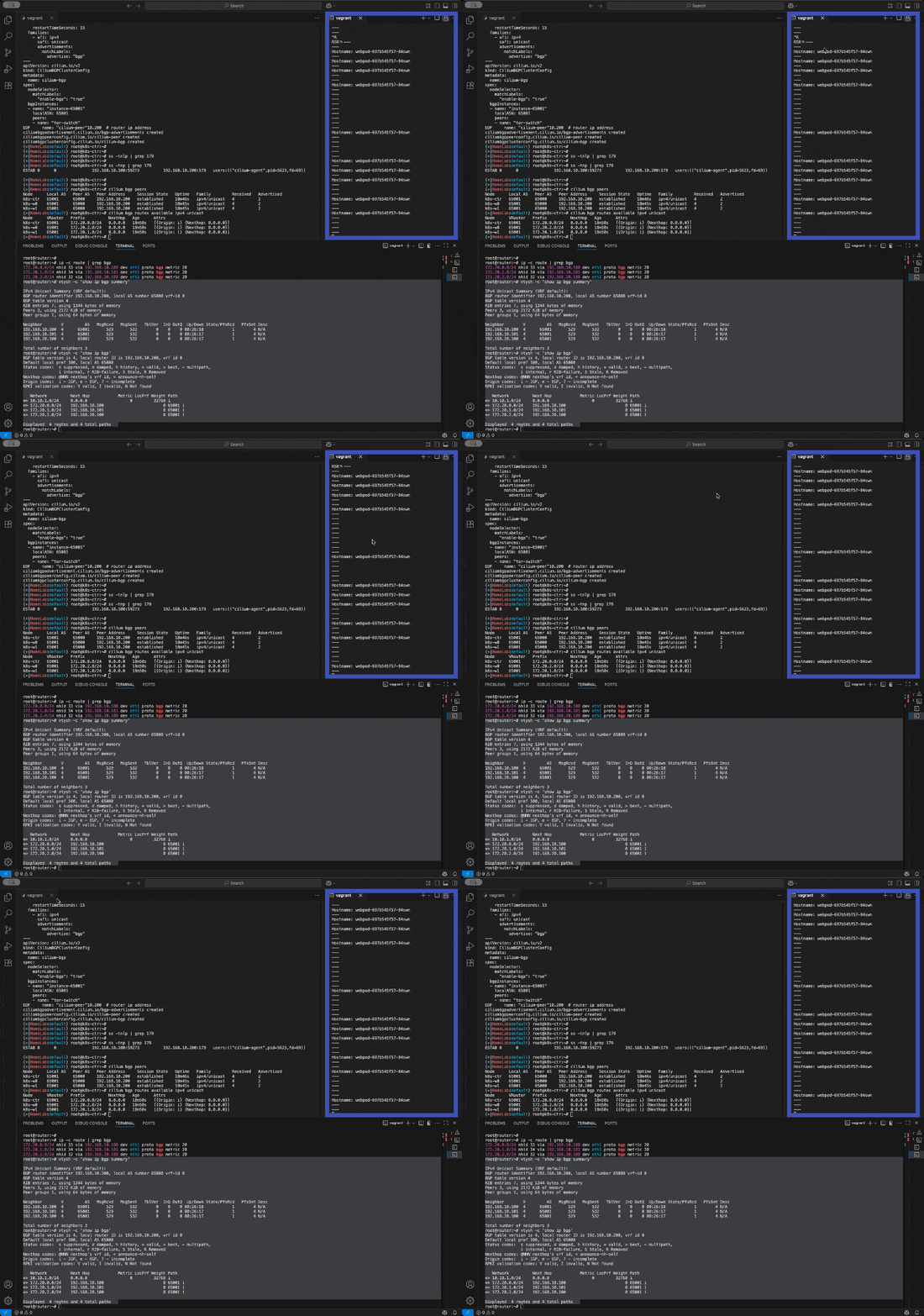
확인 해보자
k8s-ctr tcpdump 해두기
thpdump -i eth1 tcp port 179 -w /tmp/bgp.pcap
```bash
#### router : frr 재시작
systemctl restart frr && journalctl -u frr -f
```bash
#### bgp.type == 2
```bash
termshark -r /tmp/bgp.pcap
분명 Router 장비를 통해 BGP UPDATE로 받음을 확인.
cilium bgp routes
ip -c route
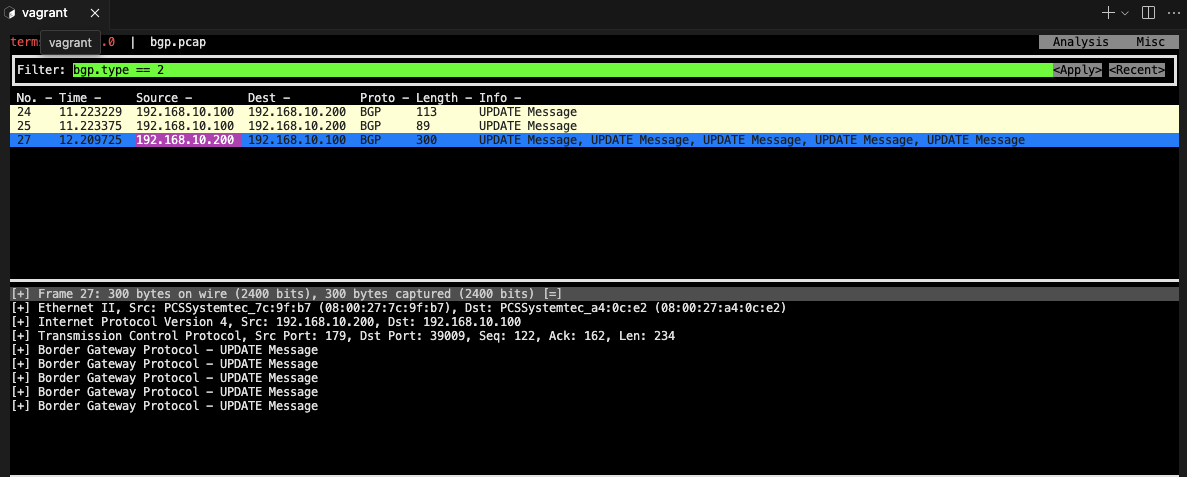
!! tmpdump termshark 확인 중 k8s-ctr 멈추고 맥미니 프로 처음으로 팬이 엄청 돈다! 발열! reload 해서 정상 됨;;
route 정보 확인 - router엔 등록 완료 node 엔 미등록
root@router:~# ip -c route
default via 10.0.2.2 dev eth0 proto dhcp src 10.0.2.15 metric 100
10.0.2.0/24 dev eth0 proto kernel scope link src 10.0.2.15 metric 100
10.0.2.2 dev eth0 proto dhcp scope link src 10.0.2.15 metric 100
10.0.2.3 dev eth0 proto dhcp scope link src 10.0.2.15 metric 100
10.10.0.0/16 via 192.168.20.200 dev eth2 proto static
10.10.1.0/24 dev loop1 proto kernel scope link src 10.10.1.200
10.10.2.0/24 dev loop2 proto kernel scope link src 10.10.2.200
172.20.0.0/24 nhid 66 via 192.168.10.100 dev eth1 proto bgp metric 20
172.20.0.0/16 via 192.168.20.200 dev eth2 proto static
172.20.1.0/24 nhid 68 via 192.168.10.101 dev eth1 proto bgp metric 20
172.20.2.0/24 nhid 64 via 192.168.20.100 dev eth2 proto bgp metric 20
192.168.10.0/24 dev eth1 proto kernel scope link src 192.168.10.200
192.168.10.0/24 via 192.168.20.200 dev eth2 proto static
192.168.20.0/24 dev eth2 proto kernel scope link src 192.168.20.200
⎈|HomeLab:default) root@k8s-ctr:~# ip -c route
default via 10.0.2.2 dev eth0 proto dhcp src 10.0.2.15 metric 100
10.0.2.0/24 dev eth0 proto kernel scope link src 10.0.2.15 metric 100
10.0.2.2 dev eth0 proto dhcp scope link src 10.0.2.15 metric 100
10.0.2.3 dev eth0 proto dhcp scope link src 10.0.2.15 metric 100
172.20.0.0/24 via 172.20.0.73 dev cilium_host proto kernel src 172.20.0.73
172.20.0.73 dev cilium_host proto kernel scope link
192.168.10.0/24 dev eth1 proto kernel scope link src 192.168.10.100default gateway 가 맞게 설정되어있음 통신 될 것이다. (일반적인 실무 환경 )
지금처럼 2개 이상의 NIC 사용할 경우에는 Node에 직접 라우팅 설정 및 관리 해당 default gateway 를 우회하도록 설정을 추가해야함
default GW가 eth0 경로이고 pod 내부느 eth1 로 초기 설정 해놓았기 때문임
k8s 파드 사용 대역 통신 전체는 eth1을 통해서 라우팅 설정
ip route add 172.20.0.0/16 via 192.168.10.200
sshpass -p 'vagrant' ssh vagrant@k8s-w1 sudo ip route add 172.20.0.0/16 via 192.168.10.200
sshpass -p 'vagrant' ssh vagrant@k8s-w0 sudo ip route add 172.20.0.0/16 via 192.168.20.200
router 가 bgp로 학습한 라우팅 정보 한번 더 확인 :
sshpass -p 'vagrant' ssh vagrant@router ip -c route | grep bgp
172.20.0.0/24 nhid 64 via 192.168.10.100 dev eth1 proto bgp metric 20
172.20.1.0/24 nhid 60 via 192.168.10.101 dev eth1 proto bgp metric 20
172.20.2.0/24 nhid 62 via 192.168.20.100 dev eth2 proto bgp metric 20
정상 통신 확인!
kubectl exec -it curl-pod -- sh -c 'while true; do curl -s --connect-timeout 1 webpod | grep Hostname; echo "---" ; sleep 1; done'hubble relay 포트 포워딩 실행
cilium hubble port-forward&
hubble status
flow log 모니터링
hubble observe -f --protocol tcp --pod curl-pod
Service(LoadBalancer - ExternalIP) IPs 도 BGP로 광고해보기
먼저 cilium으로 External IP사용하기위해 ippool생성
- 좋-은 점은 노드의 네트워크 대역이 아니여도 가능하다
cat << EOF | kubectl apply -f -
apiVersion: "cilium.io/v2"
kind: CiliumLoadBalancerIPPool
metadata:
  name: "cilium-pool"
spec:
  allowFirstLastIPs: "No"
  blocks:
  - cidr: "172.16.1.0/24"
EOF
(⎈|HomeLab:kube-system) root@k8s-ctr:~# kubectl get ippool -o yaml
apiVersion: v1
items:
- apiVersion: cilium.io/v2
  kind: CiliumLoadBalancerIPPool
  metadata:
    annotations:
      kubectl.kubernetes.io/last-applied-configuration: |
        {"apiVersion":"cilium.io/v2","kind":"CiliumLoadBalancerIPPool","metadata":{"annotations":{},"name":"cilium-pool"},"spec":{"allowFirstLastIPs":"No","blocks":[{"cidr":"172.16.1.0/24"}]}}
    creationTimestamp: "2025-08-16T09:37:25Z"
    generation: 1
    name: cilium-pool
    resourceVersion: "83551"
    uid: 468ec23d-9abd-46e6-bcb8-e908cb31bb13
  spec:
    allowFirstLastIPs: "No"
    blocks:
    - cidr: 172.16.1.0/24
    disabled: false
(⎈|HomeLab:kube-system) root@k8s-ctr:~# kubectl patch svc webpod -p '{"spec": {"type": "LoadBalancer"}}' -n default
service/webpod patched(⎈|HomeLab:kube-system) root@k8s-ctr:~# kubectl get svc webpod -n default
NAME     TYPE           CLUSTER-IP    EXTERNAL-IP   PORT(S)        AGE
webpod   LoadBalancer   10.96.88.41   172.16.1.1    80:30285/TCP   5d21h
- ippool 대역에 맞게 할당받음 172.16.1.1
(⎈|HomeLab:default) root@k8s-ctr:~# kubectl describe svc webpod | grep 'Traffic Policy'
External Traffic Policy:  Cluster
Internal Traffic Policy:  Cluster
(⎈|HomeLab:default) root@k8s-ctr:~# kubectl -n kube-system exec ds/cilium -c cilium-agent -- cilium-dbg service list |grep -A3 172.16
17   172.16.1.1:80/TCP      LoadBalancer   1 => 172.20.0.126:80/TCP (active)
                                           2 => 172.20.1.52:80/TCP (active)
                                           3 => 172.20.1.90:80/TCP (active)
(⎈|HomeLab:default) root@k8s-ctr:~# kubectl get svc webpod -o jsonpath='{.status.loadBalancer.ingress[0].ip}'
172.16.1.1(⎈|HomeLab:default) root@k8s-ctr:~#
(⎈|HomeLab:default) root@k8s-ctr:~# LBIP=$(kubectl get svc webpod -o jsonpath='{.status.loadBalancer.ingress[0].ip}')
(⎈|HomeLab:default) root@k8s-ctr:~# curl -s $LBIP
curl -s $LBIP | grep Hostname
curl -s $LBIP | grep RemoteAddrHostname: webpod-7f4b98cbcb-pczsr IP: 127.0.0.1 IP: ::1 IP: 172.20.0.126 IP: fe80::1c65:73ff:fed0:2180 RemoteAddr: 172.20.0.73:59736 GET / HTTP/1.1 Host: 172.16.1.1 User-Agent: curl/8.5.0 Accept: */* Hostname: webpod-7f4b98cbcb-pczsr(⎈|HomeLab:default) root@k8s-ctr:~# k get po -owide |grep pczsr
webpod-7f4b98cbcb-pczsr 1/1 Running 0 4h6m 172.20.0.126 k8s-ctr <none> <none>(⎈|HomeLab:default) root@k8s-ctr:~# k get ep
Warning: v1 Endpoints is deprecated in v1.33+; use discovery.k8s.io/v1 EndpointSlice
NAME         ENDPOINTS                                       AGE
kubernetes   192.168.10.100:6443                             5d23h
webpod       172.20.0.126:80,172.20.1.52:80,172.20.1.90:80   5d21h
roueter 모니터링 걸고
모니터링
watch "sshpass -p 'vagrant' ssh vagrant@router ip -c route"LB EX-IP를 BGP로 광고 설정
cat << EOF | kubectl apply -f -
apiVersion: cilium.io/v2
kind: CiliumBGPAdvertisement
metadata:
  name: bgp-advertisements-lb-exip-webpod
  labels:
    advertise: bgp
spec:
  advertisements:
    - advertisementType: "Service"
      service:
        addresses:
          - LoadBalancerIP
      selector:
        matchExpressions:
          - { key: app, operator: In, values: [ webpod ] }
EOF
(⎈|HomeLab:default) root@k8s-ctr:~# kubectl get CiliumBGPAdvertisement
NAME                                AGE
bgp-advertisements                  5h47m
bgp-advertisements-lb-exip-webpod   2m31s
(⎈|HomeLab:default) root@k8s-ctr:~# kubectl exec -it -n kube-system ds/cilium -- cilium-dbg bgp route-policies
VRouter   Policy Name                                             Type     Match Peers         Match Families   Match Prefixes (Min..Max Len)   RIB Action   Path Actions
65001     allow-local                                             import                                                                        accept
65001     tor-switch-ipv4-PodCIDR                                 export   192.168.10.200/32                    172.20.0.0/24 (24..24)          accept
65001     tor-switch-ipv4-Service-webpod-default-LoadBalancerIP   export   192.168.10.200/32                    172.16.1.1/32 (32..32)          accept
라우터에서 확인 172.20.1.1 따라가기
(⎈|HomeLab:default) root@k8s-ctr:~# sshpass -p 'vagrant' ssh vagrant@router "sudo
vtysh -c 'show ip route bgp'"
Codes: K - kernel route, C - connected, S - static, R - RIP,
       O - OSPF, I - IS-IS, B - BGP, E - EIGRP, N - NHRP,
       T - Table, v - VNC, V - VNC-Direct, A - Babel, F - PBR,
       f - OpenFabric,
- selected route, * - FIB route, q - queued, r - rejected, b - backup
       t - trapped, o - offload failure
B>* 172.16.1.1/32 [20/0] via 192.168.10.100, eth1, weight 1, 00:05:48
  *                      via 192.168.10.101, eth1, weight 1, 00:05:48
  *                      via 192.168.20.100, eth2, weight 1, 00:05:48
B>* 172.20.0.0/24 [20/0] via 192.168.10.100, eth1, weight 1, 03:44:30
B>* 172.20.1.0/24 [20/0] via 192.168.10.101, eth1, weight 1, 03:55:26
B>* 172.20.2.0/24 [20/0] via 192.168.20.100, eth2, weight 1, 00:52:28
(⎈|HomeLab:default) root@k8s-ctr:~# sshpass -p 'vagrant' ssh vagrant@router "suvtysh -c 'show ip bgp summary'"
IPv4 Unicast Summary (VRF default):
BGP router identifier 192.168.10.200, local AS number 65000 vrf-id 0
BGP table version 9
RIB entries 9, using 1728 bytes of memory
Peers 3, using 2172 KiB of memory
Peer groups 1, using 64 bytes of memory
Neighbor        V         AS   MsgRcvd   MsgSent   TblVer  InQ OutQ  Up/Down State/PfxRcd   PfxSnt Desc
192.168.10.100  4      65001      4683      4695        0    0    0 00:50:13            2        5 N/A
192.168.10.101  4      65001      4745      4752        0    0    0 00:50:01            2        5 N/A
192.168.20.100  4      65001      1845      1852        0    0    0 00:50:13            2        5 N/A
(⎈|HomeLab:default) root@k8s-ctr:~# sshpass -p 'vagrant' ssh vagrant@router "sudo vtysh -c 'show ip bgp'"
BGP table version is 9, local router ID is 192.168.10.200, vrf id 0
Default local pref 100, local AS 65000
Status codes:  s suppressed, d damped, h history, * valid, > best, = multipath,
               i internal, r RIB-failure, S Stale, R Removed
Nexthop codes: @NNN nexthop's vrf id, < announce-nh-self
Origin codes:  i - IGP, e - EGP, ? - incomplete
RPKI validation codes: V valid, I invalid, N Not found
   Network          Next Hop            Metric LocPrf Weight Path
*> 10.10.1.0/24     0.0.0.0                  0         32768 i
*> 172.16.1.1/32    192.168.10.100                         0 65001 i
*=                  192.168.20.100                         0 65001 i
*=                  192.168.10.101                         0 65001 i
*> 172.20.0.0/24    192.168.10.100                         0 65001 i
*> 172.20.1.0/24    192.168.10.101                         0 65001 i
*> 172.20.2.0/24    192.168.20.100                         0 65001 i
Displayed  5 routes and 7 total paths
(⎈|HomeLab:default) root@k8s-ctr:~# sshpass -p 'vagrant' ssh vagrant@router "sudo vtysh -c 'show ip bgp 172.16.1.1/32'"
BGP routing table entry for 172.16.1.1/32, version 9
Paths: (3 available, best #1, table default)
  Advertised to non peer-group peers:
  192.168.10.100 192.168.10.101 192.168.20.100
  65001
    192.168.10.100 from 192.168.10.100 (192.168.10.100)
      Origin IGP, valid, external, multipath, best (Router ID)
      Last update: Sat Aug 16 18:53:07 2025
  65001
    192.168.20.100 from 192.168.20.100 (192.168.20.100)
      Origin IGP, valid, external, multipath
      Last update: Sat Aug 16 18:53:07 2025
  65001
    192.168.10.101 from 192.168.10.101 (192.168.10.101)
      Origin IGP, valid, external, multipath
      Last update: Sat Aug 16 18:53:07 2025