실습을 위한 kind를 이용하여 k8s를 배포한다.
외부에서 K8s 서비스 접근을 위한 2가지 방식으로 포트를 오픈한다.
1.ingress를 위한 80,443
2.NoderPort로 접근을 위한 30000-30003
kind create cluster --name myk8s --image kindest/node:v1.32.8 --config - <<EOF
kind: Cluster
apiVersion: kind.x-k8s.io/v1alpha4
nodes:
- role: control-plane
  labels:
    ingress-ready: true
  extraPortMappings:
  - containerPort: 80
    hostPort: 80
    protocol: TCP
  - containerPort: 443
    hostPort: 443
    protocol: TCP
  - containerPort: 30000
    hostPort: 30000
  - containerPort: 30001
    hostPort: 30001
  - containerPort: 30002
    hostPort: 30002
  - containerPort: 30003
    hostPort: 30003
EOF
설치결과 확인
riverjin@gangjin-ung-ui-Macmini 5 % k get nodes
NAME                  STATUS   ROLES           AGE     VERSION
myk8s-control-plane   Ready    control-plane   2m15s   v1.32.8
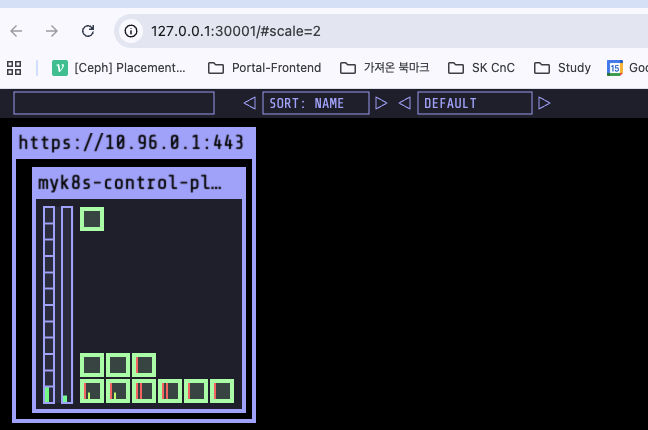
kube ops view 도 설치한다.
helm repo add geek-cookbook https://geek-cookbook.github.io/charts/
helm install kube-ops-view geek-cookbook/kube-ops-view \
  --version 1.2.2 \
  --set service.main.type=NodePort,service.main.ports.http.nodePort=30001 \
  --set env.TZ="Asia/Seoul" \
  --namespace kube-system
bash-3.2$ open "http://127.0.0.1:30001/#scale=2"
ingress-nginx를 배포해본다.
riverjin@gangjin-ung-ui-Macmini ~ % kubectl apply -f https://raw.githubusercontent.com/kubernetes/ingress-nginx/main/deploy/static/provider/kind/deploy.yaml

riverjin@gangjin-ung-ui-Macmini ~ % kubectl get deploy,svc,ep ingress-nginx-controller -n ingress-nginx

NAME                                       READY   UP-TO-DATE   AVAILABLE   AGE
deployment.apps/ingress-nginx-controller   1/1     1            1           85s

NAME                               TYPE           CLUSTER-IP      EXTERNAL-IP   PORT(S)                      AGE
service/ingress-nginx-controller   LoadBalancer   10.96.150.203   <pending>     80:31093/TCP,443:32274/TCP   85s

NAME                                 ENDPOINTS                      AGE
endpoints/ingress-nginx-controller   10.244.0.8:443,10.244.0.8:80   85s
yaml 확인
iverjin@gangjin-ung-ui-Macmini 5 % curl https://raw.githubusercontent.com/kubernetes/ingress-nginx/main/deploy/static/provider/kind/deploy.yaml |grep -i ports: -A 10
...
  ports:
  - appProtocol: http
    name: http
    port: 80
    protocol: TCP
    targetPort: http
  - appProtocol: https
    name: https
    port: 443
    protocol: TCP
    targetPort: https
--
  ports:
  - appProtocol: https
    name: https-webhook
    port: 443
    targetPort: webhook
  selector:
    app.kubernetes.io/component: controller
    app.kubernetes.io/instance: ingress-nginx
    app.kubernetes.io/name: ingress-nginx
  type: ClusterIP
---
--
        ports:
        - containerPort: 80
          hostPort: 80
          name: http
          protocol: TCP
        - containerPort: 443
          hostPort: 443
          name: https
          protocol: TCP
        - containerPort: 8443
          name: webhook
배포 내용 확인
riverjin@gangjin-ung-ui-Macmini ~ % kubectl describe -n ingress-nginx deployments/ingress-nginx-controller

Name:                   ingress-nginx-controller
Namespace:              ingress-nginx
CreationTimestamp:      Sat, 15 Nov 2025 23:43:47 +0900
Labels:                 app.kubernetes.io/component=controller
                        app.kubernetes.io/instance=ingress-nginx
                        app.kubernetes.io/name=ingress-nginx
                        app.kubernetes.io/part-of=ingress-nginx
                        app.kubernetes.io/version=1.14.0
Annotations:            deployment.kubernetes.io/revision: 1
Selector:               app.kubernetes.io/component=controller,app.kubernetes.io/instance=ingress-nginx,app.kubernetes.io/name=ingress-nginx
Replicas:               1 desired | 1 updated | 1 total | 1 available | 0 unavailable
StrategyType:           RollingUpdate
MinReadySeconds:        0
RollingUpdateStrategy:  1 max unavailable, 25% max surge
Pod Template:
  Labels:           app.kubernetes.io/component=controller
                    app.kubernetes.io/instance=ingress-nginx
                    app.kubernetes.io/name=ingress-nginx
                    app.kubernetes.io/part-of=ingress-nginx
                    app.kubernetes.io/version=1.14.0
  Service Account:  ingress-nginx
  Containers:
   controller:
    Image:           registry.k8s.io/ingress-nginx/controller:v1.14.0@sha256:e4127065d0317bd11dc64c4dd38dcf7fb1c3d72e468110b4086e636dbaac943d
    Ports:           80/TCP (http), 443/TCP (https), 8443/TCP (webhook)
    Host Ports:      80/TCP (http), 443/TCP (https), 0/TCP (webhook)
    SeccompProfile:  RuntimeDefault
    Args:
      /nginx-ingress-controller
      --election-id=ingress-nginx-leader
      --controller-class=k8s.io/ingress-nginx
      --ingress-class=nginx
      --configmap=$(POD_NAMESPACE)/ingress-nginx-controller
      --validating-webhook=:8443
      --validating-webhook-certificate=/usr/local/certificates/cert
      --validating-webhook-key=/usr/local/certificates/key
      --watch-ingress-without-class=true
      --publish-status-address=localhost
    Requests:
      cpu:      100m
      memory:   90Mi
    Liveness:   http-get http://:10254/healthz delay=10s timeout=1s period=10s #success=1 #failure=5
    Readiness:  http-get http://:10254/healthz delay=10s timeout=1s period=10s #success=1 #failure=3
    Environment:
      POD_NAME:        (v1:metadata.name)
      POD_NAMESPACE:   (v1:metadata.namespace)
      LD_PRELOAD:     /usr/local/lib/libmimalloc.so
    Mounts:
      /usr/local/certificates/ from webhook-cert (ro)
  Volumes:
   webhook-cert:
    Type:          Secret (a volume populated by a Secret)
    SecretName:    ingress-nginx-admission
    Optional:      false
  Node-Selectors:  kubernetes.io/os=linux
  Tolerations:     node-role.kubernetes.io/control-plane:NoSchedule
                   node-role.kubernetes.io/master:NoSchedule
Conditions:
  Type           Status  Reason
  ----           ------  ------
  Available      True    MinimumReplicasAvailable
  Progressing    True    NewReplicaSetAvailable
OldReplicaSets:  <none>
NewReplicaSet:   ingress-nginx-controller-8676d56f78 (1/1 replicas created)
Events:
  Type    Reason             Age    From                   Message
  ----    ------             ----   ----                   -------
  Normal  ScalingReplicaSet  4m31s  deployment-controller  Scaled up replica set ingress-nginx-controller-8676d56f78 from 0 to 1
배포 내용 분석
Deployment 기본 정보
| 항목 | 내용 | 의미 |
|---|---|---|
| Name | ingress-nginx-controller | Deployment 이름 |
| Namespace | ingress-nginx | 배포된 네임스페이스 |
| CreationTimestamp | 2025-11-15 23:43:47 +0900 | Deployment가 생성된 시간 |
| Annotations | deployment.kubernetes.io/revision: 1 | 현재 리비전 번호 |
| Selector | app.kubernetes.io/component=controller, app.kubernetes.io/instance=ingress-nginx, app.kubernetes.io/name=ingress-nginx | 이 Deployment가 관리할 파드를 선택하는 라벨 셀렉터 |
레플리카 및 업데이트 전략
| 항목 | 내용 | 의미 |
|---|---|---|
| Replicas | 1 desired | 1 updated | 1 total | 1 available | 0 unavailable | 원하는 파드 수 1개, 모두 정상 가동 중 |
| StrategyType | RollingUpdate | 파드 교체 방식 = 롤링 업데이트 |
| MinReadySeconds | 0 | 파드가 Ready 상태로 간주되기까지 기다리는 최소 시간 (0 = 즉시) |
| RollingUpdateStrategy | maxUnavailable: 1 maxSurge: 25% | 업데이트 시 최대 1개 파드만 내려가고, 동시에 25%까지 추가 파드 생성 가능 |
파드 템플릿 - 기본 설정
| 항목 | 내용 | 의미 |
|---|---|---|
| Pod Labels | app.kubernetes.io/component=controller app.kubernetes.io/instance=ingress-nginx app.kubernetes.io/name=ingress-nginx app.kubernetes.io/part-of=ingress-nginx app.kubernetes.io/version=1.14.0 | 파드에 붙는 라벨 (Selector와 거의 동일 + version) |
| ServiceAccount | ingress-nginx | 파드가 사용하는 서비스 어카운트 (권한 부여용) |
| Node Selector | kubernetes.io/os=linux | 리눅스 노드에만 스케줄링 |
| Tolerations | control-plane:NoSchedule master:NoSchedule | 컨트롤플레인/마스터 노드에 배포 가능하게 허용 |
컨테이너 상세 (controller)
| 항목 | 내용 | 의미 |
|---|---|---|
| Image | registry.k8s.io/ingress-nginx/controller:v1.14.0@sha256:e412... | 사용 중인 NGINX Ingress Controller 이미지 (버전 1.14.0) |
| Ports | 80/TCP (http) 443/TCP (https) 8443/TCP (webhook) | 컨테이너가 열어놓은 포트 (외부 트래픽 80·443, 웹훅 8443) |
| Host Ports | 80/TCP, 443/TCP, 0/TCP | 호스트 노드의 동일 포트 바인딩 (NodePort 또는 HostNetwork 사용 시) |
| Requests | cpu: 100m memory: 90Mi | 최소 보장 리소스 |
| Liveness Probe | HTTP GET /healthz on :10254 delay=10s, period=10s | 컨테이너가 살아있는지 체크 |
| Readiness Probe | HTTP GET /healthz on :10254 delay=10s, period=10s | 트래픽을 받을 준비가 되었는지 체크 |
| Environment | POD_NAME, POD_NAMESPACE LD_PRELOAD=/usr/local/lib/libmimalloc.so | 파드 이름·네임스페이스 주입 + 고성능 메모리 할당기 사용 |
컨테이너 실행 인자 (Args)
| 인자 | 의미 |
|---|---|
| --election-id=ingress-nginx-leader | 리더 선출용 ID |
| --controller-class=k8s.io/ingress-nginx | 이 컨트롤러가 담당하는 클래스 |
| --ingress-class=nginx | 처리할 Ingress 리소스의 클래스 (nginx) |
| --configmap=$(POD_NAMESPACE)/ingress-nginx-controller | 설정이 들어있는 ConfigMap |
| --validating-webhook=:8443 | Admission Webhook 활성화 (8443 포트) |
| --validating-webhook-certificate/... | 웹훅 인증서 경로 |
| --watch-ingress-without-class=true | ingress-class 없는 Ingress도 감시 |
| --publish-status-address=localhost | Ingress 상태를 localhost로 보고 |
볼륨
| 볼륨 이름 | 타입 | 출처 | 마운트 경로 | 의미 |
|---|---|---|---|---|
| webhook-cert | Secret | ingress-nginx-admission | /usr/local/certificates/ (ro) | Admission Webhook용 TLS 인증서 |
Conditions
| Type | Status | Reason | 의미 |
|---|---|---|---|
| Available | True | MinimumReplicasAvailable | 최소 레플리카 수 충족 |
| Progressing | True | NewReplicaSetAvailable | 새 ReplicaSet이 정상 생성됨 |
Events
| Type | Reason | Age | Message |
|---|---|---|---|
| Normal | ScalingReplicaSet | 4m31s | Scaled up replica set ... from 0 to 1 |
설치 내용 확인
riverjin@gangjin-ung-ui-Macmini ~ % kubectl get deploy,svc,ep ingress-nginx-controller -n ingress-nginx

NAME                                       READY   UP-TO-DATE   AVAILABLE   AGE
deployment.apps/ingress-nginx-controller   1/1     1            1           18m

NAME                               TYPE           CLUSTER-IP      EXTERNAL-IP   PORT(S)                      AGE
service/ingress-nginx-controller   LoadBalancer   10.96.150.203   <pending>     80:31093/TCP,443:32274/TCP   18m

NAME                                 ENDPOINTS                      AGE
endpoints/ingress-nginx-controller   10.244.0.8:443,10.244.0.8:80   18m
SSL Passthrough flag 활성화 설정 , 기본은 비활성화 상태이다
kubectl exec -it -n ingress-nginx deployments/ingress-nginx-controller -- /nginx-ingress-controller --help | grep ssl

    --default-ssl-certificate string          Secret containing a SSL certificate to be used by the default HTTPS server (catch-all).
    --enable-ssl-chain-completion             Autocomplete SSL certificate chains with missing intermediate CA certificates.
    --enable-ssl-passthrough                  Enable SSL Passthrough.
    --ssl-passthrough-proxy-port int          Port to use internally for SSL Passthrough. (default 442)
ArgoCD 를 tls 적용하여 설치한다.
- openssl 로 사설 인증서 생성
riverjin@gangjin-ung-ui-Macmini ~ % openssl req -x509 -nodes -days 365 -newkey rsa:2048 \
  -keyout argocd.example.com.key \
  -out argocd.example.com.crt \
  -subj "/CN=argocd.example.com/O=argocd"

Generating a 2048 bit RSA private key
................+++++
..............................................................................+++++
writing new private key to 'argocd.example.com.key'
-----

riverjin@gangjin-ung-ui-Macmini ~ % ls -l argocd.example.com.*

-rw-r--r--@ 1 riverjin  staff  1046 Nov 16 00:11 argocd.example.com.crt
-rw-r--r--@ 1 riverjin  staff  1704 Nov 16 00:11 argocd.example.com.key
- 공인인증 아님 내부 페쇄망에서 주로 사용
실행한 OpenSSL 명령어 전체 해석해보기
openssl req -x509 -nodes -days 365 -newkey rsa:2048 \
  -keyout argocd.example.com.key \
  -out argocd.example.com.crt \
  -subj "/CN=argocd.example.com/O=argocd"
openssl 명령어 옵션별 상세 해석
| 옵션 | 값 | 의미 |
|---|---|---|
| req | - | 인증서 요청(Certificate Request) 및 생성 명령어 |
| -x509 | - | 자체 서명(self-signed) 인증서를 바로 출력 (CA 없이 바로 사용 가능한 인증서) |
| -nodes | - | private key를 암호화하지 않음 → 비밀번호 없이 바로 사용 가능 |
| -days 365 | 365 | 인증서 유효 기간 = 365일 (1년) |
| -newkey rsa:2048 | rsa:2048 | 새 RSA 키페어 생성, 키 길이 2048bit (현재 표준 보안 수준) |
| -keyout | argocd.example.com.key | 생성된 개인키(private key)를 저장할 파일명 |
| -out | argocd.example.com.crt | 생성된 인증서(certificate)를 저장할 파일명 |
| -subj | "/CN=argocd.example.com/O=argocd" | 인증서 Subject 정보 • CN(Common Name) = argocd.example.com (도메인) • O(Organization) = argocd |
명령어 실행 중 출력 해석
| 출력 내용 | 의미 |
|---|---|
| Generating a 2048 bit RSA private key | 2048bit RSA 개인키 생성 시작 |
| ................+++++ ..............................................................................+++++ | 키 생성 진행 상황 (OpenSSL이 소수 찾는 과정, 점과 +는 진행률 표시) |
| writing new private key to 'argocd.example.com.key' | 개인키를 파일로 저장 완료 |
| ----- | 구분선 (BEGIN/END PRIVATE KEY 블록 표시) |
생성된 파일 정보 (ls -l 결과)
| 파일명 | 권한 | 소유자 | 크기 | 생성·수정 시간 | 의미 |
|---|---|---|---|---|---|
| argocd.example.com.crt | -rw-r--r--@ | riverjin staff | 1046 B | Nov 16 00:11 | 공개 인증서 (PEM 형식) |
| argocd.example.com.key | -rw-r--r--@ | riverjin staff | 1704 B | Nov 16 00:11 | 개인키 (PEM 형식, 암호 없음) |
실제 용도 (ArgoCD 등에서)
| 용도 | 적용 방법 예시 |
|---|---|
| ArgoCD Server TLS 종료용 self-signed 인증서 | kubectl create secret tls argocd-server-tls --cert=argocd.example.com.crt --key=argocd.example.com.key -n argocd |
| Ingress 또는 LoadBalancer에서 HTTPS 제공 | Ingress 리소스의 tls.secretName에 위 시크릿 지정 |
이 명령어 하나로 비밀번호 없는 2048bit RSA 기반 1년짜리 self-signed 인증서 + 개인키가 바로 만들어졌습니다. 프로덕션에서는 Let's Encrypt 같은 공인 인증서를 쓰는 게 좋지만, 내부 테스트·개발 환경이나 ArgoCD 같은 툴의 자체 HTTPS 설정에는 이 방식이 가장 빠르고 흔히 쓰입니다.
만들 키를 argocd secret으로 만들기
riverjin@gangjin-ung-ui-Macmini ~ % kubectl create ns argocd

namespace/argocd created
riverjin@gangjin-ung-ui-Macmini ~ %
riverjin@gangjin-ung-ui-Macmini ~ % kubectl -n argocd create secret tls argocd-server-tls \
  --cert=argocd.example.com.crt \
  --key=argocd.example.com.key

secret/argocd-server-tls created
ArgoCD helm 설치 with cusom values.yaml
riverjin@gangjin-ung-ui-Macmini ~ % cat <<EOF > argocd-values.yaml
global:
  domain: argocd.example.com

# TLS certificate configuration via cert-manager # 해당 부분은 빼도 되겠네요
certificate:
  enabled: true

server:
  ingress:
    enabled: true
    ingressClassName: nginx
    annotations:
      nginx.ingress.kubernetes.io/force-ssl-redirect: "true"
      nginx.ingress.kubernetes.io/ssl-passthrough: "true"
    tls: true
EOF

riverjin@gangjin-ung-ui-Macmini ~ % helm repo add argo https://argoproj.github.io/argo-helm

riverjin@gangjin-ung-ui-Macmini ~ % helm install argocd argo/argo-cd --version 9.0.5 -f argocd-values.yaml --namespace argocd


NAME: argocd
LAST DEPLOYED: Sun Nov 16 00:32:41 2025
NAMESPACE: argocd
STATUS: deployed
REVISION: 1
TEST SUITE: None
NOTES:
In order to access the server UI you have the following options:

1. kubectl port-forward service/argocd-server -n argocd 8080:443

    and then open the browser on http://localhost:8080 and accept the certificate

2. enable ingress in the values file `server.ingress.enabled` and either
      - Add the annotation for ssl passthrough: https://argo-cd.readthedocs.io/en/stable/operator-manual/ingress/#option-1-ssl-passthrough
      - Set the `configs.params."server.insecure"` in the values file and terminate SSL at your ingress: https://argo-cd.readthedocs.io/en/stable/operator-manual/ingress/#option-2-multiple-ingress-objects-and-hosts


After reaching the UI the first time you can login with username: admin and the random password generated during the installation. You can find the password by running:

kubectl -n argocd get secret argocd-initial-admin-secret -o jsonpath="{.data.password}" | base64 -d

(You should delete the initial secret afterwards as suggested by the Getting Started Guide: https://argo-cd.readthedocs.io/en/stable/getting_started/#4-login-using-the-cli)
실행한 Helm 명령어 와 결과 해석 정리 with AI
helm install argocd argo/argo-cd --version 9.0.5 -f argocd-values.yaml --namespace argocd명령어 옵션별 해석
| 옵션 | 값 | 의미 |
|---|---|---|
| helm install | - | Helm 차트 새로 설치 |
| Release 이름 | argocd | Helm 릴리즈 이름 (kubectl get all 했을 때 나오는 접두사) |
| 차트 | argo/argo-cd | 공식 ArgoCD Helm 차트 |
| --version | 9.0.5 | 정확히 ArgoCD v2.13.x 계열에 맞는 Helm 차트 버전 고정 설치 |
| -f | argocd-values.yaml | 사용자 정의 values 파일 적용 (ingress, resource limit 등 커스터마이징) |
| --namespace | argocd | argocd 네임스페이스에 설치 (없으면 자동 생성) |
설치 결과 요약
| 항목 | 값 | 의미 |
|---|---|---|
| NAME | argocd | Helm 릴리즈 이름 |
| LAST DEPLOYED | Sun Nov 16 00:32:41 2025 | 설치된 시간 |
| NAMESPACE | argocd | 설치된 네임스페이스 |
| STATUS | deployed | 성공적으로 배포 완료 |
| REVISION | 1 | 첫 번째 릴리즈 (helm upgrade 하면 2, 3… 으로 증가) |
| TEST SUITE | None | 테스트 훅 없음 |
NOTES 내용 상세 정리 (ArgoCD 접속 방법)
| 순번 | 접속 방법 | 상세 설명 |
|---|---|---|
| 1 | kubectl port-forward | bash\nkubectl port-forward service/argocd-server -n argocd 8080:443\n→ 브라우저에서 http://localhost:8080 접속 (self-signed 인증서라서 경고 수락해야 함) |
| 2 | Ingress 활성화 | values.yaml에 아래 설정 추가 후 helm upgradeyaml\nserver:\n ingress:\n enabled: true\n그리고 두 가지 옵션 중 하나 선택 |
| 2-1 | SSL Passthrough (권장) | Ingress에 annotation 추가yaml\nnginx.ingress.kubernetes.io/ssl-passthrough: "true"\n→ Ingress에서 TLS 종료 안 하고 ArgoCD 서버까지 그대로 전달 |
| 2-2 | server.insecure = true (간단하지만 보안 ↓) | values.yaml에 추가yaml\nconfigs:\n params:\n server.insecure: true\n→ ArgoCD가 HTTP로 동작하게 하고 Ingress에서 TLS 종료 |
초기 admin 비밀번호 확인 및 로그인 방법
| 단계 | 명령어 / 동작 | 설명 |
|---|---|---|
| 비밀번호 확인 | bash\nkubectl -n argocd get secret argocd-initial-admin-secret -o jsonpath="{.data.password}" \| base64 -d\n | 초기 생성된 랜덤 비밀번호 출력 (한 번만 유효) |
| 로그인 | UI 접속 후 username: admin password: 위 명령어로 얻은 값 | 첫 로그인 후 반드시 비밀번호 변경 권장 |
| 보안 권장 조치 | 로그인 후 secret 삭제 | bash\nkubectl -n argocd delete secret argocd-initial-admin-secret\n |
요약
- 설치 성공 → 바로 사용 가능
- 가장 빠른 테스트 방법 =
kubectl port-forward→ http://localhost:8080 - 프로덕션/실운영용 = values.yaml에 ingress 활성화 + SSL Passthrough 설정 후 helm upgrade
- 초기 비밀번호는 secret에 들어있고, 로그인 후 꼭 삭제하거나 변경하세요!
open "https://argocd.example.com" 하면 발생하는 에러 확인
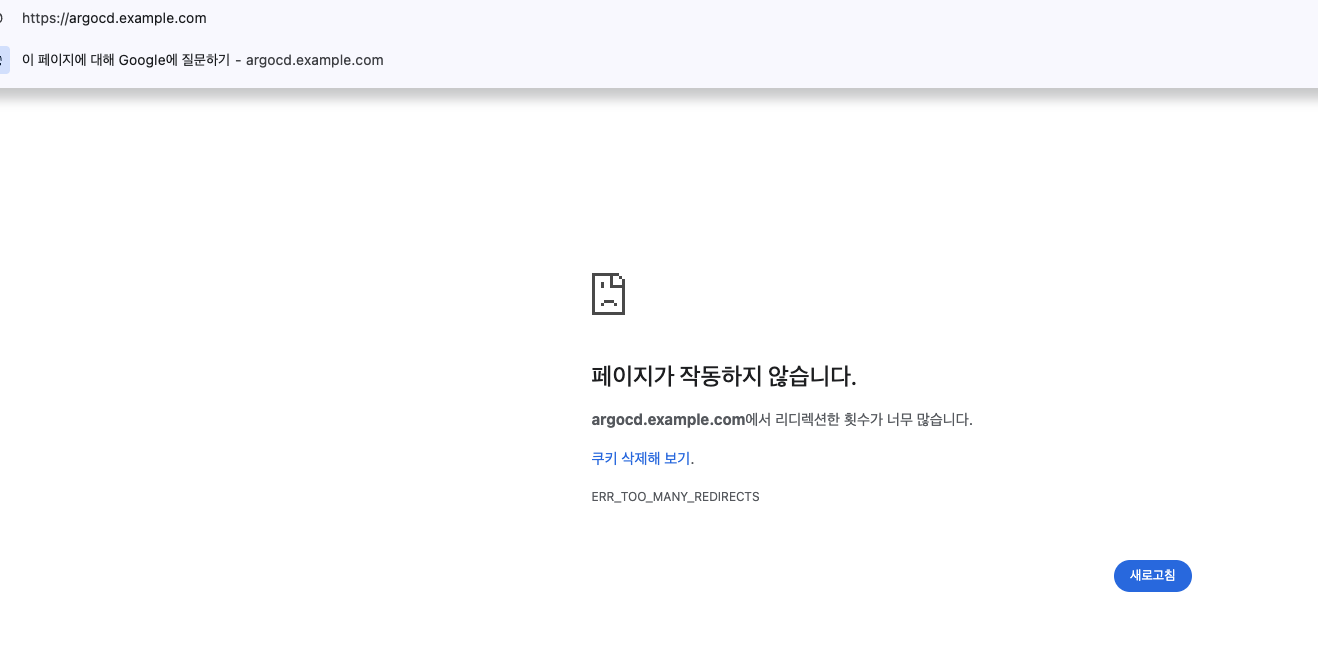
nginx 로그 보니 307 redirection 계속 발생
riverjin@gangjin-ung-ui-Macmini ~ % k -n ingress-nginx logs deployments/ingress-nginx-controller
.0.0 Safari/537.36" 18 0.000 [argocd-argocd-server-443] [] 10.244.0.15:8080 63 0.001 307 e781b4bc9b784a232f5881fb45cfd3b4
192.168.65.1 - - [15/Nov/2025:15:39:01 +0000] "GET / HTTP/2.0" 307 63 "-" "Mozilla/5.0 (Macintosh; Intel Mac OS X 10_15_7) AppleWebKit/537.36 (KHTML, like Gecko) Chrome/142.0.0.0 Safari/537.36" 18 0.001 [argocd-argocd-server-443] [] 10.244.0.15:8080 63 0.000 307 58e2bbbe4fb0874a36e10fd05664223d
192.168.65.1 - - [15/Nov/2025:15:39:01 +0000] "GET / HTTP/2.0" 307 63 "-" "Mozilla/5.0 (Macintosh; Intel Mac OS X 10_15_7) AppleWebKit/537.36 (KHTML, like Gecko) Chrome/142.0.0.0 Safari/537.36" 18 0.000 [argocd-argocd-server-443] [] 10.244.0.15:8080 63 0.000 307 63da0d05f5b09f09d8009570ada1bc94
192.168.65.1 - - [15/Nov/2025:15:39:01 +0000] "GET / HTTP/2.0" 307 63 "-" "Mozilla/5.0 (Macintosh; Intel Mac OS X 10_15_7) AppleWebKit/537.36 (KHTML, like Gecko) Chrome/142.0.0.0 Safari/537.36" 18 0.000 [argocd-argocd-server-443] [] 10.244.0.15:8080 63 0.000 307 6376351ecdade94ac029771a22c10b4c
192.168.65.1 - - [15/Nov/2025:15:39:01 +0000] "GET / HTTP/2.0" 307 63 "-" "Mozilla/5.0 (Macintosh; Intel Mac OS X 10_15_7) AppleWebKit/537.36 (KHTML, like Gecko) Chrome/142.0.0.0 Safari/537.36" 18 0.000 [argocd-argocd-server-443] [] 10.244.0.15:8080 63 0.000 307 bc68197b1ffe222ce960f911b178b5c6
192.168.65.1 - - [15/Nov/2025:15:39:01 +0000] "GET / HTTP/2.0" 307 63 "-" "Mozilla/5.0 (Macintosh; Intel Mac OS X 10_15_7) AppleWebKit/537.36 (KHTML, like Gecko) Chrome/142.0.0.0 Safari/537.36" 18 0.000 [argocd-argocd-server-443] [] 10.244.0.15:8080 63 0.001 307 4812c0c1157e61459e8e8f0280a05b83
192.168.65.1 - - [15/Nov/2025:15:39:01 +0000] "GET / HTTP/2.0" 307 63 "-" "Mozilla/5.0 (Macintosh; Intel Mac OS X 10_15_7) AppleWebKit/537.36 (KHTML, like Gecko) Chrome/142.0.0.0 Safari/537.36" 18 0.000 [argocd-argocd-server-443] [] 10.244.0.15:8080 63 0.001 307 737e30a63f611109624bfda95cbf935f
192.168.65.1 - - [15/Nov/2025:15:39:01 +0000] "GET / HTTP/2.0" 307 63 "-" "Mozilla/5.0 (Macintosh; Intel Mac OS X 10_15_7) AppleWebKit/537.36 (KHTML, like Gecko) Chrome/142.0.0.0 Safari/537.36" 18 0.000 riverjin@gangjin-ung-ui-Macmini ~ % k -n ingress-nginx logs deployments/ingress-nginx-controller[argocd-argocd-server-443] [] 10.244.0.15:8080 63 0.001 307 3863767d05346ee18c2657908baf0e14
192.168.65.1 - - [15/Nov/2025:15:39:01 +0000] "GET / HTTP/2.0" 307 63 "-" "Mozilla/5.0 (Macintosh; Intel Mac OS X 10_15_7) AppleWebKit/537.36 (KHTML, like Gecko) Chrome/142.0.0.0 Safari/537.36" 18 0.001 [argocd-argocd-server-443] [] 10.244.0.15:8080 63 0.001 307 9352eedef51ef7b35e627c8ad055abc6
192.168.65.1 - - [15/Nov/2025:15:39:01 +0000] "GET / HTTP/2.0" 307 63 "-" "Mozilla/5.0 (Macintosh; Intel Mac OS X 10_15_7) AppleWebKit/537.36 (KHTML, like Gecko) Chrome/142.0.0.0 Safari/537.36" 18 0.000 [argocd-argocd-server-443] [] 10.244.0.15:8080 63 0.000 307 50949eac93c94e75d511a5a4fa34cc3c
192.168.65.1 - - [15/Nov/2025:15:39:01 +0000] "GET / HTTP/2.0" 307 63 "-" "Mozilla/5.0 (Macintosh; Intel Mac OS X 10_15_7) Apple
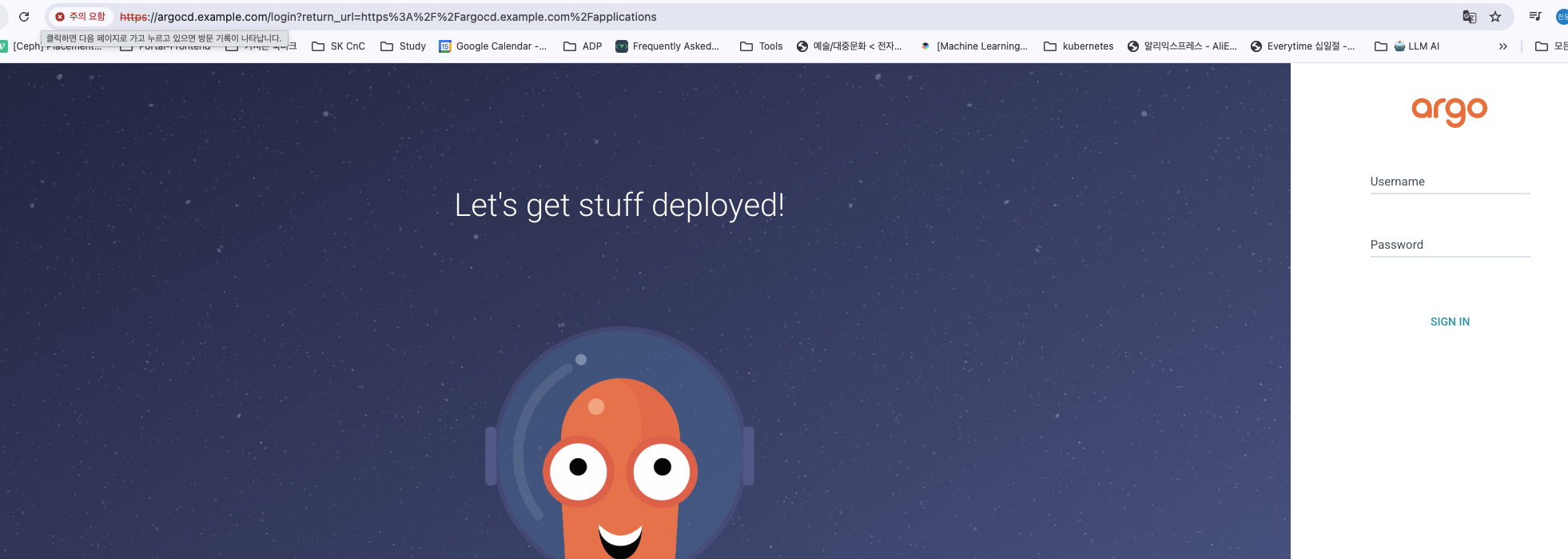
kubectl edit -n ingress-nginx deployments/ingress-nginx-controller
- --enable-ssl-passthrough 항목 추가
    spec:
 48       automountServiceAccountToken: true
 49       containers:
 50       - args:
 51         - /nginx-ingress-controller
 52         - --election-id=ingress-nginx-leader
 53         - --controller-class=k8s.io/ingress-nginx
 54         - --ingress-class=nginx
 55         - --configmap=$(POD_NAMESPACE)/ingress-nginx-controller
 56         - --validating-webhook=:8443
 57         - --validating-webhook-certificate=/usr/local/certificates/cert
 58         - --validating-webhook-key=/usr/local/certificates/key
 59         - --watch-ingress-without-class=true
 60         - --publish-status-address=localhost
 61         - --enable-ssl-passthrough
ArgoCD cli로 초기 비번 업데이트 하기
- 초기 비밀번호 조회: Argo CD 설치 시 생성된 초기 관리자 비밀번호(
GQmv1CH7zzAJrj8l)를 Kubernetes 시크릿에서 추출 - 보안 로그인:
--insecure옵션으로 TLS 검증을 건너뛰고 초기 비밀번호로 Argo CD 서버에 로그인 - 비밀번호 변경: 보안 강화를 위해 관리자 비밀번호를 새로운 값으로 업데이트
riverjin@gangjin-ung-ui-Macmini ~ % kubectl -n argocd get secret argocd-initial-admin-secret -o jsonpath="{.data.password}" | base64 -d ;echo

GQmv1CH7zzAJrj8l

riverjin@gangjin-ung-ui-Macmini ~ % argocd login argocd.example.com --insecure

Username: admin
Password:
'admin:login' logged in successfully
Context 'argocd.example.com' updated

riverjin@gangjin-ung-ui-Macmini ~ % argocd account update-password
*** Enter password of currently logged in user (admin):
*** Enter new password for user admin:
*** Confirm new password for user admin:
Password updated
Context 'argocd.example.com' updated
비번을 업데이트했는데 UI 로그인이 안된다. 해결법
 #argocd-secret edit로  admin.password 와 admin.passwordMtime 의 key, value를 모두 지우고 save

kubectl edit secret argocd-secret -n argocd

# argocd-server 파드 재시작

kubectl delete pod  argocd-server-6d98c8dd8-5wvl7 -n argocd

# 새로운 비밀번호 얻기
kubectl -n argocd get secret argocd-initial-admin-secret -o jsonpath="{.data.password}" | base64 -d
alice 로컬 사용자를 생성 - UI, CLI 모두 허용
riverjin@gangjin-ung-ui-Macmini ~ % kubectl edit  cm -n argocd argocd-cm

apiVersion: v1
  6 data:
  7   accounts.alice: apiKey, login
  8   admin.enabled: "true"

  ..

  riverjin@gangjin-ung-ui-Macmini ~ % argocd account list

NAME   ENABLED  CAPABILITIES
admin  true     login
alice  true     apiKey, login
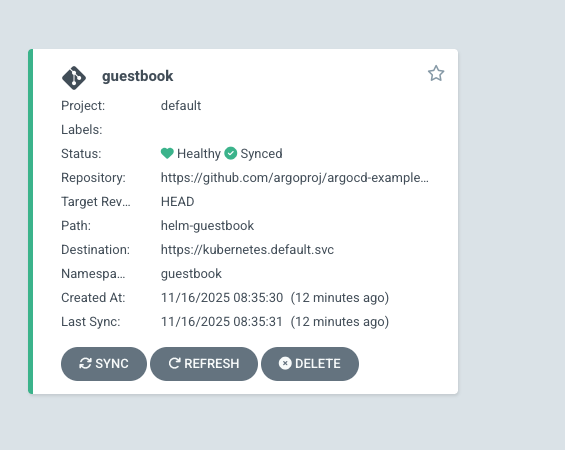
admin 계정으로 간단 앱 배포
riverjin@gangjin-ung-ui-Macmini ~ % cat <<EOF | kubectl apply -f -
apiVersion: argoproj.io/v1alpha1
kind: Application
metadata:
  name: guestbook
  namespace: argocd
  finalizers:
  - resources-finalizer.argocd.argoproj.io
spec:
  project: default
  source:
    helm:
      valueFiles:
      - values.yaml
    path: helm-guestbook
    repoURL: https://github.com/argoproj/argocd-example-apps
    targetRevision: HEAD
  syncPolicy:
    automated:
      enabled: true
      prune: true
      selfHeal: true
    syncOptions:
    - CreateNamespace=true
  destination:
    namespace: guestbook
    server: https://kubernetes.default.svc
EOF
Warning: metadata.finalizers: "resources-finalizer.argocd.argoproj.io": prefer a domain-qualified finalizer name including a path (/) to avoid accidental conflicts with other finalizer writers
application.argoproj.io/guestbook created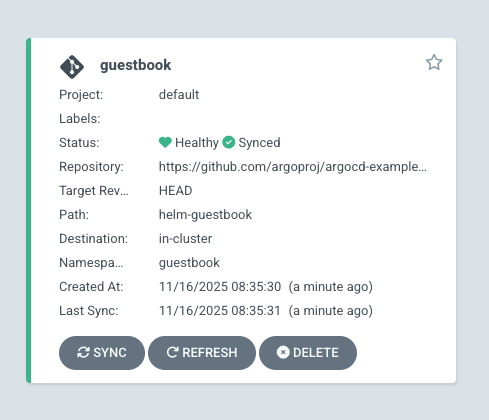
-
alice 로 로그인하면 안보인다.
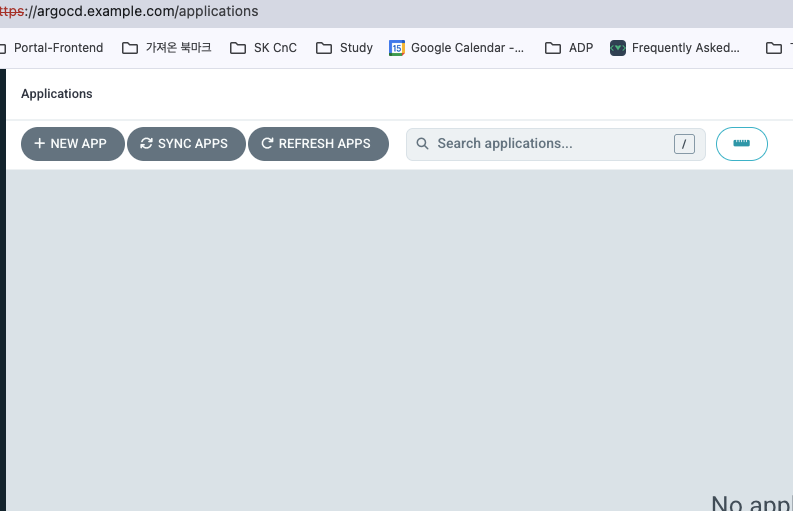
-
보이게 하려면 alice에게 권한을 줘야한다.
RBAC 으로 기본 권한 수정하기
riverjin@gangjin-ung-ui-Macmini ~ % kubectl edit cm -n argocd argocd-rbac-cm

5 apiVersion: v1
  6 data:
  7   policy.csv: ""
  8   policy.default: "role:readonly"
9 policy.matchMode: glob- 수정하자마자 보임
gitops-ci 전용 api 통신만 되는 계정 생성해보기
riverjin@gangjin-ung-ui-Macmini ~ % kubectl edit cm -n argocd argocd-cm

4 #
  5 apiVersion: v1
  6 data:
  7   accounts.alice: apiKey,login
  8   accounts.gitops-ci: apiKey


iverjin@gangjin-ung-ui-Macmini ~ % argocd account list

NAME       ENABLED  CAPABILITIES
admin      true     login
alice      true     apiKey, login
gitops-ci  true     apiKey
gitops-ci 전용 token 만들기
- 토큰은 만료시간 있음
- 권한있는 유저로 로그인 하거나 권한을 줘야함
- argocd 패턴으로 alice에게 rbac 을 줘서 만든다.
kubectl edit cm -n argocd argocd-rbac-cm
  policy.csv: |
    p, role:user-update, accounts, update, *, allow
    p, role:user-update, accounts, get, *, allow
    g, alice, role:user-update


gangjin-ung-ui-Macmini:~ riverjin$ argocd account generate-token -a gitops-ci
eyJhbGciOiJIUzI1NiIsInR5cCI6IkpXVCJ9.eyJpc3MiOiJhcmdvY2QiLCJzdWIiOiJnaXRvcHMtY2k6YXBpS2V5IiwibmJmIjoxNzYzMjUxMjEzLCJpYXQiOjE3NjMyNTEyMTMsImp0aSI6ImQ4NmYzY2YwLTc4NzMtNDFmNS04NDRkLTMzMWRmZTUyZmQzYSJ9.BITFigd782LpvNUqegyulPQm42hZN4j9TY3FKQ8sTZY

### 권한 부여 확인
gangjin-ung-ui-Macmini:~ riverjin$ argocd account get-user-info --auth-token eyJhbGciOiJIUzI1NiIsInR5cCI6IkpXVCJ9.eyJpc3MiOiJhcmdvY2QiLCJzdWIiOiJnaXRvcHMtY2k6YXBpS2V5IiwibmJmIjoxNzYzMjUyNjY4LCJpYXQiOjE3NjMyNTI2NjgsImp0aSI6IjQxZGFjYzk2LWYxYTQtNDZhOS1hNjBmLTVjNDg2MTc3NGNhNSJ9.AI3AauUYm-XOCzkW7f74Xrm45AFj4u2v_ZmCzEdyU4A
Logged In: true
Username: gitops-ci
Issuer: argocd
Groups:
ArgoCD RBAC 권한 패턴 정리
- "계정 관리자" 역할 생성: 모든 사용자 계정을 조회(get)하고 수정(update)할 수 있는 권한 정의
- alice에게 역할 부여: alice 사용자가 "계정 관리자" 역할을 갖도록 설정
- 결과: alice가 모든 사용자(관리자 포함)의 정보를 조회하고 비밀번호 변경 가능해짐
| 구성 요소 | 설명 | 예시 |
|---|---|---|
| Policy Type | RBAC 정책 종류 (p/g) | p, g |
| Role | 권한 그룹 식별자 | role:user-update |
| Subject | 적용 대상 리소스 | accounts, apps |
| Verb | 허용 작업 (get/update/delete) | update |
| Object | 권한 범위 (* 또는 특정 리소스) | applications/* |
| Effect | 접근 제어 (allow/deny) | allow |
| Policy Type | Role | Subject | Verb | Object | Effect |
|---|---|---|---|---|---|
p | role:admin | apps | create | my-app | allow |
p | role:user-update | accounts | update | * | allow |
g | alice | - | - | role:viewer | - |
1️⃣ 정책 정의
p, role:user-update, accounts, update, *, allow
role:user-update 역할에 모든 계정 수정 권한 부여
2️⃣ 조회 권한 추가
p, role:user-update, accounts, get, *, allow
같은 역할에 계정 조회 권한도 함께 부여
3️⃣ 사용자 할당
g, alice, role:user-update
사용자 alice를 role:user-update 역할에 등록 → 권한 상속
p = Policy (권한 정책), g = Group (그룹 할당)
* = 모든 리소스 (운영 시 특정 리소스로 제한 권장)
ArgoCD Project
 kubectl get appprojects.argoproj.io -n argocd default -o yaml
apiVersion: argoproj.io/v1alpha1
kind: AppProject
metadata:
  creationTimestamp: "2025-11-15T15:33:00Z"
  generation: 1
  name: default
  namespace: argocd
  resourceVersion: "6000"
  uid: 2f1fe85f-75b4-42fc-9bbb-fb94a3529895
spec:
  clusterResourceWhitelist:
  - group: '*'
    kind: '*'
  destinations:
  - namespace: '*'
    server: '*'
  sourceRepos:
  - '*'
status: {}
1. 기본 정보
| 항목 | 값 | 설명 |
|---|---|---|
| apiVersion | argoproj.io/v1alpha1 | Argo CD API 버전 |
| kind | AppProject | 애플리케이션 프로젝트 리소스 |
| name | default | 프로젝트 이름 |
| namespace | argocd | 프로젝트가 위치한 네임스페이스 |
| creationTimestamp | 2025-11-15T15:33:00Z | 생성 시간 |
2. 프로젝트 설정 (spec)
| 설정 항목 | 값 | 설명 |
|---|---|---|
| sourceRepos | ['*'] | 모든 Git 저장소 허용 |
| destinations | namespace: '*', server: '*' | 모든 클러스터/네임스페이스 허용 |
| clusterResourceWhitelist | group: '*', kind: '*' | 모든 클러스터 리소스 허용 |
프로젝트(Project)란?
- 프로젝트(Project) = Argo CD에서 애플리케이션을 그룹화하고 접근을 제어하는 논리적 단위
- Default 프로젝트 = Argo CD 설치 시 자동 생성되는 모든 권한을 가진 기본 프로젝트
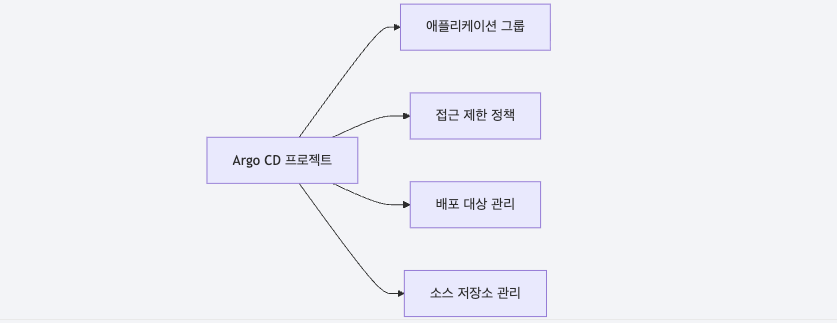
프로젝트의 주요 기능
| 기능 | 설명 |
|---|---|
| 애플리케이션 그룹화 | 관련 애플리케이션을 논리적으로 묶음 |
| 접근 제한 | 특정 사용자/그룹에게 프로젝트 접근 권한 부여 |
| 소스 저장소 제한 | 허용된 Git 저장소만 사용 가능 |
| 배포 대상 제한 | 허용된 클러스터/네임스페이스에만 배포 가능 |
| 리소스 제한 | 생성 가능한 Kubernetes 리소스 종류 제한 |
Default 프로젝트의 역할
| 특징 | 설명 |
|---|---|
| 자동 생성 | Argo CD 설치 시 자동으로 생성됨 |
| 제한 없음 | 모든 저장소, 클러스터, 리소스 허용 |
| 기본 프로젝트 | 애플리케이션 생성 시 프로젝트를 지정하지 않으면 자동 할당됨 |
| 개발/테스트용 | 제한이 없어 개발 환경에서 편리하지만 프로덕션에는 부적합 |
Default 프로젝트의 보안 영향
| 설정 | 보안 영향 |
|---|---|
| sourceRepos: '*' | 신뢰할 수 없는 저장소의 매니페스트도 배포 가능 |
| destinations: '*' | 모든 클러스터에 배포 가능 (프로덕션 클러스터 포함) |
| clusterResourceWhitelist: '*' | ClusterRole, ClusterRoleBinding 등 위험한 리소스 생성 가능 |

bytebliss