얄코 HTMl -2
링크바로접속
<body>
  <a href="https://www.google.co.kr/">구글접속</a>
</body>
새링크로 연결
<body>
  <a href="https://www.google.co.kr/" target="blank">구글접속(새창에서열기)</a>
</body>
이미지에 링크연결
<body>
  <a href="https://www.google.co.kr/" target="blank">구글접속</a>
  <a href="https://www.google.co.kr" target="_blank"><img src="이미지넣기"alt="새창에서 열기"></a>
</body>
링크에 연락처등 정보넣기
<address>
    웹사이트 주소: <a href="https://www.yalco.kr">yalco.kr</a> <br>
    오피스: 전산시 개발구 코딩동 123번길 45 <br>
    전화 <a href="tel:010-1234-5678">010-1234-5678</a> <br>
    이메일: <a href="mailto:yalco@kakao.com">yalco@kakao.com</a>
  </address>
</body>
사용자로 입력받는 태그
// 별도로 자바스크립트를 활용해야함.
<body>
  <form
    action="./01-result.html"
    method="get"
	autocomplete="off"    // 자동완성기능 off한것임
    <label for="name">이름</label>
    <input id="name" name="my-name" type="text">
    <br><br>
    <label for="age">나이</label>
    <input id="age" name="my-age" type="number">
    <br><br>
    <button type="submit">제출</button>
    <button type="reset">초기화</button>
  </form>
</body>
인풋타입
<body>
  <h1>텍스트 관련 인풋 타입</h1>
  <form action="#">
    <label for="txtIp">text</label> <br>
    <input
      id="txtIp"
      type="text"
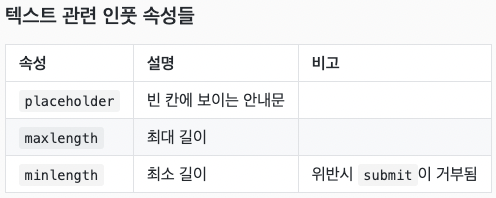
      placeholder="5자 이하"     //빈칸에 보이는 안내문 코드
      maxlength="5"           //최대길이 5글자의 코드

    <br><br>
    <label for="pwdIp">password</label> <br>
    <input
      id="pwdIp"
      type="password"
      placeholder="4자 이상"
      minlength="4"         // 최소길이 4글자의 코드

    <br><br>
    <label for="srchIp">search</label> <br>
    <input id="srchIp" type="search">
    <br><br>
    <label for="tlIp">tel</label> <br>
    <input id="tlIp" type="tel">
    <br><br>
    <button type="submit">제출</button>
  </form>
</body>
숫자관련 인풋 속성
<body>
  <h1>숫자 관련 인풋 타입</h1>
  <form action="#">
    <label for="numIp">number</label> <br>
    <input
      id="numIp"
      type="number"
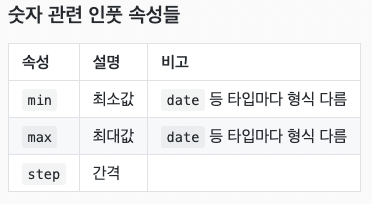
      min="0"
      max="10"

    // range 타입은 자바스크립트와 함께사용할것
    <br><br>
    <label for="rgIp">range</label> <br>
    <input
      id="rgIp"
      type="range"
      min="0"
      max="100"
      step="20"

    <br><br>
    <label for="dtIp">date</label> <br>
    <input
      id="dtIp"
      type="date"
      min="2020-01-01"
      max="2030-12-31"

    <br><br>
  </form>
</body>
체크관련 인풋 속성
<body>
  <h1>체크 관련 인풋 타입</h1>
  <form action="#">
    <h2>checkbox</h2>
    <input
      id="cbIp"
      type="checkbox"
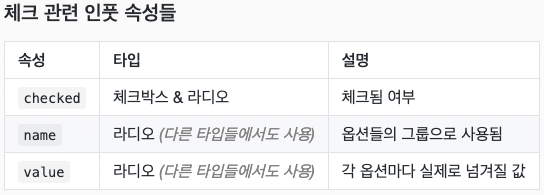
      checked

    <label for="cbIp">유기농</label> <br>
    <h2>radio</h2>
    <input
      type="radio"
      name="fruit"
      id="f_apple"
      value="apple"
      checked

    <label for="f_apple">사과</label>
    <input
      type="radio"
      name="fruit"
      id="f_grape"
      value="grape"

    <label for="f_grape">포도</label>
    <input
      type="radio"
      name="fruit"
      id="f_orange"
      value="orange"

    </body>
기타인풋 타입들
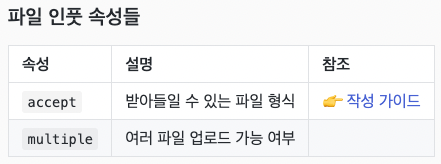
<body> <h1>기타 인풋 타입</h1> <form action="#"> <label for="fileIp">file</label> <br> <input id="fileIp" type="file" accept="image/png, image/jpeg" //accpt에 아무것도 명시하지 않으면 모든걸 제출할수있고, accpt에 명시하면 명시된것만 제출할수있음 multiple // nultiple은 한번에 여러개를 선택할수 있게하는 속성 <br><br> <label for="hdnIp">hidden</label> <br> <input id="hdnIp" type="hidden" </form> <br><hr><br> <form action="#"> <label for="emlIp">email</label> <br> <input id="emlIp" type="email" <br><br> <button type="submit">제출</button> </form> </body>메세지 입력태그
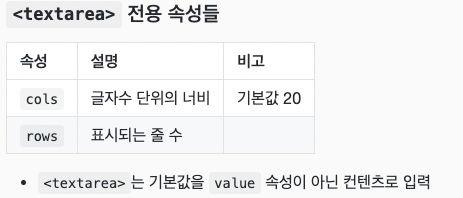
<body> <h1>textarea 태그</h1> <label for="message">메시지를 입력하세요.</label> <br> <textarea id="message" cols="64" rows="5"></textarea>옵션을 사용하는 태그
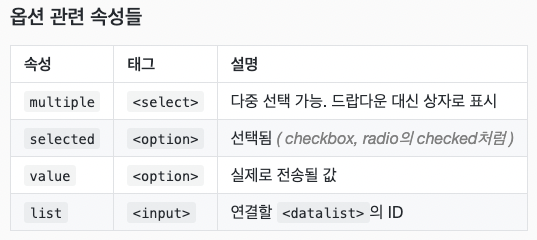
<body>
  <h1>옵션들을 사용하는 태그</h1>
  <h2>select, option 태그</h2>
  <label for="lang">언어</label> <br>
  <select id="lang">
    <option value="">-- 언어 선택 --</option>
    <option value="html">HTML</option>
    <option value="css">CSS</option>
    <option value="js">자바스크립트</option>
    <option value="ts">타입스크립트</option>
  </select>
 <br><br>
  <h2>optgroup 태그</h2>
  <label for="shopping">쇼핑 목록</label> <br>
  <select id="shopping">
    <optgroup label="과일">
      <option value="f_apl">사과</option>
      <option value="f_grp">포도</option>
      <option value="f_org">오렌지</option>
    </optgroup>
    <optgroup label="채소">
      <option value="v_crt">당근</option>
      <option value="v_tmt">토마토</option>
      <option value="v_ept">가지</option>
    </optgroup>
    <optgroup label="육류">
      <option value="m_bef">소고기</option>
      <option value="m_prk">돼지고기</option>
      <option value="m_ckn">닭고기</option>
    </optgroup>
  </select>
  <br><br>
  <h2>datalist 태그</h2>
  <label for="job">현재 직업</label> <br>
  <input id="job" list="jobs">
  <datalist id="jobs">
    <option value="학생">
    <option value="디자이너">
    <option value="퍼블리셔">
    <option value="개발자">
  </datalist>
</body>

개발작