
이전 프로젝트의 구조
미니 프로젝트에서는 프론트 3명, 백엔드 5명이 하나의 팀이 되어 프로젝트 수행을 했습니다.
아래는 당시 프로젝트의 구조이고 모놀리스 애플리케이션입니다.
- 회원 도메인
  - 로그인
  - 회원 가입
  - 회원 탈퇴

- 숙소 도메인
  - 전체 조회( 조건 O )
  - 전체 조회( 조건 X )
  - 숙소 상세 조회

- 객실 도메인
  - 객실 조회 ( 조건 O )
  - 객실 상세 조회

- 예약 도메인
  - 예약 하기
  - 예약 조회
  - 예약 취소

- 찜 도메인
  - 찜 누르기
  - 찜 취소하기

- 장바구니 도메인
  - 장바구니 추가
  - 장바구니 조회
  - 장바구니 취소

- 리뷰 도메인
  - 리뷰 추가
  - 리뷰 조회
  - 리뷰 수정
  - 리뷰 삭제
Spring Cloud 프로젝트 구성
이번 프로젝트에서는 이벤트 기반 MSA가 중점이니 최소한의 필요 서비스들로만 구성했습니다.
- Config 서비스

- Eureka 서비스

- Gateway 서비스
  - 로드 밸런스
  - 시큐리티 ( JWT 인증 / 인가 )

- 숙소 서비스
  - 숙소 전체 조회
  - 숙소 상세 조회

- 객실 서비스
  - 객실 전체 조회
  - 객실 상세 조회

- 회원 서비스
  - 회원 가입
  - 로그인
  - 로그아웃
  - 회원 탈퇴

- 예약 서비스
  - 예약 하기
  - 예약 조회
  - 예약 취소
멀티 모듈 프로젝트 생성
1. 루트 모듈 생성
일단 루트 모듈이될 프로젝트 부터 생성을 하고 기존 코드들은 모두 하위 모듈로 구성할 것이기에 루트 모듈은 아래 작업만 진행합니다.
- 새 프로젝트 생성
- src 폴더 삭제
- 루트 모듈의 build.gradle 설정
- settings.gradle에서 하위 모듈 추가
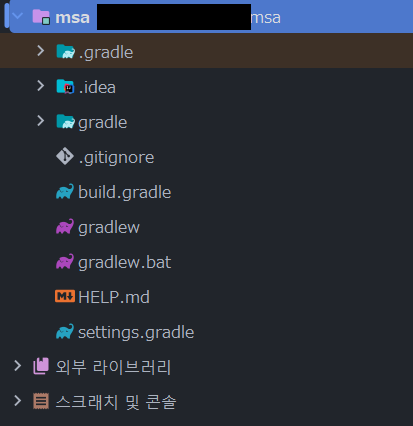
루트 모듈을 담당할 프로젝트 생성 후 src폴더 등을 삭제해 위와 같은 파일들만 존재하면 됩니다.
build.gradle
plugins {
    id 'java'
    id 'org.springframework.boot' version '3.3.2'
    id 'io.spring.dependency-management' version '1.1.6'
}

allprojects {
    group = 'com.fp'
    version = '0.0.1-SNAPSHOT'

    repositories {
        mavenCentral()
    }
}

subprojects {

    apply plugin: 'java'
    apply plugin: 'org.springframework.boot'
    apply plugin: 'io.spring.dependency-management'
    apply plugin: 'java-test-fixtures'

    java {
        toolchain {
            languageVersion = JavaLanguageVersion.of(17)
        }
    }

    configurations {
        compileOnly {
            extendsFrom annotationProcessor
        }
    }

    ext {
        set('springCloudVersion', "2023.0.3")
    }

    dependencyManagement {
        imports {
            mavenBom "org.springframework.cloud:spring-cloud-dependencies:${springCloudVersion}"
        }
    }
}

tasks.named('test') {
    useJUnitPlatform()
}

bootJar {
    enabled = false
}
jar {
    enabled = false
}
setting.gradle
rootProject.name = 'msa'
include 'config-server'
include 'eureka-server'
include 'gateway-service'
include 'accommodation-service'
include 'member-service'
include 'reservation-service'
include 'room-service'
2. 하위 모듈 생성
서비스를 담당할 하위 모듈들은 의존성을 제외하자면 설정이 동일하기 때문에 accommodation-service 모듈로 예시를 적겠습니다. 추후 추가 기능등을 위해 의존성이 추가될 예정 입니다.
build.gradle
dependencies {

    // boot
    implementation 'org.springframework.boot:spring-boot-starter'
    implementation 'org.springframework.boot:spring-boot-starter-web'
    testImplementation 'org.springframework.boot:spring-boot-starter-test'

    // dev
    compileOnly 'org.projectlombok:lombok'
    annotationProcessor 'org.projectlombok:lombok'
    implementation 'org.springframework.boot:spring-boot-starter-validation'

	// db
    implementation 'org.springframework.boot:spring-boot-starter-data-jpa'
    runtimeOnly 'com.mysql:mysql-connector-j'
}

tasks.named('test') {
    useJUnitPlatform()
}

tasks.register("prepareKotlinBuildScriptModel") {}

bootJar {
    enabled = true
}

jar {
    enabled = false
}
위 처럼 필요 의존성을 추가한 하위 모듈들을 생성하게 되면 다음과 같은 구성이 만들어집니다.
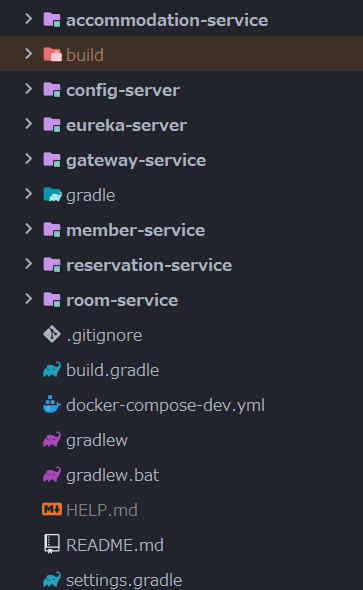
다음 포스트는 config-server를 구축해 각 서비스들의 환경변수들을 관리하고 각 서비스들을 기동할 때 config-server가 관리하고 있는 환경변수들을 조회하는 내용을 적어보도록 하겠습니다.

백엔드 개발자의 수집상자