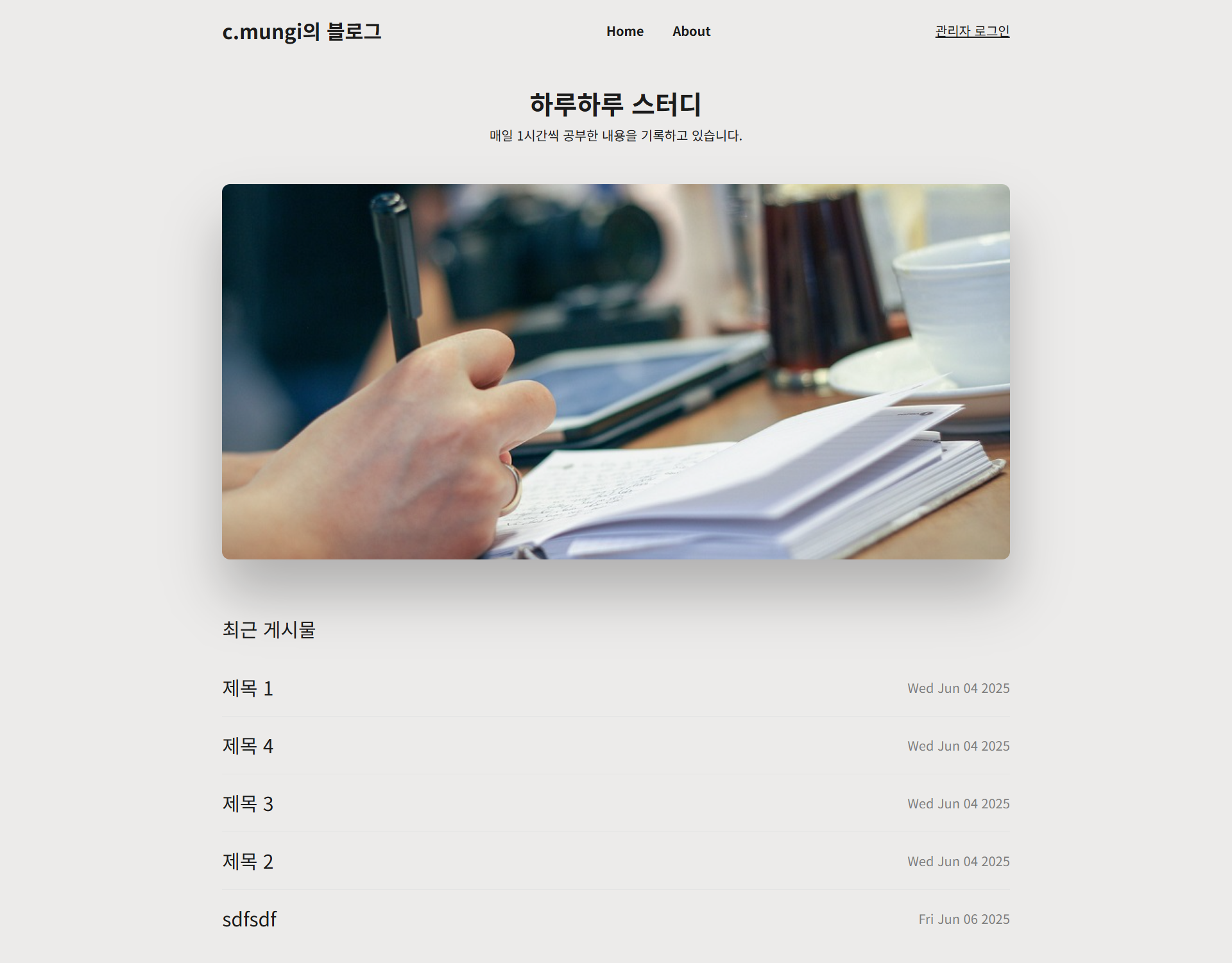
1. 시작
이전 포스트에서 Router를 구현하였다. 이제 남은 항목은 Post, Admin도메인의 Controller, Service로직만을 남겨두고 있고, 이번 포스트가 블로그 구현 프로젝트의 마지막이 될 것 같다.
2. Post Controller / Service
먼저 게시글 관련 Controller와 Service 로직을 구현하고자 한다.
2-1. postController.js
8가지의 Post API를 구현할 것이다.
- getAllPost : 전체 게시글을 조회 API
- getPostDetail : 특정 게시글을 조회 API
- getAddPostPage : 게시글 작성 페이지
- addPost : 게시글 작성 API
- editPost : 게시글 수정 API
- deletePost : 게시글 삭제 API
const postService = require("../service/postService.js");
const mainLayout = "../views/layouts/main.ejs";
const adminLayout = "../views/layouts/admin-login.ejs";
const { isAdmin } = require("../utils/authUtil");

const getAllPost = async (req, res) => {
    const layout = isAdmin(req) ? adminLayout : mainLayout;
    const locals = { title: "Home" };
    const data = await postService.fetchAllPosts();
    res.render("post/index", { locals, data, layout: layout });
};

const getPostDetail = async (req, res) => {
    const layout = isAdmin(req) ? adminLayout : mainLayout;
    const data = await postService.fetchPostById(req.params.id);
    res.render("post/post", { data, layout });
};

const getAllPostByAdmin = async (req, res) => {
    const locals = { title: "Posts" };
    const data = await postService.fetchAllPosts();
    res.render("admin/allPosts", { locals, data, layout: adminLayout });
};

const addPost = async (req, res) => {
    const { title, body } = req.body;
    if (!title || !body) {
        return res.send("'필수 항목목이 입력되지 않았습니다.'");
    }
    await postService.createPost(title, body);
    res.redirect("/allPosts");
};

const editPost = async (req, res) => {
    await postService.updatePost(req.params.id, req.body);
    res.redirect("/allPosts");
};

const deletePost = async (req, res) => {
    await postService.deletePost(req.params.id);
    res.redirect("/allPosts");
};

module.exports = {
    getAllPost,
    getPostDetail,
    getAllPostByAdmin,
    addPost,
    editPost,
    deletePost,
};
2-2. postService.js
const Post = require("../models/Post");

/**
 * 게시글 전체 조회
 */
const fetchAllPosts = async () => {
    const posts = await Post.find().sort({ createdAt: -1 }); // 내림차순으로 정렬
  	// 기존 post객체에 formattedDate필드를 추가한 새로운 post객체로 만들어 반환
    return posts.map(post => ({
        ...post._doc,
        formattedDate: post.createdAt.toISOString().split('T')[0],
    }));
};

/**
 * 특정 게시글 조회
 * @param {string} id
 */
const fetchPostById = async (id) => {
    return await Post.findOne({ _id: id });
};

const createPost = async (title, body) => {
    await Post.create({ title, body });
};

const updatePost = async (id, body) => {
    await Post.findByIdAndUpdate(id, {
        title: body.title,
        body: body.body,
        createdAt: Date.now(),
    });
};

const deletePost = async (id) => {
    await Post.deleteOne({ _id: id });
};

module.exports = {
    fetchAllPosts,
    fetchPostById,
    createPost,
    updatePost,
    deletePost
};
3. Admin Controller / Service
3-1. adminController.js
5가지의 Admin API를 구현할 것이다.
- getAdminPage : 관리자 페이지 랜더링
- getAddPostPage : 게시글 작성 페이지 랜더링
- getAllPosts : 전체 게시글 조회
- login : 로그인
- logout : 로그아웃
const adminService = require("../service/adminService");
const { isAdmin } = require("../utils/authUtil");

const login = async (req, res) => {
    const { username, password } = req.body;
    const result = await adminService.login(username, password);

    if (!result.success) {
        return res.status(401).json({ message: result.message });
    }

    res.cookie("token", result.token, { httpOnly: true });
    res.redirect("/allPosts");
};

const logout = (req, res) => {
    adminService.logout(res);
    res.redirect("/");
};

module.exports = {
    login,
    logout,
};
3-2. adminService.js
const User = require("../models/User");
const bcrypt = require("bcrypt");
const jwt = require("jsonwebtoken");
const jwtSecret = process.env.JWT_SECRET;
const jwtAccessTtl = process.env.JWT_ACCESS_TTL;

const login = async (username, password) => {
    const user = await User.findOne({ username });
    if (!user) {
        return { success: false, message: "일치하는 사용자가 없습니다." };
    }

    const isValidPassword = await bcrypt.compare(password, user.password);
    if (!isValidPassword) {
        return { success: false, message: "일치하는 사용자가 없습니다." };
    }

  	// jwt에 .env에 지정한 SecretKey와 TTL을 설정해서 발급
    const token = jwt.sign({ userId: user._id }, jwtSecret,  { expiresIn: jwtAccessTtl });
    return { success: true, token };
};

const logout = (res) => {
    res.clearCookie("token");
}

module.exports = {
    login,
    logout
};
4. 마무리
처음 다뤄본 Node.js였지만 기본 베이스가 JavaScript이라 그런지 비교적 이해하기 쉬웠다.
특히, 이제껏 Java&Spring을 주로 써왔기에 가장 크게 체감된건 Node.js & Express가 Java&Spring보다 프레임 구조나 애플리케이션 시작 등 많은 부분이 가볍다 라는 점이다.
아마 그만큼 규모가 큰 서비스나 복잡한 연산이 많이 필요한 상황에서는 Java&Spring이 더 안정적이지 않을까 라는 생각이 든다.
그래서 Node.js의 경우는 빠르게 개발하고자 할 때 사용하기엔 편할것 같다는 느낌이다.
다만, 아직까진 기본적인 문법과 express 프레임워크를 맛보는 단계로 수행했기에 깊이 있는 이해는 못했기에 다른 분들의 블로그들이나 공식 문서를 찾아보면서 Express의 동작원리도 보고 실제 배포까지 해볼 수 있는 프로젝트도 고민해봐야 할 듯 하다.
물론.. 구직활동과 자격증 공부도 꾸준히 해야하기 때문에 프로젝트는 당장 실행하는건 여건상 힘들겠지만 천천히라도 하고자 한다.

백엔드 개발자의 수집상자