※ 해당 기록은 Unreal 5.5.3 버전을 기준으로 작성되었습니다.
0. 서론
장판 패턴의 두 가지 패턴을 구현하고 생성 이후 일정 시간이 지나면 사라지도록 만들었다.
1. 패턴 1 구현
주변의 3개의 원을 배치하는 것은 플레이어의 예측 이동 위치를 이용했다. 수업의 시작부터 함께한 그 공식과 이번에도 함께한다.
위처럼 플레이어의 현재 위치와, Velocitiy값을 가져와서, 내가 원한 시간 이후의 예상 위치를 사용했다. 여기서는 0.5초를 사용했다. 구현은 다음과 같다.
//Boss::SpawnPlate 에서

FVector expectPos = playerLocation + pawn->GetVelocity() * 0.5f;
TArray<FVector> spawnLocation;
spawnLocation.Add(FVector(expectPos.X - dxdyRange, expectPos.Y, 0.f));
spawnLocation.Add(FVector(expectPos.X + dxdyRange, expectPos.Y, 0.f));
spawnLocation.Add(FVector(expectPos.X, expectPos.Y - dxdyRange, 0.f));
spawnLocation.Add(FVector(expectPos.X, expectPos.Y + dxdyRange, 0.f));


int32 randSpawn = FMath::RandRange(0, 3);

GetWorld()->SpawnActor <APlateActor>(PlateFactory,FVector(playerLocation.X, playerLocation.Y, 0.f),		FRotator::ZeroRotator);


for (int32 i = 0; i < 3; i++)
{
	FVector twistedLocation = GetRandomPos (spawnLocation[index[randSpawn][i]]);
	GetWorld()->SpawnActor <APlateActor>(PlateFactory,twistedLocation, FRotator(0.f));

}
//endregion SpawnPlate()

FVector ABoss::GetRandomPos(FVector pos)
{
	float randAngle = FMath::RandRange(0.f, 2.f * PI);
	float randRadius = FMath::RandRange(minRange, maxRange);

	float new_x = pos.X + FMath::Cos(randAngle) * randRadius;
	float new_y = pos.Y + FMath::Sin(randAngle) * randRadius;

	return FVector(new_x, new_y, pos.Z);
}

// Boss.h에서
TArray<TArray<int32>> index = { {0,1,2},{0,1,3},{0,2,3},{1,2,3} };
플레이어 예상위치를 기준으로 네 방향의 위치를 배열에 넣어준다. 그 중에 세 곳만 사용한다. 그 정보를 index 배열에 저장해 두고, 꺼내서 사용할 것이다. 반복문 전에 네 방향 중 어디를 고를지 선택하고, 반복문 내에서 해당 위치들을 스폰한다. 스폰 전에 각 위치들을 GetRandomPos()에 집어넣어, 조금 더 랜덤한 위치에서 스폰 된 것처럼 보이게 만들었다.
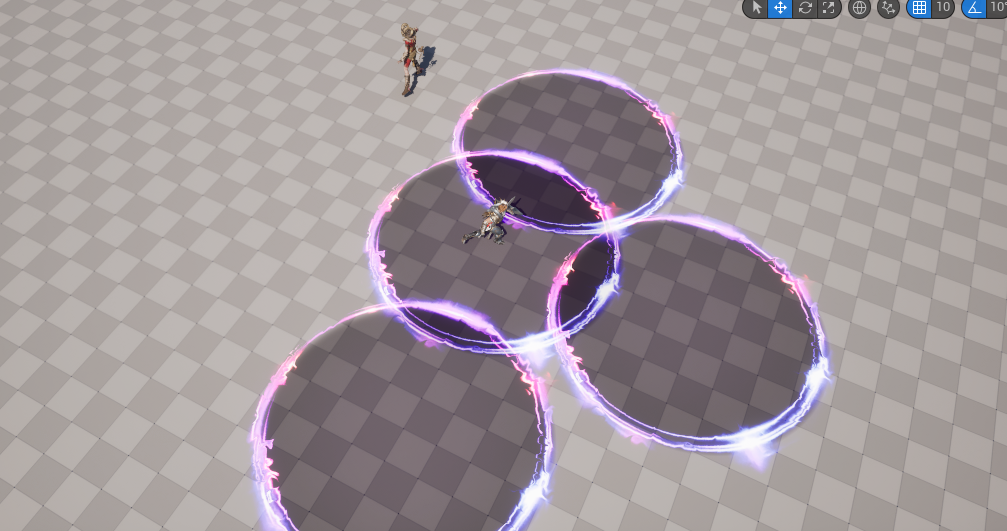
플레이어가 이동하고 있는 방향을 기준으로 정면쪽에 생성된 모습이다. 7시 방향의 장판은 다른 것보다 더 떨어져있는 걸 볼 수 있다.
2. 패턴 2 구현
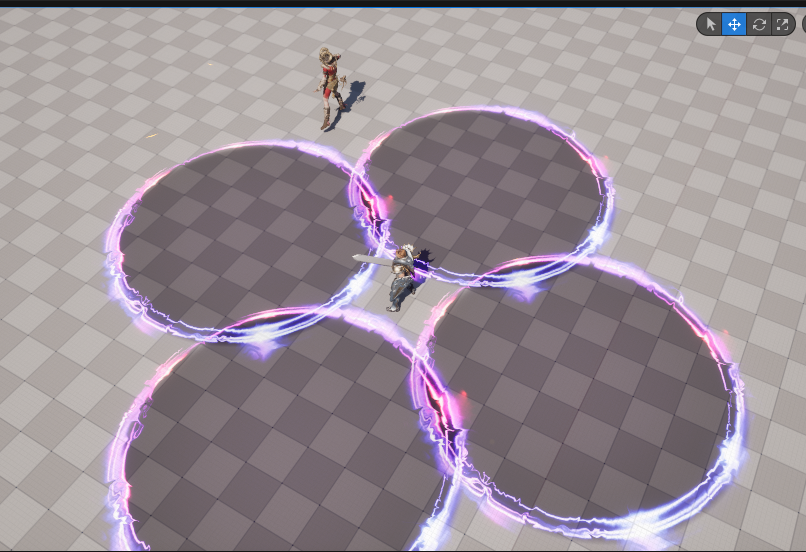
패턴 2는 더 간단하다. 플레이어가 현재 서있는 위치가 안전구역이고 그 주변으로 장판이 생성되도록 구현했다.
//Boss::SpawnPlate 에서

TArray<FVector> spawnLocation;
spawnLocation.Add(FVector(playerLocation.X - dxdyRange, playerLocation.Y, 0.f));
spawnLocation.Add(FVector(playerLocation.X + dxdyRange, playerLocation.Y, 0.f));
spawnLocation.Add(FVector(playerLocation.X, playerLocation.Y - dxdyRange, 0.f));
spawnLocation.Add(FVector(playerLocation.X, playerLocation.Y + dxdyRange, 0.f));

for (auto point : spawnLocation)
{
	GetWorld()->SpawnActor<APlateActor>(PlateFactory, point, FRotator(0.f));
}
3. 사라지는 이펙트
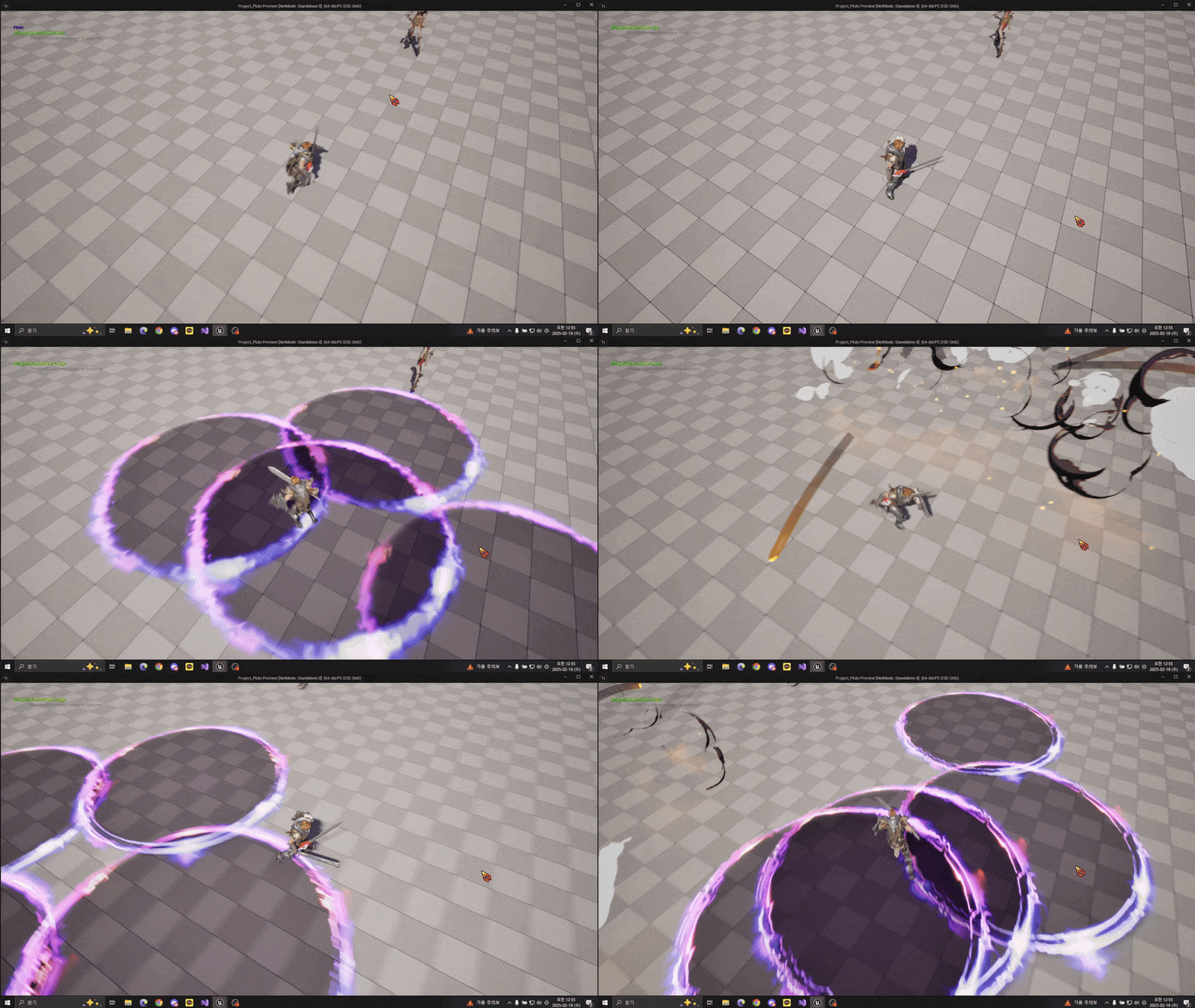
폭발 이펙트를 Activate()하고, 동시에 장판 이펙트를 끄면서 폭발 이펙트가 끝나는 시간과 맞춰 타이머로 폭발이펙트를 끄도록 했다. 다른 자료를 찾아봤을 때 DeActivate()만으로 이펙트를 끌 수 있다고 했지만, Destroy()가 바로 이어질 때 제대로 수행이 되지 않을 수 있다고 해서 DestroyComponent()를 함께 사용했다.
//PlateActor::ActivateComponent()에서
...

SpawnFXComponent->Deactivate();
SpawnFXComponent->DestroyComponent();

GetWorld()->GetTimerManager().SetTimer(DeactivateTimerHandler, this, &APlateActor::DeactivateComponent, 1.f, false, 1.5f);
다음은 구현 결과다
4. 앞으로 할 것
장판 패턴을 끝으로 보스의 패턴이 모두 완성되었으니 이제 플레이어와 데미지를 주고 받는 기능을 구현해야 한다. Monster도 만들 예정이다.