# 문자열 생성
str1 = 'My name is SungWoo'
str2 = 'Python'
str3 = '''hello'''

print(type(str1), type(str2), type(str3))
print(len(str1), len(str2), len(str3)) # 공백 포함
# 빈 문자열
str_t1 = ''
str_t2 = str()

print(type(str_t1), len(str_t1))
print(type(str_t2), len(str_t2))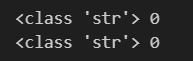
이스케이프 문자 사용
참고 : Escape 코드

\n : 개행
\t : 탭
\\ : 문자
\' : 문자
\" : 문자
\000 : 널 문자
# 이스케이프 문자 사용
# I'm Boy
print("I'm Boy")
# print('I'm Boy') 이렇게 하면 오류날수도 있어서 아래와 같이 역슬래쉬로 표현
print('I\'m Boy')
print('a \t b') # 탭만큼 벌어진다
print('a \nb') # 띄워쓰기
print('a \"\" b')
escape_str1 = "Do you have a \"money\"?"
print(escape_str1)
escape_str2 = "Who\'s he?"
print(escape_str2)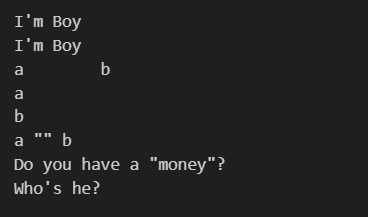
t_s1 = "Click \t start!"
t_s2 = "New Line \n Check!"

print(t_s1)
print(t_s2)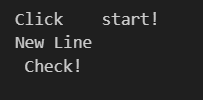
# Raw String
raw_s1 = r'D:\python\test'

print(raw_s1)
# 멀티라인 입력
multi_str = \
'''
문자열
멀티라인 입력
테스트
'''
# \ 역슬랙시로 줄바꿈해서
print(multi_str)
# 문자열 연산
str_o1 = "hi"
str_o2 = "python"
str_o3 = "nice guy"
str_o4 = "sungwoo"
str_o5 = "a b c d e"

print(str_o1 * 3)
print(str_o1 + str_o2)
print('i' in str_o1) # str_o1안에 i가 있어? (없어서 False)
print('guy' in str_o3)
print('a' not in str_o2) # 안에 a가 없어? (없어서 True)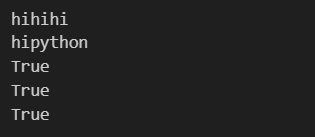
# 문자열 형 변환
print(str(66), type(str(66)))
print(str(10.1), type(str(10.1)))
print(str(True), type(str(True)))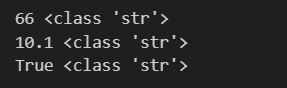
 문자열 함수(upperm isalnum, startswith, count, endswith, ...)

print("Capitalize : ", str_o1.capitalize()) # capitalize()는 첫 번째 시작 글자를 대문자로
print("endswith? : ", str_o2.endswith("a")) # endswith()는 마지막 글자가 맞는지 확인할 때
print("endswith? : ", str_o2.endswith("n"))
print("replace : ", str_o3.replace("nice", "good")) # replace(a, b) a를 찾아서 b로 바꿔줘
print("sorted : ", sorted(str_o4)) # sorted()는 정렬해서 리스트 형태로 반환한다
print("split : ", str_o3.split(' ')) # split() 띄워쓰기를 안에 넣으면 띄워쓰기 기준으로 분리해준다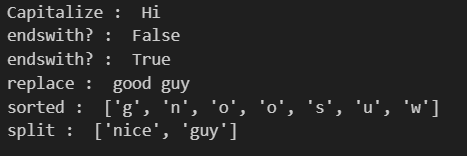
# 반복(시퀀스)
im_str = "Good night!"

print(dir(im_str)) # __iter__

# 출력
for i in im_str : # 슬라이싱 처리를 할 수 있다
print(i) 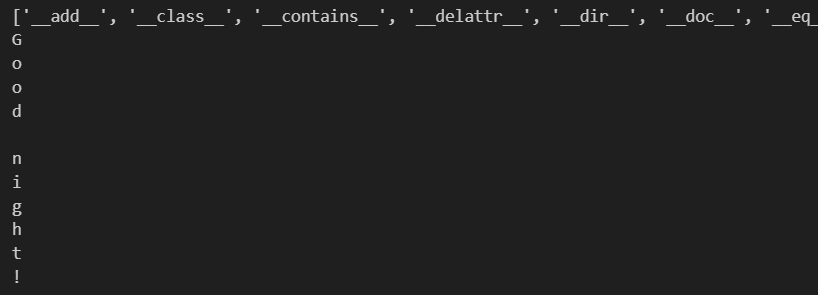
# 슬라이싱
str_sl = "Kim SungWoo"

# print(len(str_sl))
print(str_sl[0:3]) # 0 1 2 번 나옴
print(str_sl[4:])  # [4:11]
print(str_sl[:len(str_sl)]) # str_sl[:11]
print(str_sl[:-1])
print(str_sl[1:9:2])
print(str_sl[-5:])
print(str_sl[1:-2])
print(str_sl[::2])
print(str_sl[::-1])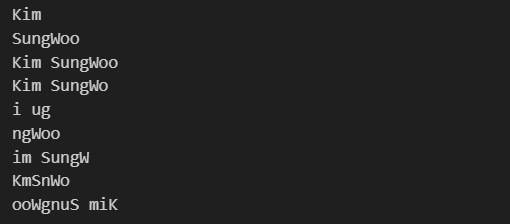

빅데이터 정복하기