참고 문서
기존 Swagger 문서 관리
-
현재 Swagger 문서를 직접 생성해서 수동으로 작성하고 있었음.
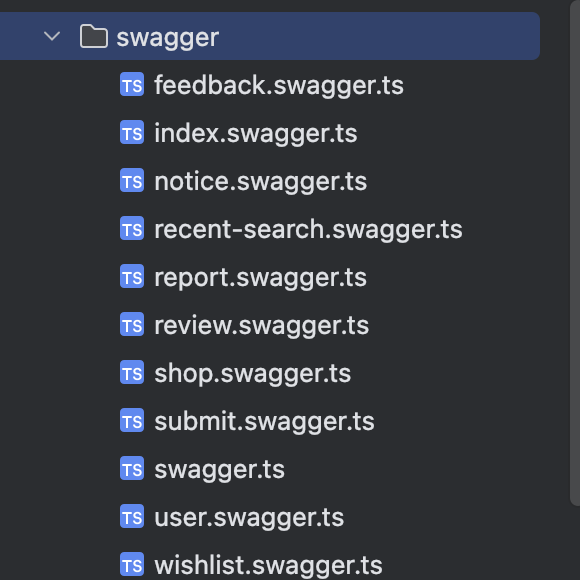
-
swagger 문서 생성 및 외부 문서 병합하여 사용 중. swaggerDocs.paths와 기존 document.paths를 병합 → 수동 정의된 Swagger 문서(swaggerDocs)를 병합해 함께 사용하려는 목적
const document = SwaggerModule.createDocument(app, config);
(document as any).paths = {
  ...document.paths,
  ...swaggerDocs.paths,
};
수동 작성에 따른 문제점
- 개발 과정에서 매개변수나 로직이 변경되면서 쿼리스트링, 응답 데이터(Response) 등이 자주 수정되는 경우가 있었다. 그러나 매번 변경 사항을 수동으로 반영하다 보니, 최신 상태로 유지되지 않는 경우가 종종 발생했다.
데코레이터 기반 자동화 전환
import { Controller, Get, Param, ParseIntPipe, Query, UseGuards } from '@nestjs/common';
import { ApiTags, ApiOperation, ApiResponse, ApiBearerAuth, ApiOkResponse, getSchemaPath, ApiExtraModels } from '@nestjs/swagger';
import { ShopService } from './shop.service';
import { SuccessResponseDTO } from 'src/common/response/response.dto';
import { GetSearchPageShopDTO, GetShopByShopIdDTO, GetShopWithin1KmDTO, ShopSearchPageNationResultDTO } from './dto/paging.dto';
import { GetUUID } from '../../common/deco/get-user.deco';
import { OptionalAuthGuard } from 'src/common/gurad/optional-auth-guard.guard';
import { ShopDetailResponseDTO, ShopRegionDTO, ShopWithin1KmResponseItemDTO } from './dto/response.dto';

@ApiTags('Shop')
@Controller('shop')
export class ShopController {
  constructor(private shopService: ShopService) {}

  @Get('/')
  @ApiOperation({
    summary: '1km 반경 내 소품샵 조회',
    description: '사용자 위치 기준 1km 반경 내의 소품샵들을 조회합니다. 거리순 또는 인기순으로 정렬할 수 있습니다.',
  })
  @ApiExtraModels(SuccessResponseDTO, ShopWithin1KmResponseItemDTO)
  @ApiOkResponse({
    description: '소품샵 목록 조회 성공',
    schema: {
      allOf: [
        { $ref: getSchemaPath(SuccessResponseDTO) },
        {
          properties: {
            result: {
              type: 'array',
              items: { $ref: getSchemaPath(ShopWithin1KmResponseItemDTO) },
            },
          },
        },
      ],
    },
  })
  @UseGuards(OptionalAuthGuard)
  async getShopWithin1Km(@Query() getShopWithin1KmDTO: GetShopWithin1KmDTO, @GetUUID() uuid: string) {
    return new SuccessResponseDTO(await this.shopService.findShopsWithin1Km(getShopWithin1KmDTO, uuid));
  }

  @Get('/search')
  @ApiOperation({
    summary: '키워드로 소품샵 검색',
    description: '키워드를 사용하여 소품샵을 검색합니다.',
  })
  @ApiExtraModels(SuccessResponseDTO, ShopSearchPageNationResultDTO)
  @ApiOkResponse({
    description: '검색 결과 조회 성공',
    schema: {
      allOf: [
        { $ref: getSchemaPath(SuccessResponseDTO) },
        {
          properties: {
            result: {
              $ref: getSchemaPath(ShopSearchPageNationResultDTO),
            },
          },
        },
      ],
    },
  })
  async getSearchPageShop(@Query() getSearchPageShopDTO: GetSearchPageShopDTO) {
    return new SuccessResponseDTO(await this.shopService.findShopsByKeyword(getSearchPageShopDTO));
  }

  @Get('/region')
  @ApiOperation({
    summary: '전체 지역 조회',
    description: '소품샵이 있는 모든 지역을 조회합니다.',
  })
  @ApiExtraModels(SuccessResponseDTO, ShopRegionDTO)
  @ApiOkResponse({
    description: '지역 목록 조회 성공',
    schema: {
      allOf: [
        { $ref: getSchemaPath(SuccessResponseDTO) },
        {
          properties: {
            result: {
              type: 'array',
              items: { $ref: getSchemaPath(ShopRegionDTO) },
            },
          },
        },
      ],
    },
  })
  async getAllShopRegion() {
    return new SuccessResponseDTO(await this.shopService.findAllShopRegion());
  }

  @Get('/temp')
  @ApiResponse({
    status: 200,
    description: '임시 데이터 조회 성공',
  })
  async getTemp() {
    return new SuccessResponseDTO(await this.shopService.findTemp());
  }

  @ApiBearerAuth('JWT-auth')
  @Get('/:shopId')
  @ApiOperation({
    summary: '소품샵 상세 정보 조회',
    description: '특정 소품샵의 상세 정보를 조회합니다.',
  })
  @ApiExtraModels(SuccessResponseDTO, ShopDetailResponseDTO)
  @ApiOkResponse({
    description: '소품샵 상세 정보 조회 성공',
    schema: {
      allOf: [
        { $ref: getSchemaPath(SuccessResponseDTO) },
        {
          properties: {
            result: { $ref: getSchemaPath(ShopDetailResponseDTO) },
          },
        },
      ],
    },
  })
  @UseGuards(OptionalAuthGuard)
  async getShopByShopId(@Param() getShopByShopIdDTO: GetShopByShopIdDTO, @GetUUID() uuid: string) {
    return new SuccessResponseDTO(await this.shopService.findShopByShopId(getShopByShopIdDTO, uuid));
  }
}
막혔던 부분
- 현재 아래 형태로 response가 되게 사용 중이였다.
{
  message: string
  statusCode: number
  result: T
}- 따라서 Swagger에서 Response를 정의할 때 해당 API에 맞는 ResponseDTO를 result 타입에 정의해줘야 했다.
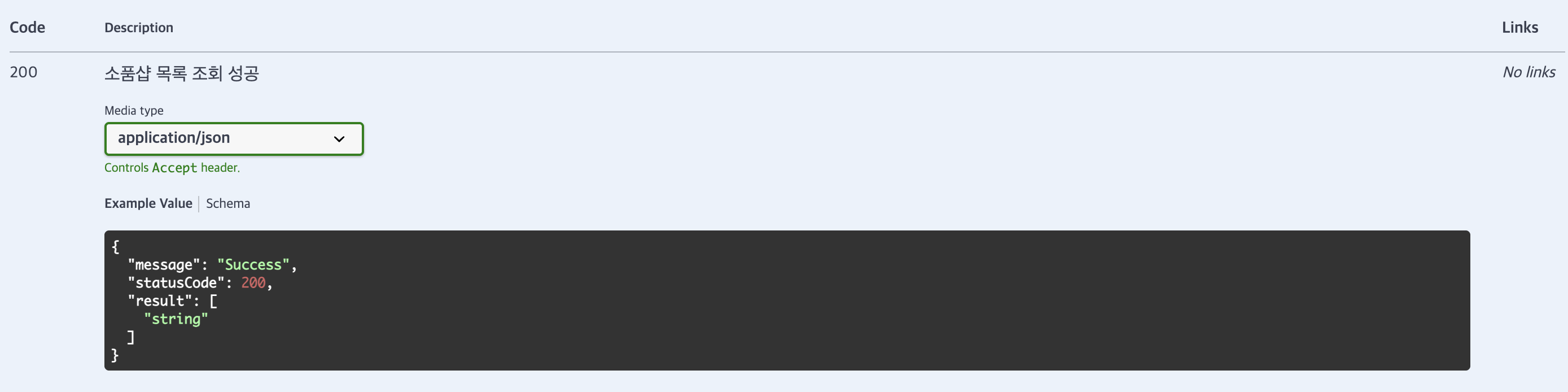
- 하지만 아래와 같이 코드를 작성했을 때 result의 타입을 Swagger에서 인식하지 못하는 오류가 발생했다.
@ApiOkResponse({
  description: '소품샵 목록 조회 성공',
  schema: {
    allOf: [
      { $ref: getSchemaPath(SuccessResponseDTO) },
      {
        properties: {
          result: {
            type: 'array',
            items: { $ref: getSchemaPath(ShopWithin1KmResponseItemDTO) }
          }
        }
      }
    ]
  }
})
-
찾아보니 @ApiExtraModels를 통해 Swagger에게 명시적으로 "이 DTO들 쓸 거야" 라고 등록하는 작업을 했어야 했다. NestJS는 제네릭 타입이나 중첩된 타입은 자동으로 감지 못하기 때문에, 수동으로 알려줘야 Swagger가 올바르게 문서를 생성한다.
-
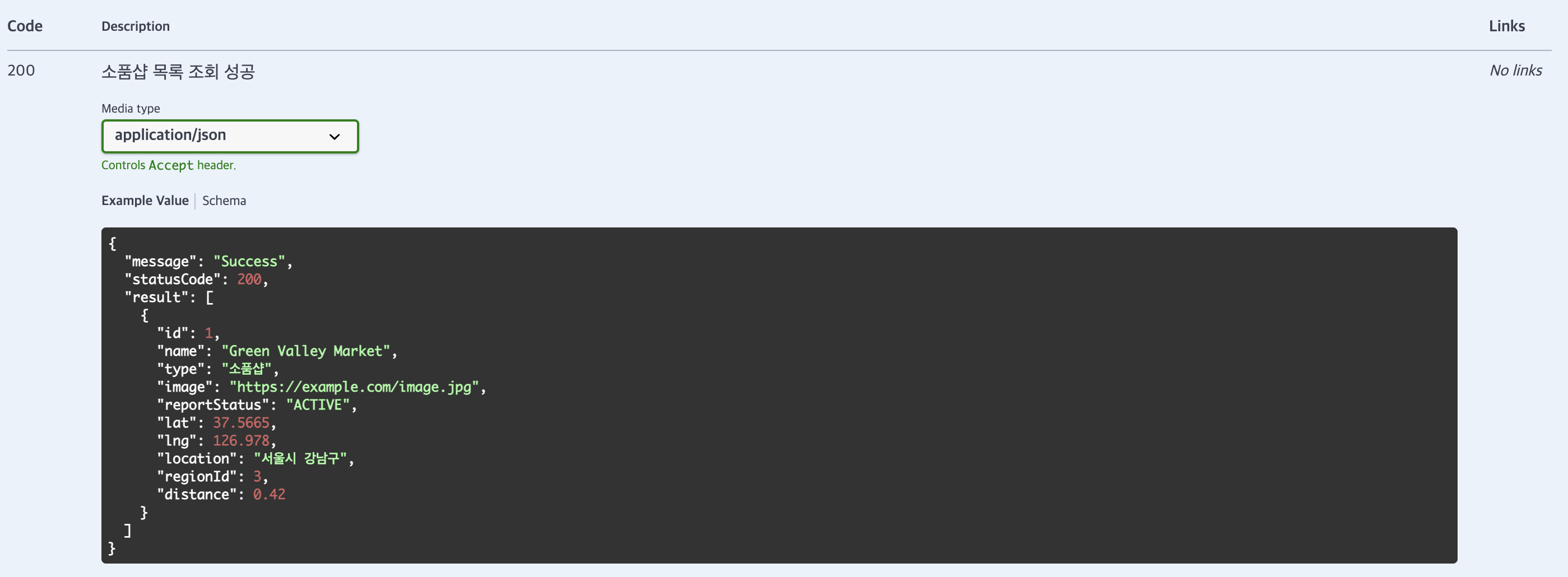
따라서 아래와 같이 코드를 수정했다.
@ApiExtraModels(SuccessResponseDTO, ShopWithin1KmResponseItemDTO)
@ApiOkResponse({
  description: '소품샵 목록 조회 성공',
  schema: {
    allOf: [
      { $ref: getSchemaPath(SuccessResponseDTO) },
      {
        properties: {
          result: {
            type: 'array',
            items: { $ref: getSchemaPath(ShopWithin1KmResponseItemDTO) }
          }
        }
      }
    ]
  }
})
@ApiExtraModels(...)란?
@ApiExtraModels(SuccessResponseDTO, ShopWithin1KmResponseItemDTO)- Swagger에게 명시적으로 "이 DTO들 쓸 거야" 라고 등록하는 작업.
- NestJS는 제네릭 타입이나 중첩된 타입은 자동으로 감지 못하기 때문에, 수동으로 알려줘야 Swagger가 올바르게 문서를 생성한다.
@ApiOkResponse({ schema: ... })란?
@ApiOkResponse({
  description: '소품샵 목록 조회 성공',
  schema: {
    allOf: [
      { $ref: getSchemaPath(SuccessResponseDTO) },
      {
        properties: {
          result: {
            type: 'array',
            items: { $ref: getSchemaPath(ShopWithin1KmResponseItemDTO) }
          }
        }
      }
    ]
  }
})- Swagger에 "응답은 SuccessResponseDTO이고, result는 배열이야" 라고 구체적으로 알려주는 코드
allOf: [...]란?
- Swagger/OpenAPI에서 스키마 조합을 의미함
SuccessResponseDTO의 기본 구조 사용 (message,statusCode,result)- 그 안의
result속성만 구체적으로 다시 정의함 (배열 형태로 덮어쓰기)
{
  "message": "Success",
  "statusCode": 200,
  "result": [
    {
      "id": 1,
      "name": "Green Valley Market",
      "lat": 37.5665,
      ...
    }
  ]
}getSchemaPath(...)란?
getSchemaPath(SuccessResponseDTO)- DTO 클래스를
$ref형식의 Swagger 경로(#/components/schemas/...)로 변환해줌 - Swagger 문서 내부에서
$ref를 통해 재사용 가능한 객체 스키마를 지정할 수 있음
코드 설명
@ApiOkResponse 데코레이터는 해당 API가 성공적으로 응답했을 때의 응답 형식을 Swagger 문서에 명시하는 역할을 한다.
이 코드에서는 응답이
SuccessResponseDTO구조를 따르되, 그 안의result필드는ShopWithin1KmResponseItemDTO타입의 객체 배열임을 명확하게 정의하고 있다.
allOf키워드를 사용해 기본 응답 구조(message,statusCode,result)는SuccessResponseDTO로부터 참조하고, 그 중result필드만ShopWithin1KmResponseItemDTO[]로 덮어써서 Swagger 문서에 반영하는 방식이다.
궁금증
- 현재 서비스에서 JWT Auth 인증이 필요하지 않은 API들이 존재한다. 따라서
@ApiTags('User')
@ApiBearerAuth('JWT-auth')
@Controller('user')
위처럼 사용하지 못하고, 각 EndPoint 별로 @ApiBearerAuth('JWT-auth') 를 설정해줘야 하는 번거로움이 생겼다.
  @ApiBearerAuth('JWT-auth')
  @Delete('/:uuid')
  @UseGuards(JwtAuthGuard)
  async deleteUser(@Query('deleteType') deleteType: number, @Param('uuid') uuid: string, @GetUUID() currentUUID: string) {
    if (uuid !== currentUUID) throw new ConflictException('Not equal User UUID');
    return new SuccessResponseDTO(await this.userService.deleteUser(uuid, deleteType));
  }

  ...

  @ApiBearerAuth('JWT-auth')
  @Post('/nickname')
  @UseGuards(JwtAuthGuard)
  async setNickName(@Body() nickNameDTO: NickNameDTO, @GetUUID() uuid: string) {
    return new SuccessResponseDTO(await this.userService.findAndUpdateUserNickname(nickNameDTO, uuid));
}- 여기서 든 생각이
- 어차피
@ApiBearerAuth('JWT-auth')를 각 Controller의 상단에 배치시켜도 동작하는 데는 문제가 없으니 상단에 항상 배치할까? - 실제 JWT 로직인
@UseGuards(JwtAuthGuard)와@ApiBearerAuth('JWT-auth')를 묶은 데코레이터를 사용할까?
- 위 두가지였다.
- 어차피
- 1번의 경우 번거로움도 없고 로직상 추가되는 것도 없어서 편할 것 같지만 Swagger란 API를 문서화하기 위한 도구인데, JWT Auth 로직이 필요하지 않는 곳에 Swagger에서 자물쇠가 걸려있다면 JWT가 필요한 로직으로 착각할 수 있을 것 같다.
- 따라서 2번을 택하는 게 좋다고 생각한다.
export function AuthGuardWithSwagger() {
  return applyDecorators(
    UseGuards(JwtAuthGuard),
    ApiBearerAuth('JWT-auth'),
  );
}
  @Delete('/:uuid')
  AuthGuardWithSwagger()
  async deleteUser(@Query('deleteType') deleteType: number, @Param('uuid') uuid: string, @GetUUID() currentUUID: string) {
    if (uuid !== currentUUID) throw new ConflictException('Not equal User UUID');
    return new SuccessResponseDTO(await this.userService.deleteUser(uuid, deleteType));
  }

  ...

  @Post('/nickname')
	AuthGuardWithSwagger()
  async setNickName(@Body() nickNameDTO: NickNameDTO, @GetUUID() uuid: string) {
    return new SuccessResponseDTO(await this.userService.findAndUpdateUserNickname(nickNameDTO, uuid));
}- 이게 최선의 방법인지 모르겠다...

개발이 즐거운 백엔드 개발자