API 예외 처리
- API 예외 처리 - 시작
- API 예외 처리 - 스프링 부트 기본 오류 처리
- API 예외 처리 - HandlerExceptionResolver 시작
- API 예외 처리 - HandlerExceptionResolver 활용
- API 예외 처리 - 스프링이 제공하는 ExceptionResolver1
- API 예외 처리 - 스프링이 제공하는 ExceptionResolver2
- API 예외 처리 - @ExceptionHandler
- API 예외 처리 - @ControllerAdvice
API 예외 처리 - 시작
목표
API 예외 처리는 어떻게 해야 할까?
API의 경우 어떻게 예외 처리를 하면 좋은지 알아보자
API도 오류페이지에서 했던 것 처럼 처음으로 돌아가서 서블릿 오류 페이지 방식을 사용해보자.
ApiExceptionController
@Slf4j
@RestController
public class ApiExceptionController {
    @GetMapping("/api/members/{id}")
    public MemberDto getMember(@PathVariable("id") String id) {
        if (id.equals("ex")) {
            throw new RuntimeException("잘못된 사용자");
        }
        return new MemberDto(id, "hello " + id);
    }

    @Data
    @AllArgsConstructor
    static class MemberDto{
        private String memberId;
        private String name;
    }
}
http://localhost:8080/api/members/spring → postman 으로 호출 시
{
    "memberId": "spring",
    "name": "hello spring"
}
반환 된다.
http://localhost:8080/api/members/ex → postman 으로 호출 시
<!DOCTYPE HTML>
<html>

<head>
    <meta charset="utf-8">
</head>

<body>
    <div class="container" style="max-width: 600px">
        <div class="py-5 text-center">
            <h2>500 오류 화면</h2>
        </div>
        <div>
            <p>오류 화면 입니다.</p>
        </div>
        <hr class="my-4">
    </div> <!-- /container -->
</body>

</html>
반환 된다.
이 반환 값은 이전 오류페이지에서 만들었던 오류 화면이다. 하지만 API 방식의 통신에서 오류에 대한 반환도 JSON type으로 받고싶다.
ErrorPageController
@RequestMapping(value = "/error-page/500", produces =
          MediaType.APPLICATION_JSON_VALUE)
public ResponseEntity<Map<String, Object>> errorPage500Api(HttpServletRequest
                                                                   request, HttpServletResponse response) {
    log.info("API errorPage 500");
    Map<String, Object> result = new HashMap<>();
    Exception ex = (Exception) request.getAttribute(ERROR_EXCEPTION);
    result.put("status", request.getAttribute(ERROR_STATUS_CODE));
    result.put("message", ex.getMessage());
    Integer statusCode = (Integer)
            request.getAttribute(RequestDispatcher.ERROR_STATUS_CODE);
    return new ResponseEntity(result, HttpStatus.valueOf(statusCode));
}- 다시 http://localhost:8080/api/members/ex postman 으로 전송하자.
- 반환 결과
{
    "message": "잘못된 사용자",
    "status": 500
}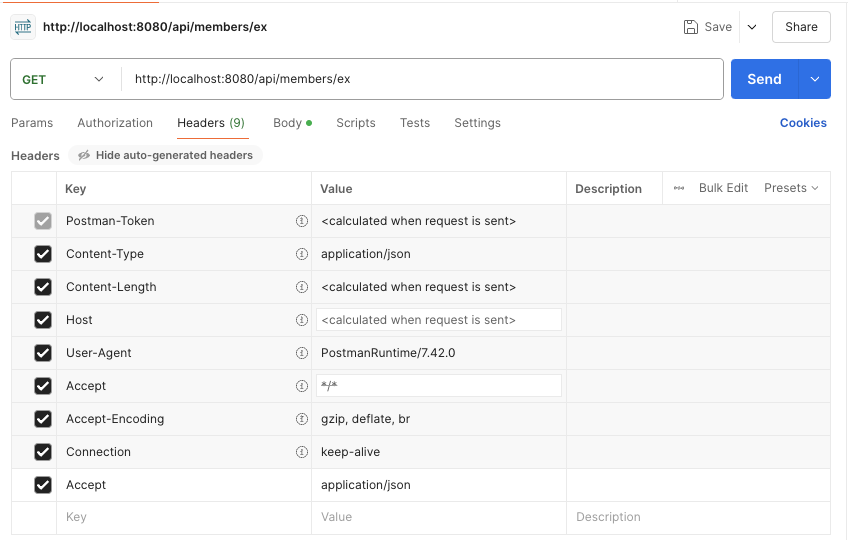
- Accept - application/json 이기때문에, RuntimeException 발생 후 WebServerCustomizer 에서 등록된
ErrorPage errorPageEx = new ErrorPage*(*RuntimeException.class, "/error-page/500"*)*;에서“/error-page/500”을 호출한다. - 그러면 컨트롤러에서
-
@RequestMapping*(*"/error-page/500"*)*public String errorPage500*(*HttpServletRequest request, HttpServletResponse response*)* -
@RequestMapping*(*value = "/error-page/500", produces = MediaType.*APPLICATION_JSON_VALUE)*public ResponseEntity*<*Map*<*String, Object*>>* errorPage500Api*(*HttpServletRequest request, HttpServletResponse response*)*→ 둘 중 하나를 선택해야 한다. 이때 요청 Headers의 Accept 값이 MediaType.APPLICATION_JSON_VALUE 와 일치하기에,
errorPage500Api가 호출된다.
-
API 예외 처리 - 스프링 부트 기본 오류 처리
Servlet을 사용한 요류처리를 사용하지 않기위해 WebServerCustomizer 의 @Component 를 주석처리 함.
스프링 부트가 기본 제공하는 BasicErrorController 를 사용할 것이다.
BasicErrorController
@RequestMapping(produces = MediaType.TEXT_HTML_VALUE)
 public ModelAndView errorHtml(HttpServletRequest request, HttpServletResponse
 response) {}
 @RequestMapping
 public ResponseEntity<Map<String, Object>> error(HttpServletRequest request) {}
http://localhost:8080/api/members/ex → postman 요청
실행 결과
{
    "timestamp": "2024-11-01T09:06:03.058+00:00",
    "status": 500,
    "error": "Internal Server Error",
    "path": "/api/members/ex"
}
스프링 부트의 예외 처리
- 스프링 부트의 기본 설정은 오류 발생 시 /error 를 오류 페이지로 요청한다.
Html 페이지 vs API 오류
BasicErrorController 를 확장하면 JSON 메시지도 변경할 수 있다. 하지만 API 오류는 조금 뒤에 설명할 @ExceptionHandler 가 제공하는 기능을 사용하는 것이 더 나은 방법이다.
API 예외 처리 - HandlerExceptionResolver 시작
목표
예외가 발생해서 서블릿을 넘어 WAS 까지 예외가 전달되면, HTTP 상태코드가 500으로 처리된다. 발생하는 예외에 따라 400, 404 등등 다른 상태코드로 처리하고 싶다.
400 → bad request
404 → not found
💡 핸들러 내부에서 400 에러가 발생하더라도, WAS 입장에서는 컨트롤러 내부에서 예외가 발생한 것이기 때문에 결과적으로 500 에러 상태 코드가 발생한다. 이를 해결해보자!
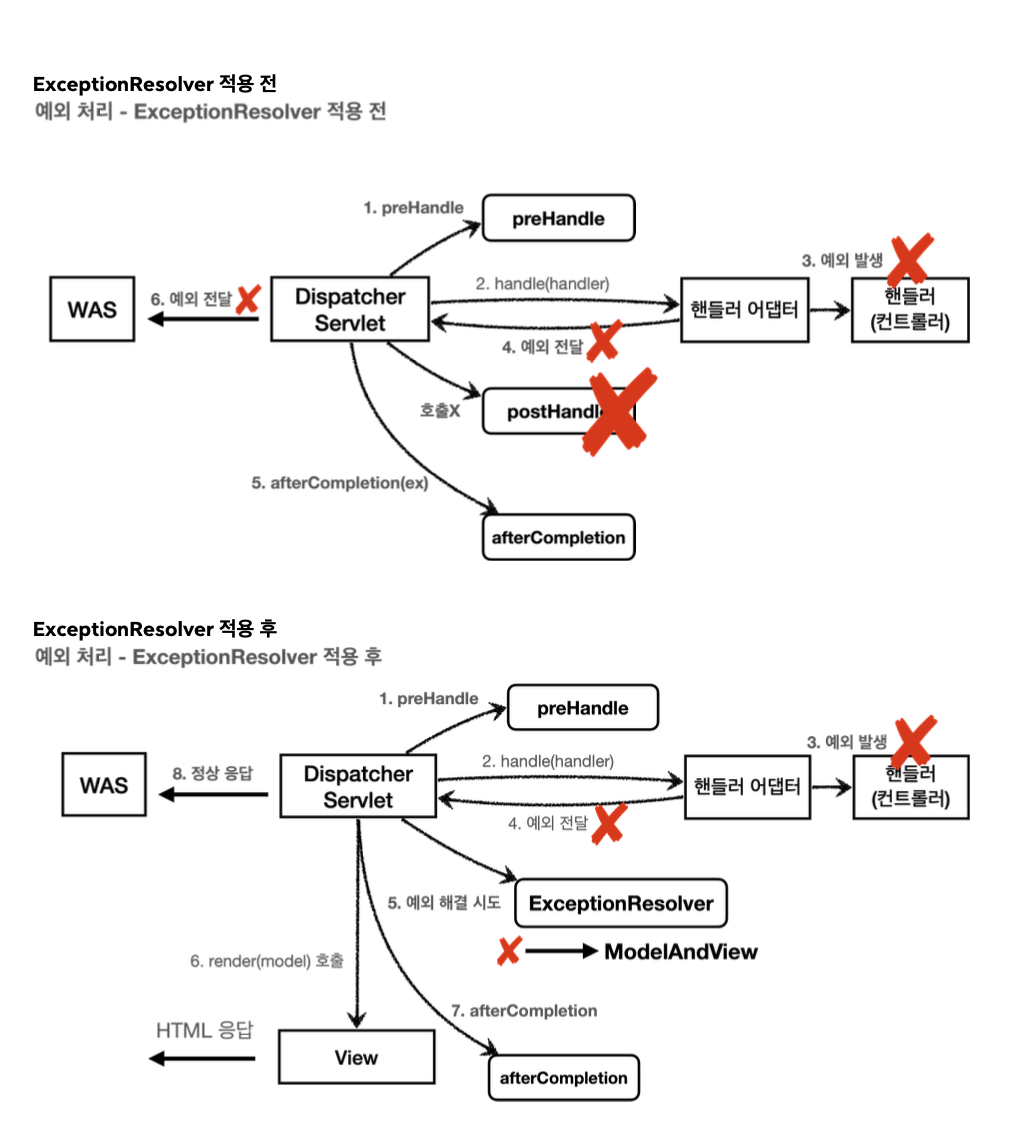
→ ExceptionResolver 는 예외를 해결해서 정상 동작을 수행할 수 있도록 (View rendering) 까지 할 수 있도록 해준다. 즉, 예외 해결사!
HandlerExceptionResolver - interface
public interface HandlerExceptionResolver {
   ModelAndView resolveException(
   HttpServletRequest request, HttpServletResponse response,
    Object handler, Exception ex);
}- handler : 핸들러 (컨트롤러) 정보
- Exception ex : 핸들러 (컨트롤러) 에서 발생한 예외
ApiExceptionController - 추가
if (id.equals("bad")) {
    throw new IllegalArgumentException("잘못된 입력 값");
}
→ 원하는 동작 : http://localhost:8080/api/members/bad 요청 시 400 Error code 반환.
이를 위해 MyHandlerResolver 생성
@Slf4j
public class MyHandlerResolver implements HandlerExceptionResolver {
    @Override
    public ModelAndView resolveException(HttpServletRequest request, HttpServletResponse response, Object handler, Exception ex) {
        try {
            if (ex instanceof IllegalArgumentException) {
                log.info("IllegalArgumentException resolver to 400");

                response.sendError(HttpServletResponse.SC_BAD_REQUEST, ex.getMessage());
                return new ModelAndView();
            }

        } catch (IOException e) {
            log.error("resolver ex", e);
        }
        return null;
    }
}
WebConfig 에 등록
@Override
public void extendHandlerExceptionResolvers(List<HandlerExceptionResolver> resolvers) {
    resolvers.add(new MyHandlerResolver());
}- IllegalArgumentException 이 발생하면 response.sendError(400) 을 호출해서 HTTP 상태 코드를 400으로 지정하고, 빈 ModelAndView를 반환한다.
동작 방식
- 빈 ModelAndView : new ModelAndView() 처럼 빈 ModelAndView를 반환하면 뷰를 랜더링하지 않고 정상 흐름으로 서블릿이 리턴된다.
- ModelAndView 지정 : View, Model 정보를 지정해서 반환하면 뷰를 랜더링 한다.
- null : null 을 반환하면, 다음 ExceptionResolver를 찾아서 실행한다. 만약 처리할 수 있는 ExceptionResolver가 없으면, 예외 처리가 안되고, 기존 발생한 예외 (500) 을 서블릿 밖으로 전달한다.
🚨 만약, WebConfig 에서 내가 만든 MyHandlerResolver 를 등록할 때, 이를 위해 configureHandlerExceptionResolvers(..) 를 사용하게 되면, 스프링이 기본으로 등록하는 ExceptionResolver 가 제거되므로 주의해야 한다!
반드시 extendHandlerExceptionResolver 를 사용하자!
API 예외 처리 - HandlerExceptionResolver 활용
예외를 여기서 마무리하기
예외가 발생하면 WAS까지 예외가 던져지고, WAS 에서 오류 페이지 정보를 찾아서 다시 /error 를 호출하는 과정은 복잡하다. ExceptionResolver 를 활용하면, 예외가 발생했을 때 이런 복잡한 과정을 없앨 수 있다.
사용자 정의 예외를 추가하자.
UserException
public class UserException extends RuntimeException {
    public UserException() {
        super();
    }

    public UserException(String message) {
        super(message);
    }

    public UserException(String message, Throwable cause) {
        super(message, cause);
    }

    public UserException(Throwable cause) {
        super(cause);
    }

    protected UserException(String message, Throwable cause, boolean enableSuppression, boolean writableStackTrace) {
        super(message, cause, enableSuppression, writableStackTrace);
    }
}
ApiExceptionController 추가
if (id.equals("user-ex")) {
    throw new UserException("사용자 오류");
}
http://localhost:8080/api/members/user-ex 요청 시 아직까지는 500에러가 발생함을 알 수 있다.
결과
{
    "timestamp": "2024-11-01T09:56:50.866+00:00",
    "status": 500,
    "error": "Internal Server Error",
    "path": "/api/members/user-ex"
}
따라서 해당 예외를 처리하기 위해 예외 Resolver 를 만들어 보자.
UserHandlerExceptionResolver
@Slf4j
public class UserHandlerExceptionResolver implements HandlerExceptionResolver {

    private final ObjectMapper objectMapper = new ObjectMapper();
    @Override
    public ModelAndView resolveException(HttpServletRequest request, HttpServletResponse response, Object handler, Exception ex) {
        try {
            if (ex instanceof UserException) {
                log.info("UserException resolver to 400");
                String acceptHeader = request.getHeader("accept");
                response.setStatus(HttpServletResponse.SC_BAD_REQUEST);

                if ("application/json".equals(acceptHeader)) {
                    Map<String, Object> errorResult = new HashMap<>();
                    errorResult.put("ex", ex.getClass());
                    errorResult.put("message", ex.getMessage());

                    String result = objectMapper.writeValueAsString(errorResult);

                    response.setContentType("application/json");
                    response.setCharacterEncoding("utf-8");
                    response.getWriter().write(result);
                    return new ModelAndView();
                } else {
                    return new ModelAndView("error/500");
                }
            }

        } catch (IOException e) {
            log.error("resolver ex", e);
        }
        return null;
    }
}
WebConfig 추가
@Override
public void extendHandlerExceptionResolvers(List<HandlerExceptionResolver> resolvers) {
  resolvers.add(new MyHandlerResolver());
  resolvers.add(new UserHandlerExceptionResolver());
}
직접 ExceptionResolver를 구현하려고 하니 상당히 복잡하다. 따라서 스프링이 제공하는 ExceptionResolver 를 알아보자.
API 예외 처리 - 스프링이 제공하는 Exception Resolver1
스프링 부트가 기본 제공하는 ExceptionResolver 3가지
- ExceptionHandlerExceptionResolver
- ResponseStatusExceptionResolver
- DefaultHandlerExceptionResolver
1 → 2 → 3 순서로 우선순위를 가진다.
ExceptionHandlerExceptionResolver
@ExceptionHandler 를 처리하고, API 예외 처리는 대부분 이 기능으로 해결이 가능하다.
ResponseStatusExceptionResolver
HTTP 상태코드를 지정해준다.
ex) @ResponseStatus(value = HttpStatus.NOT_FOUND)
ResponseStatusExceptionResolver
ResonseStatusExceptionResolver 는 예외에 따라서 HTTP 상태 코드를 지정해주는 역할을 한다.
다음 두 가지 경우를 처리한다.
@ResponseStatus가 달려있는 예외ResponseStatusException예외
하나씩 확인해보자.
💡 기본 제공 응답에 내용을 추가하기 위한 설정 추가.
application.properties
server.error.whitelabel.enabled=false
server.error.include-exception=true
server.error.include-message=always
server.error.include-stacktrace=on_param
server.error.include-binding-errors=on_param
BadRequestException
@ResponseStatus(code = HttpStatus.BAD_REQUEST, reason = "error.bad")
public class BadRequestException extends RuntimeException{
}
→ @ResponseStatus 애노테이션을 적용하면, 해당 예외에 대한 상태코드를 변경해준다.
즉, BadRequest 는 컨트롤러 밖으로 나갔을 때, ResponseStatusExceptionResolver 가 해당 애노테이션을 확인해서 오류코드를 500 (*INTERNAL_SERVER_ERROR)* 에서, 400 오류 코드로 변경하고 메시지도 담는다.
이를 위해 400 오류를 발생할 수 있는 컨트롤러를 추가한다.
@GetMapping("api/response-status-ex1")
public String responseStatusEx1() {
    log.info("bad request");
    throw new BadRequestException();
}
http://localhost:8080/api/response-status-ex1 요청 보내기. - postman
응답 결과
{
    "timestamp": "2024-11-04T03:22:36.008+00:00",
    "status": 400,
    "error": "Bad Request",
    "exception": "hello.exception.exception.BadRequestException",
    "message": "잘못된 요청 오류입니다. 메시지 사용",
    "path": "/api/response-status-ex1"
}
500 에러가 아닌 400 에러로 잘 넘어옴을 확인할 수 있다.
API 예외 처리 - 스프링이 제공하는 ExceptionResolver2
DefaultHandlerExceptionResolver
: 스프링 내부에서 발생하는 스프링 예외를 해결한다.
ex) 파라미터 바인딩 시점에 타입이 맞지 않으면? → TypeMismatchException ⇒ 400 에러가 발생하는 것이 맞다. 이를 위해 DefaultHandlerExceptionResolver 는 이것을 500오류가 아니라 400오류로 변경해준다.
바인딩 에러가 날 수 있도록 컨트롤러 추가한다.
ApiExceptionController
@GetMapping("/api/default-handler-ex")
public String defaultException(@RequestParam Integer data) {
    return "ok";
}
요청 보내기
http://localhost:8080/api/default-handler-ex?data=hello
응답 결과
{
    "timestamp": "2024-11-04T03:55:27.371+00:00",
    "status": 400,
    "error": "Bad Request",
    "exception": "org.springframework.web.method.annotation.MethodArgumentTypeMismatchException",
    "message": "Method parameter 'data': Failed to convert value of type 'java.lang.String' to required type 'java.lang.Integer'; For input string: \"hello\"",
    "path": "/api/default-handler-ex"
}
즉, 스프링이 내부 예외 상태 코드를 적절히 변경하여 알맞은 예외 상태 코드로 응답한다.
💡: 중요! API 예외 처리 - @ExceptionHandler
API 예외처리의 어려운 점
- HandlerExceptionResolver → ModelAndView 를 반환해야 했다. 하지만 이는 API 응답에는 필요 없다.
- API 응답을 위해 HttpServletResponse 에 직접 응답 데이터를 넣어주었다.
- 특정 컨트롤러에서 발생하는 예외를 별도로 처리하기 어렵다. 만약 여러 컨트롤러 중 어느 컨트롤러에서 발생한 예외인지 특정해내기 쉽지 않을 수 있다.
→ @ExceptionHandler
스프링은 API 예외 처리를 해결하기 위해 애노테이션 ExceptionHandler 라는것을 사용한다.
: ExceptionHandlerExceptionResolver
예외 처리를 적용할 컨트롤러V2 생성
ApiExceptionV2Controller
@Slf4j
@RestController
public class ApiExceptionV2Controller {

    @GetMapping("/api2/members/{id}")
    public MemberDto getMember(@PathVariable("id") String id) {
        if (id.equals("ex")) {
            throw new RuntimeException("잘못된 사용자");
        }
        if (id.equals("bad")) {
            throw new IllegalArgumentException("잘못된 입력 값");
        }
        if (id.equals("user-ex")) {
            throw new UserException("사용자 오류");
        }
        return new MemberDto(id, "hello " + id);
    }
    @Data
    @AllArgsConstructor
    static class MemberDto {
        private String memberId;
        private String name;
    }
}
-
IllegalArgumentException 처리하기 - 방법 1
-
코드 추가
@ExceptionHandler(IllegalArgumentException.class) public ErrorResult illegalExHandler(IllegalArgumentException e) { log.error("[exceptionHandler] ex ", e); return new ErrorResult("BAD", e.getMessage()); } -
실행 과정
핸들러에서 예외 발생 → DispatcherServlet은 ExceptionResolver 에게 예외 해결 요청 보내고, ExceptionResolver 에서 ExceptionHandlerExceptionResolver에게 물어보고, 이것이 컨트롤러에 애노테이션 “ExceptionHandler” 가 있는지 찾아본다. 만약 애노테이션이 있으면, 애노테이션이 붙은 메서드를 실행한다.
→ 문제점 : 이 과정을 통해, 에러가 발생했지만, 정상 동작으로 처리되어 상태코드는 정상 “200” 으로 반환된다. 상태코드는 원래의 상태코드를 추가해서 바꿔야 한다.
해결법 :
@ResponseStatus(HttpStatus.BAD_REQUEST)추가. -
-
UserException 처리하기 - 방법 2
-
코드 추가
@ExceptionHandler public ResponseEntity<ErrorResult> userExHandler(UserException e) { log.error("[exceptionHandler] ex ", e); ErrorResult errorResult = new ErrorResult("USER-EX", e.getMessage()); return new ResponseEntity<>(errorResult, HttpStatus.BAD_REQUEST); } -
코드 설명
ResponseStatus 애노테이션을 사용하지 않고, 직접 ResponseEntity를 반환하도록 할 수 있다.
ExceptionHandler 애노테이션의 argument 는 메서드 argument와 일치한다면, 생략할 수 있다.
-
-
Internal server Error
Exception → RuntimeException → UserException, IlltgalArgumentException …
위의 IllegalArgumentException 예외처리에서는 그 자식까지 예외를 잡아준다. 만약 위에서 못 잡은 예외의 경우,
@ResponseStatus(HttpStatus.INTERNAL_SERVER_ERROR)
@ExceptionHandler
public ErrorResult exHandler(Exception e) {
    log.error("[exceptionHandler] ex ", e);
    return new ErrorResult("EX", "내부 오류");
}
→ 예외를 처리한다.
⇒ 이를 통해 예상치 못하거나, 공통으로 처리하기 원하는 예외에 대해서 설정도 가능하다.
우선 순위
@ExceptionHandler(부모예외.class)
public String 부모예외처리()(부모예외 e) {}

@ExceptionHandler(자식예외.class)
public String 자식예외처리()(자식예외 e) {}
→ 자세한 것이 우선권을 가진다, 즉. 자식예외처리() 가 우선권을 가져 실행 된다.
API 예외 처리 - @ControllerAdvice
위 코드 “@ExceptionHandler” 문제점 : 정상코드 (컨트롤러) 와 예외 처리 코드가 하나의 컨트롤러 안에 섞여있다. 이를 분리하고싶다!
→ “@ControllerAdvice” or “@RestControllerAdvice”
“@RestControllerAdvice” = “@ControllerAdvice” + “@ResponseBody”
ExControllerAdvice
@Slf4j
@RestControllerAdvice
public class ExControllerAdvice {
    @ResponseStatus(HttpStatus.BAD_REQUEST)
    @ExceptionHandler(IllegalArgumentException.class)
    public ErrorResult illegalExHandler(IllegalArgumentException e) {
        log.error("[exceptionHandler] ex ", e);
        return new ErrorResult("BAD", e.getMessage());
    }

    @ExceptionHandler
    public ResponseEntity<ErrorResult> userExHandler(UserException e) {
        log.error("[exceptionHandler] ex ", e);
        ErrorResult errorResult = new ErrorResult("USER-EX", e.getMessage());
        return new ResponseEntity<>(errorResult, HttpStatus.BAD_REQUEST);
    }

    @ResponseStatus(HttpStatus.INTERNAL_SERVER_ERROR)
    @ExceptionHandler
    public ErrorResult exHandler(Exception e) {
        log.error("[exceptionHandler] ex ", e);
        return new ErrorResult("EX", "내부 오류");
    }

    @ResponseStatus(HttpStatus.INTERNAL_SERVER_ERROR)
    @ExceptionHandler
    public ErrorResult exHandler(RuntimeException e) {
        log.error("[exceptionHandler] ex ", e);
        return new ErrorResult("Runtime EX", "런타임 내부 오류");
    }
}
그리고, ApiExceptionV2Controller 에는 예외 처리 코드를 주석처리 함.
현재 “@RestControllerAdvice” 에 대상을 지정하지 않았다 → 그러면 모든 컨트롤러에 적용된다 : 글로벌 적용.
대상 컨트롤러를 지정하는 방법 3가지.
- 애노테이션에 따라 지정
- 패키지 경로로 지정
- 특정 클래스에 지정
// 1. Target all Controllers annotated with @RestController
@ControllerAdvice(annotations = RestController.class)
public class ExampleAdvice1 {}

// 2. Target all Controllers within specific packages
@ControllerAdvice("org.example.controllers")
public class ExampleAdvice2 {}

// 3. Target all Controllers assignable to specific classes
@ControllerAdvice(assignableTypes = {ControllerInterface.class,
AbstractController.class})
public class ExampleAdvice3 {}