1. 알고리즘이란?
- 어떤 문제를 해결하기 위한 명확한 절차나 일련의 단계
- 컴퓨터 과학에서 알고리즘은 특정 작업을 수행하거나 문제를 해결하기 위해 정의된, 컴퓨터가 따라야 할 명령의 집합이다.
- 명확성 : 알고리즘의 각 단계는 명확하고 이해하기 쉬워야 한다.
- 입력 : 하나 이상의 입력이 있어야 한다.
- 출력 : 하나 이상의 출력이 있으며, 이는 주어진 입력에 대한 해답이다.
- 유한성 : 유한한 수의 단계를 거쳐서 종료되어야 한다.
- 효율성 : 실행 시간과 사용하는 자원(메모리 등) 측면에서 효율적이어야 한다.
- 일반성 : 특정 문제 뿐만 아니라 문제의 범주에 속하는 다양한 문제를 해결할 수 있어야 한다.
- 알고리즘은 일상 생활의 다양한 문제를 해결하는 데 사용될 수 있으며,
- 수학적 계산, 데이터 처리, 자동화된 추론, 컴퓨터 프로그래밍 등 다양한 분야에서 중요한 역할을 한다.
세 값의 최댓값 구하기
- 세 개의 정수 값을 입력받아 그 중 가장 큰 값을 찾아내는 간단한 알고리즘
- 비교 연산자를 사용하여 각 값을 서로 비교
public class MaxValue {
    // 세 개의 정수 a,b,c 중 최대값을 구하여 반환하는 메소드
    public static int max(int a, int b, int c) {
        int max = (a > b) ? a : b;
        max = (b > c) ? b : c;

        return max;
    }

    // main
    public static void main(String[] args) {
        System.out.println("최대값 : " + max(5, 3, 6));
    }
}
숫자와 문자열 입력하기 1
Scanner를 이용한 숫자와 문자열 입력
Scanner클래스는java.util패키지에 포함되어 있으며, 다양한 형태의 입력(문자열, 정수, 실수 등)을 처리할 수 있다.
import java.util.Scanner;

public class InputExample {
    public static void main(String[] args) {
        // Scanner 객체 생성
        Scanner scanner = new Scanner(System.in);

        // 사용자로부터 정수 입력받기
        System.out.print("정수를 입력하세요: ");
        int number = scanner.nextInt();

        // 입력 버퍼 비우기 (줄바꿈 문자 제거)
        scanner.nextLine();

        // 사용자로부터 문자열 입력받기
        System.out.print("문자열을 입력하세요: ");
        String text = scanner.nextLine();

        // 입력받은 정수와 문자열 출력
        System.out.println("입력받은 정수: " + number);
        System.out.println("입력받은 문자열: " + text);

        // Scanner 객체 닫기
        scanner.close();
    }
}
Scanner 클래스의 입력 메소드들
-
nextInt(): 정수 (int) 타입의 데이터를 읽어들인다.- 범위:
-2,147,483,648에서2,147,483,647까지 ( -2^31 에서 2^31 - 1 )
- 범위:
-
nextLong(): 긴 정수 (long) 타입의 데이터를 읽어들인다.- 범위:
-9,223,372,036,854,775,808에서9,223,372,036,854,775,807까지
(-2^63에서2^63 - 1)
- 범위:
-
nextFloat(): 부동 소수점 (float) 타입의 데이터를 읽어들인다.- 범위: 대략
-3.4028235E+38에서3.4028235E+38까지
- 범위: 대략
-
nextDouble(): 더블 정밀도의 부동 소수점 (double) 타입의 데이터를 읽어들인다.- 범위: 대략
-1.7976931348623157E+308에서1.7976931348623157E+308까지
- 범위: 대략
-
nextBoolean(): 불리언 (boolean) 타입의 데이터를 읽어들인다.- 이 메소드는
true또는false문자열에 대해 대소문자를 구분하지 않는다.
- 이 메소드는
-
nextByte(): 바이트 (byte) 타입의 데이터를 읽어들인다.- 범위:
-128에서127까지 (-2^7에서2^7 - 1)
- 범위:
-
nextShort(): 짧은 정수 (short) 타입의 데이터를 읽어들인다.- 범위:
-32,768에서32,767까지 (-2^15에서2^15 - 1)
- 범위:
-
next(): 다음 토큰을 문자열로 읽어들인다.- 이 메소드는 공백으로 구분된 단어를 반환한다.
-
nextLine(): 줄의 끝까지 문자열을 읽어들인다.- 이 메소드는 한 줄 전체를 입력으로 받으며, 줄바꿈 문자를 읽은 후에 제거한다.
메서드의 반환값과 메서드의 호출식의 평가
- 자바 프로그래밍에서 메서드는 특정 작업을 수행하는 코드의 묶음이다.
- 메서드는 입력(매개변수)을 받아 처리하고, 결과를 반환(return)한다.
메서드의 반환값
- 메서드가 작업을 완료한 후 결과를 호출한 곳으로 전달할 때 사용하는 값
- 반환값의 타입은 메서드를 정의할 때 지정하며, 반환값이 없는 경우에는
void를 사용한다. - 반환값이 있는 메서드는
return키워드를 사용하여 결과값을 반환한다.접근제한자 <static> 반환타입 메서드명(매개변수) {..구현..}
메서드 호출식의 평가
- 메서드 호출은 메서드가 실행되어야 함을 나타내며, 메서드 호출식은 그 호출이 평가되는 과정을 말한다.
- 메서드 호출식의 평가 결과 = 메서드의 반환값
반환값과 메서드 호출식의 중요성
- 코드 재사용성 향상
- 메서드를 통해 코드를 분리함으로써, 같은 코드를 반복해서 작성할 필요 없이 메서드 호출을 통해 재사용할 수 있다.
- 프로그램의 구조화
- 메서드를 사용하여 프로그램을 작은 단위로 나눔으로써, 코드의 가독성과 관리가 용이해진다.
- 데이터 흐름의 명확성
- 메서드의 반환값을 통해 데이터가 어떻게 처리되고 전달되는지 명확하게 할 수 있다.
- ex) 최댓값 반환 메서드
public static int max(int x, int y) {
	if (x > y) {
		return x;
	} else {
		return y;
	}
}

public static void main(String[] args) {
	int a = 10;
	int b = 20;
	int maxValue = max(a, b);
	System.out.println("최대값: " + maxValue);
}
결정트리
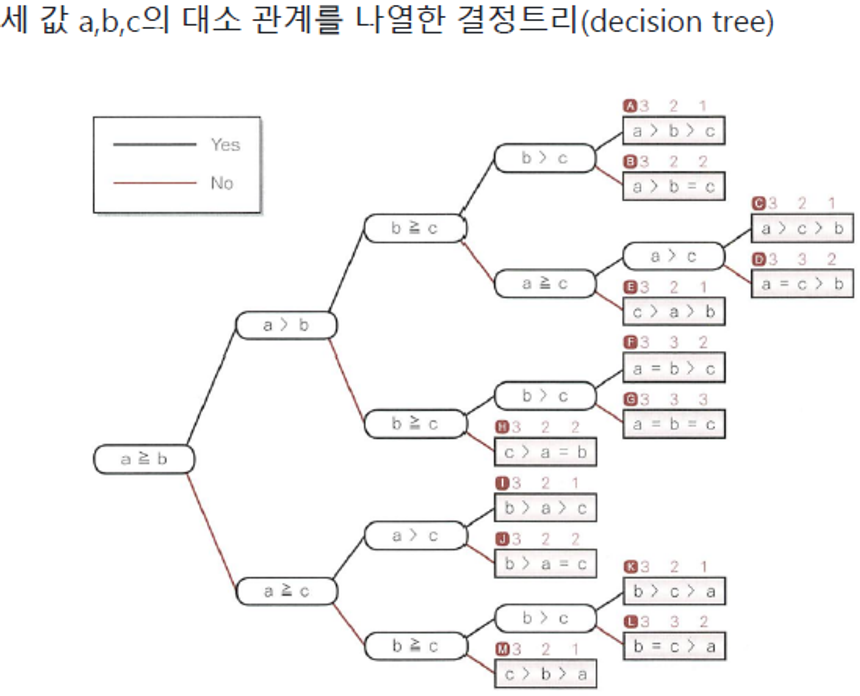
- 결정트리는 복잡한 조건과 다양한 경우의 수를 시각적으로 표현하여 이해를 돕는다.
- 프로그래밍에서 결정트리를 사용하면 코드의 흐름을 명확하게 계획하고, 효율적인 알고리즘을 설계할 수 있다.
세 값의 대소 관계와 중앙값
- 특정한 데이터 집합 내에서 중앙값(median)을 찾는 것은 중요한 작업 중 하나이다.
- 알고리즘 설명
-
a 와 b 를 비교하여, a 가 더 큰 경우 b 와 c 를 비교한다. b 가 더 크면 b 가 중앙값이다. 아니면 a 와 c 를 비교하여 더 작은 값이 중앙값이 된다.
-
- a 가 b 보다 작은 경우 a 와 c 를 비교한다. a 가 더 크면 a 가 중앙값이다. 아니면 b 와 c 를 비교하여 더 작은 값이 중앙값이 된다.
// 3개의 정숫값을 입력하고 중앙값을 구하여 출력
import java.util.Scanner;

public class Median {
    static int med3(int a, int b, int c) {
        if (a >= b)
            if (b >= c)
                return b;
            else if (a <= c)
                return a;
            else
                return c;
        else if (a > c)
            return a;
        else if (b > c)
            return c;
        else
            return b;
    }

    public static void main(String[] args) {
        Scanner stdIn = new Scanner(System.in);

        System.out.println("세 정수의 중앙값을 구합니다.");
        System.out.print("a 값 : ");
        int a = stdIn.nextInt();
        System.out.print("b 값 : ");
        int b = stdIn.nextInt();
        System.out.print("c 값 : ");
        int c = stdIn.nextInt();

        System.out.println("중앙값은 " + med3(a, b, c) + "입니다.");
    }
}
-
조건 판단과 분기
- 조건 판단과 분기는 프로그램의 흐름을 제어하는 중요한 요소이다.
- 사용자의 입력이나 계산 결과에 따라 다른 작업을 실행할 수 있도록 하는 기능을 제공 → 프로그램은 더 유연하고 다양한 상황에 대응할 수 있게 된다.
조건문을 통해 프로그램의 로직을 세분화하고, 사용자의 입력이나 계산 결과에 따라 다르게 반응하도록 설계할 수 있다.
연산자와 피연산자
- 프로그램에서 데이터를 처리하고 조작하는 데 사용되는 기본적인 구성 요소
- 연산자 : 피연산자에 대해 수행될 연산(ex: +, -, > 등)을 나타내는 기호나 키워드
- 피연산자 : 연산이 수행될 데이터(ex: 변수, 리터럴 값 등)
연산자의 종류
- 산술 연산자
+,-,*,/,%
- 비교 연산자
==,!=,<,>,<=,>=
- 논리 연산자
&&,||,!
- 할당 연산자 : 변수에 값을 할당하는 데 사용
=,+=,-=,*=,/=
- 증감 연산자
++,--
- 조건 연산자(삼항 연산자)
? :(조건식 ? 값1 : 값2)
- 비트 연산자
&,|,^,~,<<,>>
순서도의 기호
- 순서도(flowchart)는 프로그램이나 시스템의 흐름을 도식화하여 나타내는 그래픽 표현이다.
- 시작/종료 (Terminator)
- 시작과 종료를 나타내는 기호, 타원형 또는 둥근 모서리의 사각형으로 표현된다.
- 프로세스의 시작과 끝을 명확하게 한다.

- 처리 (Process)
- 일반적인 처리 단계를 나타내며, 사각형으로 표현된다.
- 계산이나 데이터 처리 등의 작업을 나타낼 때 사용한다.

- 결정 (Decesion)
- 조건 분기를 나타내며, 다이아몬드(마름모) 형태로 표현된다.

- 조건 분기를 나타내며, 다이아몬드(마름모) 형태로 표현된다.
- 입력/출력 (Input/Output)
- 입력 또는 출력을 나타내며, 평행사변형으로 표현된다.

- 입력 또는 출력을 나타내며, 평행사변형으로 표현된다.
- 순차적 연결 (Flowline)
- 화살표는 흐름의 방향을 나타낸다. 처리의 순서와 흐름의 방향을 명확하게 표시한다.
- 실선, 점선, 파선(긴 선과 짧은 선을 3:1의 비율로 이은 선)
- 서브루틴/프로세스 참조 (Predefined Process)
- 하위 프로세스 또는 서브루틴을 나타내며, 더블 사각형으로 표현된다.
- 재사용 가능한 코드 블록이나 함수 호출을 나타낼 때 사용한다.

2. 반복
1부터 n까지 정수의 합 구하기
- 기본적인 반복문 사용법을 익히는 좋은 예제
import java.util.Scanner;

class SumWhile {
	public static void main(String[] args) {
		Scanner stdIn = new Scanner(System.in);

		System.out.println("1부터 n까지의 합을 구합니다.");
		System.out.print("n값: ");
		int n = stdIn.nextInt();

		int sum = 0; // 합
		int i = 1;

		while (i <= n) { // i가 n 이하면 반복
			sum += i; // sum에 i를 더함
			i++; // i 값을 1 증가(increment)
		}
		System.out.println("1부터 " + n + "까지의 합은 " + sum + "입니다.");
	}
}
연습문제
1 - 1부터 n까지의 정수 중 짝수들의 합 구하기
import java.util.Scanner;

public class SumEven {
    public static void main(String[] args) {
        Scanner sc = new Scanner(System.in);
        int n, sum = 0;

        System.out.print("정수 n을 입력하세요 : ");
        n = sc.nextInt();

        for (int i = 1; i <= n; i++) {
            if (i % 2 == 0)
                sum += i;
        }
        System.out.println("n까지의 짝수의 합 : " + sum);
    }
}
2 - 1부터 n까지의 정수 중 3의 배수의 합 구하기
import java.util.Scanner;

public class Sum3Drainage {
    public static void main(String[] args) {
        Scanner sc = new Scanner(System.in);
        int n, sum = 0;

        System.out.print("정수 n을 입력하세요 : ");
        n = sc.nextInt();

        for (int i = 1; i <= n; i++) {
            if (i % 3 == 0)
                sum += i;
        }
        System.out.println("n까지의 3의 배수의 합 : " + sum);
    }
}
✔ 구조적 프로그래밍 - 논리연산과 드모르간 법칙
두 자리 양의 정수 입력받기
import java.util.Scanner;

public class TwoDigits {
    public static void main(String[] args) {
        Scanner sc = new Scanner(System.in);
        int n;

        System.out.println("두자리 양의 정수를 입력해주세요.");

        do {
            System.out.print("정수값 입력 : ");
            n = sc.nextInt();
        } while (n < 10 || n > 99);

        System.out.println("입력한 숫자는 " + n + "입니다.");
    }
}
논리연산자
- 주로 boolean 타입의 피연산자를 가지며, 조건문이나 반복문 내에서 조건의 조합을 평가하는 데 사용된다.
- 논리연산자는 표현식의 진리값을 결정하기 위해 사용되며, 주로 두 조건이나 표현식을 결합할 때 활용된다.
&&,||,!,^
드모르간 법칙
- NOT (A AND B) = (NOT A) OR (NOT B)
- NOT (A OR B) = (NOT A) AND (NOT B)
- 논리연산의 부정과 결합을 다룰 때, 특히 조건문이나 논리식을 간소화하는 데 유용하게 사용된다.
다중루프 - 구구단
public class Multi99Table {
    public static void main(String[] args) {
        System.out.println("------- 구구단 곱셈표 -------");

        for (int i = 1; i < 10; i++) {
            for (int j = 1; j < 10; j++) {
                System.out.printf("%d * %d =%2d  ", i, j, i * j);
            }
            System.out.println();
        }
    }
}
다중루프 - 직각 이등변 삼각형 출력
import java.util.Scanner;

public class TriangleLB {
    public static void main(String[] args) {
        Scanner sc = new Scanner(System.in);
        int n;

        do {
            System.out.print("직각 이등변 삼각형의 단 수를 입력해주세요 : ");
            n = sc.nextInt();
        } while (n <= 0);

        for (int i = 0; i <= n; i++) {
            for (int j = 1; j <= i; j++) {
                System.out.print("*");
            }
            System.out.println();
        }
    }
}
이등변 삼각형 출력
import java.util.Scanner;

public class TriangleLB2 {
    public static void main(String[] args) {
        Scanner sc = new Scanner(System.in);
        int n;

        do {
            System.out.print("이등변삼각형의 단 수를 입력해주세요 : ");
            n = sc.nextInt();
        } while (n <= 0);

        for (int i = 0; i < n; i++) {
            for (int j = 0; j < n - i; j++)
                System.out.print(" ");
            for (int j = 0; j < (i*2+1); j++)
                System.out.print("*");
            System.out.println();
        }
    }
}
2-1. 배열
- 유틸리티 메서드
1.toString(): 배열의 내용을 문자열로 변환하여 반환 . 주로 디버깅 목적으로 사용
2.sort(): 배열을 정렬. 기본적으로는 오름차순으로 정렬, 오브젝트 배열의 경우에는 해당 객체들이 구현한 Comparable 인터페이스의 compareTo() 메서드에 따라 정렬.
3.binarySearch(): 지정된 값의 위치를 찾음. 이 메서드를 사용하기 전에 배열이 반드시 정렬되어 있어야 함.
4.copyOf(): 지정된 길이로 배열을 복사.
5.copyOfRange(): 배열의 지정된 범위를 복사.
6.fill(): 배열의 모든 요소를 지정된 값으로 설정.
7.equals(): 두 배열이 같은지 비교.
8.asList(): 배열을 고정 크기의 리스트로 변환.
배열의 클론(복제)
import java.util.Arrays;

public class DuplicateArray {
    public static void main(String[] args) {
        int[] original = {10, 20, 30, 40, 50};
        int[] copied = original.clone(); // copied는 original의 복제본을 참조

        copied[2] = 0; // copied 배열의 세 번째 요소를 0으로 변경

        System.out.println("original = " + Arrays.toString(original));
        System.out.println("copied = " + Arrays.toString(copied));
    }
}
/* 실행결과
original = [10, 20, 30, 40, 50]
copied = [10, 20, 0, 40, 50]
*/
배열요소의 최댓값 구하기
import java.util.Scanner;

public class MaxOfScores {
    static int maxOf(int[] scores) {
        int max = Integer.MIN_VALUE;
        for (int i = 0; i < scores.length; i++) {
            if (scores[i] > max)
                max = scores[i];
        }
        return max;
    }

    public static void main(String[] args) {
        Scanner sc = new Scanner(System.in);

        System.out.print("학생 수 입력 : ");
        int n = sc.nextInt();
        int[] scores = new int[n];

        for (int i = 0; i < n; i++) {
            System.out.print((i + 1) + "번째 점수 입력 : ");
            scores[i] = sc.nextInt();
        }

        System.out.println("최댓값 : " + maxOf(scores));
    }
}
난수 사용해 배열의 요솟값 설정하기
import java.util.Random;
import java.util.Scanner;

public class MaxOfWeightsRand {
    static int maxOf(int[] weights) {
        int max = weights[0];
        for (int i = 1; i < weights.length; i++)
            if (weights[i] > max)
                max = weights[i];
        return max;
    }

    public static void main(String[] args) {
        Random rand = new Random();
        Scanner sc = new Scanner(System.in);

        System.out.println("몸무게의 최댓값을 구합니다.");
        System.out.print("사람 수: ");
        int num = sc.nextInt(); // 입력받은 사람 수로 배열의 크기를 결정
        int[] weights = new int[num]; // 사람 수만큼 몸무게를 저장할 배열 생성

        for (int i = 0; i < num; i++) {
            weights[i] = 40 + rand.nextInt(60); // 몸무게를 40kg에서 100kg 사이의 난수로 결정
            System.out.println("weights[" + i + "] : " + weights[i]);
        }
        System.out.println("최댓값은 " + maxOf(weights) + "입니다.");
    }
}.nextInt(): -2,147,483,648 ~ 2,147,483,647 사이의 값 (min ~ max).nextInt(60): 0~60 의 난수
배열을 역순으로 정렬하기
// 사용자로부터 입력받은 값으로 구성된 배열을 역순으로 정렬
import java.util.Arrays;
import java.util.Scanner;

class InvertArray {
    //--- 배열 요소 a[idx1]과 a[idx2]의 값을 교환 ---//
    static void swap(int[] a, int idx1, int idx2) {
        int temp = a[idx1];
        a[idx1] = a[idx2];
        a[idx2] = temp;
    }

    //--- 배열 a의 요소를 역순으로 정렬 ---//
    static void reverse(int[] a) {
        for (int i = 0; i < a.length / 2; i++)
            swap(a, i, a.length - i - 1);
    }

    public static void main(String[] args) {
        Scanner sc = new Scanner(System.in);

        System.out.print("점수의 개수: ");
        int num = sc.nextInt(); // 점수의 개수를 입력받음
        int[] scores = new int[num]; // 점수를 저장할 배열 생성

        for (int i = 0; i < num; i++) {
            System.out.print("scores[" + i + "] : ");
            scores[i] = sc.nextInt(); // 점수 입력
        }

        reverse(scores); // 배열 scores의 요소를 역순으로 정렬

        System.out.println("점수를 역순으로 정렬했습니다.");
        System.out.println("scores = " + Arrays.toString(scores));
    }
}
두 배열의 비교
public class CompareArrays {
    static boolean areArraysEqual(int[] arr1, int[] arr2) {
        if (arr1.length != arr2.length)
            return false;

        for (int i = 0; i < arr1.length; i++) {
            if (arr1[i] != arr2[i])
                return false;
        }

        return true;
    }

    public static void main(String[] args) {
        // 테스트를 위한 두 배열 선언
        int[] array1 = {1, 2, 3, 4, 5};
        int[] array2 = {1, 2, 3, 4, 5};
        int[] array3 = {1, 2, 3, 4};

        // areArraysEqual 메소드를 사용하여 배열 비교
        System.out.println("array1과 array2는 동일한가? " + areArraysEqual(array1, array2));
        System.out.println("array1과 array3는 동일한가? " + areArraysEqual(array1, array3));
    }
}
기수변환
분할과 나머지를 이용한 방법
- 10진수 29를 2진수로 변환 후 출력
public class DecimalToBinaryExam {
    public static void main(String[] args) {
        int decimal = 29;
        StringBuilder binary = new StringBuilder();

        while (decimal > 0) {
            binary.append(decimal % 2);
            decimal /= 2;
        }
        System.out.println(binary.reverse().toString());
    }
}
2-2. StringBuilder
- StringBuilder / 배열
: 문자열을 동적으로 조작하고 수정하는 데 사용됨.
: 문자열의 변경이 필요한 상황
StringBuilder sb = new StringBuilder();

    // 문자열 추가
    sb.append("Hello");

    // 문자열 삽입
    sb.insert(5, " ");

    // 문자열 수정
    sb.replace(6, 10, "World");

    // 문자열 삭제
    sb.delete(5, 6);

    // 문자열 출력
    System.out.println(sb.toString()); // 출력 결과: HelloWorld
안녕하세요, 박경서입니다.