git 명령어를 주로 사용하던 나는 intellij에서 github를 연동해서 사용해보던 중 CRLF와 LF에 대해서 처음 접하게 되었다.
경고 문구는 아래와 같다.(그림)
You are about to commit CRLF line separators to the Git repositoy.
It is recommended to set the core.autocrlf Git attribute to true to avoid line separator issues.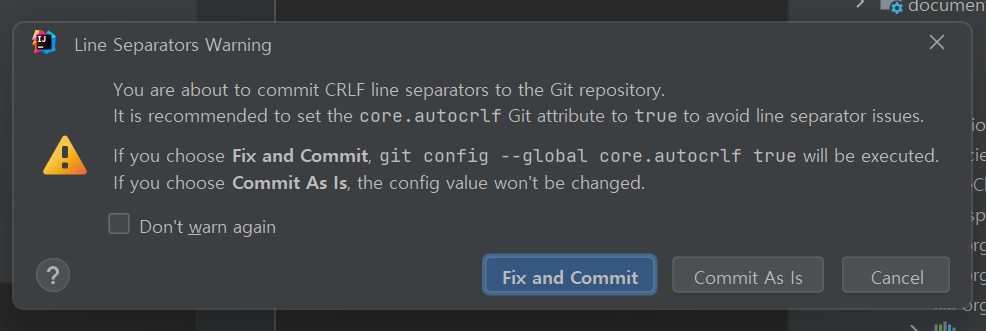
-
해결
결론적으로 Window에서 사용하는 줄바꿈 방식과 maxOS, Linux에서 사용하는 줄바꿈 방식이 달름으로 Git에서 core.autocrlf를 true로 사용하면 줄바꿈을 git에서 자동으로 관리해준다. 그럼으로 Fix and commit을 사용하면 되더라.
명령어로 직접 지정한다면 아래처럼 사용할 수 있다. 관련 git공식문서git config --global core.eol [crlf|lf] git config --global core.autocrlf [ture|input|false(Default)] -
그럼 CRLF랑 LF는 뭘까, 뭐가 다르지, 고려해야되나?
- CRLF(Carriage Return Line Feed)
- 줄바꿈시 두개의 문자를 사용한다. CR이 나오고 다음에 LF가 나온다.- ex)
hello\r\nWorld
- ex)
- LF(Line Feed)
- 줄바꿈시 LF하나의 문자만 사용한다.- ex)
hello\nWorld
- ex)
- 운영체제 호완성에서 크로스플렛폼에서 텍스트 파일이 다르게 표기될 수 있다.
- IDE에서 특정 줄 바꿈 방식을 선호할 수 있다. window에 설치된 IDE는 CRLF를 지정하고 있을 수 있다.

N잡러 대충 이것저것 해보며 대충 사는 중