Optuna를 이용한 하이퍼파라미터 튜닝
저번 학기에 이어 이번 학기도 캡스톤디자인과창업프로젝트 과목을 수강하고 있다. 현재 우리 팀의 연구는 끝났지만, 연구 과정에서 사용한 툴 한 가지를 소개하고자 한다. 바로 Oputna이다.
우리는 이 툴을 우리가 개발한 Linciever-IO 모델의 성능을 최대한 끌어낼 수 있는 하이퍼파라미터를 찾기 위해 사용하였다.
Optuna란?
공식 사이트
Optuna는 최적화된 하이퍼파라미터를 찾아주는 프레임워크이다. 하이퍼파라미터 튜닝을 위해서는 Scikit-Learn에서 제공하는 GridSearchCV, RandomizedSearchCV와 같은 툴을 많이 사용한다. 하지만 이런 툴들은 그 알고리즘의 태생적 한계로 인해 튜닝에 있어 아주 긴 시간이 소요된다는 문제점이 존재한다.
물론 Optuna 또한 매우 빠른 것은 아니다. 이는 하이퍼파라미터 튜닝이라는 기법 자체가 결국 모든 케이스에 대해 실행해보고 비교해야 한다는 특성을 가지고 있기 때문이다. 하지만, Optuna는 위의 두 기법들과 비교해서는 훨씬 더 빠르다. 그리고, Pytorch, TensorFlow, Keras와 같은 메이저한 딥러닝 프레임워크에서 모두 사용 가능하다는 점도 아주 큰 장점이다.

현재 Optuna의 공식 사이트는 위 세 가지 점을 장점으로 내세우고 있다. 참고하면 좋을 듯 하다.
사용하기
Optuna의 사용을 위해서는 먼저 설치가 필요하다. 다른 패키지들과 같이 pip로 간단하게 설치할 수 있다.
pip install optuna다음, Optuna의 하이퍼파라미터 튜닝은 objective 함수 안에서 이루어진다.
나는 튜닝을 위해 다음과 같은 함수를 만들었다.
def objective(trial):

    # 조정 원하는 파라미터 범위 선언
    depth = trial.suggest_int("depth", 2, 8)
    latent_dim = trial.suggest_int("latent_dim", 128, 512, step=64)
    num_latents = trial.suggest_int("num_latents", 64, 256, step=32)
    learning_rate = trial.suggest_loguniform("learning_rate", 1e-4, 1e-2)

    # 기기 및 모델, 옵티마이저, 손실함수 선언
    device = torch.device("cuda")
    model = PerceiverMNIST(depth=depth, latent_dim=latent_dim, num_latents=num_latents).to(device)
    optimizer = optim.Adam(model.parameters(), lr=learning_rate)
    criterion = nn.CrossEntropyLoss()

    # 훈련
    model.train()
    total_loss = 0
    for images, labels in trainloader:
        images, labels = images.to(device), labels.to(device)
        optimizer.zero_grad()
        logits = model(images)
        loss = criterion(logits, labels)
        loss.backward()
        optimizer.step()
        total_loss += loss.item()

    return total_loss / len(trainloader)
나머지 부분은 일반적인 Pytorch의 훈련 loop와 동일하지만, 주목할 부분은 위의 파라미터 범위를 선언한 부분이다.
앞서 말했듯, 하이퍼파라미터 튜닝을 위해서는 결국 일일히 파라미터를 설정해서 결과를 내는 것이 필요하다. 이때 내가 파라미터를 어디서부터 어디까지 테스트할 것인지 그 범위를 설정해야 한다. 이를 위 코드의 앞부분이 설정하는 것이다.
위 코드에서 사용된 함수는 다음과 같다.
suggest_int : 정수 범위를 정한다. 조정하고자 하는 파라미터의 이름과 시작, 끝을 인자로 준다. 만약 1 단위가 아니라 64, 32와 같은 단위로 숫자가 증가하도록 하고 싶다면 step=을 주면 된다.
suggest_loguniform : 연속된 숫자의 범위를 정한다. 다만 이 함수는 이후 버전에서 삭제된다고 한다. 대신 suggest_float(..., log=True)를 사용하라고 한다.
위 코드에서는 depth, latent_dim, num_latents, learning_rate 네 개의 파라미터에 대해 튜닝을 시도하였다. 범위를 선언한 뒤 해당 범위로 모델 및 학습률을 설정하고, 훈련을 시켰다.
이를 실제로 실행하기 위해서는 다음과 같이 study를 생성한 다음, objective 함수를 인자로 주어 optimize를 수행해야 한다.
import optuna

study = optuna.create_study(direction="minimize")
study.optimize(objective, n_trials=30)
여기서 create_study()의 인자인 direction="minimize"는 objective 함수가 return하는 값이 감소하는 방향으로 최적화를 진행하겠다는 것을 의미한다. 여기서 위의 함수는 loss를 return하고 있기 때문에, 당연히 감소하도록 최적화하는 것이 맞다.
이렇게 study를 생성한 후, optimize 함수로 최적화를 수행한다. objective 함수와 n_trials를 인자로 준다. n_trials는 전체 시행 횟수를 의미한다.
코드를 실행하면 다음과 같이 trial이 시행되며 그 때의 최적 value와 파라미터, 그리고 지금까지 가장 좋은 값이 나왔던 trial을 보여준다.
[I 2025-03-06 07:07:39,857] Trial 0 finished with value: 0.26668225020182124 and parameters: {'depth': 7, 'latent_dim': 192, 'num_latents': 64, 'learning_rate': 0.0005968324834796224}. Best is trial 0 with value: 0.26668225020182124.
[I 2025-03-06 07:09:11,290] Trial 1 finished with value: 3.8591011294227306 and parameters: {'depth': 7, 'latent_dim': 320, 'num_latents': 160, 'learning_rate': 0.005783782916666108}. Best is trial 0 with value: 0.26668225020182124.
[I 2025-03-06 07:09:31,260] Trial 2 finished with value: 0.3522836375556616 and parameters: {'depth': 2, 'latent_dim': 128, 'num_latents': 128, 'learning_rate': 0.0001962797474825985}. Best is trial 0 with value: 0.26668225020182124.
[I 2025-03-06 07:11:02,492] Trial 3 finished with value: 4.282872916789039 and parameters: {'depth': 7, 'latent_dim': 320, 'num_latents': 160, 'learning_rate': 0.0062681789918993406}. Best is trial 0 with value: 0.26668225020182124.
[I 2025-03-06 07:12:53,767] Trial 4 finished with value: 1.0389763821782207 and parameters: {'depth': 5, 'latent_dim': 384, 'num_latents': 224, 'learning_rate': 0.0031583777405563137}. Best is trial 0 with value: 0.26668225020182124.
[I 2025-03-06 07:13:21,763] Trial 5 finished with value: 0.3259865055694731 and parameters: {'depth': 3, 'latent_dim': 256, 'num_latents': 96, 'learning_rate': 0.00013326825932084483}. Best is trial 0 with value: 0.26668225020182124.
[I 2025-03-06 07:13:45,325] Trial 6 finished with value: 0.3730849254169444 and parameters: {'depth': 4, 'latent_dim': 128, 'num_latents': 64, 'learning_rate': 0.0032579798046704542}. Best is trial 0 with value: 0.26668225020182124.
[I 2025-03-06 07:18:05,079] Trial 7 finished with value: 8.307785088732553 and parameters: {'depth': 8, 'latent_dim': 512, 'num_latents': 256, 'learning_rate': 0.005633941542665712}. Best is trial 0 with value: 0.26668225020182124.
[I 2025-03-06 07:18:39,135] Trial 8 finished with value: 0.2756429120068198 and parameters: {'depth': 8, 'latent_dim': 192, 'num_latents': 64, 'learning_rate': 0.000335277034681362}. Best is trial 0 with value: 0.26668225020182124.
[I 2025-03-06 07:21:02,136] Trial 9 finished with value: 11.076749913791604 and parameters: {'depth': 8, 'latent_dim': 384, 'num_latents': 192, 'learning_rate': 0.0063976046053722925}. Best is trial 0 with value: 0.26668225020182124.
[I 2025-03-06 07:22:25,992] Trial 10 finished with value: 0.2677588141255224 and parameters: {'depth': 6, 'latent_dim': 512, 'num_latents': 96, 'learning_rate': 0.0006167022115396635}. Best is trial 0 with value: 0.26668225020182124.
[I 2025-03-06 07:23:49,837] Trial 11 finished with value: 0.2702346246228861 and parameters: {'depth': 6, 'latent_dim': 512, 'num_latents': 96, 'learning_rate': 0.00077167476845985}. Best is trial 0 with value: 0.26668225020182124.
[I 2025-03-06 07:25:02,303] Trial 12 finished with value: 0.27797159841304014 and parameters: {'depth': 6, 'latent_dim': 448, 'num_latents': 96, 'learning_rate': 0.0008276816679701316}. Best is trial 0 with value: 0.26668225020182124.
[I 2025-03-06 07:25:31,583] Trial 13 finished with value: 0.25901897840483834 and parameters: {'depth': 5, 'latent_dim': 256, 'num_latents': 64, 'learning_rate': 0.0004322355545064367}. Best is trial 13 with value: 0.25901897840483834.
[I 2025-03-06 07:25:55,515] Trial 14 finished with value: 0.27312530935811463 and parameters: {'depth': 4, 'latent_dim': 192, 'num_latents': 64, 'learning_rate': 0.0016535293914112447}. Best is trial 13 with value: 0.25901897840483834.
[I 2025-03-06 07:26:40,226] Trial 15 finished with value: 0.2554813757209159 and parameters: {'depth': 5, 'latent_dim': 256, 'num_latents': 128, 'learning_rate': 0.0004002663484281009}. Best is trial 15 with value: 0.2554813757209159.
[I 2025-03-06 07:27:24,980] Trial 16 finished with value: 0.25565995413786186 and parameters: {'depth': 5, 'latent_dim': 256, 'num_latents': 128, 'learning_rate': 0.0003776580179276335}. Best is trial 15 with value: 0.2554813757209159.
[I 2025-03-06 07:28:03,775] Trial 17 finished with value: 0.2654680540221237 and parameters: {'depth': 4, 'latent_dim': 256, 'num_latents': 128, 'learning_rate': 0.0002610171011079572}. Best is trial 15 with value: 0.2554813757209159.
[I 2025-03-06 07:29:10,768] Trial 18 finished with value: 0.3302811196665647 and parameters: {'depth': 3, 'latent_dim': 384, 'num_latents': 192, 'learning_rate': 0.00010365658913629019}. Best is trial 15 with value: 0.2554813757209159.
[I 2025-03-06 07:29:55,467] Trial 19 finished with value: 0.2866133468489705 and parameters: {'depth': 5, 'latent_dim': 256, 'num_latents': 128, 'learning_rate': 0.0013988263583856568}. Best is trial 15 with value: 0.2554813757209159.
[I 2025-03-06 07:30:51,669] Trial 20 finished with value: 0.2745055094945119 and parameters: {'depth': 3, 'latent_dim': 320, 'num_latents': 192, 'learning_rate': 0.00020538133772138157}. Best is trial 15 with value: 0.2554813757209159.
[I 2025-03-06 07:31:48,387] Trial 21 finished with value: 0.25277498057449677 and parameters: {'depth': 5, 'latent_dim': 256, 'num_latents': 160, 'learning_rate': 0.00041984666204054915}. Best is trial 21 with value: 0.25277498057449677.
[I 2025-03-06 07:32:35,559] Trial 22 finished with value: 0.26705718970100983 and parameters: {'depth': 5, 'latent_dim': 192, 'num_latents': 160, 'learning_rate': 0.00041908016880449524}. Best is trial 21 with value: 0.25277498057449677.
[I 2025-03-06 07:33:22,563] Trial 23 finished with value: 0.27611159145244274 and parameters: {'depth': 4, 'latent_dim': 320, 'num_latents': 128, 'learning_rate': 0.0012366012560476457}. Best is trial 21 with value: 0.25277498057449677.
[I 2025-03-06 07:34:13,026] Trial 24 finished with value: 0.260062302501479 and parameters: {'depth': 6, 'latent_dim': 256, 'num_latents': 128, 'learning_rate': 0.0003121371654371933}. Best is trial 21 with value: 0.25277498057449677.
[I 2025-03-06 07:35:00,120] Trial 25 finished with value: 0.2908944913239748 and parameters: {'depth': 5, 'latent_dim': 192, 'num_latents': 160, 'learning_rate': 0.00017289120110738774}. Best is trial 21 with value: 0.25277498057449677.
[I 2025-03-06 07:35:48,746] Trial 26 finished with value: 0.25546947501992967 and parameters: {'depth': 4, 'latent_dim': 256, 'num_latents': 160, 'learning_rate': 0.0004696972031772631}. Best is trial 21 with value: 0.25277498057449677.
[I 2025-03-06 07:36:30,426] Trial 27 finished with value: 0.266836045512449 and parameters: {'depth': 4, 'latent_dim': 128, 'num_latents': 224, 'learning_rate': 0.0005274984910314277}. Best is trial 21 with value: 0.25277498057449677.
[I 2025-03-06 07:37:09,359] Trial 28 finished with value: 0.32742580597692017 and parameters: {'depth': 2, 'latent_dim': 320, 'num_latents': 160, 'learning_rate': 0.0020888611036553547}. Best is trial 21 with value: 0.25277498057449677.
[I 2025-03-06 07:37:47,981] Trial 29 finished with value: 0.25377385729332086 and parameters: {'depth': 3, 'latent_dim': 192, 'num_latents': 192, 'learning_rate': 0.0006198691658685506}. Best is trial 21 with value: 0.25277498057449677.
study가 종료된 후에는 최적 파라미터와 최적 value가 저장된다.
study.best_params와 study.best_value로 각각 이 값을 확인할 수 있다.

따라서 위에서 얻은 최적 파라미터를 이용해 같은 모델로도 하이퍼파라미터를 조정하는 것만으로 더 좋은 결과를 얻을 수 있는 것이다.
마무리
이 글에서는 간단히 Optuna의 objective 함수를 설정하고, 이를 사용해 study를 실행하는 것까지만 다뤘지만, 실제로 Optuna의 기능은 이 외에도 더 많다.
Optuna를 더욱 강력하게 만들어주는 툴도 존재한다. Optuna Dashboard와 OptunaHub가 그것이다.
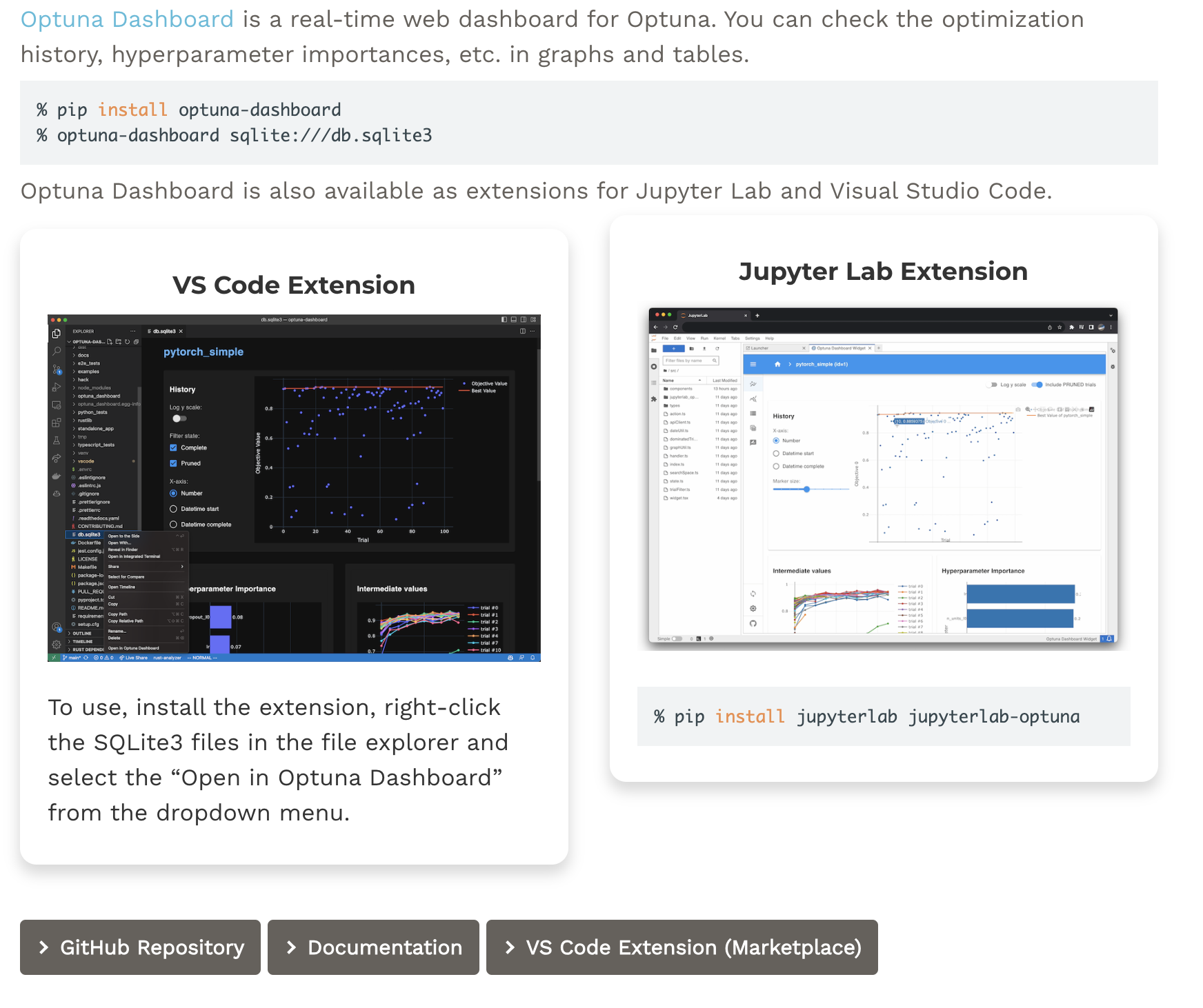
Optuna Dashboard는 말 그대로 Optuna에서 수행한 결과를 시각화하여 확인할 수 있는 대시보드이다. 최적화 히스토리나 파라미터의 중요도와 같은 값들을 확인할 수 있다.
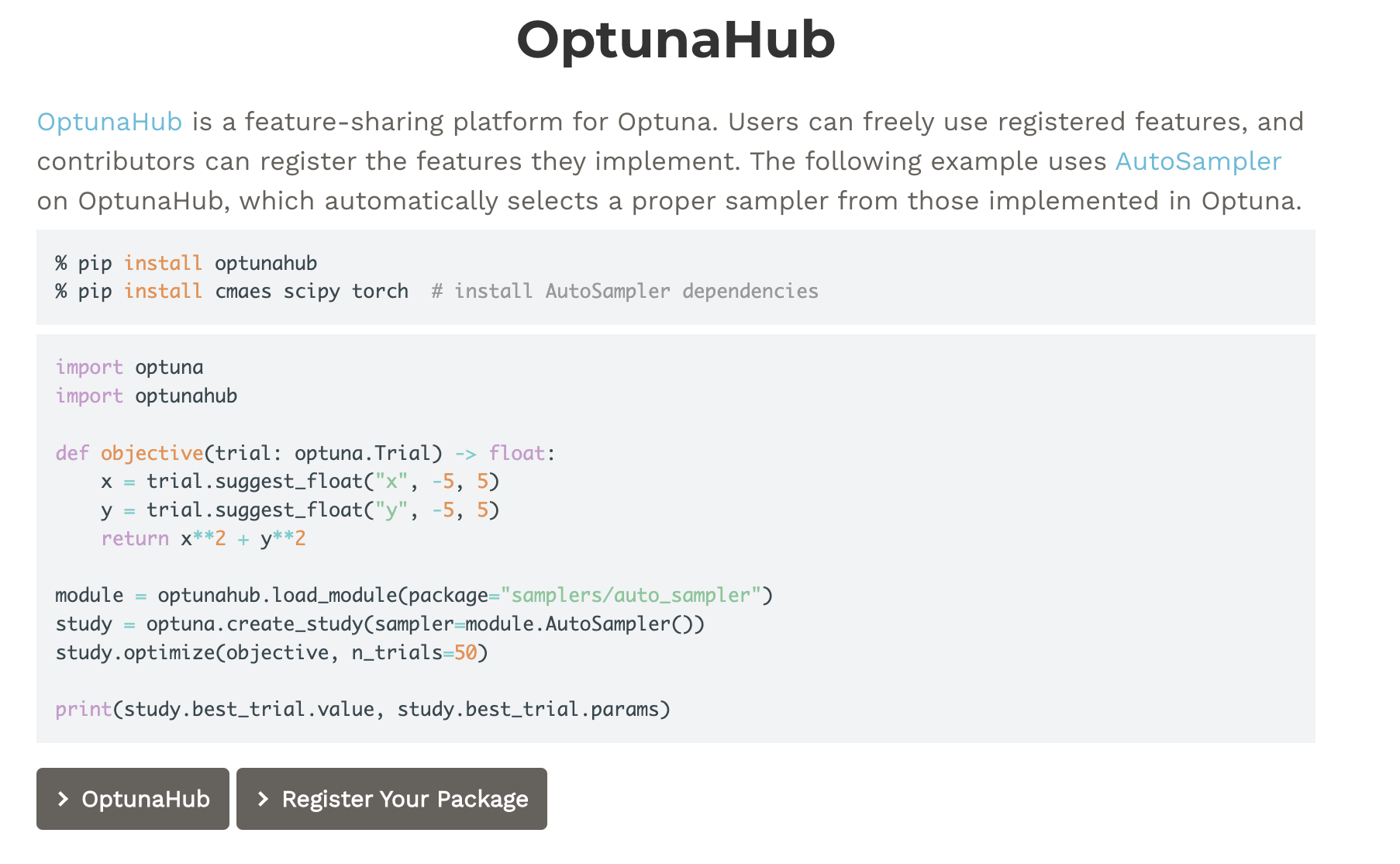
OptunaHub는 유저들이 업로드한 feature를 자유롭게 사용할 수 있는 플랫폼이다. 유저들이 제작한 강력한 feature를 사용하여 튜닝 작업을 더욱 효과적으로 진행할 수 있다.
이렇게 이번 글에서는 Optuna의 대한 간단한 소개와 사용법, 그리고 연관된 툴까지 알아보았다. 이후에 더욱 다양한 기능들도 사용하여 연구에 큰 도움을 얻을 수 있으면 하는 바람이다.
