Hash
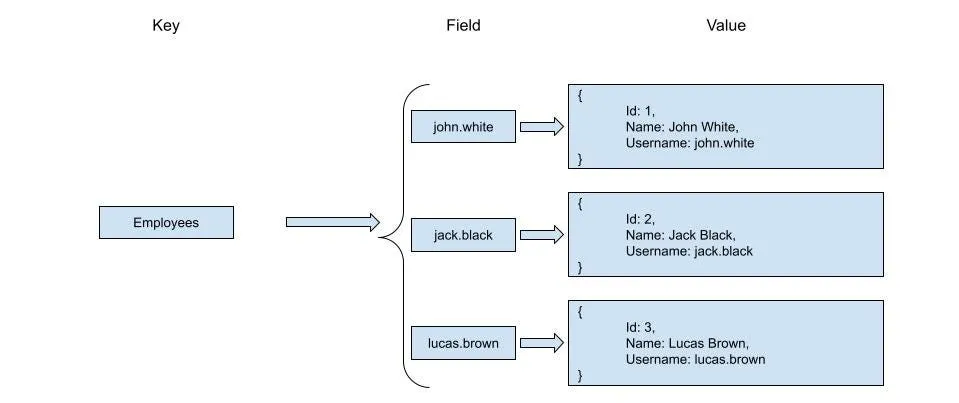
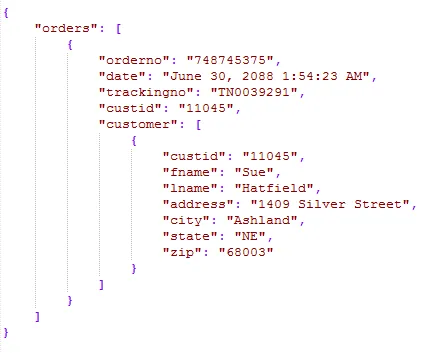
Hash를 사용해 아래 이미지같은 여러 단계로 중첩된 Key-Value 쌍은 저장할 수 없음.
- JSON Object처럼 생각할 수 있음
- 객체를 담고있는 배열도 가질 수 없음.
- Key와 Value는 숫자 or 문자열만 값이 될 수 있음.
명령어
HSET & HGET
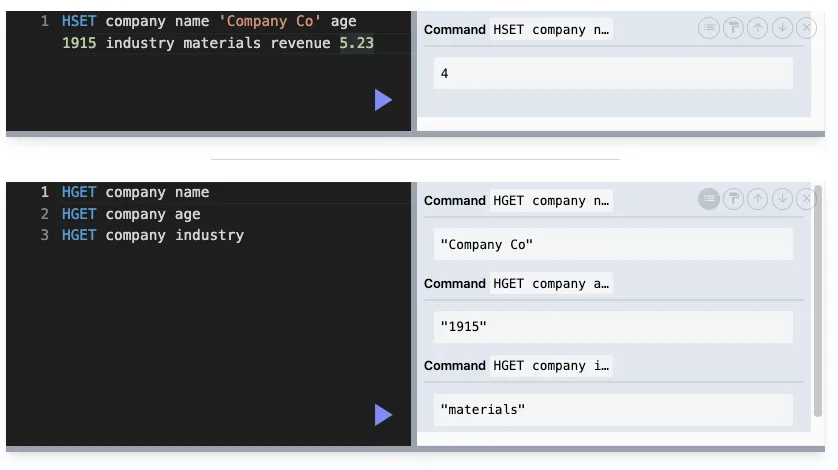
HSET 해쉬이름 Key1 Value1 Key2 Value2 ….
const run = async () => {
    await client.hSet('car', {
        color: 'red',
        year: 1950,
        engine: {cylindes: 8}, // 에러 or [object Object]라는 이상한 값으로 저장
        owner: null, // 에러 -> null || ''
        service: undefined // 에러 undefined || ''
    });

    const car = await client.hGetAll('car');

    console.log(car)
};

run();- node-redis에서는 값을 .toString()메서드를 통해 문자열로 변경해 저장한다. → null, undefined같은 값들은 에러가 발생한다.
[Object: null prototype] {
  color: 'red',
  year: '1950',
  engine: '[object Object]',
  owner: '',
  service: ''
}
HGETALL
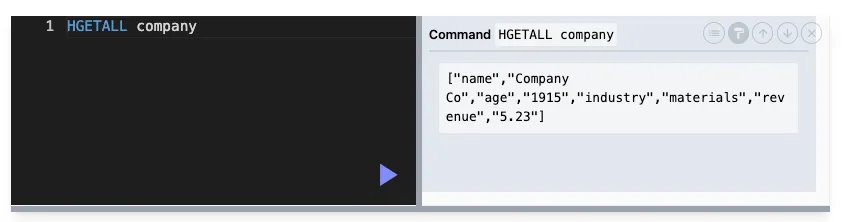
HGETALL은 Object형태가 아닌 배열의 형태로 [key, value, key, value …] 형태로 값이 반환된다.
node-redis같은 라이브러리들이 자동으로 Object형태로 포맷을 변경해주는 경우도 있음.

존재하지않는다면 빈 배열을 반환한다.
// 잘못된 코드
const run = async () => {
    await client.hSet('car', {
        color: 'red',
        year: 1950,
    });

    const car = await client.hGetAll('car#123123123123');

    if (!car) {
        console.log("Car not found. 404 Error");
        return;
    }
    console.log(car)
};

run();

'
'

console : {}
// 올바른 코드
const run = async () => {
await client.hSet('car', {
color: 'red',
year: 1950,
});
const car = await client.hGetAll('car#123123123123');
if (Object.keys(car).length === 0) {
console.log("Car not found. 404 Error");
return;
}
console.log(car)
};
run();
'
'
console : Car not found. 404 ErrorHEXISTS
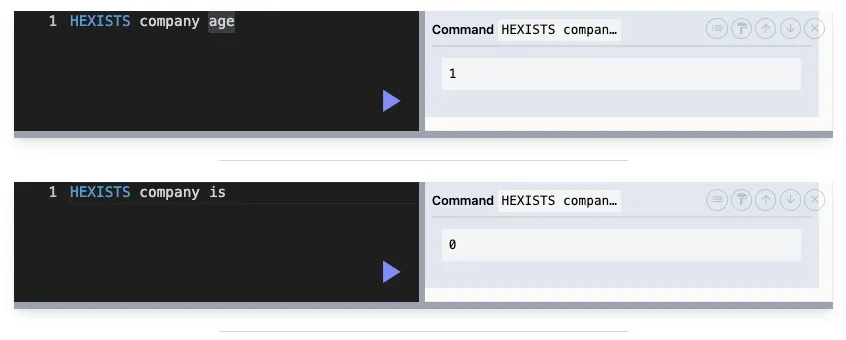
해당 Key가 있는지 확인하는 명령어
DEL & HDEL
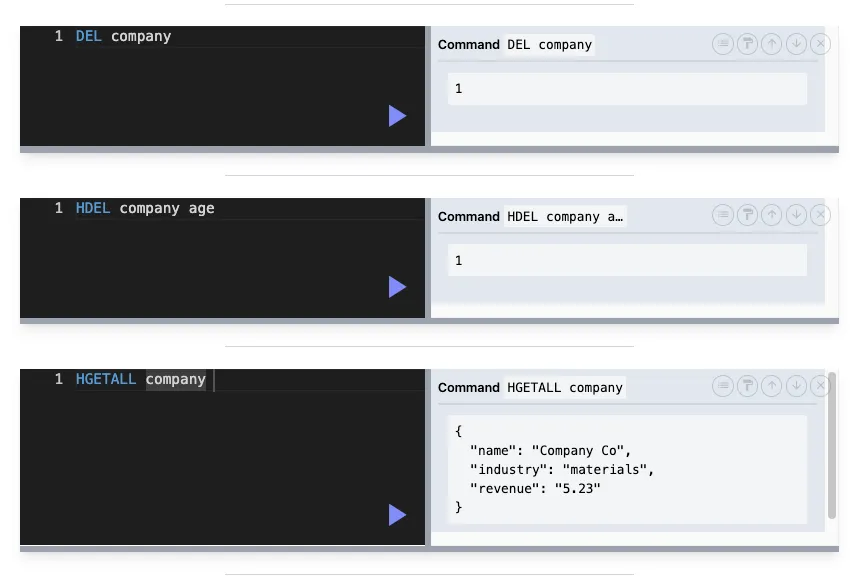
DEL은 전체를 제거하는 명령어
HDEL은 특정 Key를 제거하는 명령어
‘
‘
‘
정수를 더하는 명령어 : HINCRBY company age 10
실수를 더하는 명령어 : HINCRBYFLOAT company age 1.1234
지정된 문자열 길이를 반환하는 명령어 : HSTRLEN company name
Hash의 모든 Key를 반환하는 명령어 : HKEYS company
Hash의 모든 Value를 반환하는 명령어 : HVALS company
직렬화(Serialize) & 역직렬화(Deserialize)
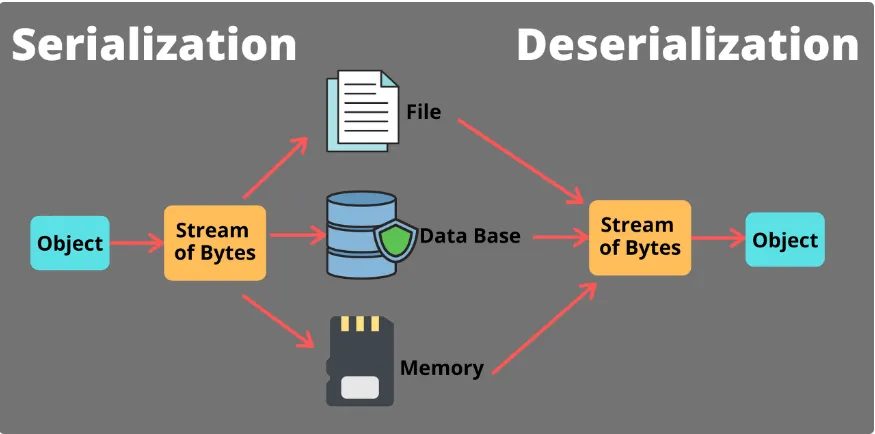
Redis는 기본적으로 Hash의 모든 값을 문자열(String)으로 저장하기때문에 직렬화, 역직렬화 과정이 필요하다.
데이터를 저장하거나 불러올 때 사용하는 과정으로, 일반적으로 데이터를 저장하는 형식과 실제 사용 가능한 형식 간의 변환을 의미.
Redis는 문자열, 리스트, 셋, 해시, 정수 등의 다양한 자료형을 지원하지만, 복잡한 객체나 데이터 구조를 저장하고 읽어오는 경우에는 직렬화와 역직렬화가 필요함.
ex) LocalDateTIme
But!!!!
Spring Data Redis node-redis 같은 라이브러리들이 보통 직렬화 / 역직렬화 과정에 도움을 준다.
DateTime같은 경우에는 Unix Time으로 변경해서 사용하는 것이 일반적.
예시코드 With Java
@Configuration
public class RedisConfig {

    @Bean
    public RedisTemplate<String, Object> redisTemplate(RedisConnectionFactory factory) {
        RedisTemplate<String, Object> template = new RedisTemplate<>();
        template.setConnectionFactory(factory);

        // StringRedisSerializer 사용
        StringRedisSerializer stringRedisSerializer = new StringRedisSerializer();

        // RedisTemplate의 직렬화/역직렬화 방식 설정
        template.setKeySerializer(stringRedisSerializer);
        template.setValueSerializer(stringRedisSerializer);
        template.setHashKeySerializer(stringRedisSerializer);
        template.setHashValueSerializer(stringRedisSerializer);

        return template;
    }
}

'
'

@Service
public class CompanyService {

    private final RedisTemplate<String, Object> redisTemplate;

    @Autowired
    public CompanyService(RedisTemplate<String, Object> redisTemplate) {
        this.redisTemplate = redisTemplate;
    }

    // 회사 정보를 Redis Hash에 저장
    public void saveCompany(Company company) {
        HashOperations<String, String, Object> hashOperations = redisTemplate.opsForHash();

        // "company:" + company.getName()을 key로 사용하고,
        // 각 필드를 Hash의 field로 저장
        hashOperations.put("company:" + company.getName(), "name", company.getName());
        hashOperations.put("company:" + company.getName(), "age", company.getAge());
        hashOperations.put("company:" + company.getName(), "createdAt", company.getCreatedAt().toString());  // LocalDateTime을 String으로 변환하여 저장
    }

    // Redis에서 Hash의 모든 필드를 조회하여 Company 객체로 변환
    public Company getCompany(String name) {
        HashOperations<String, String, Object> hashOperations = redisTemplate.opsForHash();

        // HGETALL처럼 Hash의 모든 필드를 가져옴
        Map<String, Object> companyFields = hashOperations.entries("company:" + name);

        // 가져온 필드를 사용하여 Company 객체 생성
        Company company = new Company();
        company.setName((String) companyFields.get("name"));
        company.setAge((Integer) companyFields.get("age"));

        // createdAt은 String으로 저장되었으므로 LocalDateTime으로 변환
        String createdAtString = (String) companyFields.get("createdAt");
        LocalDateTime createdAt = LocalDateTime.parse(createdAtString);
        company.setCreatedAt(createdAt);

        return company;
    }
}
예시코드 With Node.js
const redis = require('redis');
const client = redis.createClient(); // 기본 Redis 클라이언트 생성

client.on('error', (err) => {
    console.log('Redis error: ', err);
});

// Company 객체 예시
const company = {
    name: 'TechCorp',
    age: 10,
    createdAt: new Date()  // LocalDateTime과 유사한 Date 객체
};

// 1. 객체를 JSON 문자열로 직렬화하여 Redis에 저장
client.set('company:TechCorp', JSON.stringify(company), (err, reply) => {
    if (err) {
        console.error('Error storing data in Redis:', err);
        return;
    }
    console.log('Data saved:', reply);

    // 2. Redis에서 데이터를 꺼내서 JSON 문자열을 객체로 변환
    client.get('company:TechCorp', (err, reply) => {
        if (err) {
            console.error('Error retrieving data from Redis:', err);
            return;
        }

        // JSON 문자열을 객체로 변환
        const retrievedCompany = JSON.parse(reply);

        console.log('Retrieved Company:', retrievedCompany);
        console.log('Created At (Date):', new Date(retrievedCompany.createdAt)); // Date 객체로 변환

        client.quit(); // Redis 클라이언트 종료
    });
});