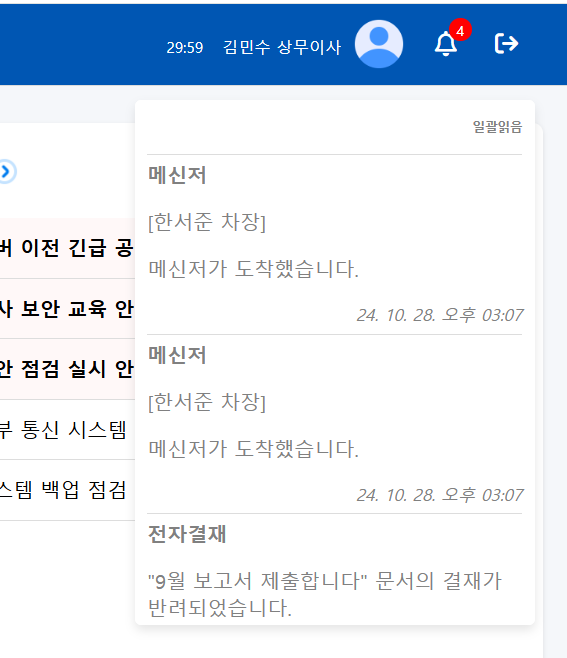
구성
- 알림 모달창 뿐만 아니라 다른 알림 리스트가 필요
- 그리고 안읽음 개수 또한 출력하여 쌓여있는 알림 내용을 확인 가능하도록 구성
- 일괄 읽음을 통해 읽지 않은 내용을 처리
- 모달창과 동일하게 내용 구성
- 실시간 변화가 적용되어야 함
기능 구현
//통합알림 개수
function bellUnreadCount() {
       fetch(`/api/nofication/unread/${headerCurrentMember}`)
           .then(response => response.json())
           .then(data => {
                const notificationBell = document.getElementById('notification-bell');

                const existingCount = document.getElementById('unread-bell-count');
                console.log(data.unreadCount);

                if (existingCount) {
                    notificationBell.removeChild(existingCount);
                }

                if (data.unreadCount > 0) {
                    const unreadBellCount = document.createElement('span');
                    unreadBellCount.id = 'unread-bell-count';
                    unreadBellCount.className = 'badge';
                    unreadBellCount.textContent = data.unreadCount;

                    notificationBell.appendChild(unreadBellCount);
                }
           });
}
- 페이지 접근 시, 읽지 않은 값을 테이블에서 가져와 출력
notificationContainer.appendChild(notificationModal);
let unreadCountElement = document.getElementById('unread-bell-count');
if (!unreadCountElement) {
	unreadCountElement = document.createElement('span');
	unreadCountElement.id = 'unread-bell-count';
	unreadCountElement.className = 'badge';
	document.getElementById('notification-bell').appendChild(unreadCountElement);
}
// 현재 카운트 가져오기 및 증가
const currentCount = parseInt(unreadCountElement.textContent) || 0;
unreadCountElement.textContent = currentCount + 1;- 모달창과 동시에 현재 카운트에서 +1을 하여 값을 실시간 증가
- 이를 통해 알림 개수를 실시간, 기존 값을 노출 가능
//통합 알림 드롭 리스트
 notificationModal.innerHTML = `
    <li id="mark-as-read" class="mark-as-read" style="font-size: 10px; text-align: right; color: gray;">일괄읽음</li>
`;
addMarkAsReadListener();
data.unreadList.forEach(notification => {
	const listItem = document.createElement('li');
    listItem.setAttribute('data-notification-no', notification.nofication_no);
    listItem.setAttribute('data-notification-type', notification.nofication_type);
    listItem.setAttribute('data-notification-type-pk', notification.nofication_type_pk);
    const date = new Date(notification.nofication_create_date);
    const formattedDate = date.toLocaleDateString('ko-KR', {
         year: '2-digit',
         month: '2-digit',
         day: '2-digit'
    });
    const formattedTime = date.toLocaleTimeString('ko-KR', {
         hour: '2-digit',
         minute: '2-digit',
         hour12: true
    });
    listItem.innerHTML = `
         <strong style="margin-bottom: 5px;">${notification.nofication_title}</strong>
         <p>${notification.nofication_content}</p>
         <em style="display: block; margin-bottom: 5px; float: right;">${formattedDate} ${formattedTime}</em>
         <hr style="border: none; margin: 10px 0;">
    `;
- 클릭 모션과 동시에 드롭 리스트가 열리면서 해당 값들을 가져와 출력
- 드롭 리스트가 열려있는 상태에서 알림이 오게 되면, 이 또한 js에서 실시간 웹소켓 값을 통해 노출되어 반영되도록 구성함
 alarmSocket.onmessage = function(event) {
     const message = JSON.parse(event.data);
     const currentType = message.nofication_type;
     const notificationModal = document.getElementById('notification-bell-modal');
     if(message.pk != null){
     	if(message.type === 'vacationApprovalAlarm'){
           const title = message.title;
           const content = message.content;
           if (notificationModal.children.length <= 1) {
              notificationModal.innerHTML = `
                 <li id="mark-as-read" class="mark-as-read" style="font-size: 10px; text-align: right; color: gray;">일괄읽음</li>
              `;
              addMarkAsReadListener();
           }
           message.data.forEach(function(item) {
               const listItem = document.createElement('li');
    		   listItem.setAttribute('data-notification-no', item.nofication_pk);
                        listItem.setAttribute('data-notification-type', message.nofication_type);
                        listItem.innerHTML = `
                        <strong style="margin-bottom: 5px;">${title}</strong>
                        <p>${content}</p>
                        <em style="display: block; margin-bottom: 5px; float: right;">${message.timestamp}</em>
                        <hr style="border: none; margin: 10px 0;">
                        `;
                        notificationModal.insertBefore(listItem, notificationModal.children[1]);
});- 실시간 생성은 맨 위에 노출되어야 하기에 notificationModal.children[1]를 통해 맨 위에 출력
깨달은 점
- 실시간 반영에 신경써야 할 세부적인 요소들이 많아서 웹소켓에서 값을 받아 js에서 표현할 때 꼼꼼히 진행해야 함
- 기존 채팅 웹소켓을 통해 큰 오류없이 진행은 순조로웠음

백엔드 개발⭐